|
|

Table Of Contents
Calling Name and Number feature
Cisco Hardware and Software Requirements
PBX Hardware and Software Requirements
Configuration Sequence and Tasks
Configuration Menus and Commands
Layers 2 & 3 (Q.921 and Q.931)
National ISDN/Network
isdn switch-type
primary-NI2 /isdn protocol-emulate user
Phone A to Phone C
Yes
Yes
No
No1
No
Phone C to Phone A
Yes
Yes
No
Yes
No
1 CallManager is not sending "Connected Number" information in the connect message back to PBX.
2 Calling Name delivery and presentation features are not supported by the Ericsson ISDN PRI Link.
Call Transfers: (Supervised Local Transfers)
Ericsson MD-110 Software Version
Cisco 2621 Router Configuration
Application Note
Ericsson MD-110 Rel BC9 PBX with CallManager using 2621-T1 PRI NI-2 Gateway
Integration Description
Connectivity is achieved by using the industry standard PRI NI-2 protocol. The Ericsson MD-110 can be configured as either NETWORK or USER side.
Network Topology
Figure 1 Test Setup
Limitations
User/Network Settings
The Cisco 2621 router with ISDN switch type setting of primary-ni supports both protocol sides by using the "isdn protocol-emulate network/user" command.
Calling Name and Number feature
•
Calling Name delivery and presentation features are not supported by the Ericsson MD-110 PBX.
•
•
System Components
Cisco Hardware and Software Requirements
•
•
PBX Hardware and Software Requirements
•
•
Features Supported
Calling/Called Number
Configuration
Configuration Sequence and Tasks
Configure in the following sequence:
Step 1.
Setup internal characteristics for the route. Ex. Traffic direction, services, Bearer capabilities.<_ROCAP:ROU=20;ROUTE CATEGORY DATAROU SEL TRM SERV NODG DIST DISL TRAF SIG BCAP20 711000000000 7 3110000010 0 5 20 03151515 211100000031 111111Step 2.
T1-PRI Route Protocol Characteristics, protocol side "Network"<_RODAP:ROU=20;ROUTE DATAROU TYPE VARC VARI VARO FILTER20 SL63 H'00001110 H'00000002 H'00000037 NOENDT1-PRI Route Protocol Characteristics, protocol side "User"<_RODAP:ROU=20;ROUTE DATAROU TYPE VARC VARI VARO FILTER20 SL63 H'00001110 H'00000002 H'00000027 NOENDStep 3.
T1-PRI trunk lines (B-channels)<_ROEDP:ROU=20,TRU=ALL;ROUTE EQUIPMENT DATAROU TRU EQU SQU INDDAT20 001-1 001-0-00-00 0-00-3 H'00000000000020 001-2 001-0-00-01 0-00-3 H'00000000000020 001-3 001-0-00-02 0-00-3 H'00000000000020 001-4 001-0-00-03 0-00-3 H'00000000000020 001-5 001-0-00-04 0-00-3 H'00000000000020 001-6 001-0-00-05 0-00-3 H'00000000000020 001-7 001-0-00-06 0-00-3 H'00000000000020 001-8 001-0-00-07 0-00-3 H'00000000000020 001-9 001-0-00-08 0-00-3 H'00000000000020 001-10 001-0-00-09 0-00-3 H'00000000000020 001-11 001-0-00-10 0-00-3 H'00000000000020 001-12 001-0-00-11 0-00-3 H'00000000000020 001-13 001-0-00-12 0-00-3 H'00000000000020 001-14 001-0-00-13 0-00-3 H'00000000000020 001-15 001-0-00-14 0-00-3 H'00000000000020 001-16 001-0-00-15 0-00-3 H'00000000000020 001-17 001-0-00-16 0-00-3 H'00000000000020 001-18 001-0-00-17 0-00-3 H'00000000000020 001-19 001-0-00-18 0-00-3 H'00000000000020 001-20 001-0-00-19 0-00-3 H'00000000000020 001-21 001-0-00-20 0-00-3 H'00000000000020 001-22 001-0-00-21 0-00-3 H'00000000000020 001-23 001-0-00-22 0-00-3 H'000000000000ENDStep 4.
Route and Access Code for the trunk Information- Note PRI uses Route 20<_RODDP:DEST=ALL;EXTERNAL DESTINATION ROUTE DATADEST DRN ROU CHO CUST ADC TRC SRT NUMACK PRE2 20 100500000000025000 0 1 030 1 100500000000025000 0 3 031 2 100500000000025000 0 3 032 3 100500000000025000 0 3 033 4 100500000000025000 0 3 034 5 100500000000025000 0 3 035 6 000500000000025000 0 3 036 7 000500000000025000 0 3 037 8 000500000000025000 0 3 039 21 100500000000025000 0 3 040 11 100500000000025000 0 3 041 12 000500000000025000 0 3 042 13 000500000000025000 0 3 0END
Note:
Configuration Menus and Commands
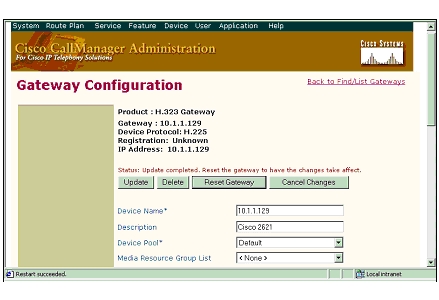
Configuring the Cisco Call Manager
Figure 2 H323 (Cisco 2621) Gateway Configuration
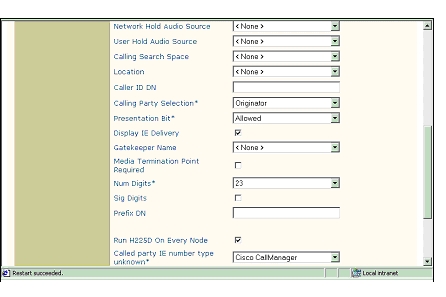
Figure 3
H323 (Cisco 2621) Gateway Configuration, cont.
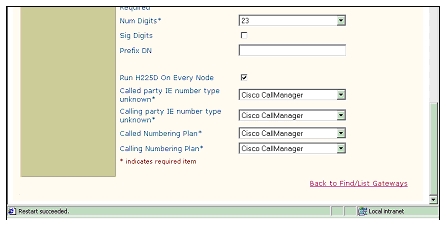
Figure 4 More H323 (Cisco 2621) Gateway Configuration
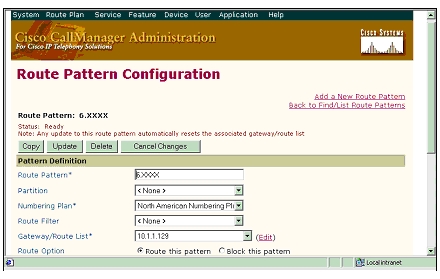
Figure 5 Route Pattern Configuration
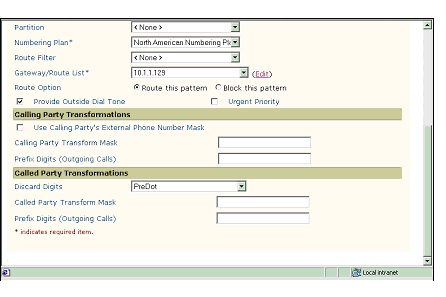
Figure 6 Route Pattern Configuration, Cont.
Test Configuration
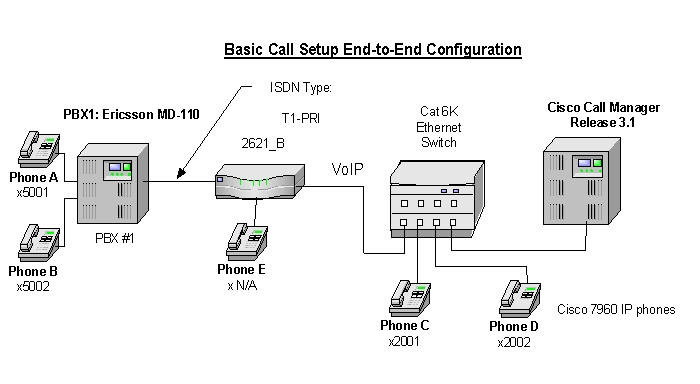
As shown in Figure 7 below, an Ericsson MD-110 PBX was connected via an ISDN T1 PRI link to a Cisco 2621, which in turn, was connected to an Ethernet switch. The interoperability testing involved Layers 1, 2 and 3 on the ISDN PRI link between a Cisco 2621 and the PBX.
Figure 7 Test Configuration
Layer 1 (Physical Layer)
The Ericsson MD-110 uses a command line interface which allows you to change many switch features with a single command. The PBX documentation must be consulted to make changes. Physical layer parameters (along with many other features) are controlled by using RODAI command.
Layers 2 & 3 (Q.921 and Q.931)
Layer 2 and 3 packet exchanges were monitored using an Acacia Clarinet protocol analyzer, bridged across the PRI link in high impedance mode.
Layer 2 Q.921 packets were monitored to ensure that each PBX/2621 software configuration properly exchanged SABME/UA packets to initialize the ISDN link, and then RR packets were exchanged every 30 seconds.
Layer 3 Q.931 packets were monitored to ensure that the appropriate call setup/trade-in packets were exchanged for each configuration, and that the SETUP packets contained the mandatory Information Elements (IEs) with the necessary details, as well as optional IEs such as Calling Name and Number.
Telephone calls were made end-to-end in both directions through the Cisco 2621 Gateway. A check was made to ensure that there was an audio path in both directions for each call.
User/Network Settings
The Cisco 2621 Gateway with ISDN protocol type setting of primary-ni supports both protocol sides by using the"isdn protocol-emulate network/user" command.
The Ericsson MD-110, supports both "USER" (peer-slave) and "NETWORK" (peer-master) protocol sides by using RODAI command.
Test Results
PBX1 configured as National ISDN (emulate Network) and Cisco 2621 Gateway configured as primary-NI2 (emulate User).
National ISDN/Network
isdn switch-type
primary-NI2 /isdn protocol-emulate user
Basic Calls: (Enbloc Sending)
Phone A to Phone C
Yes
Yes
No
No1
No
Phone C to Phone A
Yes
Yes
No
Yes
No
1 CallManager is not sending "Connected Number" information in the connect message back to PBX.
2 Calling Name delivery and presentation features are not supported by the Ericsson ISDN PRI Link.
Call Transfers: (Supervised Local Transfers)
Call Conferencing (Local)
Call Forward (Local)
Appendix
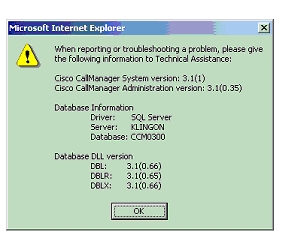
Figure 8 CallManager Software Release:
Ericsson MD-110 Software Version
<_CADAP;CALENDAR DATAIDENTITY=DANDS-EURO-TESTVERSION=ASB50104-R6-SES-R9-BC90D/CNI80CALENDAR TIME NOT VALID16:28:45TUE 11 SEP 2001ENDCisco 2621 Router Configuration
2621_B#sh verCisco Internetwork Operating System SoftwareIOS (tm) C2600 Software (C2600-JS-M), Version 12.2(3.5)T, MAINTENANCE INTERIM SOFTWARETAC Support: http://www.cisco.com/tacCopyright (c) 1986-2001 by cisco Systems, Inc.Compiled Fri 03-Aug-01 22:45 by ccaiImage text-base: 0x80008088, data-base: 0x81631DD8ROM: System Bootstrap, Version 12.1(3r)T2, RELEASE SOFTWARE (fc1)2621_B uptime is 1 week, 4 days, 3 hours, 15 minutesSystem returned to ROM by power-onSystem image file is "flash:c2600-js-mz.122-3.5.T"cisco 2621 (MPC860) processor (revision 0x200) with 56320K/9216K bytes of memory.Processor board ID JAD051516TX (503811939)M860 processor: part number 0, mask 49Bridging software.X.25 software, Version 3.0.0.SuperLAT software (copyright 1990 by Meridian Technology Corp).TN3270 Emulation software.Primary Rate ISDN software, Version 1.1.2 FastEthernet/IEEE 802.3 interface(s)24 Serial network interface(s)2 Channelized T1/PRI port(s)32K bytes of non-volatile configuration memory.16384K bytes of processor board System flash (Read/Write)Configuration register is 0x21022621_B#_________________________________________________________________________________________2621_B#sh diagSlot 0:C2621 2FE Mainboard Port adapter, 2 portsPort adapter is analyzedPort adapter insertion time unknownEEPROM contents at hardware discovery:Hardware Revision : 2.0PCB Serial Number : JAD051516TX (503811939)Part Number : 73-3200-08RMA History : 00RMA Number : 0-0-0-0Board Revision : A0Deviation Number : 0-21249EEPROM format version 4EEPROM contents (hex):0x00: 04 FF 40 00 A2 41 02 00 C1 17 4A 41 44 30 35 310x10: 35 31 36 54 58 20 28 35 30 33 38 31 31 39 33 390x20: 29 82 49 0C 80 08 04 00 81 00 00 00 00 42 41 300x30: 80 00 00 53 01 FF FF FF FF FF FF FF FF FF FF FF0x40: FF FF FF FF FF FF FF FF FF FF FF FF FF FF FF FF0x50: FF FF FF FF FF FF FF FF FF FF FF FF FF FF FF FF0x60: FF FF FF FF FF FF FF FF FF FF FF FF FF FF FF FF0x70: FF FF FF FF FF FF FF FF FF FF FF FF FF FF FF FFSlot 1:High Density Voice Port adapterPort adapter is analyzedPort adapter insertion time unknownEEPROM contents at hardware discovery:Hardware Revision : 1.1Top Assy. Part Number : 800-03567-01Board Revision : F1Deviation Number : 0-0Fab Version : 02PCB Serial Number : JAB05080LU9RMA Test History : 00RMA Number : 0-0-0-0RMA History : 00EEPROM format version 4EEPROM contents (hex):0x00: 04 FF 40 00 CC 41 01 01 C0 46 03 20 00 0D EF 010x10: 42 46 31 80 00 00 00 00 02 02 C1 8B 4A 41 42 300x20: 35 30 38 30 4C 55 39 03 00 81 00 00 00 00 04 000x30: FF FF FF FF FF FF FF FF FF FF FF FF FF FF FF FF0x40: FF FF FF FF FF FF FF FF FF FF FF FF FF FF FF FF0x50: FF FF FF FF FF FF FF FF FF FF FF FF FF FF FF FF0x60: FF FF FF FF FF FF FF FF FF FF FF FF FF FF FF FF0x70: FF FF FF FF FF FF FF FF FF FF FF FF FF FF FF FFVIC Slot 0:T1 (2 Port) Multi-Flex Trunk (Drop&Insert) WAN Daughter CardHardware revision 1.0 Board revision B0Serial number 17759676 Part number 800-04614-01Test history 0x0 RMA number 00-00-00Connector type PCIEEPROM format version 1EEPROM contents (hex):0x20: 01 24 01 00 01 0E FD BC 50 12 06 01 00 00 00 000x30: 58 00 00 00 00 01 15 00 FF FF FF FF FF FF FF FFHDV firmware: Compiled Fri 23-Mar-01 00:20 by miriyalaHDV memory size 524280 heap free 1750652621_B#_________________________________________________________________________________________2621_B#sh controllers t1 1/0T1 1/0 is up.Applique type is Channelized T1Cablelength is long gain36 0dbNo alarms detected.alarm-trigger is not setVersion info Firmware: 20010710, FPGA: 15Framing is ESF, Line Code is B8ZS, Clock Source is Line.Data in current interval (184 seconds elapsed):0 Line Code Violations, 0 Path Code Violations0 Slip Secs, 0 Fr Loss Secs, 0 Line Err Secs, 0 Degraded Mins0 Errored Secs, 0 Bursty Err Secs, 0 Severely Err Secs, 0 Unavail Secs2621_B#_________________________________________________________________________________________2621_B#sh conf2621_B#sh configurationUsing 1824 out of 29688 bytes!version 12.2no parser cacheservice timestamps debug datetime msec localtime show-timezoneservice timestamps log uptimeno service password-encryption!hostname 2621_B!no logging bufferedenable password cisco!!!memory-size iomem 15voice-card 1dspfarm!ip subnet-zero!!no ip domain-lookup!isdn switch-type primary-ni!!voice class codec 1codec preference 1 g729r8codec preference 2 g711ulawcodec preference 3 g711alaw!!!!!!!controller T1 1/0framing esflinecode b8zspri-group timeslots 1-24!controller T1 1/1shutdownframing esflinecode b8zs!!!!interface FastEthernet0/0ip address 192.168.100.2 255.255.255.0no ip mroute-cacheload-interval 30no keepalivespeed autohalf-duplex!interface FastEthernet0/1ip address 10.1.1.129 255.255.255.0no ip mroute-cacheduplex autospeed auto!interface Serial1/0:23no ip addressno logging event link-statusisdn switch-type primary-niisdn incoming-voice voiceisdn T309-enableisdn T306 30000isdn T310 40000no cdp enable!router ripnetwork 1.0.0.0network 192.168.100.0!ip classlessno ip http serverip pim bidir-enable!dialer-list 1 protocol ip permitdialer-list 1 protocol ipx permit!!snmp-server packetsize 4096snmp-server managertftp-server nvramcall rsvp-sync!voice-port 1/0:23!!mgcp profile default!dial-peer cor custom!!!dial-peer voice 1 potsdestination-pattern 5...direct-inward-dialport 1/0:23prefix 5!dial-peer voice 3 voipdestination-pattern 2...progress_ind setup enable 1voice-class codec 1session target ipv4:10.1.1.2dtmf-relay h245-alphanumeric!!line con 0exec-timeout 0 0line aux 0exec-timeout 0 0line vty 0 4exec-timeout 0 0password ciscologinline vty 5 15exec-timeout 0 0login!scheduler allocate 3996 1000!end2621_B#
Posted: Thu Sep 6 12:06:27 PDT 2007
All contents are Copyright © 1992--2007 Cisco Systems, Inc. All rights reserved.
Important Notices and Privacy Statement.