
3.20. JTable and TableModel
javax.swing.JTable is another powerful Swing component for displaying complex data structures. Like JTree, JTable relies on a separate model object to hold and represent the data it displays and has its own package of helper classes, javax.swing.table. This package contains the TableModel interface and its default implementations, AbstractTableModel and DefaultTableModel.
If your table data is tidily organized, it is easy to use JTable without worrying about the TableModel. If your data is an array of rows, where each row is an array of objects, you can just pass this Object[][] directly to the JTable constructor. If you want, you can also specify an optional array of column names. This is all you need to do: the JTable does the rest. This technique also works if your data is stored in a Vector of rows, where each row is itself a Vector.
Often, however, your data is not as regular as that. When you want to display a tabular view of data that is not, by nature, tabular, you must implement the TableModel interface (or, more likely, subclass the AbstractTableModel class). The job of this TableModel implementation is to serve as the interface between your data, which is not neatly organized into a table, and the JTable object, which wants to display a table. In other words, your TableModel presents a neat tabular view of your data, regardless of how the data is organized underneath.
Example 3-3 shows how this can be done. Given a File object that represents a directory in the filesystem, this example displays the contents of that directory in tabular form, as shown in Figure 3-8. Once again, notice how a relatively simple TableModel implementation enables the use of the powerful table-display capabilities of the JTable component.
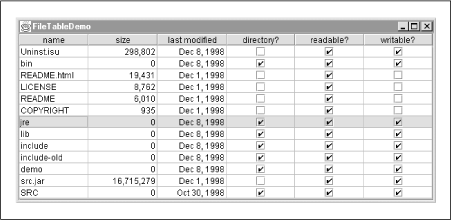
Figure 3-8. The JTable component
Example 3-3. Using JTable and TableModel
import javax.swing.*;
import javax.swing.table.*;
import java.io.File;
import java.util.Date;

public class FileTableDemo {
  public static void main(String[] args) {
    // Figure out what directory to display
    File dir;
    if (args.length > 0) dir = new File(args[0]);
    else dir = new File(System.getProperty("user.home"));

    // Create a TableModel object to represent the contents of the directory
    FileTableModel model = new FileTableModel(dir);

    // Create a JTable and tell it to display our model
    JTable table = new JTable(model);

    // Display it all in a scrolling window and make the window appear
    JFrame frame = new JFrame("FileTableDemo");
    frame.getContentPane().add(new JScrollPane(table), "Center");
    frame.setSize(600, 400);
    frame.setVisible(true);
  }
}

/**
 * The methods in this class allow the JTable component to get
 * and display data about the files in a specified directory.
 * It represents a table with six columns: filename, size, modification date,
 * plus three columns for flags: directory, readable, writable.
 **/
class FileTableModel extends AbstractTableModel {
  protected File dir;
  protected String[] filenames;

  protected String[] columnNames = new String[] {
    "name", "size", "last modified", "directory?", "readable?", "writable?"
  };

  protected Class[] columnClasses = new Class[] {
    String.class, Long.class, Date.class,
      Boolean.class, Boolean.class, Boolean.class
  };

  // This table model works for any one given directory
  public FileTableModel(File dir) {
    this.dir = dir;
    this.filenames = dir.list();  // Store a list of files in the directory
  }

  // These are easy methods
  public int getColumnCount() { return 6; }  // A constant for this model
  public int getRowCount() { return filenames.length; }  // # of files in dir

  // Information about each column
  public String getColumnName(int col) { return columnNames[col]; }
  public Class getColumnClass(int col) { return columnClasses[col]; }

  // The method that must actually return the value of each cell
  public Object getValueAt(int row, int col) {
    File f = new File(dir, filenames[row]);
    switch(col) {
    case 0: return filenames[row];
    case 1: return new Long(f.length());
    case 2: return new Date(f.lastModified());
    case 3: return f.isDirectory() ? Boolean.TRUE : Boolean.FALSE;
    case 4: return f.canRead() ? Boolean.TRUE : Boolean.FALSE;
    case 5: return f.canWrite() ? Boolean.TRUE : Boolean.FALSE;
    default: return null;
    }
  }
}
 |  |  |
| 3.19. JTree and TreeModel |  | 3.21. JTextComponent and HTML Text Display |

Copyright © 2001 O'Reilly & Associates. All rights reserved.