
3.19. JTree and TreeModel
The javax.swing.JTree class is a powerful Swing component for displaying tree-structured data. Like all Swing components, JTree relies on a separate model object to hold and represent the data that it displays. Most Swing components create this model object automatically, and you never need to work with it explicitly. The JTree component, however, displays data that is much more complex than a typical Swing component. When you are working with a JTree, you must create a model object that implements the javax.swing.tree.TreeModel interface.
One approach is to use the DefaultTreeModel class, which implements the TreeModel interface using the TreeNode and MutableTreeNode interfaces (all defined in javax.swing.tree). To use DefaultTreeModel, you must implement your hierarchical data structures so that each element of the tree implements the TreeNode or MutableTreeNode interface. Now you can create a DefaultTreeModel object simply by passing the root TreeNode of your tree to a DefaultTreeModel constructor. Then you create a JTree component to display your tree simply by passing the DefaultTreeModel to the setModel() method of the JTree.
Sometimes, however, you do not have the luxury of designing the data structures used to represent your tree, so implementing the TreeNode interface is simply not an option. In this case, you can implement the TreeModel interface directly. The resulting TreeModel object serves as the interface between your data and the JTree component that displays the data. Your TreeModel implementation provides the methods that allow the JTree component to traverse the nodes of your tree, regardless of the actual representation of the tree data.
Example 3-2 shows a program that implements the TreeModel interface to represent the hierarchical structure of the filesystem, thereby allowing the file and directory tree to be displayed in a JTree component. Notice how a relatively simple implementation of TreeModel enables the powerful tree- browsing capabilities shown in Figure 3-7.
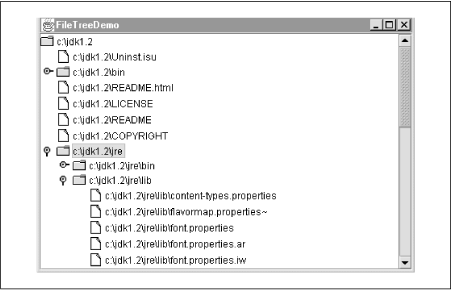
Figure 3-7. The JTree component
Example 3-2. Using JTree and TreeModel
import javax.swing.*;
import javax.swing.event.*;
import javax.swing.tree.*;
import java.io.File;

public class FileTreeDemo {
  public static void main(String[] args) {
    // Figure out where in the filesystem to start displaying
    File root;
    if (args.length > 0) root = new File(args[0]);
    else root = new File(System.getProperty("user.home"));

    // Create a TreeModel object to represent our tree of files
    FileTreeModel model = new FileTreeModel(root);

    // Create a JTree and tell it to display our model
    JTree tree = new JTree();
    tree.setModel(model);

    // The JTree can get big, so allow it to scroll
    JScrollPane scrollpane = new JScrollPane(tree);

    // Display it all in a window and make the window appear
    JFrame frame = new JFrame("FileTreeDemo");
    frame.getContentPane().add(scrollpane, "Center");
    frame.setSize(400,600);
    frame.setVisible(true);
  }
}

/**
 * The methods in this class allow the JTree component to traverse
 * the file system tree and display the files and directories.
 **/
class FileTreeModel implements TreeModel {
  // We specify the root directory when we create the model.
  protected File root;
  public FileTreeModel(File root) { this.root = root; }

  // The model knows how to return the root object of the tree
  public Object getRoot() { return root; }

  // Tell JTree whether an object in the tree is a leaf
  public boolean isLeaf(Object node) {  return ((File)node).isFile(); }

  // Tell JTree how many children a node has
  public int getChildCount(Object parent) {
    String[] children = ((File)parent).list();
    if (children == null) return 0;
    return children.length;
  }

  // Fetch any numbered child of a node for the JTree.
  // Our model returns File objects for all nodes in the tree.  The
  // JTree displays these by calling the File.toString() method.
  public Object getChild(Object parent, int index) {
    String[] children = ((File)parent).list();
    if ((children == null) || (index >= children.length)) return null;
    return new File((File) parent, children[index]);
  }

  // Figure out a child's position in its parent node.
  public int getIndexOfChild(Object parent, Object child) {
    String[] children = ((File)parent).list();
    if (children == null) return -1;
    String childname = ((File)child).getName();
    for(int i = 0; i < children.length; i++) {
      if (childname.equals(children[i])) return i;
    }
    return -1;
  }

  // This method is invoked by the JTree only for editable trees.
  // This TreeModel does not allow editing, so we do not implement
  // this method.  The JTree editable property is false by default.
  public void valueForPathChanged(TreePath path, Object newvalue) {}

  // Since this is not an editable tree model, we never fire any events,
  // so we don't actually have to keep track of interested listeners
  public void addTreeModelListener(TreeModelListener l) {}
  public void removeTreeModelListener(TreeModelListener l) {}
}
 |  |  |
| 3.18. Menus |  | 3.20. JTable and TableModel |

Copyright © 2001 O'Reilly & Associates. All rights reserved.