|
|

Table Of Contents
Cisco Systems Equipment Needed
Configuring the Nortel Meridian Opt11C PBX
Configure the Common Equipment
Configure the Route Data Block
Configure the Coordinated Dialing Plan
Calling Name and Number Feature
Nortel Meridian Opt11C Software Release
Catalyst 2621 Router Configuration
Application Note
Nortel Meridian Opt11C Rel 25 PBX with CallManager using the Cisco 2621-T1 PRI NI-2 Gateway
This application note discusses the integration of the Nortel Meridian Opt11C Rel 25 PBX with CallManager using the Cisco 2621-T1 PRI NI-2 Gateway.
Integration Description
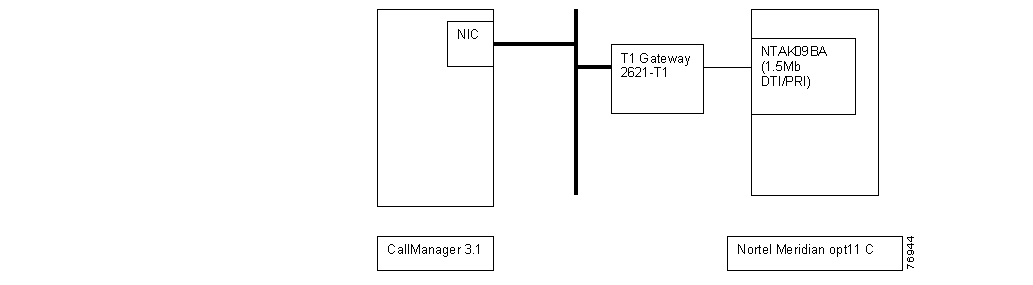
Connectivity is achieved by using the industry standard PRI NI-2 protocol. The Nortel Meridian Opt11C can be configured as either the NETWORK or USER side. The figure below shows the general network layout for the integration.
Network Layout
Cisco Systems Equipment Needed
•
Hardware (Gateway): Cisco 2621 2 MFT T1 Port
•
PBX Requirements
•
•
Features
Key features supported:
•
Key features not supported:
•
Configuring the Nortel Meridian Opt11C PBX
To configure the Nortel Meridian Opt11C PBX, do the following:
Step 1.
Step 2.
Step 3.
Step 4.
Step 5.
Configure the Common Equipment
The following example shows the configuration of the common equipment.
Common Equipment Configuration
LD 22PT2000MARP NOT ACTIVATEDREQ PRTTYPE CEQUCEQUMPED 8DSUPL 000 004 008 012016 032 036 040044 048 064 068072XCT 000CONF 029 030 031 062094 095DLOP NUM DCH FRM LCMT YALM T1TE TRSHPRI 004 23 ESF B8S FDL - 00005 23 ESF B8S FDL - 00MISPREQ ****Configure the D-Channel
The following example shows the configuration of the D-channel.
D-channel Configuration
>LD 22PT2000MARP NOT ACTIVATEDREQ PRTTYPE ADAN DCH 5ADAN DCH 5CTYP MSDLCARD 05PORT 1DES DMS-100USR PRIDCHL 5OTBF 32PARM RS422 DTEDRAT 64KCCLOK EXTIFC D100SIDE USRCNEG 1RLS ID **RCAP ND2MBGA NOOVLR NOOVLS NOT200 3T203 10N200 3N201 260K 7REQ ****Configure the Route Data Block
The following example shows the configuration of the Route Data Block.
Route Data Block Configuration
>LD 21PT1000REQ: PRTTYPE: RDBCUST 0ROUT 105TYPE RDBCUST 00DMODROUT 105DES NI2TKTP DIDM911_ANI NOM911_TONE NONPID_TBL_NUM 0SAT NORCLS EXTDTRK YESBRIP NODGTP PRIISDN YESMODE PRAIFC NI2CBCR NONCOS 0SBN NOPNI 00001NCNA YESNCRD YESCHTY BCHCPFXS YESCPUB OFFDAPC NOBCOT 0INTC NODSEL VODPTYP PRIAUTO NODNIS NODCDR NOICOG IAORANX NOSRCH RRBTRMB YESSTEPACOD 705TCPP NOPII NOTARG 01CLEN 1BILN NOOABSINSTICIS YESTIMR ICF 512OGF 512EOD 13952NRD 10112DDL 70ODT 4096RGV 640FLH 510GRD 896SFB 3NBS 2048NBL 4096TFD 0DRNG NOCDR NOPAGE 002MUS NOEQAR NOOHQ NOOHQT 00TTBL 0PLEV 2MCTS NOALRM NOART 0SGRP 0AACR NOREQ: ****Configure the Trunk
The following example shows the configuration of the trunk.
Trunk Configuration
>LD 20PT0000MARP NOT ACTIVATEDREQ: PRTTYPE: TNBTN 5 1DTC103DATEPAGEDESTN 005 01TYPE DIDCDEN SDCUST 0TRK PRIPDCA 1PCML MUNCOS 0RTMB 105 1B-CHANNEL SIGNALINGNITESTRI/STRO OWK OWKAST NOIAPG 0CLS UNR DTN CND WTA LPR APN THFD HKDP10 VNLTKIDDATE 8 MAR 2001NACT ****Configure the Coordinated Dialing Plan
The following example shows the configuration of the coordinated dialing plan.
Coordinated Dialing Plan Configuration
>LD 87ESN000MEM AVAIL: (U/P): 1302848 USED U P: 62313 27478 TOT: 1392639DISK RECS AVAIL: 491REQ PRTCUST 0FEAT CDPTYPE DSCDSC 50DSC 50FLEN 0DSP LSCRLI 5NPANXXMEM AVAIL: (U/P): 1302848 USED U P: 62313 27478 TOT: 1392639DISK RECS AVAIL: 491REQ ****>OVL000>LD 86ESN000MEM AVAIL: (U/P): 1302848 USED U P: 62313 27478 TOT: 1392639DISK RECS AVAIL: 491REQ PRTCUST 0FEAT RLBRLI 5RLI 5ENTR 0LTER NOROUT 105TOD 0 ON 1 ON 2 ON 3 ON4 ON 5 ON 6 ON 7 ONCNV NOEXP NOFRL 0DMI 0FCI 0FSNI 0SBOC NRROHQ NOCBQ NOISET 0NALT 5MFRL 0OVLL 0MEM AVAIL: (U/P): 1302848 USED U P: 62313 27478 TOT: 1392639DISK RECS AVAIL: 491REQ ****Configuring Cisco CallManager
To configure Cisco CallManager, do the following:
Step 1.
Step 2.
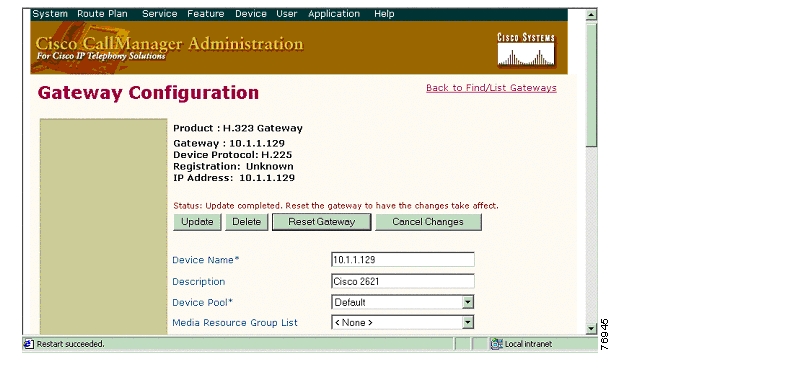
Gateway Configuration
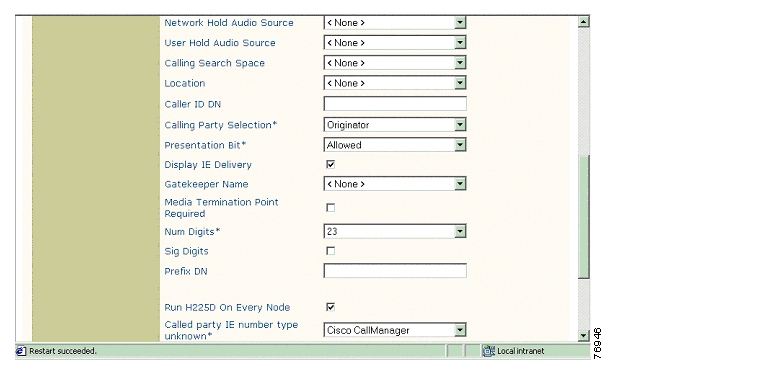
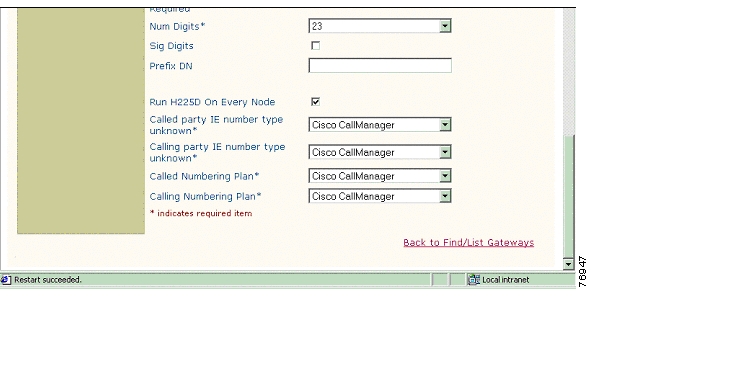
The following figures show the configuration of the Cisco 2621 Gateway.
Cisco 2621 Gateway Configuration
Cisco 2621 Gateway Configuration Continued
Cisco 2621 Gateway Configuration Continued
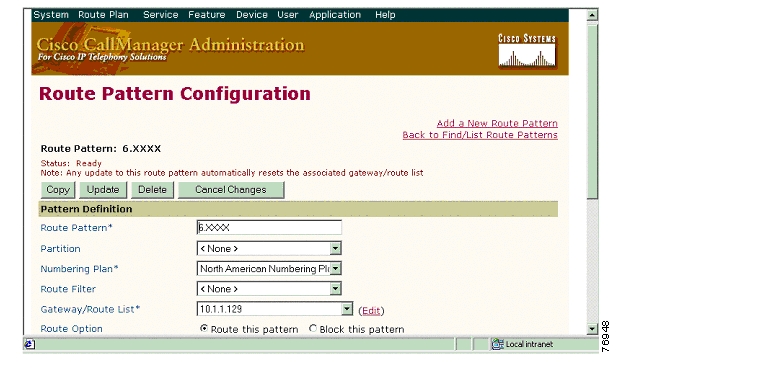
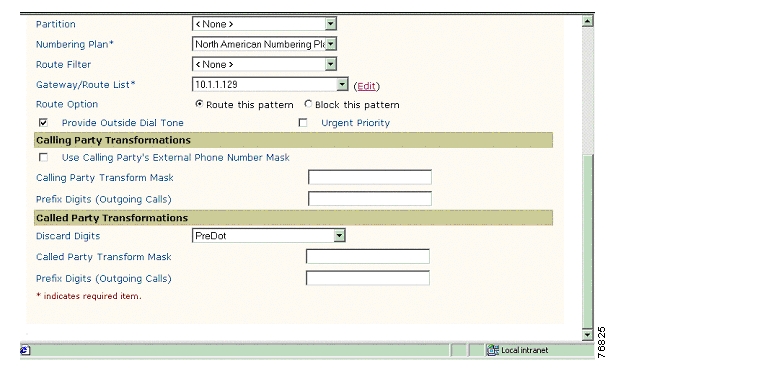
Route Pattern Configuration
The following figures show the configuration of the route pattern.
Route Pattern Configuration
Route Pattern Configuration Continued
Considerations
User/Network Settings
The Cisco 2621 router with ISDN switch type setting of primary-ni supports both protocol sides using the isdn protocol-emulate network/user command. When the router is set to emulate the Network side and the Nortel trunk type is set for DID, the Nortel must send at least 10 digits for the router to properly route the call. Otherwise, the Cisco 2621 router sends back a release message containing a release cause of "Invalid Number Format."
Calling Name and Number Feature
Calling Name delivery and presentation features are not supported by the Nortel PBX as of Release 25. The only switch-types available on the Nortel with calling name delivery/presentation feature are QSIG with GF platform (i.e. ESGF, ISGF and E4GF) and DMS100.
When calling from a Cisco 7960 IP phone to a Nortel digital phone, the Calling/Called Number is displayed on both phones after the call is answered as expected.
When calling from a Nortel digital phone to a Cisco 7960 IP phone, the IP phone displays the Connected Number after the call is answered. The Nortel phone, however, is not updated when the call is answered. It displays the numbers being dialed instead. (the access code and the extension number). It was verified using ISDN protocol analyzer that the CallManager was not sending "Connected Number" information in the CONNECT message back to PBX.
Integration Testing
This section contains information about the setup used in testing the integration of the Nortel Meridian Opt11C Release 25 PBX and the Cisco 2621-T1 PRI NI-2 Gateway.
CallManager Software Release:
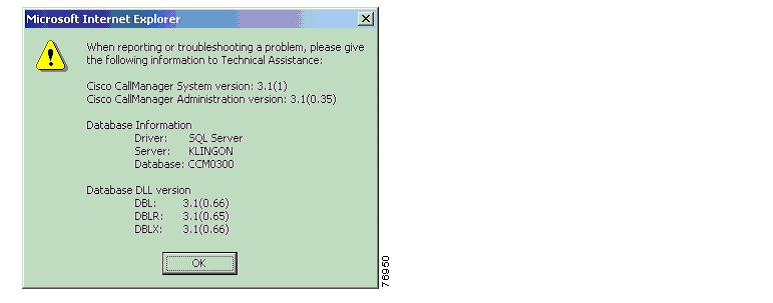
The following figure shows the information about the release of CallManager being used.
CallManager Software Release
Nortel Meridian Opt11C Software Release
The following provides information about the release of the Nortel Meridian Opt11C used.
Software Release
>LD 22PT2000MARP NOT ACTIVATEDREQ ISSVERSION 2111RELEASE 25ISSUE 15 +PSWV VERSION: PSWV 33REQDTC103****Software Packages Installed (Release 25)
>LD 22PT2000MARP NOT ACTIVATEDREQ PRTTYPE PKGOPTF 1CUST 2CDR 4CTY 5RAN 7TAD 8DNDI 9EES 10INTR 11ANI 12ANIR 13BRTE 14DNDG 16MSB 17SS25 18DDSP 19ODAS 20DI 21CHG 23CAB 24BAUT 25CASM 26CASR 27BQUE 28NTRF 29NCOS 32CPRK 33SSC 34IMS 35UST 35UMG 35ROA 36NSIG 37MCBQ 38NSC 39BACD 40ACDB 41ACDC 42LMAN 43MUS 44ACDA 45MWC 46AAB 47GRP 48NFCR 49ACDD 50LNK 51FCA 52SR 53AA 54HIST 55AOP 56BARS 57NARS 58CDP 59PQUE 60FCBQ 61OHQ 62NAUT 63SNR 64PAGE 001NXFR 67HOT 70DHLD 71LSEL 72SS5 73DRNG 74PBXI 75DLDN 76CSL 77OOD 79SCI 80CCOS 81CDRQ 83TENS 86FTDS 87DSET 88TSET 89LNR 90DLT2 91PXLT 92SUPV 93CPND 95DNIS 98BGD 99RMS 100MR 101AWU 102PMSI 103LLC 105MCT 107ICDR 108APL 109TVS 110TOF 111IDC 113AUXS 114DCP 115PAGT 116CBC 117CCDR 118EMUS 119SCMP 121FTC 125BKI 127DTI2 129TBAR 132ENS 133FFC 139DCON 140MPO 141ISDN 145PRA 146ISL 147NTWK 148IEC 149DNXP 150CDRE 151IAP3P 153PRI2 154ACNT 155THF 157PAGE 002FGD 158FNP 160ISDN INTL SUP 161SAR 162LAPW 164GPRI 167ARIE 170CPGS 172ECCS 173AAA 174NMS 175EOVF 178HVS 179DKS 180SACP 181OVLP 184EDRG 185POVR 186SECL 191ORC-RVQ 192AINS 200IPRA 202XPE 203XCT0 204XCT1 205MLWU 206NACD 207HSE 208MLM 209MAID 210VAWU 212EAR 214ECT 215BRI 216IVR 218MWI 219MSDL 222FC68 223M911 224CWNT 225SSAU 229BRIT 233FCDR 234BRIL 235MCMO 240MULTI_USER 242ALRM_FILTER 243VMBA 246CALL ID 247M911 ENH 249DPNA 250SCDR 251ARFW 253PHTN 254ADMINSET 256ATX 258QSIG 263NI-2 291MAT 296MQA 297CPP 301PAGE 003QSIGGF 305CPRKNET 306PAGENET 307CPCI 310NGCC 311TATO 312TATO 312QSIG-SS 316QTN 321NGEN 324RANBRD 327MUSBRD 328ESA 329ESA_SUPP 330ESA_CLMP 331CNUMB 332CNAME 333NI-2 CBC 334MEET 348MC32 350DBA 351FDID 362NMCE 364STS_MSG 380CDIR 381VIRTUAL_OFFICE 382REQ ****>OVL000Catalyst 2621 Router Configuration
The following shows the configuration of the Cisco 2621 Router.
2621_B#show versionCisco Internetwork Operating System SoftwareIOS (tm) C2600 Software (C2600-JS-M), Version 12.2(3.5)T, MAINTENANCE INTERIM SOFTWARETAC Support: http://www.cisco.com/tacCopyright (c) 1986-2001 by cisco Systems, Inc.Compiled Fri 03-Aug-01 22:45 by ccaiImage text-base: 0x80008088, data-base: 0x81631DD8ROM: System Bootstrap, Version 12.1(3r)T2, RELEASE SOFTWARE (fc1)2621_B uptime is 1 week, 4 days, 3 hours, 15 minutesSystem returned to ROM by power-onSystem image file is "flash:c2600-js-mz.122-3.5.T"cisco 2621 (MPC860) processor (revision 0x200) with 56320K/9216K bytes of memory.Processor board ID JAD051516TX (503811939)M860 processor: part number 0, mask 49Bridging software.X.25 software, Version 3.0.0.SuperLAT software (copyright 1990 by Meridian Technology Corp).TN3270 Emulation software.Primary Rate ISDN software, Version 1.1.2 FastEthernet/IEEE 802.3 interface(s)24 Serial network interface(s)2 Channelized T1/PRI port(s)32K bytes of non-volatile configuration memory.16384K bytes of processor board System flash (Read/Write)Configuration register is 0x21022621_B#______________________________________________________________________________2621_B#show diagSlot 0:C2621 2FE Mainboard Port adapter, 2 portsPort adapter is analyzedPort adapter insertion time unknownEEPROM contents at hardware discovery:Hardware Revision : 2.0PCB Serial Number : JAD051516TX (503811939)Part Number : 73-3200-08RMA History : 00RMA Number : 0-0-0-0Board Revision : A0Deviation Number : 0-21249EEPROM format version 4EEPROM contents (hex):0x00: 04 FF 40 00 A2 41 02 00 C1 17 4A 41 44 30 35 310x10: 35 31 36 54 58 20 28 35 30 33 38 31 31 39 33 390x20: 29 82 49 0C 80 08 04 00 81 00 00 00 00 42 41 300x30: 80 00 00 53 01 FF FF FF FF FF FF FF FF FF FF FF0x40: FF FF FF FF FF FF FF FF FF FF FF FF FF FF FF FF0x50: FF FF FF FF FF FF FF FF FF FF FF FF FF FF FF FF0x60: FF FF FF FF FF FF FF FF FF FF FF FF FF FF FF FF0x70: FF FF FF FF FF FF FF FF FF FF FF FF FF FF FF FFSlot 1:High Density Voice Port adapterPort adapter is analyzedPort adapter insertion time unknownEEPROM contents at hardware discovery:Hardware Revision : 1.1Top Assy. Part Number : 800-03567-01Board Revision : F1Deviation Number : 0-0Fab Version : 02PCB Serial Number : JAB05080LU9RMA Test History : 00RMA Number : 0-0-0-0RMA History : 00EEPROM format version 4EEPROM contents (hex):0x00: 04 FF 40 00 CC 41 01 01 C0 46 03 20 00 0D EF 010x10: 42 46 31 80 00 00 00 00 02 02 C1 8B 4A 41 42 300x20: 35 30 38 30 4C 55 39 03 00 81 00 00 00 00 04 000x30: FF FF FF FF FF FF FF FF FF FF FF FF FF FF FF FF0x40: FF FF FF FF FF FF FF FF FF FF FF FF FF FF FF FF0x50: FF FF FF FF FF FF FF FF FF FF FF FF FF FF FF FF0x60: FF FF FF FF FF FF FF FF FF FF FF FF FF FF FF FF0x70: FF FF FF FF FF FF FF FF FF FF FF FF FF FF FF FFVIC Slot 0:T1 (2 Port) Multi-Flex Trunk (Drop&Insert) WAN Daughter CardHardware revision 1.0 Board revision B0Serial number 17759676 Part number 800-04614-01Test history 0x0 RMA number 00-00-00Connector type PCIEEPROM format version 1EEPROM contents (hex):0x20: 01 24 01 00 01 0E FD BC 50 12 06 01 00 00 00 000x30: 58 00 00 00 00 01 15 00 FF FF FF FF FF FF FF FFHDV firmware: Compiled Fri 23-Mar-01 00:20 by miriyalaHDV memory size 524280 heap free 1750652621_B#______________________________________________________________________________2621_B#show controllers t1 1/0T1 1/0 is up.Applique type is Channelized T1Cablelength is long gain36 0dbNo alarms detected.alarm-trigger is not setVersion info Firmware: 20010710, FPGA: 15Framing is ESF, Line Code is B8ZS, Clock Source is Line.Data in current interval (184 seconds elapsed):0 Line Code Violations, 0 Path Code Violations0 Slip Secs, 0 Fr Loss Secs, 0 Line Err Secs, 0 Degraded Mins0 Errored Secs, 0 Bursty Err Secs, 0 Severely Err Secs, 0 Unavail Secs2621_B#______________________________________________________________________________2621_B#show configurationUsing 1824 out of 29688 bytes!version 12.2no parser cacheservice timestamps debug datetime msec localtime show-timezoneservice timestamps log uptimeno service password-encryption!hostname 2621_B!no logging bufferedenable password cisco!!!memory-size iomem 15voice-card 1dspfarm!ip subnet-zero!!no ip domain-lookup!isdn switch-type primary-ni!!voice class codec 1codec preference 1 g729r8codec preference 2 g711ulawcodec preference 3 g711alaw!!!!!!!controller T1 1/0framing esflinecode b8zspri-group timeslots 1-24!controller T1 1/1shutdownframing esflinecode b8zs!!!!interface FastEthernet0/0ip address 192.168.100.2 255.255.255.0no ip mroute-cacheload-interval 30no keepalivespeed autohalf-duplex!interface FastEthernet0/1ip address 10.1.1.129 255.255.255.0no ip mroute-cacheduplex autospeed auto!interface Serial1/0:23no ip addressno logging event link-statusisdn switch-type primary-niisdn incoming-voice voiceisdn T309-enableisdn T306 30000isdn T310 40000no cdp enable!router ripnetwork 1.0.0.0network 192.168.100.0!ip classlessno ip http serverip pim bidir-enable!dialer-list 1 protocol ip permitdialer-list 1 protocol ipx permit!!snmp-server packetsize 4096snmp-server managertftp-server nvramcall rsvp-sync!voice-port 1/0:23!!mgcp profile default!dial-peer cor custom!!!dial-peer voice 1 potsdestination-pattern 3...direct-inward-dialport 1/0:23prefix 3!dial-peer voice 3 voipdestination-pattern 5...progress_ind setup enable 1voice-class codec 1session target ipv4:10.1.1.2dtmf-relay h245-alphanumeric!!line con 0exec-timeout 0 0line aux 0exec-timeout 0 0line vty 0 4exec-timeout 0 0password ciscologinline vty 5 15exec-timeout 0 0login!scheduler allocate 3996 1000!end2621_B#Test Configuration
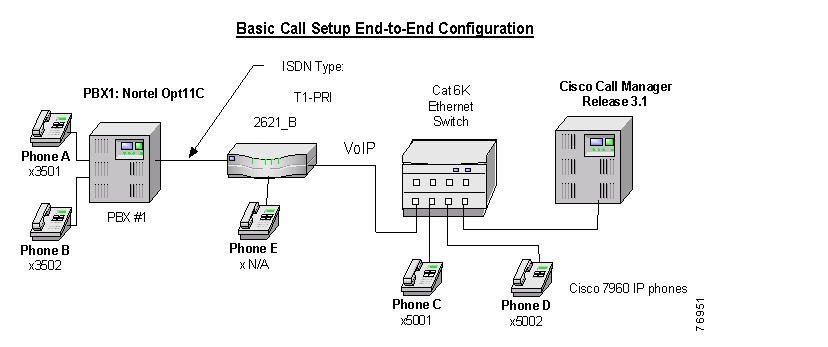
The following figure represents the various configurations used for testing.
Testbed Network Configuration
As shown in the figure above,, a Nortel Meridian Opt 11C PBX was connected via an ISDN T1 PRI link to a Cisco 2621, which in turn, was connected to an Ethernet switch. The interoperability testing involved Layers 1, 2 and 3 on the ISDN PRI link between a Cisco 2621 and the PBX.
Layer 1 (Physical Layer)
The Nortel configuration screen for the T1 trunk interface is reached using LD 17, setting the CEQU (Common Equipment parameters).
Layers 2 & 3 (Q.921 and Q.931)
Layer 2 and 3 packet exchanges were monitored using an Acacia Clarinet protocol analyzer, bridged across the PRI link in high impedance mode.
Layer 2 Q.921 packets were monitored to ensure that each PBX/2621 software configuration properly exchanged SABME/UA packets to initialize the ISDN link, and then RR packets were exchanged every 30 seconds.
Layer 3 Q.931 packets were monitored to ensure that the appropriate call setup/teardown packets were exchanged for each configuration, and that the SETUP packets contained the mandatory Information Elements with the necessary details, as well as optional IEs such as Calling Name and Number.
Telephone calls were made end-to-end in both directions through the Cisco 2621 Gateway, and a check was made to ensure that there was an audio path in both directions for each call.
User/Network Settings
The Cisco 2621 Gateway with ISDN protocol type setting of primary-ni supports both protocol sides using the isdn protocol-emulate network/user command.
The Nortel Meridian Option 11C, when set to NI2, supports both the USER and NETWORK protocol sides. This USER/NETWORK choice is set on the Nortel by using LD 17.
Test Results
Testing was performed by Test Engineer(s): Samir Batio, September 10, 2001
Test 1
In test 1:
•
•
The results are shown in the following tables.
Table 1 Basic Calls (Enbloc Sending)
Phone A to Phone C
Yes
Yes
No1
No 2
No
Phone C to Phone A
Yes
Yes
No
Yes
No
1 The Nortel PRI interface with NI2 setting does not support "Calling Name" presentation Feature.
2 CallManager is not sending the Connected Number information in the CONNECT message back to PBX.
Test 2
In test 2:
•
•
The test results are identical to those in Test 1.
Posted: Thu Sep 6 11:29:28 PDT 2007
All contents are Copyright © 1992--2007 Cisco Systems, Inc. All rights reserved.
Important Notices and Privacy Statement.