|
|

Table Of Contents
Configuring Networking Protocols
Basic IP Routing Protocol Configuration
Configure EIGRP Route Authentication
Border Gateway Protocol and Classless Interdomain Routing
Verifying the IS-IS Configuration
Monitoring and Maintaining the IP Network
Understanding IP Multicast Routing
Configuring IP Multicast Routing
Monitoring and Verifying IP Multicast Operation
Configuring Networking Protocols
This chapter describes how to configure the ML-Series card for supported IP routing protocols. It is intended to provide enough information for a network administrator to get the protocols up and running. However, this section does not provide in-depth configuration detail for each protocol. For detailed information, refer to the Cisco IOS IP and IP Routing Configuration Guide and the Cisco IOS IP and IP Routing Command Reference publications.
This chapter contains the following major sections:
•
Basic IP Routing Protocol Configuration
•
•
•
•
Basic IP Routing Protocol Configuration
IP routing is enabled by default on the ML-Series card.
For IP routing, you need the following to configure your interface:
•
•
You also need to do the following:
•
•
The ML Series supports the routing protocols listed and described in the following sections.
To configure IP routing protocols to run on a Fast Ethernet, Gigabit Ethernet, or Packet-over-SONET/SDH (POS) interface, perform one of the following procedures, depending on the protocol you are configuring.
RIP
To configure the Routing Information Protocol (RIP), perform the following procedure, beginning in global configuration mode:
EIGRP
To configure the Enhanced Interior Gateway Routing Protocol (EIGRP), perform the following procedure, beginning in global configuration mode:
OSPF
To configure the Open Shortest Path First (OSPF) protocol, perform the following procedure, beginning in global configuration mode:
BGP
To configure the Border Gateway Protocol (BGP), perform the following procedure, beginning in global configuration mode:
Enabling IP Routing
Beginning in privileged EXEC mode, follow this procedure to enable IP routing:
Note
Use the no ip routing global configuration command ( Example 11-1) to disable routing.
Example 11-1 Enabling IP Routing Using RIP as the Routing Protocol
Router# configure terminalRouter(config)# ip routingRouter(config)# router ripRouter(config-router)# network 10.0.0.0Router(config-router)# endConfiguring IP Routing
You can now set up parameters for the selected routing protocols as described in these sections:
Configuring RIP
The Routing Information Protocol (RIP) is an Interior Gateway Protocol (IGP) created for use in small, homogeneous networks. It is a distance-vector routing protocol that uses broadcast User Datagram Protocol (UDP) data packets to exchange routing information. The protocol is documented in RFC 1058. You can find detailed information about RIP in IP Routing Fundamentals, published by Cisco Press.
Using RIP, the switch sends routing information updates (advertisements) every 30 seconds. If a router does not receive an update from another router for 180 seconds or more, it marks the routes served by that router as unusable. If there is still no update after 240 seconds, the router removes all routing table entries for the nonupdating router.
RIP uses hop counts to rate the value of different routes. The hop count is the number of routers that can be traversed in a route. A directly connected network has a hop count of zero; a network with a hop count of 16 is unreachable. This small range (0 to 15) makes RIP unsuitable for large networks.
If the router has a default network path, RIP advertises a route that links the router to the pseudo network 0.0.0.0. The 0.0.0.0 network does not exist; it is treated by RIP as a network to implement the default routing feature. The switch advertises the default network if a default was learned by RIP or if the router has a gateway of last resort and RIP is configured with a default metric. RIP sends updates to the interfaces in specified networks. If an interface's network is not specified, it is not advertised in any RIP update.
Table 11-1 shows the default RIP configuration.
To configure RIP, enable RIP routing for a network and optionally configure other parameters.
Beginning in privileged EXEC mode, follow this procedure to enable and configure RIP:
To turn off the RIP routing process, use the no router rip global configuration command.
To display the parameters and current state of the active routing protocol process, use the show ip protocols privileged EXEC command ( Example 11-2).
Example 11-2 show ip protocols Command Output (Showing RIP Processes)
Router# show ip protocolsRouting Protocol is "rip"Sending updates every 30 seconds, next due in 15 secondsInvalid after 180 seconds, hold down 180, flushed after 240Outgoing update filter list for all interfaces is not setIncoming update filter list for all interfaces is not setRedistributing: ripDefault version control: send version 1, receive any versionInterface Send Recv Triggered RIP Key-chainFastEthernet0 1 1 2POS0 1 1 2Automatic network summarization is in effectMaximum path: 4Routing for Networks:192.168.2.0192.168.3.0Routing Information Sources:Gateway Distance Last Update192.168.2.1 120 00:00:23Distance: (default is 120)Use the show ip rip database privileged EXEC command to display summary address entries in the RIP database ( Example 11-3).
Example 11-3 show ip rip database Command Output
Router# show ip rip database192.168.1.0/24 auto-summary192.168.1.0/24[1] via 192.168.2.1, 00:00:24, POS0192.168.2.0/24 auto-summary192.168.2.0/24 directly connected, POS0192.168.3.0/24 auto-summary192.168.3.0/24 directly connected, FastEthernet0RIP Authentication
RIP Version 1 does not support authentication. If you are sending and receiving RIP Version 2 packets, you can enable RIP authentication on an interface. The key chain determines the set of keys that can be used on the interface. If a key chain is not configured, no authentication is performed, not even the default.
The switch supports two modes of authentication on interfaces for which RIP authentication is enabled: plain text and message-digest key (MD5). The default is plain text.
Beginning in privileged EXEC mode, follow this procedure to configure RIP authentication on an interface:
To restore clear text authentication, use the no ip rip authentication mode interface configuration command. To prevent authentication, use the no ip rip authentication key-chain interface configuration command.
Summary Addresses and Split Horizon
Routers connected to broadcast-type IP networks and using distance-vector routing protocols normally use the split-horizon mechanism to reduce the possibility of routing loops. Split horizon blocks information about routes from being advertised by a router on any interface from which that information originated. This feature usually optimizes communication among multiple routers, especially when links are broken.
Note
If you want to configure an interface running RIP to advertise a summarized local IP address pool on a network access server for dial-up clients, use the ip summary-address rip interface configuration command.
Beginning in privileged EXEC mode, follow these steps to set an interface to advertise a summarized local IP address pool and to disable split horizon on the interface:
To disable IP summarization, use the no ip summary-address rip router configuration command.
Note
Configuring OSPF
This section briefly describes how to configure the Open Shortest Path First (OSPF) protocol. For a complete description of the OSPF commands, refer to the "OSPF Commands" chapter of the Cisco IOS IP and IP Routing Command Reference publication.
OSPF is an IGP designed expressly for IP networks, supporting IP subnetting and tagging of externally derived routing information. OSPF also allows packet authentication and uses IP multicast when sending and receiving packets. The Cisco implementation supports RFC 1253, the OSPF MIB.
The Cisco implementation conforms to the OSPF Version 2 specifications with these key features:
•
•
•
•
•
•
OSPF typically requires coordination among many internal routers, area border routers (ABRs) connected to multiple areas, and autonomous system boundary routers (ASBRs). The minimum configuration would use all default parameter values, no authentication, and interfaces assigned to areas. If you customize your environment, you must ensure coordinated configuration of all routers.
Table 11-2 shows the default OSPF configuration.
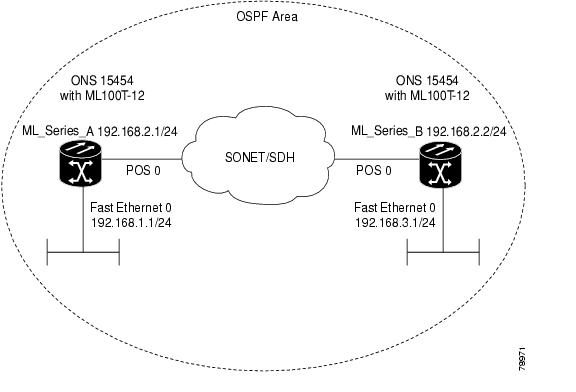
Figure 11-1 shows an example of an IP routing protocol using OSPF.
Figure 11-1 IP Routing Protocol Example Using OSPF
Enabling OSPF requires that you create an OSPF routing process, specify the range of IP addresses to be associated with the routing process, and assign area IDs to be associated with that range.
Beginning in privileged EXEC mode, follow this procedure to enable OSPF:
To terminate an OSPF routing process, use the no router ospf process-id global configuration command.
Example 11-4 shows an example of configuring an OSPF routing process. In the example, a process number of 1 is assigned. Example 11-5 shows the output of the command used to verify the OSPF process ID.
Example 11-4 Configuring an OSPF Routing Process
Router(config)# router ospf 1Router(config-router)# network 192.168.1.0 0.0.0.255 area 0Example 11-5 show ip protocols Privileged EXEC Command Output
Router# show ip protocolsRouting Protocol is "ospf 1"Outgoing update filter list for all interfaces is not setIncoming update filter list for all interfaces is not setRouter ID 192.168.3.1Number of areas in this router is 1. 1 normal 0 stub 0 nssaMaximum path: 4Routing for Networks:192.168.2.0 0.0.0.255 area 0192.168.3.0 0.0.0.255 area 0Routing Information Sources:Gateway Distance Last Update192.168.3.1 110 00:03:34192.168.2.1 110 00:03:34Distance: (default is 110)OSPF Interface Parameters
You can use the ip ospf interface configuration commands to modify interface-specific OSPF parameters. You are not required to modify any of these parameters, but some interface parameters (hello interval, dead interval, and authentication key) must be consistent across all routers in an attached network. If you modify these parameters, be sure all routers in the network have compatible values.
Note
Beginning in privileged EXEC mode, follow these steps to modify OSPF interface parameters:
Use the no form of these commands to remove the configured parameter value or return to the default value. Example 11-6 shows the output of the show ip ospf interface privileged EXEC command.
Example 11-6 show ip ospf interface Privileged EXEC Command Output
Router# show ip ospf interfaceFastEthernet0 is up, line protocol is upInternet Address 192.168.3.1/24, Area 0Process ID 1, Router ID 192.168.3.1, Network Type BROADCAST, Cost: 1Transmit Delay is 1 sec, State DR, Priority 1Designated Router (ID) 192.168.3.1, Interface address 192.168.3.1No backup designated router on this networkTimer intervals configured, Hello 10, Dead 40, Wait 40, Retransmit 5Hello due in 00:00:01Index 2/2, flood queue length 0Next 0x0(0)/0x0(0)Last flood scan length is 0, maximum is 0Last flood scan time is 0 msec, maximum is 0 msecNeighbor Count is 0, Adjacent neighbor count is 0Suppress hello for 0 neighbor(s)POS0 is up, line protocol is upInternet Address 192.168.2.2/24, Area 0Process ID 1, Router ID 192.168.3.1, Network Type BROADCAST, Cost: 1Transmit Delay is 1 sec, State DR, Priority 1Designated Router (ID) 192.168.3.1, Interface address 192.168.2.2Backup Designated router (ID) 192.168.2.1, Interface address 192.168.2.1Timer intervals configured, Hello 10, Dead 40, Wait 40, Retransmit 5Hello due in 00:00:05Index 1/1, flood queue length 0Next 0x0(0)/0x0(0)Last flood scan length is 2, maximum is 2Last flood scan time is 0 msec, maximum is 0 msecNeighbor Count is 1, Adjacent neighbor count is 1Adjacent with neighbor 192.168.2.1 (Backup Designated Router)Suppress hello for 0 neighbor(s)OSPF Area Parameters
You can optionally configure several OSPF area parameters. These parameters include authentication for password-based protection against unauthorized access to an area, stub areas, and NSSAs. Stub areas are areas into which information about external routes is not sent. Instead, the ABR generates a default external route into the stub area for destinations outside the autonomous system (AS). An NSSA does not flood all LSAs from the core into the area, but can import AS external routes within the area by redistribution.
Route summarization is the consolidation of advertised addresses into a single summary route to be advertised by other areas. If network numbers are contiguous, you can use the area range router configuration command to configure the ABR to advertise a summary route that covers all networks in the range.
Note
Beginning in privileged EXEC mode, follow these steps to configure area parameters:
Use the no form of these commands to remove the configured parameter value or to return to the default value. Example 11-7 shows the output of the show ip ospf database and the show ip ospf privileged EXEC commands.
Example 11-7 show ip ospf database and show ip ospf Privileged EXEC Command Ouputs
Router# show ip ospf databaseOSPF Router with ID (192.168.3.1) (Process ID 1)Router Link States (Area 0)Link ID ADV Router Age Seq# Checksum Link count192.168.2.1 192.168.2.1 428 0x80000003 0x004AB8 2192.168.3.1 192.168.3.1 428 0x80000003 0x006499 2Net Link States (Area 0)Link ID ADV Router Age Seq# Checksum192.168.2.2 192.168.3.1 428 0x80000001 0x00A4E0Router# show ip ospfRouting Process "ospf 1" with ID 192.168.3.1Supports only single TOS(TOS0) routesSupports opaque LSASPF schedule delay 5 secs, Hold time between two SPFs 10 secsMinimum LSA interval 5 secs. Minimum LSA arrival 1 secsNumber of external LSA 0. Checksum Sum 0x000000Number of opaque AS LSA 0. Checksum Sum 0x000000Number of DCbitless external and opaque AS LSA 0Number of DoNotAge external and opaque AS LSA 0Number of areas in this router is 1. 1 normal 0 stub 0 nssaExternal flood list length 0Area BACKBONE(0)Number of interfaces in this area is 2Area has no authenticationSPF algorithm executed 4 timesArea ranges areNumber of LSA 3. Checksum Sum 0x015431Number of opaque link LSA 0. Checksum Sum 0x000000Number of DCbitless LSA 0Number of indication LSA 0Number of DoNotAge LSA 0Flood list length 0Other OSPF Behavior Parameters
You can optionally configure other OSPF parameters in router configuration mode:
•
•
•
•
•
•
•
•
•
Beginning in privileged EXEC mode, follow this procedure to configure these OSPF parameters:
Step 1
Router# configure terminalEnters global configuration mode.
Step 2
Router(config)# router ospf process-idEnables OSPF routing, and enters router configuration mode.
Step 3
Router(config)# summary-address address-mask(Optional) Specifies an address and IP subnet mask for redistributed routes so that only one summary route is advertised.
Step 4
Router(config)# area area-id virtual-link router-id [hello-interval seconds] [retransmit-interval seconds] [trans] {[authentication-key key] | [message-digest-key key-id md5 key]}(Optional) Establishes a virtual link and set its parameters. See the "OSPF Interface Parameters" section for parameter definitions and Table 11-2 for virtual link defaults.
Step 5
Router(config)# default-information originate [always] [metric metric-value] [metric-type type-value] [route-map map-name](Optional) Forces the ASBR to generate a default route into the OSPF routing domain. Parameters are all optional.
Step 6
Router(config)# ip ospf name-lookup(Optional) Configures DNS name lookup. The default is disabled.
Step 7
Router(config)# ip auto-cost reference-bandwidth ref-bw(Optional) Specifies an address range for which a single route will be advertised. Use this command only with area border routers.
Step 8
Router(config)# distance ospf {[inter-area dist1] | [inter-area dist2] | [external dist3]}(Optional) Changes the OSPF distance values. The default distance for each type of route is 110. The range is 1 to 255.
Step 9
Router(config)# passive-interface type number(Optional) Suppresses the sending of hello packets through the specified interface.
Step 10
Router(config)# timers spf spf-delay spf-holdtime(Optional) Configures route calculation timers.
•
•
Step 11
Router(config)# ospf log-adj-changes(Optional) Sends syslog message when a neighbor state changes.
Step 12
Router(config)# endReturns to privileged EXEC mode.
Step 13
Router# show ip ospf [process-id [area-id]] databaseDisplays lists of information related to the OSPF database for a specific router. For some of the keyword options, see to the "Monitoring OSPF" section.
Step 14
Router# copy running-config
startup-config
(Optional) Saves your entries in the configuration file.
Change LSA Group Pacing
The OSPF LSA group pacing feature allows the router to group OSPF LSAs and pace the refreshing, check-summing, and aging functions for more efficient router use. This feature is enabled by default with a four-minute default pacing interval, and you do not usually need to modify this parameter. The optimum group pacing interval is inversely proportional to the number of LSAs the router is refreshing, check-summing, and aging. For example, if you have approximately 10,000 LSAs in the database, decreasing the pacing interval would benefit you. If you have a very small database (40 to 100 LSAs), increasing the pacing interval to 10 to 20 minutes might benefit you slightly.
Beginning in privileged EXEC mode, follow this procedure to configure OSPF LSA pacing:
To return to the default value, use the no timers lsa-group-pacing router configuration command.
Loopback Interface
OSPF uses the highest IP address configured on the interfaces as its router ID. If this interface is down or removed, the OSPF process must recalculate a new router ID and resend all its routing information out of its interfaces. If a loopback interface is configured with an IP address, OSPF uses this IP address as its router ID, even if other interfaces have higher IP addresses. Because loopback interfaces never fail, this provides greater stability. OSPF automatically prefers a loopback interface over other interfaces, and it chooses the highest IP address among all loopback interfaces.
Beginning in privileged EXEC mode, follow this procedure to configure a loopback interface:
Use the no interface loopback 0 global configuration command to disable the loopback interface.
Monitoring OSPF
You can display specific statistics such as the contents of IP routing tables, caches, and databases.
Table 11-3 lists some of the privileged EXEC commands for displaying statistics. For more show ip ospf database privileged EXEC command options and for explanations of fields in the resulting display, refer to the Cisco IOS IP and IP Routing Command Reference.
Configuring EIGRP
Enhanced IGRP (EIGRP) is a Cisco proprietary enhanced version of the Interior Gateway Routing Protocol (IGRP). Enhanced IGRP uses the same distance vector algorithm and distance information as IGRP; however, the convergence properties and the operating efficiency of Enhanced IGRP are significantly improved.
The convergence technology employs an algorithm referred to as the Diffusing Update Algorithm (DUAL), which guarantees loop-free operation at every instant throughout a route computation and allows all devices involved in a topology change to synchronize at the same time. Routers that are not affected by topology changes are not involved in recomputations.
IP EIGRP provides increased network width. With RIP, the largest possible width of your network is 15 hops. When IGRP is enabled, the largest possible width is 224 hops. Because the EIGRP metric is large enough to support thousands of hops, the only barrier to expanding the network is the transport-layer hop counter. EIGRP increments the transport control field only when an IP packet has traversed 15 routers and the next hop to the destination was learned through EIGRP. When a RIP route is used as the next hop to the destination, the transport control field is incremented as usual.
EIGRP offers the following features:
•
•
•
•
•
•
•
EIGRP has four basic components:
•
•
•
•
Table 11-4 shows the default EIGRP configuration.
To create an EIGRP routing process, you must enable EIGRP and associate networks. EIGRP sends updates to the interfaces in the specified networks. If you do not specify an interface network, it is not advertised in any EIGRP update.
EIGRP Router Mode Commands
Beginning in privileged EXEC mode, follow these steps to configure EIGRP. Configuring the routing process is required; other steps are optional.
Use the no forms of these commands to disable the feature or return the setting to the default value. Example 11-8 shows the output for the show ip protocols privileged EXEC command.
Example 11-8 show ip protocols privileged EXEC Command Output (for EIGRP)
Router# show ip protocols
Routing Protocol is "eigrp 1"
Outgoing update filter list for all interfaces is not set
Incoming update filter list for all interfaces is not set
Default networks flagged in outgoing updates
Default networks accepted from incoming updates
EIGRP metric weight K1=1, K2=0, K3=1, K4=0, K5=0
EIGRP maximum hopcount 100
EIGRP maximum metric variance 1
Redistributing: eigrp 1
Automatic network summarization is in effect
Automatic address summarization:
192.168.3.0/24 for POS0
192.168.2.0/24 for FastEthernet0
Maximum path: 4
Routing for Networks:
192.168.2.0
192.168.3.0
Routing Information Sources:
Gateway Distance Last Update
192.168.2.1 90 00:03:16
Distance: internal 90 external 170
EIGRP Interface Mode Commands
Other optional EIGRP parameters can be configured on an interface basis.
Beginning in privileged EXEC mode, follow these steps:
Use the no forms of these commands to disable the feature or return the setting to the default value. Example 11-9 shows the output of the show ip eigrp interface privileged EXEC command.
Example 11-9 show ip eigrp interface Privileged EXEC Command Output
Router# show ip eigrp interfaceIP-EIGRP interfaces for process 1Xmit Queue Mean Pacing Time Multicast PendingInterface Peers Un/Reliable SRTT Un/Reliable Flow Timer RoutesPO0 1 0/0 20 0/10 50 0Fa0 0 0/0 0 0/10 0 0Configure EIGRP Route Authentication
EIGRP route authentication provides MD5 authentication of routing updates from the EIGRP routing protocol to prevent the introduction of unauthorized or false routing messages from unapproved sources.
Beginning in privileged EXEC mode, follow these steps to enable authentication:
Use the no forms of these commands to disable the feature or to return the setting to the default value.
Monitoring and Maintaining EIGRP
You can delete neighbors from the neighbor table. You can also display various EIGRP routing statistics. Table 11-5 lists the privileged EXEC commands for deleting neighbors and displaying statistics. For explanations of fields in the resulting display, refer to the Cisco IOS IP and IP Routing Command Reference publication.
Example 11-10 shows the output of the show ip eigrp interface privileged EXEC command. Example 11-11 shows the output of the show ip eigrp neighbors privileged EXEC command. Example 11-12 shows the output of the show ip eigrp topology privileged EXEC command. Example 11-13 shows the output of the show ip eigrp traffic privileged EXEC command.
Example 11-10 show ip eigrp interface Privileged EXEC Command Output
Router# show ip eigrp interfaceIP-EIGRP interfaces for process 1Xmit Queue Mean Pacing Time Multicast PendingInterface Peers Un/Reliable SRTT Un/Reliable Flow Timer RoutesPO0 1 0/0 20 0/10 50 0Fa0 0 0/0 0 0/10 0 0Example 11-11 show ip eigrp neighbors Privileged EXEC Command Output
Router# show ip eigrp neighborsIP-EIGRP neighbors for process 1H Address Interface Hold Uptime SRTT RTO Q Seq Type(sec) (ms) Cnt Num0 192.168.2.1 PO0 13 00:08:15 20 200 0 2Example 11-12 show ip eigrp topology Privileged EXEC Command Output
Router# show ip eigrp topologyIP-EIGRP Topology Table for AS(1)/ID(192.168.3.1)Codes: P - Passive, A - Active, U - Update, Q - Query, R - Reply,r - reply Status, s - sia StatusP 192.168.1.0/24, 1 successors, FD is 30720via 192.168.2.1 (30720/28160), POS0P 192.168.2.0/24, 1 successors, FD is 10752via Connected, POS0P 192.168.3.0/24, 1 successors, FD is 28160via Connected, FastEthernet0Example 11-13 show ip eigrp traffic Privileged EXEC Command Output
Router# show ip eigrp trafficIP-EIGRP Traffic Statistics for process 1Hellos sent/received: 273/136Updates sent/received: 5/2Queries sent/received: 0/0Replies sent/received: 0/0Acks sent/received: 1/2Input queue high water mark 1, 0 dropsSIA-Queries sent/received: 0/0SIA-Replies sent/received: 0/0Border Gateway Protocol and Classless Interdomain Routing
Border Gateway Protocol (BGP) is an Exterior Gateway Protocol (EGP) that allows you to set up an interdomain routing system to automatically guarantee the loop-free exchange of routing information between autonomous systems. In BGP, each route consists of a network number, a list of autonomous systems that information has passed through (called the autonomous system path), and a list of other path attributes.
Layer 3 switching supports BGP version 4, including CIDR. CIDR lets you reduce the size of your routing tables by creating aggregate routes resulting in supernets. CIDR eliminates the concept of network classes within BGP and supports the advertising of IP prefixes. CIDR routes can be carried by OSPF, EIGRP, and RIP.
Configuring BGP
To configure BGP routing, perform the following steps, beginning in global configuration mode:
Example 11-14 shows and example of configuring BGP routing.
Example 11-14 Configuring BGP Routing
Router(config)# ip routingRouter(config)# router bgp 30Router(config-router)# network 192.168.1.1Router(config-router)# neighbor 192.168.2.1Router(config-router)# endFor more information about configuring BGP routing, refer to the "Configuring BGP" chapter in the Cisco IOS IP and IP Routing Configuration Guide.
Verifying the BGP Configuration
Table 11-6 lists some common EXEC commands used to view the BGP configuration. Example 11-15 shows the output of the commands listed in Table 11-6.
Example 11-15 BGP Configuration Information
Router# show ip protocolsRouting Protocol is "bgp 1"Outgoing update filter list for all interfaces is not setIncoming update filter list for all interfaces is not setIGP synchronization is enabledAutomatic route summarization is enabledRedistributing: connectedNeighbor(s):Address FiltIn FiltOut DistIn DistOut Weight RouteMap192.168.2.1Maximum path: 1Routing for Networks:Routing Information Sources:Gateway Distance Last UpdateDistance: external 20 internal 200 local 200Router# show ip bgp neighborBGP neighbor is 192.168.2.1, remote AS 1, internal linkBGP version 4, remote router ID 192.168.2.1BGP state = Established, up for 00:08:46Last read 00:00:45, hold time is 180, keepalive interval is 60 secondsNeighbor capabilities:Route refresh: advertised and received(new)Address family IPv4 Unicast: advertised and receivedReceived 13 messages, 0 notifications, 0 in queueSent 13 messages, 0 notifications, 0 in queueRoute refresh request: received 0, sent 0Default minimum time between advertisement runs is 5 secondsFor address family: IPv4 UnicastBGP table version 3, neighbor version 3Index 1, Offset 0, Mask 0x22 accepted prefixes consume 72 bytesPrefix advertised 2, suppressed 0, withdrawn 0Number of NLRIs in the update sent: max 2, min 0Connections established 1; dropped 0Last reset neverConnection state is ESTAB, I/O status: 1, unread input bytes: 0Local host: 192.168.2.2, Local port: 179Foreign host: 192.168.2.1, Foreign port: 11001Enqueued packets for retransmit: 0, input: 0 mis-ordered: 0 (0 bytes)Event Timers (current time is 0x45B7B4):Timer Starts Wakeups NextRetrans 13 0 0x0TimeWait 0 0 0x0AckHold 13 9 0x0SendWnd 0 0 0x0KeepAlive 0 0 0x0GiveUp 0 0 0x0PmtuAger 0 0 0x0DeadWait 0 0 0x0iss: 3654396253 snduna: 3654396567 sndnxt: 3654396567 sndwnd: 16071irs: 3037331955 rcvnxt: 3037332269 rcvwnd: 16071 delrcvwnd: 313SRTT: 247 ms, RTTO: 663 ms, RTV: 416 ms, KRTT: 0 msminRTT: 4 ms, maxRTT: 300 ms, ACK hold: 200 msFlags: passive open, nagle, gen tcbsDatagrams (max data segment is 1460 bytes):Rcvd: 15 (out of order: 0), with data: 13, total data bytes: 313Sent: 22 (retransmit: 0), with data: 12, total data bytes: 313Router# show ip bgp summaryBGP router identifier 192.168.3.1, local AS number 1BGP table version is 3, main routing table version 33 network entries and 4 paths using 435 bytes of memory2 BGP path attribute entries using 120 bytes of memory0 BGP route-map cache entries using 0 bytes of memory0 BGP filter-list cache entries using 0 bytes of memoryBGP activity 3/6 prefixes, 4/0 paths, scan interval 60 secsNeighbor V AS MsgRcvd MsgSent TblVer InQ OutQ Up/Down State/PfxRcd192.168.2.1 4 1 14 14 3 0 0 00:09:45 2Router# show ip bgpBGP table version is 3, local router ID is 192.168.3.1Status codes: s suppressed, d damped, h history, * valid, > best, i - internalOrigin codes: i - IGP, e - EGP, ? - incompleteNetwork Next Hop Metric LocPrf Weight Path* i192.168.1.0 192.168.2.1 0 100 0 ?* i192.168.2.0 192.168.2.1 0 100 0 ?*> 0.0.0.0 0 32768 ?*> 192.168.3.0 0.0.0.0 0 32768 ?Configuring IS-IS
To configure Intermediate System-to-Intermediate System (IS-IS) routing, perform the following steps, beginning in global configuration mode:
Example 11-16 shows an example of IS-IS routing configuration.
Example 11-16 Configuring IS-IS Routing
Router(config)# router isisRouter(config-router)# net 49.0001.0000.0000.000a.00Router(config-router)# interface gigabitethernet 0Router(config-if)# ip router isisRouter(config-if)# endFor more information about configuring IS-IS routing, refer to the "Configuring Integrated IS-IS" chapter in the Cisco IOS IP and IP Routing Configuration Guide.
Verifying the IS-IS Configuration
To verify the IS-IS configuration, use the EXEC commands listed in Table 11-7. Example 11-17 shows examples of the commands in Table 11-7 and their output.
Note
Example 11-17 IS-IS Configuration
Router# show ip protocolsRouting Protocol is "isis"Invalid after 0 seconds, hold down 0, flushed after 0Outgoing update filter list for all interfaces is not setIncoming update filter list for all interfaces is not setRedistributing: isisAddress Summarization:NoneMaximum path: 4Routing for Networks:FastEthernet0POS0Routing Information Sources:Gateway Distance Last Update192.168.2.1 115 00:06:48Distance: (default is 115)Router# show isis databaseIS-IS Level-1 Link State Database:LSPID LSP Seq Num LSP Checksum LSP Holdtime ATT/P/OLRouter_A.00-00 0x00000003 0xA72F 581 0/0/0Router_A.02-00 0x00000001 0xA293 581 0/0/0Router.00-00 * 0x00000004 0x79F9 582 0/0/0IS-IS Level-2 Link State Database:LSPID LSP Seq Num LSP Checksum LSP Holdtime ATT/P/OLRouter_A.00-00 0x00000004 0xF0D6 589 0/0/0Router_A.02-00 0x00000001 0x328C 581 0/0/0Router.00-00 * 0x00000004 0x6A09 586 0/0/0Router# show clns neighborsSystem Id Interface SNPA State Holdtime Type ProtocolRouter_A PO0 0005.9a39.6790 Up 7 L1L2 IS-ISConfiguring Static Routes
Static routes are user-defined routes that cause packets moving between a source and a destination to take a specified path. Static routes can be important if the router cannot build a route to a particular destination. They are also useful for specifying a gateway of last resort to which all unroutable packets are sent.
Beginning in privileged EXEC mode, follow these steps to configure a static route:
Step 1
Router# configure terminalEnters global configuration mode.
Step 2
Router(config)# ip route prefix mask { address | interface } [distance]Establishes a static route. Illustrated in Example 11-18.
Step 3
Router(config)# endReturns to privileged EXEC mode.
Step 4
Router# copy running-config
startup-config
(Optional) Saves your entries in the configuration file.
Example 11-18 Static Route
Router(config)# ip route 0.0.0.0 0.0.0.0 192.168.2.1Use the no ip route prefix mask {address | interface} global configuration command to remove a static route. Use the show ip route privileged EXEC command to view information about the static IP route ( Example 11-19).
Example 11-19 show ip route Privileged EXEC Command Output (with a Static Route Configured)
Router# show ip routeCodes: C - connected, S - static, I - IGRP, R - RIP, M - mobile, B - BGPD - EIGRP, EX - EIGRP external, O - OSPF, IA - OSPF inter areaN1 - OSPF NSSA external type 1, N2 - OSPF NSSA external type 2E1 - OSPF external type 1, E2 - OSPF external type 2, E - EGPi - IS-IS, L1 - IS-IS level-1, L2 - IS-IS level-2, ia - IS-IS inter area* - candidate default, U - per-user static route, o - ODRP - periodic downloaded static routeGateway of last resort is 192.168.2.1 to network 0.0.0.0C 192.168.2.0/24 is directly connected, POS0C 192.168.3.0/24 is directly connected, FastEthernet0S* 0.0.0.0/0 [1/0] via 192.168.2.1The output from the show ip route privileged EXEC command lists codes for the routing protocols. Table 11-8 shows the default administrative distances for these routing protocols.
Monitoring Static Routes
You can display statistics about static routes with the show ip route command ( Example 11-20). For more show ip privileged EXEC command options and for explanations of fields in the resulting display, refer to the Cisco IOS IP and IP Routing Command Reference publication.
Example 11-20 show ip route Command Output (with a Static Route Configured)
Router# show ip routeCodes: C - connected, S - static, I - IGRP, R - RIP, M - mobile, B - BGPD - EIGRP, EX - EIGRP external, O - OSPF, IA - OSPF inter areaN1 - OSPF NSSA external type 1, N2 - OSPF NSSA external type 2E1 - OSPF external type 1, E2 - OSPF external type 2, E - EGPi - IS-IS, L1 - IS-IS level-1, L2 - IS-IS level-2, ia - IS-IS inter area* - candidate default, U - per-user static route, o - ODRP - periodic downloaded static routeGateway of last resort is 192.168.2.1 to network 0.0.0.0C 192.168.2.0/24 is directly connected, POS0C 192.168.3.0/24 is directly connected, FastEthernet0S* 0.0.0.0/0 [1/0] via 192.168.2.1Monitoring and Maintaining the IP Network
You can remove all contents of a particular cache, table, or database. You can also display specific statistics. Use the privileged EXEC commands in Table 11-9 to clear routes or display status.
Understanding IP Multicast Routing
As networks increase in size, multicast routing becomes critically important as a means to determine which segments require multicast traffic and which do not. IP multicasting allows IP traffic to be propagated from one source to a number of destinations, or from many sources to many destinations. Rather than sending one packet to each destination, one packet is sent to the multicast group identified by a single IP destination group address.
A principal component of IP multicasting is the Internet Group Management Protocol (IGMP). Hosts identify their multicast group membership by sending IGMP messages to the ML-Series card. Traffic is sent to all members of a multicast group. A host can be a member of more than one group at a time. In addition, a host does not need to be a member of a group to send data to that group. When you enable Protocol Independent Multicast (PIM) on an interface, you will have enabled IGMP operation on that same interface.
The ML-Series cards support the protocol independent multicast (PIM) routing protocol and the Auto-RP configuration.
PIM includes three different modes of behavior for dense and sparse traffic environments. These are referred to as dense mode, sparse mode, and sparse-dense mode.
PIM dense mode assumes that the downstream networks want to receive the datagrams forwarded to them. The ML-Series card forwards all packets on all outgoing interfaces until pruning and truncating occur. Interfaces that have PIM dense mode enabled receive the multicast data stream until it times out. PIM dense mode is most useful under these conditions:
•
•
•
PIM sparse mode assumes that the downstream networks do not want to forward multicast packets for a group unless there is an explicit request for the traffic. PIM sparse mode defines a rendezvous point, which is used as a registration point to facilitate the proper routing of packets.
When a sender wants to send data, it first sends the data to the rendezvous point. When a ML-Series card is ready to receive data, it registers with the rendezvous point. After the data stream begins to flow from the sender to the rendezvous point and then to the receiver, ML-Series cards in the data path optimize the path by automatically removing any unnecessary hops, including the rendezvous point.
PIM sparse mode is optimized for environments in which there are many multipoint data streams and each multicast stream goes to a relatively small number of LANs in the internetwork. PIM sparse mode is most useful under these conditions:
•
•
•
Note
Configuring IP Multicast Routing
To configure IP multicast routing, perform the following procedure, beginning in global configuration mode:
Monitoring and Verifying IP Multicast Operation
After IP multicast routing is configured, you can monitor and verify its operation by performing the commands listed in Table 11-10, from privileged EXEC mode.
Posted: Tue Sep 11 07:06:43 PDT 2007
All contents are Copyright © 1992--2007 Cisco Systems, Inc. All rights reserved.
Important Notices and Privacy Statement.