|
|

Table Of Contents
Understanding Integrated Routing and Bridging
Configuring IRB
This chapter describes how to configure integrated routing and bridging (IRB) for the ML-Series card. For more information about the Cisco IOS commands used in this chapter, refer to the Cisco IOS Command Reference publication.
This chapter includes the following major sections:
•
Understanding Integrated Routing and Bridging
•
Caution
Understanding Integrated Routing and Bridging
Your network might require you to bridge local traffic within several segments and have hosts on the bridged segments reach the hosts or ML-Series card on routed networks. For example, if you are migrating bridged topologies into routed topologies, you might want to start by connecting some of the bridged segments to the routed networks.
Using the integrated routing and bridging (IRB) feature, you can route a given protocol between routed interfaces and bridge groups within a single ML-Series card. Specifically, local or unroutable traffic is bridged among the bridged interfaces in the same bridge group, while routable traffic is routed to other routed interfaces or bridge groups.
Because bridging is in the data link layer and routing is in the network layer, they have different protocol configuration models. With IP, for example, bridge group interfaces belong to the same network and have a collective IP network address. In contrast, each routed interface represents a distinct network and has its own IP network address. Integrated routing and bridging uses the concept of a Bridge Group Virtual Interface (BVI) to enable these interfaces to exchange packets for a given protocol.
A BVI is a virtual interface within the ML-Series card that acts like a normal routed interface. A BVI does not support bridging but actually represents the corresponding bridge group to routed interfaces within the ML-Series card. The interface number is the link between the BVI and the bridge group.
Before configuring IRB, consider the following:
•
•
•
•
•
Configuring IRB
The process of configuring integrated routing and bridging consists of the following tasks:
1.
a.
b.
c.
2.
3.
a.
b.
4.
5.
When you configure the BVI and enable routing on it, packets that come in on a routed interface destined for a host on a segment that is in a bridge group are routed to the BVI and forwarded to the bridging engine. From the bridging engine, the packet exits through a bridged interface. Similarly, packets that come in on a bridged interface but are destined for a host on a routed interface go first to the BVI. The BVI forwards the packets to the routing engine that sends them out on the routed interface.
To configure a bridge group and an interface in the bridge group, perform the following procedure, beginning in global configuration mode:
To enable and configure IRB and BVI, perform the following procedure, beginning in global configuration mode:
IRB Configuration Example
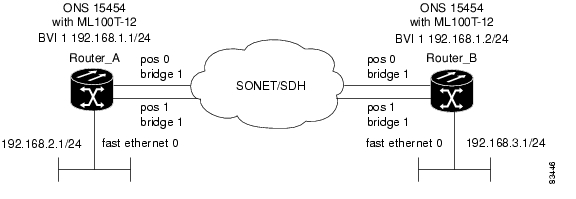
Figure 12-1 shows an example of IRB configuration. Example 12-1 shows the configuration code for Router A, and Example 12-2 shows the configuration code for Router B.
Figure 12-1 Configuring IRB
Example 12-1 Configuring Router A
bridge irbbridge 1 protocol ieeebridge 1 route ip!!interface FastEthernet0ip address 192.168.2.1 255.255.255.0!interface POS0no ip addresscrc 32bridge-group 1pos flag c2 1!interface POS1no ip addresscrc 32bridge-group 1pos flag c2 1!interface BVI1ip address 192.168.1.1 255.255.255.0!router ospf 1log-adjacency-changesnetwork 192.168.1.0 0.0.0.255 area 0network 192.168.2.0 0.0.0.255 area 0Example 12-2 Configuring Router B
bridge irbbridge 1 protocol ieeebridge 1 route ip!!interface FastEthernet0ip address 192.168.3.1 255.255.255.0!interface POS0no ip addresscrc 32bridge-group 1pos flag c2 1!interface POS1no ip addresscrc 32bridge-group 1pos flag c2 1!interface BVI1ip address 192.168.1.2 255.255.255.0!router ospf 1log-adjacency-changesnetwork 192.168.1.0 0.0.0.255 area 0network 192.168.3.0 0.0.0.255 area 0Monitoring and Verifying IRB
Table 12-1 shows the privileged EXEC commands for monitoring and verifying IRB.
The following is sample output from the show interfaces bvi and show interfaces irb commands:
Example 12-3 Monitoring and Verifying IRB
Router# show interfaces bvi1BVI1 is up, line protocol is upHardware is BVI, address is 0011.2130.b340 (bia 0000.0000.0000)Internet address is 100.100.100.1/24MTU 1500 bytes, BW 145152 Kbit, DLY 5000 usec,reliability 255/255, txload 1/255, rxload 1/255Encapsulation ARPA, loopback not setARP type: ARPA, ARP Timeout 04:00:00Last input 03:35:28, output never, output hang neverLast clearing of "show interface" counters neverInput queue: 0/75/0/0 (size/max/drops/flushes); Total output drops: 0Queueing strategy: fifoOutput queue: 0/0 (size/max)5 minute input rate 0 bits/sec, 0 packets/sec5 minute output rate 0 bits/sec, 0 packets/sec0 packets input, 0 bytes, 0 no bufferReceived 0 broadcasts (0 IP multicast)0 runts, 0 giants, 0 throttles0 input errors, 0 CRC, 0 frame, 0 overrun, 0 ignored, 0 abort1353 packets output, 127539 bytes, 0 underruns0 output errors, 0 collisions, 0 interface resets0 output buffer failures, 0 output buffers swapped outRouter# show interfaces irbBVI1Software MAC address filter on BVI1Hash Len Address Matches Act Type0x00: 0 ffff.ffff.ffff 0 RCV Physical broadcastGigabitEthernet0Bridged protocols on GigabitEthernet0:clns ipSoftware MAC address filter on GigabitEthernet0Hash Len Address Matches Act Type0x00: 0 ffff.ffff.ffff 0 RCV Physical broadcast0x58: 0 0100.5e00.0006 0 RCV IP multicast0x5B: 0 0100.5e00.0005 0 RCV IP multicast0x65: 0 0011.2130.b344 0 RCV Interface MAC address0xC0: 0 0100.0ccc.cccc 0 RCV CDP0xC2: 0 0180.c200.0000 0 RCV IEEE spanning treePOS0Routed protocols on POS0:ipBridged protocols on POS0:clns ipSoftware MAC address filter on POS0Hash Len Address Matches Act Type0x00: 0 ffff.ffff.ffff 9 RCV Physical broadcast0x58: 0 0100.5e00.0006 0 RCV IP multicast0x5B: 0 0100.5e00.0005 1313 RCV IP multicast0x61: 0 0011.2130.b340 38 RCV Interface MAC address0x61: 1 0011.2130.b340 0 RCV Bridge-group Virtual Interface0x65: 0 0011.2130.b344 0 RCV Interface MAC address0xC0: 0 0100.0ccc.cccc 224 RCV CDP0xC2: 0 0180.c200.0000 0 RCV IEEE spanning treePOS1SPR1Bridged protocols on SPR1:clns ipSoftware MAC address filter on SPR1Hash Len Address Matches Act Type0x00: 0 ffff.ffff.ffff 0 RCV Physical broadcast0x60: 0 0011.2130.b341 0 RCV Interface MAC address0x65: 0 0011.2130.b344 0 RCV Interface MAC address0xC0: 0 0100.0ccc.cccc 0 RCV CDP0xC2: 0 0180.c200.0000 0 RCV IEEE spanning treeTable 12-1 describes significant fields shown in the display.
Posted: Mon Dec 3 03:02:02 PST 2007
All contents are Copyright © 1992--2007 Cisco Systems, Inc. All rights reserved.
Important Notices and Privacy Statement.