|
|

Table Of Contents
Monitoring and Verifying Bridging
Configuring Bridges
This chapter describes how to configure bridging for the ML-Series card. For more information about the Cisco IOS commands used in this chapter, refer to the Cisco IOS Command Reference publication.
This chapter includes the following major sections:
•
Monitoring and Verifying Bridging
Caution
Understanding Bridging
The ML-Series card supports transparent bridging for Fast Ethernet, Gigabit Ethernet and POS ports. It supports a maximum of 255 active bridge groups. Transparent bridging combines the speed and protocol transparency of a spanning-tree bridge, along with the functionality, reliability, and security of a router.
To configure bridging, you must perform the following tasks in the modes indicated:
•
–
–
•
–
The ML-Series card bridges all nonrouted traffic among the network interfaces comprising the bridge group. If spanning tree is enabled, the interfaces became part of the same spanning tree. Interfaces not participating in a bridge group cannot forward bridged traffic.
If the destination address of the packet is known in the bridge table, the packet is forwarded on a single interface in the bridge group. If the packet's destination is unknown in the bridge table, the packet is flooded on all forwarding interfaces in the bridge group. The bridge places source addresses in the bridge table as it learns them during the process of bridging.
Spanning tree is not mandatory for an ML-Series card bridge group. But if it is configured, a separate spanning-tree process runs for each configured bridge group. A bridge group establishes a spanning tree based on the bridge protocol data units (BPDUs) it receives on only its member interfaces. The ML-Series card has a 255 active bridge group maximum.
Configuring Bridging
Use the following steps to configure bridging:
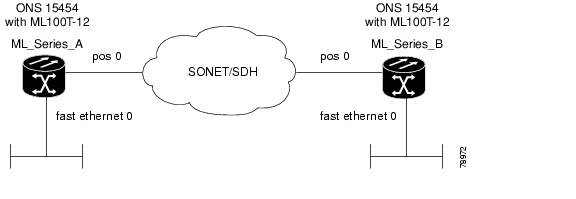
Figure 6-1 shows a bridging example. Example 6-1 shows the code used to configure ML-Series A. Example 6-2 shows the code used to configure ML-Series B.
Figure 6-1 Bridging Example
Example 6-1 Router A Configuration
bridge 1 protocol ieee!!interface FastEthernet0no ip addressbridge-group 1!interface POS0no ip addresscrc 32bridge-group 1pos flag c2 1Example 6-2 Router B Configuration
bridge 1 protocol ieee!!interface FastEthernet0no ip addressbridge-group 1!interface POS0no ip addresscrc 32bridge-group 1pos flag c2 1Monitoring and Verifying Bridging
After you have set up the ML-Series card for bridging, you can monitor and verify its operation by performing the following procedure in privileged EXEC mode:
Example 6-3 shows an example of the monitoring and verifying bridging.
Example 6-3 Monitoring and Verifying Bridging
ML-Series# show bridgeTotal of 300 station blocks, 298 freeCodes: P - permanent, S - selfBridge Group 1:Maximum dynamic entries allowed: 1000Current dynamic entry count: 2Address Action Interface0000.0001.6000 forward FastEthernet00000.0001.6100 forward POS0ML-Series# show bridge verboseTotal of 300 station blocks, 298 freeCodes: P - permanent, S - selfMaximum dynamic entries allowed: 1000Current dynamic entry count: 2BG Hash Address Action Interface VC Age RX count TX count1 60/0 0000.0001.6000 forward FastEthernet0 -1 61/0 0000.0001.6100 forward POS0 -Flood portsFastEthernet0POS0ML-Series# show spanning-tree briefBridge group 1Spanning tree enabled protocol ieeeRoot ID Priority 32769Address 0005.9a39.6634This bridge is the rootHello Time 2 sec Max Age 20 sec Forward Delay 15 secBridge ID Priority 32769 (priority 32768 sys-id-ext 1)Address 0005.9a39.6634Hello Time 2 sec Max Age 20 sec Forward Delay 15 secAging Time 300Interface Role Sts Cost Prio.Nbr Type---------------- ---- --- --------- -------- --------------------------------Fa0 Desg FWD 19 128.3 P2pPO0 Desg FWD 9 128.20 P2p
Posted: Mon Dec 3 02:58:46 PST 2007
All contents are Copyright © 1992--2007 Cisco Systems, Inc. All rights reserved.
Important Notices and Privacy Statement.