


|
|

The Cisco Micro Hub can be wall-mounted by using two number 6, 3/4-inch screws and the molded mounting brackets on the bottom of the hub. You must provide the screws. We recommend using pan-head or round-head screws.
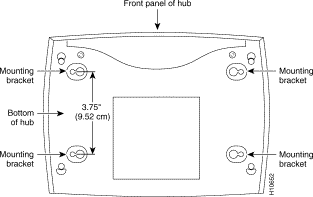
To mount the hub on a wall or other surface:
Step 1 Install the two screws 3.75 inches (9.52 centimeters) apart on a wall or other vertical surface.
The screws should protrude 0.25 inches (0.64 centimeters) from the surface of the wall.
Step 2 Hang the hub on the screws with the mounting brackets so that:
 Caution If you install the screws in drywall, use hollow wall-anchors (1/8 inch by 5/16 inch) to secure the screws. If the screws are not properly anchored, the strain of the cables connected to the hub rear panel connectors could pull the hub from the wall.
|
|