
 |  |
8.4. Case Study: Adding Sessions to the Winestore
In this section we use sessions to improve the user interaction with the client entry <form> developed in Chapter 6. The improvements focus on the interaction when the <form> is submitted and fields don't validate. We modify the scripts to:
-
Display error messages on the client entry <form>
-
Use session variables to pass back the submitted fields to the <form> generation script, saving the user rekeying all the data to correct the errors
8.4.1. Improving the Client Entry <form>
The client entry <form>, generated by the script shown in Example 6-7, collects client fields to either create a new client or edit the details of an existing client. The script shown in Example 6-8 performs the server-side validation of the client <form> data, and updates or inserts a row in the customer table if there are no errors.
If the validation fails, the script shown in Example 6-8 generates a page to display the errors to the user, and the user then follows a hypertext link back to the client entry <form> to reenter the fields. The solution provided by Example 6-7 and Example 6-8 suffers three problems:
-
The user is forced to reenter the entire client entry <form> from scratch when an error is encountered during validation
-
The errors that are encountered during validation are displayed by Example 6-8 and not the entry <form> where they would be useful
-
The error page generated by Example 6-8 isn't safe from the reload problem described in Chapter 6
In this section we develop the scripts to make use of session variables to solve these problems. Rather than displaying the error messages on a page generated by the validation script, we make the necessary changes to display the errors in red above the appropriate fields on the client entry <form>, as shown in Figure 8-2.
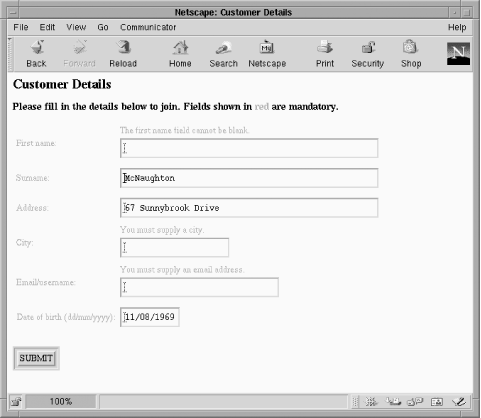
Figure 8-2. Client entry <form> showing error messages placed above the appropriate fields
Both the script that generates the client entry <form> and the script that validates the data need to be modified to use sessions and the session variables. Because the validation script processes the fields collected in the client <form> and generates any associated errors, we look at the changes required for that script first.
8.4.2. The Validation Script
We begin the improvements to the validation script with the changes required to support an error message session variable and then discuss how to record the values to pass back to the client entry <form> generation code. We then present the complete structure of the modified validation script.
8.4.2.1. Improving error messages
We examine the changes required for error messages first. The validation script checks each variable submitted from the client <form>. Each field is checked with more or less rigor, depending on the purpose of the field. The script shown in Example 6-8 builds up a long formatted error message by concatenating error messages together as they are found. In the modified script, an associative array is registered to hold error messages associated with each field. This allows more flexibility when displaying the error messages.
First, we need to initialize a session and register a variable to hold an array of errors. This is achieved by adding the following lines to the start of the script:
// Initialize a session
session_start( );

// Register an error array - just in case!
if (!session_is_registered("errors"))
   session_register("errors");

// Clear any errors that might have been
// found previously
$errors = array( );
Because this validation script may be called several times in a session, any errors that may have been recorded previously need to be cleared. This is the reason for setting the $errors value to a new, empty array.
The script checks each variable and adds an error message to the associative array $errors if an error is encountered. The error message is indexed by the name of the field being checked. For example, the validation of the surname is coded as:
// Validate the Surname
if (empty($formVars["surname"]))
   // the user's surname cannot be a null string
    $errors["surname"] =
        "The surname field cannot be blank.";
Once all the fields have been validated, you can test the size of the array $errors to determine if any errors were encountered. If the size of the $errors array is 0, you create or update the row as before. If there are any error messages in the array, you need to display them.
// Now the script has finished the validation,
// check if there were any errors
if (count($errors))
{
    // There are errors. Relocate back to the
    // client form
    header("Location: example.8-5.php");
    exit;
}
In Example 6-8, the script itself displays any errors, and because the request contains variables in a POST method request, the resulting page suffers from the reload problem discussed in Chapter 6. In a nonsession-based environment, this problem can't be solved with a Location: header field, as the error messages are lost. In the validation script developed here, we relocate back to the client entry <form>—shown later, in Example 8-5—and let it display the errors held in the session variable $errors. We show the changes that allow the client entry <form> to display error messages in the next section.
8.4.2.2. Saving last-entered values as a session variable
We now develop the script to pass the field data from the validation script back to the client entry <form> to avoid rekeying when an error occurs. The script is modified by saving the user-entered data in another session variable, the associative array $formVars. The client details <form> already uses an array, $formVars, to populate the entry fields from a customer record when editing an existing client. By setting the $formVars session variable in the validation script, the client entry <form> populates the <input> fields with the values that were last entered.
The following code—inserted just after $errors is registered as a session variable—registers the array $formVars and then loops through each user-entered variable, setting a value in the array, indexed by the name of the variable. Note that the clean( ) function described in Chapter 5 is used to secure the user data.
// Set up a $formVars array with the POST variables
// and register with the session.
if (!session_is_registered("formVars"))
   session_register("formVars");

foreach($HTTP_POST_VARS as $varname => $value)
    $formVars[$varname] = trim(clean($value, 50));
When the modified client entry <form> is run, the most recent values entered from the session variable $formVars are shown.
WARNING: While the $HTTP_POST_VARS associative array can be stored in a session and accessed like any other session variable, there is a catch. The value of $HTTP_POST_VARS is determined by PHP before scripts are run. If a session has registered a variable with the name $HTTP_POST_VARS, the values held in $HTTP_POST_VARS that were set up by PHP—as a result of processing a POST request—are overwritten by the session variable.If register_globals is enabled in php.ini, the GET or POST variables PHP sets up can also be overwritten by session variables with the same name.
The safe way to read cookies, GET, and POST variables that have name conflicts is to use the $HTTP_COOKIE_VARS, $HTTP_GET_VARS, and $HTTP_POST_VARS associative arrays, as discussed in Chapter 6.
The final change needed in Example 6-8 is to destroy the session when the script successfully saved a row in the customer table:
// Clear the session
session_destroy( );
8.4.2.3. The final validation script
Example 8-4 shows the final validation script derived from Example 6-8.
Example 8-4. The complete validation script derived from Example 6-8
<?php
  include 'db.inc';
  include 'error.inc';

  // Initialize a session
  session_start( );

  // Register an error array - just in case!
  if (!session_is_registered("errors"))
     session_register("errors");

  // Clear any errors that might have been
  // found previously
  $errors = array( );

  // Set up a $formVars array with the POST variables
  // and register with the session.
  if (!session_is_registered("formVars"))
     session_register("formVars");

  foreach($HTTP_POST_VARS as $varname => $value)
      $formVars[$varname] = trim(clean($value, 50));

  // Vaildate the firstName
  if (empty($formVars["firstName"]))
      // First name cannot be a null string
      $errors["firstName"] =
          "The first name field cannot be blank.";

  // Validate the Surname
  if (empty($formVars["surname"]))
      // the user's surname cannot be a null string
      $errors["surname"] =
          "The surname field cannot be blank.";

  // Validate the Address
  if (empty($formVars["address1"]))
      // all the fields of the address cannot be null
      $errors["address"] =
          "You must supply at least one address line.";

  // Validate the City
  if (empty($formVars["city"]))
      // the user's city cannot be a null string
      $errors["city"] = "You must supply a city.";

  // Validate Date of Birth
  if (empty($formVars["dob"]))
      // the user's date of birth cannot be a
      // null string
      $errors["dob"] =
        "You must supply a date of birth.";

  elseif (!ereg("^([0-9]{2})/([0-9]{2})/([0-9]{4})$",
          $formVars["dob"],
          $parts))
      // Check the format
      $errors["dob"] =
        "The date of birth is not a valid date " .
        "in the format DD/MM/YYYY";

  if (empty($formVars["email"]))
      // the user's email cannot be a null string
      $errors["email"] =
        "You must supply an email address.";

  // Now the script has finished the validation,
  // check if there were any errors
  if (count($errors))
  {
      // There are errors.  Relocate back to the
      // client form
      header("Location: example.8-5.php");
      exit;
  }

  // If we made it here, then the data is valid

  if (!($connection = @ mysql_pconnect($hostName,
                                       $username,
                                       $password)))
     showerror( );

  if (!mysql_select_db($databaseName, $connection))
     showerror( );

  // Reassemble the date of birth into database format
  $dob = " \"$parts[3]-$parts[2]-$parts[1]\"";

  // Is this an update?
  if (!empty($custID))
  {
    $query = "UPDATE customer SET ".
      "surname = \"" . $formVars["surname"] . "\", " .
      "firstname = \"" . $formVars["firstName"] . "\", " .
      "addressline1 = \"" .
                    $formVars["address1"] . "\", " .
      "city = \"" . $formVars["city"] . "\", " .
      "email = \"" . $formVars["email"] . "\", " .
      "birth_date = " . $dob .
      " WHERE cust_id = $custID";
  }
  else
     // Create a query to insert the customer
     $query = "INSERT INTO customer SET" .
       "cust_id = NULL, " .
       "surname = \"" . $formVars["surname"] . "\", " .
       "firstname = \"" .
                    $formVars["firstName"] . "\", " .
       "addressline1 = \"" .
                    $formVars["address1"] . "\", " .
       "city = \"" . $formVars["city"] . "\", " .
       "email = \"" . $formVars["email"] . "\", " .
       "birth_date = $dob";

  // Run the query on the customer table
  if (!(@ mysql_query ($query, $connection)))
     showerror( );

  // Is this an insert?
  if (empty($custID))
  // Find out the cust_id of the new customer
  $custID = mysql_insert_id( );

  // Clear the session
  session_destroy( );

  // Now show the customer receipt
  header("Location: customer_receipt.php?custID=$custID");
?>
8.4.3. The Client Entry <form> Script
Now let's turn to the changes required for the script that generates the client entry <form> shown in Example 6-7. In the last section, we set up two session variables: the associative array $errors used to hold a list of error messages found in the validation script and the associative array $formVars used to hold the POST variables you processed.
8.4.3.1. Displaying previously entered values
As Example 6-7 already sets the value attribute of the <input> elements from the array $formVars, there are no changes needed to display previously entered values; Example 6-7 uses $formVars when displaying the current values of clients from the customer table. By setting $formVars as a session variable, Example 6-7 displays the values passed back from the validation script with each <input> field.
8.4.3.2. Displaying error messages
Changes are required to display the errors that are saved in the session variable $errors in the validation script. We have added the function fieldError( ) to help display the error messages above the <input> fields. The function takes two parameters: $errors, which is the associative array of error messages, and $fieldName, which is the index into the array.
function fieldError($fieldName, $errors)
{
  if (isset($errors[$fieldName]))
    echo
    "<font color=RED>$errors[$fieldName]</font><br>";
}
This function tests if the indexed error message exists and, if so, echoes an appropriately formatted error message. When each <input> element is displayed, a call is made to the fieldError( ) function, as shown for the firstName and surname fields:
<tr>
  <td><font color="red">First name:</font></td>
  <td><? echo fieldError("firstName", $errors); ?>
      <input type="text" name="firstName"
         value="<? echo $formVars["firstName"]; ?>"
         size=50></td>
</tr>
<tr>
  <td><font color="red">Surname:</font></td>
  <td><? echo fieldError("surname", $errors); ?>
      <input type="text" name="surname"
         value="<? echo $formVars["surname"]; ?>"
         size=50></td>
</tr>
Figure 8-2 shows the final results: a client entry <form> with error messages placed over the corresponding fields.
8.4.3.3. The final client entry script
Example 8-5 shows the complete client entry script, derived from Example 6-7, that displays the previous <form> values and the error messages held in session variables.
Example 8-5. Client entry form derived from Example 6-7
<?php
  include 'db.inc';
  include 'error.inc';

  function fieldError($fieldName, $errors)
  {
     if (isset($errors[$fieldName]))
        echo
        "<font color=RED>$errors[$fieldName]</font><br>";
  }

  // Connect to a session.
  // Up to three session variables can be registered:
  // (1) $formVars - previously entered data that has
  //     failed validation
  // (2) $errors - an array of error messages, up to
  //     one per widget
  // (3) $custID - the customer ID of a customer
  //     to edit
  session_start( );

  // $custID can also be passed as a GET parameter
  // If it is, override any session variable
  if (!empty($HTTP_GET_VARS["custID"]))
     $custID = clean($HTTP_GET_VARS["custID"], 5);

  // Has a custID been provided and are there no errors?
  // If so, retrieve the customer details for editing.
  if (!empty($custID) && empty($errors))
  {
     // Register the custID as a session variable
     if (!session_is_registered("custID"))
        session_register("custID");

     if (!($connection = @ mysql_pconnect($hostName,
                                         $username,
                                         $password)))
        die("Could not connect to database");

     if (!mysql_select_db($databaseName, $connection))
        showerror( );

     $query = "SELECT * FROM customer
               WHERE cust_id = " . $custID;

     if (!($result = @ mysql_query($query, $connection)))
        showerror( );

     $row = mysql_fetch_array($result);

     // Reset $formVars, since we're loading from
     // the customer table
     $formVars = array( );

     // Load all the form variables with customer data
     $formVars["surname"] = $row["surname"];
     $formVars["firstName"] = $row["firstname"];
     $formVars["address1"] = $row["addressline1"];
     $formVars["city"] = $row["city"];
     $formVars["email"] = $row["email"];
     $formVars["dob"] = $row["birth_date"];
     $formVars["dob"] =
            substr($formVars["dob"], 8, 2) . "/" .
            substr($formVars["dob"], 5, 2) . "/" .
            substr($formVars["dob"], 0, 4);
  }
?>
<!DOCTYPE HTML PUBLIC
   "-//W3C//DTD HTML 4.0 Transitional//EN"
   "http://www.w3.org/TR/html4/loose.dtd" >
<html>
<head><title>Customer Details</title></head>
<body bgcolor="white">
<form method="post" action="example.8-4.php">
<h1>Customer Details</h1>
<?php
  // Show meaningful instructions for UPDATE or INSERT
  if (!empty($custID))
     echo "<h3>Please amend your details below as
           required. Fields shown in
           <font color=\"red\">red</font> are
           mandatory.</h3>";
  else
     echo "<h3>Please fill in the details below to
           join. Fields shown in
           <font color=\"red\">red</font> are
           mandatory.</h3>";
?>
<table>
<col span="1" align="right">

<tr><td><font color="red">First name:</font></td>
    <td><? echo fieldError("firstName", $errors); ?>
        <input type="text" name="firstName"
           value="<? echo $formVars["firstName"]; ?>"
           size=50></td>
</tr>
<tr><td><font color="red">Surname:</font></td>
    <td><? echo fieldError("surname", $errors); ?>
        <input type="text" name="surname"
           value="<? echo $formVars["surname"]; ?>"
           size=50></td>
</tr>
<tr><td><font color="red">Address:</font></td>
    <td><? echo fieldError("address", $errors); ?>
        <input type="text" name="address1"
           value="<? echo $formVars["address1"]; ?>"
           size=50><td>
</tr>
<tr><td><font color="red">City:</font></td>
    <td><? echo fieldError("city", $errors); ?>
        <input type="text" name="city"
           value="<? echo $formVars["city"]; ?>"
           size=20><td>
</tr>
<tr><td><font color="red">Email/username:</font></td>
    <td><? echo fieldError("email", $errors); ?>
        <input type="text" name="email"
            value="<? echo $formVars["email"]; ?>"
            size=30><td>
</tr>
<tr><td>
    <font color="red">Date of birth (dd/mm/yyyy):</font>
    </td>
    <td><? echo fieldError("dob", $errors); ?>
        <input type="text" name="dob"
           value="<? echo $formVars["dob"]; ?>"
           size=10><td>
</tr>
</table><br>
<input type="submit" value="SUBMIT">
</form>
</body>
</html> |  | |
| 8.3. PHP Session Management |  | 8.5. When to Use Sessions |

Copyright © 2003 O'Reilly & Associates. All rights reserved.