
 |  |
8.28. Program: Abusive User Checker
Shared memory's speed makes it an ideal way to store data different web server processes need to access frequently when a file or database would be too slow. Example 8-7 shows the pc_Web_Abuse_Check class, which uses shared memory to track accesses to web pages in order to cut off users that abuse a site by bombarding it with requests.
Example 8-7. pc_Web_Abuse_Check class
class pc_Web_Abuse_Check {
  var $sem_key;
  var $shm_key;
  var $shm_size;
  var $recalc_seconds;
  var $pageview_threshold;
  var $sem;
  var $shm;
  var $data;
  var $exclude;
  var $block_message;

  function pc_Web_Abuse_Check() {
    $this->sem_key = 5000;
    $this->shm_key = 5001;
    $this->shm_size = 16000;
    $this->recalc_seconds = 60;
    $this->pageview_threshold = 30;

    $this->exclude['/ok-to-bombard.html'] = 1;
    $this->block_message =<<<END
<html>
<head><title>403 Forbidden</title></head>
<body>
<h1>Forbidden</h1>
You have been blocked from retrieving pages from this site due to
abusive repetitive activity from your account. If you believe this
is an error, please contact
<a href="mailto:webmaster@example.com?subject=Site+Abuse">webmaster@example.com</a>.
</body>
</html>
END;
   }

  function get_lock() {
    $this->sem = sem_get($this->sem_key,1,0600);
    if (sem_acquire($this->sem)) {
      $this->shm = shm_attach($this->shm_key,$this->shm_size,0600);
      $this->data = shm_get_var($this->shm,'data');
    } else {
      error_log("Can't acquire semaphore $this->sem_key");
    }
  }

  function release_lock() {
    if (isset($this->data)) {
      shm_put_var($this->shm,'data',$this->data);
    }
    shm_detach($this->shm);
    sem_release($this->sem);
  }

  function check_abuse($user) {
    $this->get_lock();
    if ($this->data['abusive_users'][$user]) {
      // if user is on the list release the semaphore & memory
      $this->release_lock();
      //  serve the "you are blocked" page
      header('HTTP/1.0 403 Forbidden');
      print $this->block_message;
      return true;
    } else {
     // mark this user looking at a page at this time
     $now = time();
     if (! $this->exclude[$_SERVER['PHP_SELF']]) {
       $this->data['user_traffic'][$user]++;
     }
     // (sometimes) tote up the list and add bad people
     if (! $this->data['traffic_start']) {
       $this->data['traffic_start'] = $now;
     } else {
       if (($now - $this->data['traffic_start']) > $this->recalc_seconds) {
         while (list($k,$v) = each($this->data['user_traffic'])) {
           if ($v > $this->pageview_threshold) {
             $this->data['abusive_users'][$k] = $v;
             // log the user's addition to the abusive user list
             error_log("Abuse: [$k] (from ".$_SERVER['REMOTE_ADDR'].')');
           }
         }
         $this->data['traffic_start'] = $now;
         $this->data['user_traffic'] = array();
       }
     }
     $this->release_lock();
    }
    return false;
  }
}
To use this class, call its check_abuse( ) method at the top of a page, passing it the username of a logged in user:
// get_logged_in_user_name() is a function that finds out if a user is logged in
if ($user = get_logged_in_user_name( )) {
    $abuse = new pc_Web_Abuse_Check( );
    if ($abuse->check_abuse($user)) {
        exit;
    }
}
The check_abuse( ) method secures exclusive access to the shared memory segment in which information about users and traffic is stored with the get_lock( ) method. If the current user is already on the list of abusive users, it releases its lock on the shared memory, prints out an error page to the user, and returns true. The error page is defined in the class's constructor.
If the user isn't on the abusive user list, and the current page (stored in $_SERVER['PHP_SELF']) isn't on a list of pages to exclude from abuse checking, the count of pages that the user has looked at is incremented. The list of pages to exclude is also defined in the constructor. By calling check_abuse( ) at the top of every page and putting pages that don't count as potentially abusive in the $exclude array, you ensure that an abusive user will see the error page even when retrieving a page that doesn't count towards the abuse threshold. This makes your site behave more consistently.
The next section of check_abuse( ) is responsible for adding users to the abusive users list. If more than $this->recalc_seconds have passed since the last time it added users to the abusive users list, it looks at each user's pageview count and if any are over $this->pageview_threshold, they are added to the abusive users list, and a message is put in the error log. The code that sets $this->data['traffic_start'] if it's not already set is executed only the very first time check_abuse( ) is called. After adding any new abusive users, check_abuse( ) resets the count of users and pageviews and starts a new interval until the next time the abusive users list is updated. After releasing its lock on the shared memory segment, it returns false.
All the information check_abuse( ) needs for its calculations, such as the abusive user list, recent pageview counts for users, and the last time abusive users were calculated, is stored inside a single associative array, $data. This makes reading the values from and writing the values to shared memory easier than if the information was stored in separate variables, because only one call to shm_get_var( ) and shm_put_var( ) are necessary.
The pc_Web_Abuse_Check class blocks abusive users, but it doesn't provide any reporting capabilities or a way to add or remove specific users from the list. Example 8-8 shows the abuse-manage.php program, which lets you manage the abusive user data.
Example 8-8. abuse-manage.php
// the pc_Web_Abuse_Check class is defined in abuse-check.php
require 'abuse-check.php';

$abuse = new pc_Web_Abuse_Check();
$now = time();

// process commands, if any
$abuse->get_lock();
switch ($_REQUEST['cmd']) {
    case 'clear':
      $abuse->data['traffic_start'] = 0;
      $abuse->data['abusive_users'] = array();
      $abuse->data['user_traffic'] = array();
      break;
    case 'add':
      $abuse->data['abusive_users'][$_REQUEST['user']] = 'web @ '.strftime('%c',$now);
      break;
    case 'remove':
      $abuse->data['abusive_users'][$_REQUEST['user']] = 0;
      break;
}
$abuse->release_lock();

// now the relevant info is in $abuse->data

print 'It is now <b>'.strftime('%c',$now).'</b><br>';
print 'Current interval started at <b>'.strftime('%c',$abuse->data['traffic_start']);
print '</b> ('.($now - $abuse->data['traffic_start']).' seconds ago).<p>';

print 'Traffic in the current interval:<br>';
if (count($abuse->data['user_traffic'])) {
  print '<table border="1"><tr><th>User</th><th>Pages</th></tr>';
  while (list($user,$pages) = each($abuse->data['user_traffic'])) {
    print "<tr><td>$user</td><td>$pages</td></tr>";
  }
  print "</table>";
} else {
  print "<i>No traffic.</i>";
}
print '<p>Abusive Users:';

if ($abuse->data['abusive_users']) {
  print '<table border="1"><tr><th>User</th><th>Pages</th></tr>';
  while (list($user,$pages) = each($abuse->data['abusive_users'])) {
    if (0 === $pages) {
      $pages = 'Removed';
      $remove_command = '';
    } else {
      $remove_command =
         "<a href=\"$_SERVER[PHP_SELF]?cmd=remove&user=".urlencode($user)."\">remove</a>";
    }
    print "<tr><td>$user</td><td>$pages</td><td>$remove_command</td></tr>";
  }
  print '</table>';
} else {
  print "<i>No abusive users.</i>";
}

print<<<END
<form method="post" action="$_SERVER[PHP_SELF]">
<input type="hidden" name="cmd" value="add">
Add this user to the abusive users list:
<input type="text" name="user" value="">
<br>
<input type="submit" value="Add User">
</form>
<hr>
<form method="post" action="$_SERVER[PHP_SELF]">
<input type="hidden" name="cmd" value="clear">
<input type="submit" value="Clear the abusive users list">
END;
Example 8-8 prints out information about current user page view counts and the current abusive user list, as shown in Figure 8-1. It also lets you add or remove specific users from the list and clear the whole list.
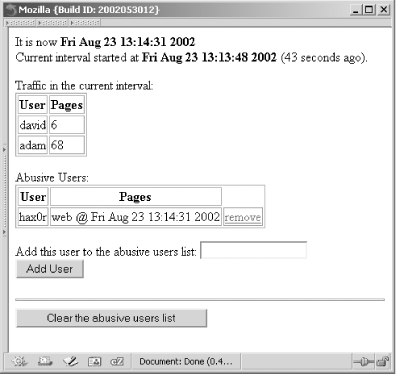
Figure 8-1. Abusive users
When it removes users from the abusive users list, instead of:
unset($abuse->data['abusive_users'][$_REQUEST['user']])
it sets the following to 0:
$abuse->data['abusive_users'][$_REQUEST['user']]
This still causes check_abuse( ) to return false, but it allows the page to explicitly note that the user was on the abusive users list but was removed. This is helpful to know in case a user that was removed starts causing trouble again.
When a user is added to the abusive users list, instead of recording a pageview count, the script records the time the user was added. This is helpful in tracking down who or why the user was manually added to the list.
If you deploy pc_Web_Abuse_Check and this maintenance page on your server, make sure that the maintenance page is protected by a password or otherwise inaccessible to the general public. Obviously, this code isn't very helpful if abusive users can remove themselves from the list of abusive users.
|  | |
| 8.27. Program: Website Account (De)activator |  | 9. Forms |

Copyright © 2003 O'Reilly & Associates. All rights reserved.