
 |  |
13.2. Simple Dialog Boxes
Three commonly used Window methods are alert( ) , confirm( ), and prompt( ). These methods pop up simple dialog boxes. alert( ) displays a message to the user, confirm( ) asks the user to click an Ok or Cancel button to confirm or cancel an operation, and prompt( ) asks the user to enter a string. Sample dialog boxes produced by these three methods are shown in Figure 13-1.
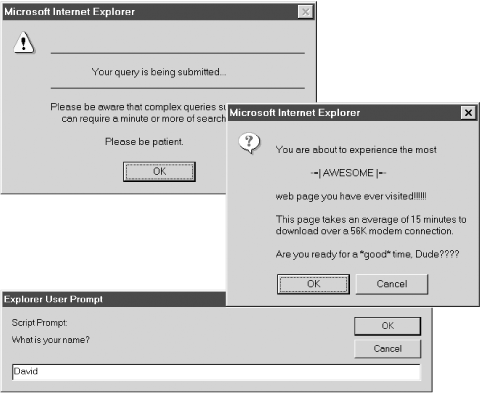
Figure 13-1. alert( ), confirm( ), and prompt( ) dialog boxes
Note that the text displayed by these dialog boxes is plain text, not HTML-formatted text. You can format these dialog boxes only with spaces, newlines, and various punctuation characters. Adjusting the layout generally requires trial and error. Bear in mind, though, that the dialog boxes look different on different platforms and in different browsers, so you can't always count on your formatting to look right on all possible browsers.
Some browsers (such as Netscape 3 and 4) display the word "JavaScript" in the titlebar or upper-left corner of all dialog boxes produced by alert( ), confirm( ), and prompt( ). Although designers find this annoying, it should be considered a feature instead of a bug: it is there to make the origin of the dialog box clear to users and to prevent you from writing Trojan-horse code that spoofs system dialog boxes and tricks users into entering their passwords or doing other things that they shouldn't do.
The confirm( ) and prompt( ) methods block -- that is, those methods do not return until the user dismisses the dialog boxes they display. This means that when you pop up one of these boxes, your code stops running and the currently loading document, if any, stops loading until the user responds with the requested input. There is no alternative to blocking for these methods -- their return value is the user's input, so they must wait for the user before they can return. In most browsers, the alert( ) method also blocks and waits for the user to dismiss the dialog box. In some browsers, however (notably Netscape 3 and 4 on Unix platforms), alert( ) does not block. In practice, this minor incompatibility rarely causes problems.
Example 13-1 shows some typical uses of these methods.
Example 13-1. Using the alert( ), confirm( ), and prompt( ) methods
// Here's a function that uses the alert( ) method to tell the user
// that form submission will take some time and that the user should
// be patient. It would be suitable for use in the onsubmit event handler
// of an HTML form.
// Note that all formatting is done with spaces, newlines, and underscores.
function warn_on_submit( )
{
    alert("\n_________________________________________________  _\n\n" +
          "                   Your query is being submitted...\n"    +
          "_________________________________________________  _\n\n"   +
          "Please be aware that complex queries such as yours\n"     +
          "     can require a minute or more of search time.\n\n"    +
          "                         Please be patient.");
}

// Here is a use of the confirm( ) method to ask if the user really
// wants to visit a web page that takes a long time to download. Note that
// the return value of the method indicates the user response. Based
// on this response, we reroute the browser to an appropriate page.
var msg = "\nYou are about to experience the most\n\n" +
          "                -=| AWESOME |=-\n\n" +
          "web page you have ever visited!!!!!!\n\n" +
          "This page takes an average of 15 minutes to\n" +
          "download over a 56K modem connection.\n\n" +
          "Are you ready for a *good* time, Dude????";

if (confirm(msg))
    location.replace("awesome_page.html");
else
    location.replace("lame_page.html");

// Here's some very simple code that uses the prompt( ) method to get
// a user's name and then uses that name in dynamically generated HTML.
n = prompt("What is your name?", "");
document.write("<hr><h1>Welcome to my home page, " + n + "</h1><hr>");
|  | |
| 13. Windows and Frames |  | 13.3. The Status Line |

Copyright © 2003 O'Reilly & Associates. All rights reserved.