
 |  |
8.5. Sample Application
Because web database applications are such a mainstay of web development, we've decided to show you a complete sample application in this chapter. This section develops a self-maintaining business listing service. Companies add their own records to the database and pick the category or categories by which they want to be indexed.
Two HTML forms are needed to populate the database tables. One form provides the site administrator with the means to add category IDs, titles, and descriptions. The second form, used by the self-registering businesses, collects the business contact information and permits the registrant to associate the listing with one or more categories. A separate page displays the listings by category on the web page.
8.5.1. Database Tables
There are three tables: businesses to collect the address data for each business, categories to name and describe each category, and an associative table called biz_categories to relate entries in the other two tables to each other. These tables and their relationships are shown in Figure 8-3.
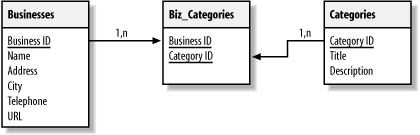
Figure 8-3. Database design for business listing service
Example 8-2 contains a dump of the table schema in MySQL format. Depending on your database's features, the schema may have to be altered slightly.
Example 8-2. Database schema
# --------------------------------------------------------
#
# Table structure for table 'biz_categories'
#

CREATE TABLE biz_categories (
   business_id int(11) NOT NULL,
   category_id char(10) NOT NULL,
   PRIMARY KEY (business_id, category_id),
   KEY business_id (business_id, category_id)
);

# --------------------------------------------------------
#
# Table structure for table 'businesses'
#

CREATE TABLE businesses (
   business_id int(11) NOT NULL auto_increment,
   name varchar(255) NOT NULL,
   address varchar(255) NOT NULL,
   city varchar(128) NOT NULL,
   telephone varchar(64) NOT NULL,
   url varchar(255),
   PRIMARY KEY (business_id),
   UNIQUE business_id (business_id),
   KEY business_id_2 (business_id)
);

# --------------------------------------------------------
#
# Table structure for table 'categories'
#

CREATE TABLE categories (
   category_id varchar(10) NOT NULL,
   title varchar(128) NOT NULL,
   description varchar(255) NOT NULL,
   PRIMARY KEY (category_id),
   UNIQUE category_id (category_id),
   KEY category_id_2 (category_id)
);
8.5.2. Database Connection
We've designed these pages to work with a MySQL, PostgreSQL, or Oracle 8i backend. The only visible sign of this in the PHP code is that we use commit( ) after every update. We've abstracted the database-specific stuff to a db_login.php library, shown in Example 8-3, which selects an appropriate DSN for MySQL, PostgreSQL, or Oracle.
Example 8-3. Database connection abstraction script (db_login.php)
<?php
 require_once('DB.php');

 // database connection setup section

 $username = 'user';
 $password = 'seekrit';
 $hostspec = 'localhost';
 $database = 'phpbook';

 // select one of these three values for $phptype

 // $phptype = 'pgsql';
 // $phptype = 'oci8';
 $phptype = 'mysql';

 // check for Oracle 8 - data source name syntax is different

 if ($phptype != 'oci8'){
     $dsn = "$phptype://$username:$password@$hostspec/$database";
 } else {
     $net8name = 'www';
     $dsn = "$phptype://$username:$password@$net8name";
 }

 // establish the connection

 $db = DB::connect($dsn);
 if (DB::isError($db)) {
     die ($db->getMessage( ));
 }
?>
8.5.3. Administrator's Page
Example 8-4 shows the backend page that allows administrators to add categories to the listing service. The input fields for adding a new record appear after a dump of the current data. The administrator fills in the form and presses the Add Category button, and the page redisplays with the new record. If any of the three fields are not filled in, the page displays an error message.
Example 8-4. Backend administration page
<html>
<head>
<?php
 require_once('db_login.php');
?>

<title>
<?php
 // print the window title and the topmost body heading
 $doc_title = 'Category Administration';
 echo "$doc_title\n";
?>
</title>
</head>
<body>
<h1>
<?php
 echo "$doc_title\n";
?>
</H1>

<?php
 // add category record input section

 // extract values from $_REQUEST
 $Cat_ID = $_REQUEST['Cat_ID'];
 $Cat_Title = $_REQUEST['Cat_Title'];
 $Cat_Desc = $_REQUEST['Cat_Desc'];
 $add_record = $_REQUEST['add_record'];

 // determine the length of each input field
 $len_cat_id = strlen($_REQUEST['Cat_ID']);
 $len_cat_tl = strlen($_REQUEST['Cat_Title']);
 $len_cat_de = strlen($_REQUEST['Cat_Desc']);

 // validate and insert if the form script has been
 // called by the Add Category button
 if ($add_record == 1) {
     if (($len_cat_id > 0) and ($len_cat_tl > 0) and ($len_cat_de > 0)){
         $sql  = "insert into categories (category_id, title, description)";
         $sql .= " values ('$Cat_ID', '$Cat_Title', '$Cat_Desc')";
         $result = $db->query($sql);
         $db->commit( );
     } else {
     echo "<p>Please make sure all fields are filled in ";
     echo "and try again.</p>\n";
     }
 }

 // list categories reporting section

 // query all records in the table after any
 // insertion that may have occurred above
 $sql = "select * from categories";
 $result = $db->query($sql);
?>

<form method="POST" action="cat_admin.php">

<table>
<tr><th bgcolor="#EEEEEE">Cat ID</th>
    <th bgcolor="#EEEEEE">Title</th>
    <th bgcolor="#EEEEEE">Description</th>
</tr>

<?php
 // display any records fetched from the database
 // plus an input line for a new category
 while ($row = $result->fetchRow( )){
     echo "<tr><td>$row[0]</td><td>$row[1]</td><td>$row[2]</td></tr>\n";
 }
?>

<tr><td><input type="text" name="Cat_ID"    size="15" maxlength="10"></td>
    <td><input type="text" name="Cat_Title" size="40" maxlength="128"></td>
    <td><input type="text" name="Cat_Desc"  size="45" maxlength="255"></td>
</tr>
</table>
<input type="hidden" name="add_record" value="1">
<input type="submit" name="submit" value="Add Category">
</body>
</html>
When the administrator submits a new category, we construct a query to add the category to the database. Another query displays the table of all current categories. Figure 8-4 shows the page with five records loaded.
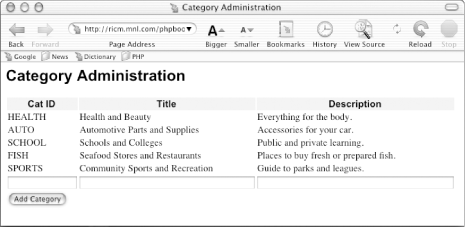
Figure 8-4. The administration page
8.5.4. Adding a Business
Example 8-5 shows the page that lets a business insert data into the business and biz_categories tables. Figure 8-5 shows the form.
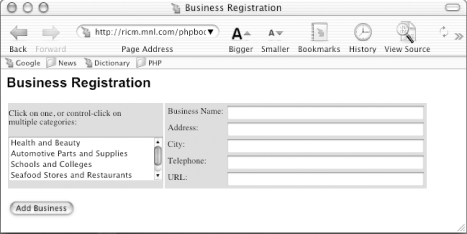
Figure 8-5. The business registration page
When the user enters data and clicks on the Add Business button, the script calls itself to display a confirmation page. Figure 8-6 shows a confirmation page for a company listing assigned to two categories.
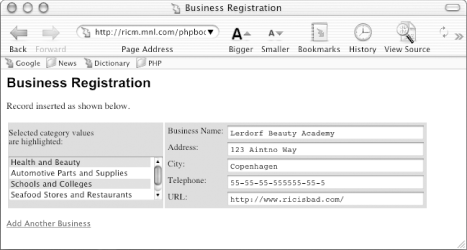
Figure 8-6. Listing assigned to two categories
In the confirmation page, the Add Business button is replaced by a link that will invoke a fresh instance of the script. A success message is displayed at the top of the page. Instructions for using the scrolling pick list are replaced with explanatory text.
As shown in Example 8-5, we build the scrolling list from a query to select all the categories. As we produce HTML for each of the results from that query, we also check to see whether the current category was one of the categories submitted for the new business. If it was, we add a new record to the biz_categories table.
Example 8-5. Adding a business
<html>
<head>
<title>
<?php
 $doc_title = 'Business Registration';
 echo "$doc_title\n";
?>
</title>
</head>
<body>
<h1>
<?= $doc_title ?>
</h1>

<?php
 require_once('db_login.php');

 // fetch query parameters
 $add_record = $_REQUEST['add_record'];
 $Biz_Name = $_REQUEST['Biz_Name'];
 $Biz_Address = $_REQUEST['Biz_Address'];
 $Biz_City = $_REQUEST['Biz_City'];
 $Biz_Telephone = $_REQUEST['Biz_Telephone'];
 $Biz_URL = $_REQUEST['Biz_URL'];
 $Biz_Categories = $_REQUEST['Biz_Categories'];

 $pick_message = 'Click on one, or control-click on<BR>multiple ';
 $pick_message .= 'categories:';

 // add new business
 if ($add_record == 1) {
     $pick_message = 'Selected category values<BR>are highlighted:';
     $sql  = 'INSERT INTO businesses (name, address, city, telephone, ';
     $sql .= ' url) VALUES (?, ?, ?, ?, ?)';
     $params = array($Biz_Name, $Biz_Address, $Biz_City, $Biz_Telephone, $Biz_URL);
     $query = $db->prepare($sql);
     if (DB::isError($query)) die($query->getMessage( ));
     $resp = $db->execute($query, $params);
     if (DB::isError($resp)) die($resp->getMessage( ));
     $resp = $db->commit( );
     if (DB::isError($resp)) die($resp->getMessage( ));
     echo '<P CLASS="message">Record inserted as shown below.</P>';
     $biz_id = $db->getOne('SELECT max(business_id) FROM businesses');
 }
?>

<form method="POST" action="<?= $PHP_SELF ?>">
<table>
<tr><td class="picklist"><?= $pick_message ?>
    <p>
    <select name="Biz_Categories[]" size="4" multiple>
    <?php
     // build the scrolling pick list for the categories
     $sql = "SELECT * FROM categories";
     $result = $db->query($sql);
     if (DB::isError($result)) die($result->getMessage( ));
     while ($row = $result->fetchRow( )){
         if (DB::isError($row)) die($row->getMessage( ));
         if ($add_record == 1){
             $selected = false;
             // if this category was selected, add a new biz_categories row
             if (in_array($row[1], $Biz_Categories)) {
                 $sql  = 'INSERT INTO biz_categories';
                 $sql .= ' (business_id, category_id)';
                 $sql .= ' VALUES (?, ?)';
                 $params = array($biz_id, $row[0]);
                 $query = $db->prepare($sql);
                 if (DB::isError($query)) die($query->getMessage( ));
                 $resp = $db->execute($query, $params);
                 if (DB::isError($resp)) die($resp->getMessage( ));
                 $resp = $db->commit( );
                 if (DB::isError($resp)) die($resp->getMessage( ));
                 echo "<option selected>$row[1]</option>\n";
                 $selected = true;
             }
             if ($selected == false) {
                 echo "<option>$row[1]</option>\n";
             }
         } else {
             echo "<option>$row[1]</option>\n";
         }
     }
    ?>

    </select>
    </td>
    <td class="picklist">
        <table>
        <tr><td class="FormLabel">Business Name:</td>
            <td><input type="text" name="Biz_Name" size="40" maxlength="255"
                value="<?= $Biz_Name ?>"</td>
        </tr>
        <tr><td class="FormLabel">Address:</td>
         <td><input type="text" name="Biz_Address" size="40" maxlength="255"
                value="<?= $Biz_Address ?>"</td>
        </tr>
        <tr><td class="FormLabel">City:</td>
            <td><input type="text" name="Biz_City" size="40" maxlength="128"
                value="<?= $Biz_City ?>"</td>
        </tr>
        <tr><td class="FormLabel">Telephone:</td>
        <td><input type="text" name="Biz_Telephone" size="40" maxlength="64"
                value="<?= $Biz_Telephone ?>"</td>
        </tr>
        <tr><td class="FormLabel">URL:</TD>
            <td><input type="text" name="Biz_URL" size="40" maxlength="255"
                value="<?= $Biz_URL ?>"</td>
        </tr>
        </table>
    </td>
</tr>
</table>
<p>
<input type="hidden" name="add_record" value="1">

<?php
 // display the submit button on new forms; link to a fresh registration
 // page on confirmations
 if ($add_record == 1){
     echo '<p><a href="',$PHP_SELF,'>Add Another Business</a></p>';
 } else {
     echo '<input type="submit" name="submit" value="Add Business">';
 }
?>

</p>
</body>
</html>
8.5.5. Displaying the Database
Example 8-6 shows a page that displays the information in the database. The links on the left side of the page are created from the categories table and link back to the script, adding a category ID. The category ID forms the basis for a query on the businesses table and the biz_categories table.
Example 8-6. Business listing page
<html>
<head>
<title>
<?php
 $doc_title = 'Business Listings';
 echo "$doc_title\n";
?>
</title>
</head>
<body>
<h1>
<?= $doc_title ?>
</h1>

<?php
 // establish the database connection

 require_once('db_login.php');

 $pick_message = 'Click on a category to find business listings:';
?>

<table>
<tr><td valign="top">
    <table>
    <tr><td class="picklist"><?= $pick_message ?></td></tr>
    <p>
    <?php
     // build the scrolling pick list for the categories
     $sql = "SELECT * FROM categories";
     $result = $db->query($sql);
     if (DB::isError($result)) die($result->getMessage( ));
     while ($row = $result->fetchRow( )){
         if (DB::isError($row)) die($row->getMessage( ));
         echo '<tr><td class="formlabel">';
         echo "<a href=\"$PHP_SELF?cat_id=$row[0]\">";
         echo "$row[1]</a></td></tr>\n";
     }
    ?>
    </table>
</td>
<td valign="top">
     <table>
     <?php
      if ($cat_id) {
        $sql = "SELECT * FROM businesses b, biz_categories bc where";
        $sql .= " category_id = '$cat_id'";
        $sql .= " and b.business_id = bc.business_id";
        $result = $db->query($sql);
        if (DB::isError($result)) die($result->getMessage( ));
        while ($row = $result->fetchRow( )){
          if (DB::isError($row)) die($row->getMessage( ));
          if ($color == 1) {
            $bg_shade = 'dark';
            $color = 0;
          } else {
            $bg_shade = 'light';
            $color = 1;
          }
          echo "<tr>\n";
          for($i = 0; $i < count($row); $i++) {
            echo "<td class=\"$bg_shade\">$row[$i]</td>\n";
          }
          echo "</tr>\n";
        }
      }
     ?>
     </table>
</td></tr>
</table>
</body>
</html>
The business listings page is illustrated in Figure 8-7.
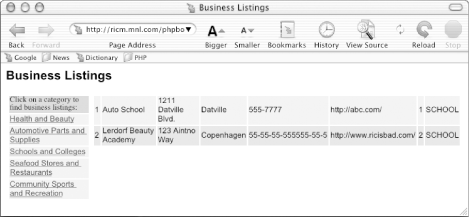
Figure 8-7. Business listings page
|  | |
| 8.4. Advanced Database Techniques |  | 9. Graphics |

Copyright © 2003 O'Reilly & Associates. All rights reserved.