
 |  |
11.3. Accessing the MySQL DBMS with PHP
This section shows you how to connect to and query the MySQL DBMS using PHP. The examples are illustrated with the first of three scripts from a simple but useful PHP application: a wedding gift registry that allows guests to log in, view a list of gifts wanted by the bride and groom, and reserve gifts that they plan to purchase by putting them on a shopping list. The complete application—including the database, scripts, and instructions on how to install it on your web site—is available at http://www.webdatabasebook.com/wedding/.
The gift registry application illustrates the basics of interacting with MySQL using PHP. It shows how to:
-
Call PHP library functions to connect to the MySQL DBMS, execute queries through the DBMS connection, and retrieve query result sets
-
Present query results using HTML
-
Interact with the user, and preprocess user data to minimize security risks
-
Add session support to an application so that a user can log in and out
-
Pass data between scripts by creating embedded hypertext links in HTML, develop HTML <form> environments, and use HTTP headers
-
Handle MySQL errors with PHP
-
Manage DBMS credentials with include files
This section introduces the basics of interacting with MySQL using PHP. The script described here displays the gifts that are unreserved and the gifts that have been reserved by the current user. The output of the script rendered by a Netscape browser is shown in Figure 11-1. The script assumes the guest has already logged in. The script for logging in is discussed later in Section 11.7. The script that adds and removes gifts from the guest's shopping list is discussed in Section 11.6.
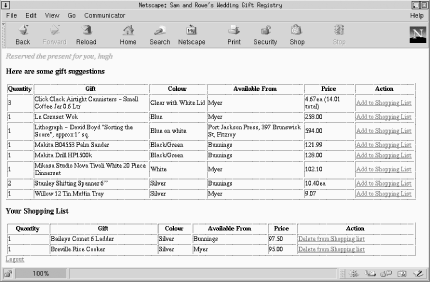
Figure 11-1. The wedding gift registry
The scripts in the gift registry use only the common PHP MySQL library functions. Chapter 18 is a reference to PHP's complete MySQL function library.
11.3.1. The Wedding Gift Registry Database
Example 11-1 is a file that contains the SQL statements (and the MySQL use command) to create and populate the wedding database. The database contains only two tables: presents, which stores data about gifts, including a unique identifier, description, desired quantity, color, place of purchase, price, and the user who reserved the gift, and people, which stores a unique username and password for each guest.
A one-to-many relationship is maintained between the two tables; each guest stored in the people table can reserve zero or more gifts in the presents table. When the gifts are initially inserted in the wedding database using the statements in Example 11-1, the people_id in the presents table is set to NULL so that all gifts are unreserved. If a guest reserves a gift, the NULL value is replaced with the guest's people_id. For example, if the guest hugh reserves the gift with a present_id of 2 (such as the Richmond Tigers autographed print (unframed)), the people_id of that gift is set to hugh.
Example 11-1. The statements to create and populate the wedding database
create database wedding;
use wedding;

CREATE TABLE people (
  people_id varchar(30) DEFAULT '' NOT NULL,
  passwd varchar(30),
  PRIMARY KEY (people_id)
);

INSERT INTO people VALUES ('hugh','huw8o3cEvVS8o');

CREATE TABLE presents (
  present_id int(11) DEFAULT '0' NOT NULL auto_increment,
  present varchar(255),
  shop varchar(100),
  quantity varchar(30),
  colour varchar(30),
  price varchar(30),
  people_id varchar(30),
  PRIMARY KEY (present_id)
);

INSERT INTO presents VALUES (1,'Mikasa Studio Nova Tivoli White 20 Piece
Dinnerset','Myer','1','White','102.10',NULL);
INSERT INTO presents VALUES (2,'Richmond Tigers autographed print (unframed)',
'www.greatmoments.com.au','1','NA','375.00',NULL);
INSERT INTO presents VALUES (3,'Breville Rice Cooker','Myer','1',
'Silver','95.00','NULL');
INSERT INTO presents VALUES (4,'Krups - Nespresso 986 coffee machine','Myer','1',
'Black','608.00',NULL);
INSERT INTO presents VALUES (5,'Click Clack Airtight Cannisters - Small Coffee Jar
0.6 Ltr','Myer','3','Clear with White Lid','4.67ea (14.01 total)',NULL);
INSERT INTO presents VALUES (6,'Avanti Twin Wall Mixing Bowls 2.8 Ltr','Myer','2',
'Silver','41.65ea (83.30 total)',NULL);
INSERT INTO presents VALUES (7,'Lithograph - David Boyd 'Sorting the Score',
approx 1" sq.','Port Jackson Press, 397 Brunswick St, Fitzroy','1',
'Blue on white','594.00',NULL);
INSERT INTO presents VALUES (8,'Le Creuset Wok','Myer','1','Blue','258.00',NULL);
INSERT INTO presents VALUES (9,'Willow 12 Tin Muffin Tray','Myer','1',
'Silver','9.07',NULL);
INSERT INTO presents VALUES (10,'Baileys Comet 6 Ladder','Bunnings','1',
'Silver','97.50',NULL);
INSERT INTO presents VALUES (11,'Makita Drill HP1500k','Bunnings','1',
'Black/Green','128.00',NULL);
INSERT INTO presents VALUES (12,'Makita B04553 Palm Sander','Bunnings','1',
'Black/Green','121.99',NULL);
INSERT INTO presents VALUES (13,'Stanley Shifting Spanner 6""','Bunnings','2',
'Silver','10.40ea',NULL);
The MySQL DBMS that maintains the gift registry has a user fred who has a password shhh. This user is set up using the following SQL GRANT statement:
GRANT SELECT, INSERT, DELETE, UPDATE
ON wedding.*
TO fred@localhost
IDENTIFIED by 'shhh';
In our environment, the web server and the MySQL DBMS are running on the same machine, so the user fred needs access only from the local host. Having the DBMS and web server on the same machine is a good decision for small- to medium-size web database applications because there is no network communications overhead between the DBMS and the web server. For high-traffic or complex web database applications, it may be desirable to have dedicated hardware for each application.
11.3.2. Opening and Using a Database Connection
Several PHP library functions are used to connect to a MySQL DBMS, run queries, retrieve results, and handle any errors that occur along the way. The presents.php script shown in Example 11-2 illustrates five of these functions in action.
Example 11-2. Querying a MySQL DBMS using PHP to display the gift registry
<?php
// Show the user the available presents and the presents in their shopping
// list
// Include the DBMS credentials
include 'db.inc';
// Check if the user is logged in
// (this also starts the session)
logincheck( );
// Show the user the gifts
//
// Parameters:
// (1) An open $connection to the DBMS
// (2) Whether to show the available gifts with the option to add
// them to the shopping list ($delete = false) or to show the current
// user's shopping list with the option to remove the gifts ($delete = true)
// (3) The $user name
function showgifts($connection, $delete, $user)
{
// If we're showing the available gifts, then set up
// a query to show all unreserved gifts (where people IS NULL)
if ($delete == false)
$query = "SELECT *
FROM presents
WHERE people_id IS NULL
ORDER BY present";
else
// Otherwise, set up a query to show all gifts reserved by
// this user
$query = "SELECT *
FROM presents
WHERE people_id = \"{$user}\"
ORDER BY present";
// Run the query
if (!($result = @ mysql_query ($query, $connection)))
showerror( );
// Did we get back any rows?
if (@ mysql_num_rows($result) != 0)
{
// Yes, so show the gifts as a table
echo "\n<table border=1 width=100%>";
// Create some headings for the table
echo "\n<tr>" .
"\n\t<th>Quantity</th>" .
"\n\t<th>Gift</th>" .
"\n\t<th>Colour</th>" .
"\n\t<th>Available From</th>" .
"\n\t<th>Price</th>" .
"\n\t<th>Action</th>" .
"\n</tr>";
// Fetch each database table row of the results
while($row = @ mysql_fetch_array($result))
{
// Display the gift data as a table row
echo "\n<tr>" .
"\n\t<td>{$row["quantity"]}</td>" .
"\n\t<td>{$row["present"]}</td>" .
"\n\t<td>{$row["colour"]}</td>" .
"\n\t<td>{$row["shop"]}</td>" .
"\n\t<td>{$row["price"]}</td>";
// Should we offer the chance to remove the gift?
if ($delete == true)
// Yes. So set up an embedded link that the user can click
// to remove the gift to their shopping list by running
// action.php with action=delete
echo "\n\t<td><a href=\"action.php?action=delete&" .
"present_id={$row["present_id"]}\">Delete from Shopping list</a>";
else
// No. So set up an embedded link that the user can click
// to add the gift from their shopping list by running
// action.php with action=insert
echo "\n\t<td><a href=\"action.php?action=insert&" .
"present_id={$row["present_id"]}\">Add to Shopping List</a>";
}
echo "\n</table>";
}
else
{
// No data was returned from the query.
// Show an appropriate message
if ($delete == false)
echo "\n<h3><font color=\"red\">No gifts left!</font></h3>";
else
echo "\n<h3><font color=\"red\">Your Basket is Empty!</font></h3>";
}
}
?>
<!DOCTYPE HTML PUBLIC
"-//W3C//DTD HTML 4.0 Transitional//EN"
"http://www.w3.org/TR/html4/loose.dtd">
<html>
<head>
<title>Sam and Rowe's Wedding Gift Registry</title>
</head>
<body bgcolor=#ffffff>
<?php
// Secure the user data
$message = clean($message, 128);
// If there's a message to show, output it
if (!empty($message))
echo "\n<h3><font color=\"red\"><em>{$message}</em></font></h3>";
// Connect to the MySQL DBMS
if (!($connection = @ mysql_pconnect($hostName, $username, $password)))
   showerror( );

// Use the wedding database
if (!mysql_select_db($databaseName, $connection))
   showerror( );
echo "\n<h3>Here are some gift suggestions</h3>";
// Show the gifts that are still unreserved
showgifts($connection, false, $user);
echo "\n<h3>Your Shopping List</h3>";
// Show the gifts that have been reserved by this user
showgifts($connection, true, $user);
// Show a logout link
echo "<a href=\"logout.php\">Logout</a>";
?>
</body>
</html>The script in Example 11-2 shows the current user a list of gifts that are not reserved by any of the guests and a list of gifts reserved by the current user. Using this script (and the script action.php that we discuss later in Section 11.6) the user can add and remove gifts from her shopping list by clicking on the links next to each gift. Figure 11-1 shows the output of the script rendered in a Netscape browser.
The user must be logged in (the logincheck( ) function is discussed later) and a message parameter is expected by the script. As discussed earlier, parameters can be passed with a URL, or a user can enter the data into an HTML form. At this point, it's not important how the data is passed (we discuss this later in Section 11.7) but that a $message variable is set.
The example has two parts: the main body and a function showgifts( ). To begin, let's focus on the MySQL library functions that are prefixed with the string mysql_. The main body has two MySQL function calls:
// Connect to the MySQL DBMS if (!($connection = @ mysql_pconnect($hostName, $username, $password))) showerror( ); // Use the wedding database if (!mysql_select_db($databaseName, $connection)) showerror( );
The function mysql_pconnect( ) is used to establish a connection to the DBMS. In the example, three parameters are passed to the function: the values of variables $hostName, $username, and $password. These variables are initialized in an auxiliary include file and are set to localhost, fred, and shhh respectively. The function returns a connection resource handle. A handle is a value that can be used to access information associated with the connection.
Connections opened with mysql_pconnect( ) can be reused in other scripts. The p stands for persistent, which means that after the script ends, the connection is kept in a pool of open connections. The connection can then be reused by any other script that requires a connection with the same host, username, and password. Connections in the pool that are unused for five seconds are closed to save resources. The time restriction is a MySQL parameter that can be changed with the --set-variable connect_timeout parameter when the MySQL server is started.
The mysql_select_db( ) function is then used to access the required database. Two parameters are passed to the function in this example: the $databaseName (set to wedding in the auxiliary include file) and the $connection handle that was returned from mysql_pconnect( ).
The main script also calls the showgifts( ) function that runs the queries and processes the results. It calls three MySQL library functions. The first runs a query:
// Run the query
if (!($result = @ mysql_query ($query, $connection)))
   showerror( );
The function takes two parameters: the SQL query and the DBMS connection to use. The query is a string created at the beginning of showgifts( ). The connection parameter is the value returned from the earlier call to mysql_pconnect( ). The function mysql_query( ) returns a result set handle resource that is used to retrieve the output of the query.
11.3.3. Handling Results
The second MySQL library function called in showgifts( ) returns the number of rows that have been output by the query:
// Did we get back any rows?
if (@ mysql_num_rows($result) != 0)
{
The function takes one parameter, the result set handle returned from mysql_query( ).
The last MySQL function called in showgifts( ) fetches the data:
// Fetch each database table row of the results
while($row = @ mysql_fetch_array($result))
{
This function retrieves row data, taking only the result set handle returned from mysql_query( ) as a parameter. Each call to mysql_fetch_array( ) fetches the next row of results and returns an array. In this example, the attributes are stored in the array $row. The function returns false when there are no more rows to fetch.
The attribute data stored in the array $row can be accessed associatively, that is, the attribute name can be used as a key to retrieve its value. For example, the following code prints the values of each presents table attribute as an HTML table row:
// Display the gift data as a table row
echo "\n<tr>" .
     "\n\t<td>{$row["quantity"]}</td>" .
     "\n\t<td>{$row["present"]}</td>" .
     "\n\t<td>{$row["colour"]}</td>" .
     "\n\t<td>{$row["shop"]}</td>" .
     "\n\t<td>{$row["price"]}</td>";
The name of the attribute from the presents table—for example, quantity—is used as an index in the statement {$row["quantity"]}. The braces are a new feature in PHP that allow all variables to be included directly into strings that are delimited by double quotation marks; if a variable can be unambiguously parsed from within a double-quoted string, the braces can be omitted.
Here's an example of the output of the above code fragment:
<tr>
  <td>1</td>
  <td>Baileys Comet 6 Ladder</td>
  <td>Silver</td>
  <td>Bunnings</td>
  <td>97.50</td>
The code in showgifts( ) also uses associative array access to produce embedded links for each gift, such as:
<td><a href="action.php?action=insert&present_id=10">Add to Shopping List</a>
In this example, when the user clicks the link, the script action.php is requested, and two parameters are passed: action=insert and present_id=10. In response to these parameters, the script action.php inserts the gift with the present_id of 10 into the shopping list of the guest who's logged in. The script is discussed later in Section 11.6.
There are three tricks to accessing data returned from mysql_fetch_array( ):
-
When both a table and attribute name are used in a SELECT statement, only the attribute name is used to access the data associatively. For example, after executing the statement:
SELECT presents.quantity FROM presents
the data is accessed associatively as $row["quantity"]. If two attributes have the same name, you must use aliases so that both can be accessed in the associative array. For example, the attributes in the following query:
SELECT cust.name AS cname, stock.name AS sname FROM cust, stock
can be accessed in an array as $row["cname"] and $row["sname"].
-
Aggregate functions such as SELECT count(*) FROM presents are associatively accessed as $row["count(*)"].
-
Prior to PHP 4.0.5, NULL values were not returned into the array. This doesn't affect associative access but causes renumbering for numeric access. If a present has a color attribute that is NULL, the array that is returned has six elements instead of seven. The missing element can still be referenced as $row["color"] since referencing a nonexistent element returns NULL. However, if you want to avoid arrays of different lengths being returned, ensure that all attributes have a value or upgrade to a new release of PHP.
Other MySQL library functions can be used to process result sets differently. These are discussed in Chapter 18. However, all of the basic techniques needed to develop a simple application are shown by the functions in this chapter.
11.3.4. Frequently Used MySQL Library Functions
This chapter develops applications using the following PHP calls:
- resource mysql_pconnect([string host[:port]], [string username], [string password])
-
Used to
establish a connection to the MySQL DBMS. Upon success, the function
returns a connection resource handle that can be used to access
databases through subsequent function calls. It returns
false on failure.
The function has three optional parameters. The first is the host name of the DBMS and an optional port number; a default port of 3306 for MySQL is assumed if the port is omitted. The host parameter is usually set to localhost when the MySQL DBMS and the web server are running on the same machine.
The username and password are MySQL DBMS username and password credentials. These are the same username and password used to access the DBMS though the command-line monitor mysql.
- int mysql_select_db (string database, [resource connection])
- Use the specified database through the connection. The connection is a resource handle returned from mysql_pconnect( ). The second parameter is optional but always recommended in practice. The function returns true on success and false on failure.
- resource mysql_query(string SQL, [resource connection])
-
Run an SQL
statement through a MySQL DBMS connection.
The second parameter is optional but always recommended in practice.
On success, the function returns a query result resource that can be
used to fetch data. The function returns false on
failure.
The SQL statement does not need to be terminated with a semicolon, and any SQL statement is allowed, including SELECT, INSERT, DELETE, UPDATE, DROP, and CREATE.
- int mysql_num_rows(resource query_handle)
- Returns the number of rows associated with the query_handle returned from mysql_query( ). The function works only for SELECT queries; the number of rows affected by an SQL INSERT, UPDATE, or DELETE statement can be determined using the function mysql_affected_rows( ).
- array mysql_fetch_array(resource query_handle, [int result_type])
-
Retrieves
as an array the next available row from the result set associated
with the parameter query_handle. The
query_handle is returned from a prior call
to mysql_query( ). The function returns
false when no more rows are available.
Each row is returned as an array. The second parameter result_type controls whether associative access, numeric access, or both are possible on the array. Since the default is MYSQL_BOTH, there is no reason to supply or change the parameter.
- int mysql_errno(resource connection)
- Returns the error number of the last error on the connection resource. Error handling is discussed in the next section.
- string mysql_error(resource connection)
- Returns a string that describes the last error on the connection. Error handling is discussed in the next section.
- int mysql_affected_rows([resource connection])
- Returns the number of rows affected by the last UPDATE, DELETE, or INSERT SQL statement on the connection resource passed as a parameter. The parameter is optional but always recommended in practice. The function does not work for SELECT statements; in this case, mysql_num_rows( ) should be used instead. The function is discussed later in Section 11.6.
11.3.5. Handling MySQL Errors
The script in Example 11-2 includes MySQL error handling. Errors can occur in many different cases. For example, the MySQL DBMS might be unavailable, it might not be possible to establish a connection because the DBMS user's credentials are incorrect, or an SQL query might be incorrectly formed.
Consider a fragment from Example 11-2:
// Run the query
if (!($result = @ mysql_query ($query, $connection)))
   showerror( );
If the mysql_query( ) function returns false, the function showerror( ) is called to output details of the error:
// Show an error and stop the script
function showerror( )
{
   if (mysql_error( ))
      die("Error " . mysql_errno() . " : " . mysql_error( ));
   else
      die("Could not connect to the DBMS");
}
If a MySQL error has occurred, the script outputs the error number and a descriptive string, and the PHP engine stops. If the error isn't a MySQL error, there is a problem connecting to the DBMS with mysql_pconnect( ). The showerror( ) function is part of the db.inc include file.
When a function such as showerror( ) is used, MySQL function calls are usually prefixed with the @ operator. The @ stops the PHP engine from outputting its own internal error messages. If the @ is omitted, the output of showerror( ) is shown interleaved with the PHP engine's internal error messages, which can be confusing to debug.
11.3.6. Include Files
Example 11-3 shows the db.inc file that is included in each of the gift registry scripts. The include directive allows the variables and functions in db.inc to be used by each script without duplicating the code. Note that the code in include files must always be surrounded by PHP start and end tags.
Example 11-3. The db.inc include file
<?php

// These are the DBMS credentials and the database name
$hostName = "localhost";
$databaseName = "wedding";
$username = "fred";
$password = "shhh";

// Show an error and stop the script
function showerror( )
{
   if (mysql_error( ))
      die("Error " . mysql_errno() . " : " . mysql_error( ));
   else
      die("Could not connect to the DBMS");
}

// Secure the user data by escaping characters and shortening the input string
function clean($input, $maxlength)
{
  $input = substr($input, 0, $maxlength);
  $input = EscapeShellCmd($input);
  return ($input);
}

// Check if the user is logged in. If not, send him to the login page
function logincheck( )
{
   session_start( );

   if (!session_is_registered("user"))
      // redirect to the login page
      header("Location: index.php");
}
?>
The db.inc include file stores the four variables that are used in connecting to the DBMS and selecting the database. The showerror( ) function is discussed in the previous section. The clean( ) function is discussed below. The logincheck( ) function is discussed in Section 11.5.
The include file has an .inc extension, which presents a minor security problem. If the user creates a URL to request the include file, the source of the include file will be shown in the browser. The user can then see the DBMS credentials and some of the source code. These details should be secure.
You can secure your .inc files by configuring the web server so that retrieval of files with that extension is forbidden. With Apache, you can do this by adding the following to the httpd.conf file and restarting the web server:
<Files ~ "\.inc$">
    Order allow,deny
    Deny from all
    Satisfy All
</Files>
Other approaches that achieve the same result are renaming the include file with a .php extension—so that the source is no longer output—or moving the include files outside of the web server's document tree.
|  | |
| 11.2. Installing PHP |  | 11.4. Securing User Data |

Copyright © 2003 O'Reilly & Associates. All rights reserved.