
 |  |
D.8. Hangman Application
In this section we're going to develop a web application based on the classic hangman example from the O'Reilly book Writing Apache Modules with Perl and C. Most of the game logic is borrowed intact or with minor modifications. However, when it comes to generating the HTML pages to return to the client, the script calls on the Template Toolkit to perform the task.
D.8.1. Hangman CGI Script
The first implementation shows a simple all-in-one CGI script that gets the job done quickly and easily. Following that, we'll look at how it can be adapted into a Template Toolkit plug-in and subsequently deployed under mod_perl.
Here's how the CGI script begins:
#!/usr/bin/perl
#
# hangman1.pl
#
# This variation of the classic hangman game implements
# the game logic at the start of the CGI script to
# define a game state.  It then processes an all-in-one
# template to generate the HTML page.
#
# The 'state' variable maintains the state of the game.
# It contains the following:
#   word     => the unknown word
#   guessed  => list of the guessed letters
#   gameno   => the number of words the user has tried
#   won      => the number of times the user guessed correctly
#   total    => the total number of incorrect guesses
#   left     => the number of tries the user has left on this turn
#

use IO::File ( );
use CGI qw(:standard);
use Template;

use strict;
use constant URL   => '/cgi-bin/hangman1.pl';
use constant ICONS => '/icons/hangman';
use constant WORDS => '/usr/games/hangman-words';
use constant TRIES => 6;
Nothing too taxing here. We provide some sensible comments, load the Perl modules we're going to use (including the Template module, of course), and define some constants.
Next comes the core application logic:
# retrieve the state
my $state = get_state( );

# reinitialize if we need to
$state = initialize($state) if !$state or param('restart');

# process the current guess, if any
my ($message, $status) = process_guess(param('guess') || '', $state );
We first call the get_state( )subroutine to restore any current game state from the CGI parameters. We'll see the definition of that subroutine a little later. For now, all we need to know is that it might return undef, indicating that there isn't any current state. In this case, or if the restart CGI parameter is set, we need to call initialize( ) to set the state to contain some sensible starting values.
Then we call process_guess( ) to process any pending guess. We pass the value of the guess CGI parameter or an empty string if not defined, and also a reference to the $state hash array. The subroutine returns a message and a status value that indicates the current state of play.
Now that we've got the application processing out of the way, we can set about generating some output. To do this, we create a Template object and call its process( ) method, specifying a template to process and a hash reference containing template variables:
# create a Template object
my $tt = Template->new( );

# define Template variables
my $vars = {
    url     => URL,
    icons   => ICONS,
    tries   => TRIES,
    title   => 'Template Toolkit Hangman #1',
    state   => $state,
    status  => $status,
    message => $message,
    wordmap => \&wordmap,
};

# process the main template at the end of this file
$tt->process(*DATA, $vars) || die $tt->error( );
In this example we're going to define the main template in the _ _DATA_ _section of the CGI script itself. The Template process( ) methods allows a file handle such as *DATA to be specified in place of a template name and will read the content and process it accordingly. Doing this allows us to separate the game logic written in Perl from the presentation template that generates the HTML page, with the benefit of being able to keep everything self-contained in a single file.
That's the main body of the Perl code. Before we look at the template defined at the end of the file, let's look at the subroutine definitions.
The get_state( )subroutine reads the values of a number of CGI parameters and populates them into the $state hash, which it then returns:
sub get_state {
    return undef unless param( );
    my $state = {  };
    foreach (qw(word gameno left won total guessed)) {
        $state->{$_} = param($_);
    }
    return $state;
}
The initializesubroutine is called to start a new game. It picks a new random word and updates the existing $state hash or creates a new one:
sub initialize {
    my $state = shift || { };

    # pick a word, any word
    my $list = IO::File->new(WORDS)
        || die "Couldn't open ${\WORDS}: $!\n";
    my $word;
    rand($.) < 1 && ($word = $_) while <$list>;
    chomp $word;

    # setup state
    $state->{word}    = $word;
    $state->{left}    = TRIES;
    $state->{guessed} = '';
    $state->{gameno} += 1;
    $state->{won}    += 0;
    $state->{total}  += 0;
    return $state;
}
The process_guess( )subroutine contains the core of the game logic. It processes the guess passed as the first argument and updates the current state passed as the second. It returns two values: a message for displaying to the user and a status flag indicating the current state of play.
sub process_guess {
    my($guess, $state) = @_;

    # lose immediately if user has no more guesses left
    return ('', 'lost') unless $state->{left} > 0;

    my %guessed = map { $_ => 1 } $state->{guessed} =~ /(.)/g;
    my %letters = map { $_ => 1 } $state->{word} =~ /(.)/g;

    # return immediately if user has already guessed the word
    return ('', 'won') unless grep(!$guessed{$_}, keys %letters);

    # do nothing more if no guess
    return ('', 'continue') unless $guess;

    # This section processes individual letter guesses
    $guess = lc $guess;
    return ("Not a valid letter or word!", 'error')
        unless $guess =~ /^[a-z]+$/;
    return ("You already guessed that letter!", 'error')
        if $guessed{$guess};

    # This section is called when the user guesses the whole word
    if (length($guess) > 1 and $guess ne $state->{word}) {
        $state->{total} += $state->{left};
        return ( qq{Loser!  The word was "$state->{word}."}, 'lost')
    }

    # update the list of guesses
    foreach ($guess =~ /(.)/g) { $guessed{$_}++; }
    $state->{ guessed } = join '', sort keys %guessed;

    # correct guess -- word completely filled in
    unless (grep(!$guessed{$_}, keys %letters)) {
        $state->{won}++;
        return (qq{Bingola!  The word was "$state->{word}."}, 'won');
    }

    # incorrect guess
    if (!$letters{$guess}) {
        $state->{total}++;
        $state->{left}--;
        # user out of turns
        return (qq{The jig is up!  The word was "$state->{word}".}, 'lost')
            if $state->{left} <= 0;
        # user still has some turns
        return ('Wrong guess!', 'continue');
    }

    # correct guess but word still incomplete
    return (qq{Good guess!}, 'continue');
}
In addition to these subroutines that are called from Perl, we also define wordmap( ) and bind it by reference to the corresponding wordmap template argument. This allows it to be called from within the template.
sub wordmap {
    my($word, $guessed) = @_;
        my %guessed = map { $_ => 1 } $guessed =~ /(.)/g;
        join '', map { $guessed{$_} ? "$_ " : '_ ' } $word =~ /(.)/g;
}
The subroutine expects to be passed the current word and a string containing the letters previously guessed. It returns a string representing the word with only the guessed letters shown and the others blanked out.
At the end of the script, we have the template that is processed to generate the HTML output. Notice that it follows the _ _DATA_ _ marker, which Perl will automatically bind to the *DATA file handle that we passed as the first argument to the process( ) method.[62]
[62]The drawback of using the _ _DATA_ _ marker is that you cannot run this script under Apache::Registry, as we explained in Chapter 6. However, the script can be easily converted into a mod_perl handler, which has no problems with the _ _DATA_ _ marker.
In the opening segment, we first define the content type and general HTML headers. This is followed by a directive that defines a particular format for displaying floating-point numbers, done by means of a standard format plug-in loaded via the USE directive. We then go on to calculate the number of tries remaining and the current game averages, storing them in a hash array named average:
_ _DATA_ _
Content-type: text/html

<!DOCTYPE HTML PUBLIC "-//W3C//DTD HTML 3.2 Final//EN">
<html>
<head>
  <title>[% title %]</title>
</head>

<body onload="if (document.gf) document.gf.guess.focus( )">
[%
    # define a format for displaying averages
    USE format('%2.3f');

    # how many guesses left to go?
    tries_left = tries - state.left

    # calculate current averages
    average = {
      current = state.total / state.gameno
      overall = state.gameno > 1
        ? ( state.total - (tries - state.left)) / (state.gameno - 1)
        : 0
    }
%]
This next section displays the game title and the appropriate image for the number of tries left. It then generates a table to display the current game averages. Note that the format is now used to display the floating-point averages to a fixed precision.
<h1>[% title %]</h1>

<img src="[% icons %]/h[% tries_left %].gif"
     align="left" alt="[[% tries_left %] tries left]" />

<table width="100%">
<tr>
  <td><b>Word #: [% state.gameno %]</b></td>
  <td><b>Guessed: [% state.guessed %]</b></td>
</tr>
<tr>
  <td><b>Won: [% state.won %]</b></td>
  <td><b>Current average: [% format(average.current) %]</b></td>
  <td><b>Overall average: [% format(average.overall) %]</b></td>
</tr>
</table>
This is where we display the current word with unguessed letters blanked out. We're using the wordmap variable, which results in a call back to our wordmapsubroutine. We pass the current word and string of guessed letters as arguments:
<h2>Word: [% wordmap(state.word, state.guessed) %]</h2>
Is there a message to display? If so, this code makes it stand out as a red level-2 heading; otherwise, it does nothing.
[% IF message -%]
<h2><font color="red">[% message %]</font></h2>
[% END %]
Now we can generate the input form:
<form method="post" action="[% url %]" name="gf"
      enctype="application/x-www-form-urlencoded">

[% FOREACH var = [ 'word' 'gameno' 'left'
                   'won' 'total' 'guessed' ]
-%]
<input type="hidden" name="[% var %]" value="[% state.$var %]" />
[% END %]
We're taking the simple approach and using hidden form variables to maintain the state of the game between requests. The FOREACH loop shown above generates these fields for each of state.word, state.gameno, state.left, state.won, state.total, and state.guessed. Rather than spelling out each one, it uses an interpolated variable, state.$var. The leading $ means that the value of the var variable is used to specify the intended item in state. In Perl, this would be just like writing $state->{ $var }.
[% IF status =  = 'won' or status =  = 'lost' %]
   Do you want to play again?
   <input type="submit" name="restart" value="Another game" />
[% ELSE %]
   Your guess: <input type="text" name="guess" />
   <input type="submit" name=".submit" value="Guess" />
[% END %]

</form>
If the current game status is "won" or "lost", the game is over and we generate a button allowing the player to start a new game. Otherwise, it's business as usual and we generate an input field for the guess before closing up the form.
Finally, we have the page footer to add some trailing text and tidy up everything nicely:
<br clear="all">
<hr />

<a href="[% url %]">Home</a>

<p>
  <cite style="fontsize: 10pt">graphics courtesy Andy Wardley</cite>
</p>

</body>
</html>
And that's it! We now have a self-contained CGI script that can be installed and run from a cgi-bin directory with little or no configuration required (see Figure D-2).
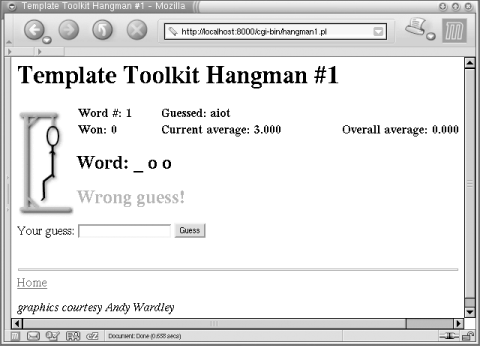
Figure D-2. Self-contained CGI hangman
D.8.2. Hangman with Modular Templates
Perhaps the biggest limitation of the previous example is that the presentation template isn't at all modular. In this example, we're going to split the one large template into a number of smaller ones placed in separate files. This makes the main template much simpler and easier to follow. It also allows each of the individual template components to be updated in isolation. If you want to change the display of the game averages, for example, then you just need to edit the status template and can leave everything else as it is.
We're also going to use a standard html/page template, provided as part of the Template Toolkit, to generate the required container elements to make a valid HTML page. The default location for these templates is /usr/local/tt2/templates. You will also need to define the directory in which you're going to put the hangman templates. So, to the top of the previous script, we can add the following constant definitions (tailor them to your local values, of course):
use constant TEMPLATES => '/home/stas/templates/hangman2';
use constant SHARED    => '/usr/local/tt2/templates';
Then, when we create the Template object, we specify these directories as a list reference for the INCLUDE_PATH option:
# create a Template object
my $tt = Template->new({
    INCLUDE_PATH => [ TEMPLATES, SHARED ],
});
The rest of the script remains the same, with exception of the template specified in the _ _DATA_ _section. This can now be written as:
_ _DATA_ _
Content-type: text/html

[% WRAPPER html/page
     html.head.title  = title
     html.body.onload = 'if (document.gf) document.gf.guess.focus( )'
%]

[% PROCESS header %]

[% IF status =  = 'won' or status =  = 'lost';
      PROCESS restart;
   ELSE;
      PROCESS guess;
   END
%]

[% PROCESS footer %]

[% END %]
We've moved the header, the footer, and the two different variants of the form out into separate templates. The entire page is enclosed within a WRAPPER block, which generates the required <html>, <head>, and <body> tags to wrap around the page using the standard html/page template.
The external header and footer templates are shown in Examples D-6 and D-7. According to the value of TEMPLATESset above, these should be located in /home/stas/templates/hangman.
Example D-6. hangman2/templates/header
<h1>[% title %]</h1>

[% # how many guesses left to go?
   tries_left = tries - state.left
%]

[%# display the appropriate image -%]
<img src="[% icons %]/h[% tries_left %].gif"
     align="left" alt="[[% tries_left %] tries left]" />

[% # display the game averages
   PROCESS status
%]
Example D-7. hangman2/templates/footer
<br clear="all">
<hr />

<a href="[% url %]">Home</a>

<p>
  <cite style="fontsize: 10pt">graphics courtesy Andy Wardley</cite>
</p>
D.8.3. Hangman Plug-in
To take our example a stage further, we're going to convert this simple application into a Template Toolkit plug-in module. A plug-in is just like any other Perl module, except that it lives in a special namespace (Template::Plugin::*) and gets passed a reference to a special variable, the context, when its new( ) constructor is called. Plug-ins can be loaded and used via the USE directive. Here's what the module looks like:[63]
[63]The code assumes that Perl 5.6.0 or higher is used. If you are using an older version, use the vars pragma instead of our.
#------------------------------------------------------------------
# Template::Plugin::Games::Hangman
#
# Implementation of the classic hangman game written as a
# plug-in module for the Template Toolkit.
#
# Written by Andy Wardley.
#------------------------------------------------------------------

package Template::Plugin::Games::Hangman;

use strict;
use Template::Plugin;
use Template::Exception;
use IO::File ( );
use CGI;

use base qw( Template::Plugin );

our $URL    = '/cgi-bin/hangman';
our $ICONS  = '/icons/hangman';
our $WORDS  = '/usr/games/hangman-words';
our $TRIES  = 6;
our @STATE  = qw( word gameno left won total guessed );
The start of the module is very similar to the CGI script. In this case we're defining everything to be in the Template::Plugin::Games::Hangman namespace and specifying that it is a subclass of the Template::Plugin module.
sub new {
    my($class, $context, $config) = @_;

    # create plugin object
    my $self = bless {
        cgi      => CGI->new( ),
        url      => $config->{ url    } || $URL,
        icons    => $config->{ icons  } || $ICONS,
        words    => $config->{ words  } || $WORDS,
        tries    => $config->{ tries  } || $TRIES,
        _context => $context,
    }, $class;

    # restore current game or start new game
    $self->restore( ) || $self->init( );

    return $self;
}
When the plug-in is loaded via a USE directive, the new( ) constructor method is called. The first (zeroth) argument is the calling class name, Template::Plugin::Games::Hangman->new($context, $config), passed as a reference to a context object through which you can access the functionality of the Template Toolkit. The second argument is a reference to a hash array of any configuration items specified with the USE directive.
This method defines an object, $self, using values defined in the $config hash or the defaults specified in the approprate package variables. It then calls the restore( ) method and, if restore( ) doesn't return a true value, the init( ) method. Here are the definitions of those methods:
sub restore {
    my $self = shift;
    my $cgi  = $self->{ cgi };
    return undef if !$cgi->param( );
    $self->{ $_ } = $cgi->param($_) foreach @STATE;
    return undef if $cgi->param('restart');
    return $self;
}

sub init {
    my $self = shift;

    # pick a word, any word
    my $list = IO::File->new($WORDS)
        || die "failed to open '$WORDS' : $!\n";
    my $word;
    rand($.) < 1 && ($word = $_) while <$list>;
    chomp $word;

    $self->{ word    }  = $word;
    $self->{ left    }  = $self->{ tries };
    $self->{ guessed }  = '';
    $self->{ gameno  } += 1;
    $self->{ won     } += 0;
    $self->{ total   } += 0;
    return $self;
}
They are just like their counterparts in the earlier CGI script, with a few minor exceptions. A CGI object is defined in $self->{ cgi } rather than using imported subroutines, and operations are performed on $self rather than on a $state hash array passed as an argument.
The guess( ) method is also very similar to the process_guess( )subroutine in the CGI script:
sub guess {
    my $self  = shift;
    my $cgi   = $self->{ cgi };
    my $guess = $cgi->param('guess') || return;

    # lose immediately if user out of guesses
    return $self->state('lost')
        unless $self->{ left } > 0;

    my %guessed = map { $_ => 1 } $self->{ guessed } =~ /(.)/g;
    my %letters = map { $_ => 1 } $self->{ word    } =~ /(.)/g;

    # return immediately if user has already guessed the word
    return $self->state('won')
        unless grep(! $guessed{ $_ }, keys %letters);

    # do nothing more if no guess
    return $self->state('continue') unless $guess;

    # process individual letter guesses
    $guess = lc $guess;
    return $self->state(continue => 'Not a valid letter or word!')
        unless $guess =~ /^[a-z]+$/;
    return $self->state(continue => 'You already guessed that letter!')
        if $guessed{$guess};

    # handle the user guessing the whole word
    if (length($guess) > 1 and $guess ne $self->{word}) {
        $self->{ total } += $self->{ left };
        return $self->state(lost => "You lose.  The word was $self->{word}.");
    }

    # update the list of guesses and word map
    foreach ($guess =~ /(.)/g) { $guessed{$_}++; }
    $self->{ guessed } = join '', sort keys %guessed;

    # correct guess -- word completely filled in
    unless (grep(!$guessed{$_}, keys %letters)) {
        $self->{ won }++;
        return $self->state(won => qq{You got it!  The word was "$self->{word}".});
    }

    # incorrect guess
    if (!$letters{$guess}) {
        $self->{total}++;
        $self->{left}--;
        return $self->state(lost =>
            qq{No dice, dude! The word was "$self->{word}".})
                if $self->{left} <= 0;
        return $self->state(continue => 'Wrong guess!');
    }

    # correct guess but word still incomplete
    return $self->state(continue => 'Good guess!');
}
As a matter of convenience, we also provide the state( ) method, to retrieve the current state (when called without arguments) or set both state and message (when called with one or more arguments):
sub state {
    my $self = shift;
    if (@_) {
        $self->{ state   } = shift;
        $self->{ message } = join('', @_);
    }
    else {
        return $self->{ state };
    }
}
We also define averages( ) and wordmap( ) as object methods:
sub averages {
    my $self = shift;
    return {
        current => $self->{ total } / $self->{ gameno },
        overall => $self->{ gameno } > 1
             ? ($self->{ total } + $self->{ left } - $self->{ tries })
             / ($self->{ gameno } - 1)
             : 0
    };
}

sub wordmap {
    my $self = shift;
    my %guessed = map { $_ => 1 } $self->{ guessed } =~ /(.)/g;
    join ' ', map { $guessed{$_} ? "$_ " : '_ ' }
        $self->{ word } =~ /(.)/g;
}
We can also encode the high-level game logic in a method:
sub play {
    my $self = shift;

    # process any current guess
    $self->guess( );

    # determine which form to use based on state
    my $form = (exists $self->{ state } &&
                $self->{ state } =~ /^won|lost$/)
        ? 'restart' : 'guess';

    # process the three templates: header, form and footer
    $self->{ _context }->include([ 'header', $form, 'footer' ]);
}
The play( ) method calls guess( ) to process a guess and then calls on the context object that we previously saved in _context to process three templates: the header template, the form relevant to the current game state, and the footer template.
The script that uses this plug-in can now be made even simpler, as shown in Example D-8.
Example D-8. hangman3.pl
#!/usr/bin/perl
#
# hangman3.pl
#
# CGI script using Template Toolkit Hangman plug-in.
#

use strict;
use Template;

# may need to tell Perl where to find plug-in module
use lib qw( /usr/local/tt2/hangman/hangman3/perl5lib );

use constant TEMPLATES => '/home/stas/templates/hangman3';
use constant SHARED    => '/usr/local/tt2/templates';
use constant URL       => '/cgi-bin/hangman3.pl';
use constant ICONS     => '/icons/hangman';
use constant WORDS     => '/usr/games/hangman-words';

# create a Template object
my $tt = Template->new({
    INCLUDE_PATH => [ TEMPLATES, SHARED ],
});

# define Template variables
my $vars = {
    url   => URL,
    icons => ICONS,
    words => WORDS,
    title => 'Template Toolkit Hangman #3',
};

# process the main template
$tt->process(*DATA, $vars)
    || die $tt->error( );
Other than creating a Template object and defining variables, we don't need to do any special processing relevant to the hangman application. That is now handled entirely by the plug-in.
The template defined in the _ _DATA_ _section can be made to look very similar to the earlier example. In this case, we're loading the plug-in (Games.Hangman, corresponding to Template::Plugin::Games::Hangman) and aliasing the object returned from new( ) to the hangman variable. We manually call the guess( ) method and PROCESS external templates according to the game state:
_ _DATA_ _
Content-type: text/html

[%  WRAPPER html/page
        html.head.title  = title
        html.body.onload = 'if (document.gf) document.gf.guess.focus( )';

        TRY;
            # load the hangman plug-in
            USE hangman = Games.Hangman(
                words = words
                icons = icons
                url   = url
            );

            # process a guess
            CALL hangman.guess;

            # print header showing game averages
            PROCESS header;

            # process the right form according to game state
            IF hangman.state =  = 'won'
            OR hangman.state =  = 'lost';
                PROCESS restart;
            ELSE;
                PROCESS guess;
            END;

            # now print the footer
            PROCESS footer;
        CATCH;
            # and if any of that goes wrong...
            CLEAR;
            PROCESS error;
        END;
    END
%]
One other enhancement we've made is to enclose the body in a TRY block. If the plug-in init( ) method fails to open the words file, it reports the error via die( ). The TRY directive allows this error to be caught and handled in the corresponding CATCH block. This clears any output generated in the TRY block before the error occured and processes an error template instead to report the error in a nice manner.
The template in this example controls the overall flow of the game logic. If you prefer, you can simply call the play( ) method and have the plug-in take control. It handles all the flow control for you, processing the guess and then making calls back into the Template Toolkit to process the header, relevant form, and footer templates.
_ _DATA_ _
Content-type: text/html

[%  #Template Toolkit Hangman #4
        WRAPPER html/page
        html.head.title  = title
        html.body.onload = 'if (document.gf) document.gf.guess.focus( )';

        TRY;
            USE hangman = Games.Hangman(
                words = words
                icons = icons
                url   = url
            );
            hangman.play;

        CATCH;
            CLEAR;
            PROCESS error;
        END;
    END
%]
The complete set of templates that go with this final example are presented in Examples D-9 through D-15.
Example D-9. hangman3/templates/header
<h1>[% title %]</h1>

[% # how many guesses left to go?
   tries_left = hangman.tries - hangman.left
%]

[%# display the appropriate image -%]
<img src="[% hangman.icons %]/h[% tries_left %].gif"
     align="left" alt="[[% tries_left %] tries left]" />

[% PROCESS status %]
Example D-10. hangman3/templates/status
[% # define a format for displaying averages
   USE format('%2.3f');
   average = hangman.averages;
%]

<table width="100%">
<tr>
  <td><b>Word #: [% hangman.gameno %]</b></td>
  <td><b>Guessed: [% hangman.guessed %]</b></td>
</tr>
<tr>
  <td><b>Won: [% hangman.won %]</b></td>
  <td><b>Current average: [% format(average.current) %]</b></td>
  <td><b>Overall average: [% format(average.overall) %]</b></td>
</tr>
</table>

<h2>Word: [% hangman.wordmap %]</h2>

[% IF hangman.message -%]
<h2><font color="red">[% hangman.message %]</font></h2>
[% END %]
Example D-11. hangman3/templates/guess
<form method="post" action="[% hangman.url %]"
      enctype="application/x-www-form-urlencoded" name="gf">
  Your guess: <input type="text" name="guess" />
  <input type="submit" name=".submit" value="Guess" />
  [% PROCESS state %]
</form>
Example D-12. hangman3/templates/restart
<form method="post" action="[% hangman.url %]"
      enctype="application/x-www-form-urlencoded">
  Do you want to play again?
  <input type="submit" name="restart" value="Another game" />
  [% PROCESS state %]
</form>
Example D-13. hangman3/templates/state
[% FOREACH var = [ 'word' 'gameno' 'left' 'won' 'total' 'guessed' ] -%]
<input type="hidden" name="[% var %]" value="[% hangman.$var %]" />
[% END %]
Example D-14. hangman3/templates/footer
<br clear="all">
<hr />
<a href="[% hangman.url %]">Home</a>
<p>
  <cite style="fontsize: 10pt">graphics courtesy Andy Wardley</cite>
</p>
D.8.4. Self-Contained Hangman Template
One of the benefits of writing the hangman application as a plug-in is that you no longer need to write a CGI script at all. You can load and use the plug-in from any template, which you can process via a generic CGI script, a mod_perl handler, or perhaps the Apache::Template module.
Here's an example of a self-contained template using the hangman plug-in. All we need to do is to hardcode some variable values at the start of the template:
[%  title = 'Template Toolkit Hangman #5'
    url   = '/tt2/hangman.html'
    words = '/usr/games/hangman-words'
    icons = '/icons/hangman';

    WRAPPER html/page
        html.head.title  = title
        html.body.onload = 'if (document.gf) document.gf.guess.focus( )';

        TRY;
            USE hangman = Games.Hangman(
                words = words
                icons = icons
                url   = url
            );
            hangman.play;
        CATCH;
            CLEAR;
            PROCESS error;
        END;
    END
%]
If you're using Apache::Template to run the application, you can define these variables in the Apache httpd.conf file:
PerlModule          Apache::Template

TT2IncludePath      /usr/local/tt2/hangman/hangman3/templates
TT2IncludePath      /usr/local/tt2/templates
TT2Variable         title  "Template Toolkit Hangman #5"
TT2Variable         words  /usr/games/hangman-words
TT2Variable         icons  /icons/hangman
TT2Params           uri

<Location /tt2/hangman.html>
    SetHandler      perl-script
    PerlHandler     Apache::Template
</Location>
Our three variables, title, words, and icons, are defined using the TT2Variable directive. In addition, we use TT2Params to instruct Apache::Template to make the request URI available as the uri template variable. We previously used url to denote the URL of the hangman application, so we need to make one small change to the template. Using this dynamic uri variable should mean that the value will remain correct even if the application is moved to a new URL. The template should now look like this:
[%
    # ...etc...

    USE hangman = Games.Hangman(
        words   = words
        icons   = icons
        url     = uri     # now use 'uri' not 'url'
    );

    # ...etc...
%]
The game in Figure D-3 is for you to complete.
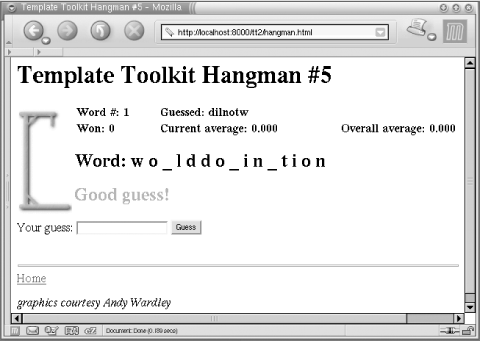
Figure D-3. White to play and mate in three moves
|  | |
| D.7. Apache::Template Module |  | D.9. References |

Copyright © 2003 O'Reilly & Associates. All rights reserved.