
11.2. Hidden Fields
Hidden form fields allow us to store "hidden" information within a form; these fields are not displayed by the browser. However, you can view the contents of the entire form, including the hidden fields, by viewing its HTML source, using the browser's " View Source" option. Therefore, hidden fields are not meant for security (since anyone can see them), but just for passing session information to and from forms transparently. See Chapter 4, "Forms and CGI", for more information on forms and hidden fields.
Just to refresh your memory, here's a snippet containing a hidden field that holds a session identifier:
<FORM ACTION="/cgi/program.cgi" METHOD="POST">
<INPUT TYPE="hidden" NAME  = "id"
                     VALUE = "e07a08c4612b0172a162386ca76d2b65">
.
.
</FORM>
When the user presses the submit button, the browser encodes the information within all the fields and then passes the information to the server, without differentiating the hidden fields in any manner.
Now that we know how hidden f ields work, let's use them to implement a very simple application that maintains state information between invocations of multiple forms. And what better example to illustrate hidden fields than a shopping cart application? See Figure 11-1.
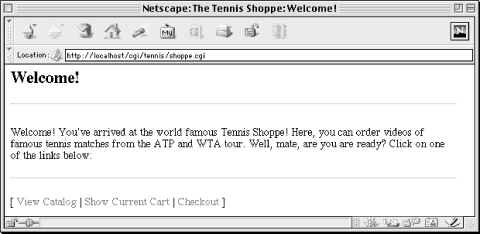
Figure 11-1. The shoppe.cgi welcome page
The shopping cart application we'll discuss is rather primitive. We don't perform any database lookups for product information or prices. We don't accept credit card numbers or payment authorization. Our main goal in this section is to understand state maintenance.
How does our application work? A typical shopping cart application presents the user with several features, namely the ability to browse the catalog of products, to place products in the cart, to view the contents of the cart, and then finally to check out.
Our first goal is to create a unique session identifier, right from the very beginning. Thus, the user must start at a dynamic web page, not a static one. Our welcome page is this:
http://localhost/cgi/shoppe.cgi
In fact, this one CGI script handles all of the pages. It creates a session identifier for the user, appends it as a query string to each link, and inserts it as a hidden field to each form. Thus, the links that appear on the bottom of each page look like this:
shoppe.cgi?action=catalog&id=7d0d4a9f1392b9dd9c138b8ee12350a4
shoppe.cgi?action=cart&id=7d0d4a9f1392b9dd9c138b8ee12350a4
shoppe.cgi?action=checkout&id=7d0d4a9f1392b9dd9c138b8ee12350a4
The catalog page is shown in Figure 11-2.
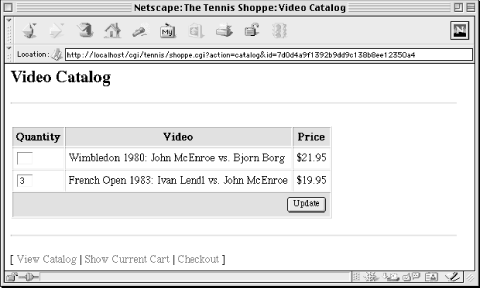
Figure 11-2. The shoppe.cgi catalog page
Our script determines which page to display by looking at the value of the action parameter. Although users will typically move from the catalog to the cart to the checkout, they are free to move around. If you try to check out before you select any items, the system will ask you to go back and select items (but it will remember your checkout information when you return!).
Let's take a look at the code, shown in Example 11-3.
Example 11-3. shoppe.cgi
#!/usr/bin/perl -wT

use strict;

use CGI;
use CGIBook::Error;
use HTML::Template;


BEGIN {
    $ENV{PATH} = "/bin:/usr/bin";
    delete @ENV{ qw( IFS CDPATH ENV BASH_ENV ) };
    sub unindent;
}

use vars qw( $DATA_DIR $SENDMAIL $SALES_EMAIL $MAX_FILES );

local $DATA_DIR     = "/usr/local/apache/data/tennis";
local $SENDMAIL     = "/usr/lib/sendmail -t -n";
local $SALES_EMAIL  = 'sales@email.address.com';
local $MAX_FILES    = 1000;

my $q       = new CGI;
my $action  = $q->param("action") || 'start';
my $id      = get_id( $q );


if ( $action eq "start" ) {
    start( $q, $id );
}
elsif ( $action eq "catalog" ) {
    catalog( $q, $id );
}
elsif ( $action eq "cart" ) {
    cart( $q, $id );
}
elsif ( $action eq "checkout" ) {
    checkout( $q, $id );
}
elsif ( $action eq "thanks" ) {
    thanks( $q, $id );
}
else {
    start( $q, $id );
}
This script starts like most that we have seen. It calls the get_id function, which we will look at a little later; get_id returns the session identifier and loads any previously saved session information into the current CGI.pm object.
We then branch to an appropriate subroutine depending on the action requested. Here are the subroutines that handle these requests:
#/--------------------------------------------------------------------
# Page Handling subs
#


sub start {
    my( $q, $id ) = @_;

    print header( $q, "Welcome!" ),
          $q->p( "Welcome! You've arrived at the world famous Tennis Shoppe! ",
                 "Here, you can order videos of famous tennis matches from ",
                 "the ATP and WTA tour. Well, mate, are you are ready? ",
                 "Click on one of the links below:"
          ),
          footer( $q, $id );
}


sub catalog {
    my( $q, $id ) = @_;

    if ( $q->request_method eq "POST" ) {
        save_state( $q );
    }

    print header( $q, "Video Catalog" ),
          $q->start_form,
          $q->table(
              { -border       => 1,
                -cellspacing  => 1,
                -cellpadding  => 4,
              },
              $q->Tr( [
                  $q->th( { -bgcolor => "#CCCCCC" }, [
                      "Quantity",
                      "Video",
                      "Price"
                  ] ),
                  $q->td( [
                      $q->textfield(
                          -name   => "* Wimbledon 1980",
                          -size   => 2
                      ),
                      "Wimbledon 1980: John McEnroe vs. Bjorn Borg",
                      '$21.95'
                  ] ),
                  $q->td( [
                      $q->textfield(
                          -name   => "* French Open 1983",
                          -size   => 2
                      ),
                      "French Open 1983: Ivan Lendl vs. John McEnroe",
                      '$19.95'
                  ] ),
                  $q->td( { -colspan  => 3,
                            -align    => "right",
                            -bgcolor  => "#CCCCCC"
                          },
                          $q->submit( "Update" )
                  )
              ] ),
          ),
          $q->hidden(
              -name     => "id",
              -default  => $id,
              -override => 1
          ),
          $q->hidden(
              -name     => "action",
              -default  => "catalog",
              -override => 1
          ),
          $q->end_form,
          footer( $q, $id );
}


sub cart {
    my( $q, $id ) = @_;

    my @items     = get_items( $q );
    my @item_rows = @items ?
        map $q->td( $_ ), @items :
        $q->td( { -colspan => 2 }, "Your cart is empty" );

    print header( $q, "Your Shopping Cart" ),
          $q->table(
              { -border       => 1,
                -cellspacing  => 1,
                -cellpadding  => 4,
              },
              $q->Tr( [
                  $q->th( { -bgcolor=> "#CCCCCC" }, [
                      "Video Title",
                      "Quantity"
                  ] ),
                  @item_rows
              ] )
          ),
          footer( $q, $id );
}


sub checkout {
    my( $q, $id ) = @_;

    print header( $q, "Checkout" ),
          $q->start_form,
          $q->table(
              { -border       => 1,
                -cellspacing  => 1,
                -cellpadding  => 4
              },
              $q->Tr( [
                  map( $q->td( [
                          $_,
                          $q->textfield( lc $_ )
                       ] ), qw( Name Email Address City State Zip )
                  ),
                  $q->td( { -colspan  => 2,
                            -align    => "right",
                          },
                          $q->submit( "Checkout" )
                  )
              ] ),
          ),
          $q->hidden(
              -name     => "id",
              -default  => $id,
              -override => 1
          ),
          $q->hidden(
              -name     => "action",
              -default  => "thanks",
              -override => 1
          ),
          $q->end_form,
          footer( $q, $id );
}

sub thanks {
    my( $q, $id ) = @_;
    my @missing;
    my %customer;

    my @items = get_items( $q );

    unless ( @items ) {
        save_state( $q );
        error( $q, "Please select some items before checking out." );
    }

    foreach ( qw( name email address city state zip ) ) {
        $customer{$_} = $q->param( $_ ) || push @missing, $_;
    }

    if ( @missing ) {
        my $missing = join ", ", @missing;
        error( $q, "You left the following required fields blank: $missing" );
    }

    email_sales( \%customer, \@items );
    unlink cart_filename( $id ) or die "Cannot remove user's cart file: $!";

    print header( $q, "Thank You!" ),
          $q->p( "Thanks for shopping with us, $customer{name}. ",
                 "We will contactly you shortly!"
          ),
          $q->end_html;
}
Again, nothing here should be unfamiliar. Within our tables we make extensive use of the feature within CGI.pm that distributes tags around items if they are supplied as array references. We also include hidden fields in all of our forms for "id", which contains the session identifier.
Figure 11-3 shows the shopping cart page.
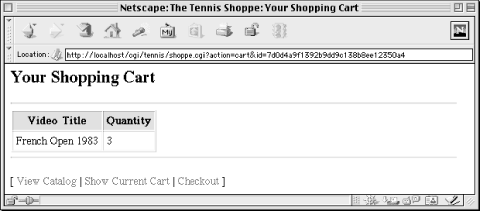
Figure 11-3. The shoppe.cgi shopping cart page
Now let's look at the functions that maintain the user's state for us:
#/--------------------------------------------------------------------
# State subs
#


sub get_id {
    my $q = shift;
    my $id;

    my $unsafe_id = $q->param( "id" ) || '';
    $unsafe_id =~ s/[^\dA-Fa-f]//g;

    if ( $unsafe_id =~ /^(.+)$/ ) {
        $id = $1;
        load_state( $q, $id );
    }
    else {
        $id = unique_id(  );
        $q->param( -name => "id", -value => $id );
    }

    return $id;
}


# Loads the current CGI object's default parameters from the saved state
sub load_state {
    my( $q, $id ) = @_;
    my $saved = get_state( $id ) or return;

    foreach ( $saved->param ) {
        $q->param( $_ => $saved->param($_) ) unless defined $q->param($_);
    }
}


# Reads a saved CGI object from disk and returns its params as a hash ref
sub get_state {
    my $id = shift;
    my $cart = cart_filename( $id );
    local *FILE;

    -e $cart or return;
    open FILE, $cart or die "Cannot open $cart: $!";
    my $q_saved = new CGI( \*FILE ) or
        error( $q, "Unable to restore saved state." );
    close FILE;

    return $q_saved;
}


# Saves the current CGI object to disk
sub save_state {
    my $q = shift;
    my $cart = cart_filename( $id );
    local( *FILE, *DIR );

    # Avoid DoS attacks by limiting the number of data files
    my $num_files = 0;
    opendir DIR, $DATA_DIR;
    $num_files++ while readdir DIR;
    closedir DIR;

    # Compare the file count against the max
    if ( $num_files > $MAX_FILES ) {
        error( $q, "We cannot save your request because the directory " .
                   "is full. Please try again later" );
    }

    # Save the current CGI object to disk
    open FILE, "> $cart" or return die "Cannot write to $cart: $!";
    $q->save( \*FILE );
    close FILE;
}


# Returns a list of item titles and quantities
sub get_items {
    my $q = shift;
    my @items;

    # Build a sorted list of movie titles and quantities
    foreach ( $q->param ) {
        my( $title, $quantity ) = ( $_, $q->param( $_ ) );

        # Skip "* " from beginning of movie titles; skip other keys
        $title =~ s/^\*\s+// or next;
        $quantity or next;

        push @items, [ $title, $quantity ];
    }
    return @items;
}


# Separated from other code in case this changes in the future
sub cart_filename {
    my $id = shift;
    return "$DATA_DIR/$id";
}


sub unique_id {
    # Use Apache's mod_unique_id if available
    return $ENV{UNIQUE_ID} if exists $ENV{UNIQUE_ID};

    require Digest::MD5;

    my $md5 = new Digest::MD5;
    my $remote = $ENV{REMOTE_ADDR} . $ENV{REMOTE_PORT};

    # Note this is intended to be unique, and not unguessable
    # It should not be used for generating keys to sensitive data
    my $id = $md5->md5_base64( time, $$, $remote );
    $id =~ tr|+/=|-_.|;  # Make non-word chars URL-friendly
    return $id;
}
The first function, get_id, checks whether the script received a parameter named "id"; this can be supplied in the query string or as a hidden field in a form submitted via POST. Because we later use this as a filename, we perform a couple of checks to make sure that the identifier is safe. Then we call load_state to retrieve any previously saved information. If it did not receive an identifier, then it generates a new one.
The load_state function calls get_state, which checks whether there is a file matching the user's identifier and creates a CGI.pm object from it if so. load_state then loops through the parameters in the saved CGI.pm, adding them to the current CGI.pm object. It skips any parameters that are already defined in the current CGI.pm object. Remember this was triggered by a call to get_id at the top of the script, so all of this is happening before any form processing has been done; if we overwrite any current parameters, we lose that information. By loading saved parameters into the current CGI.pm object, it allows CGI.pm to fill in these values as defaults in the forms. Thus, the catalog and checkout pages remember the information you previously entered until the order is submitted and the cart is deleted.
The save_state function is the complement of get_state. It takes a CGI.pm object and saves it to disk. It also counts the number of carts that are already in the data directory. One problem with this CGI script is that it allows someone to repeatedly visit the site with different identifiers and thus create multiple cart files. We do not want someone to fill up the available disk space, so we limit the number of carts. We could also assign $CGI::POST_MAX a low value at the start of the script if we wanted to be extra careful (refer to Section 5.1.1, "Denial of Service Attacks").
The get_items function is used by the cart function, above, and the send_email function, below. It loops over the parameters in a CGI.pm object, finds the ones beginning with an asterisk, and builds a list of these items along with their quantities.
The get_state, save_state, and thanks functions all interact with the cart file. The cart_filename function simply encapsulates the logic used to generate a filename.
Finally, the unique_id function is the same one we saw earlier in Example 11-1.
Our CGI script also uses a number of additional utility functions. Let's take a look at them:
#/--------------------------------------------------------------------
# Other helper subs
#


sub header {
    my( $q, $title ) = @_;

    return $q->header( "text/html" ) .
           $q->start_html(
               -title    => "The Tennis Shoppe: $title",
               -bgcolor  => "white"
           ) .
           $q->h2( $title ) .
           $q->hr;
}


sub footer {
    my( $q, $id ) = @_;
    my $url = $q->script_name;

    my $catalog_link =
       $q->a( { -href => "$url?action=catalog&id=$id" }, "View Catalog" );
    my $cart_link =
       $q->a( { -href => "$url?action=cart&id=$id" }, "Show Current Cart" );
    my $checkout_link =
       $q->a( { -href => "$url?action=checkout&id=$id" }, "Checkout" );

    return $q->hr .
           $q->p( "[ $catalog_link | $cart_link | $checkout_link ]" ) .
           $q->end_html;
}


sub email_sales {
    my( $customer, $items ) = @_;
    my $remote = $ENV{REMOTE_HOST} || $ENV{REMOTE_ADDR};
    local *MAIL;

    my @item_rows  = map sprintf( "%-50s     %4d", @$_ ), @$items;
    my $item_table = join "\n", @item_rows;

    open MAIL, "| $SENDMAIL" or
        die "Cannot create pipe to sendmail: $!";

    print MAIL unindent <<"    END_OF_MESSAGE";
        To: $SALES_EMAIL
        Reply-to: $customer->{email}
        Subject: New Order
        Mime-Version: 1.0
        Content-Type: text/plain; charset="us-ascii"
        X-Mailer: WWW to Mail Gateway
        X-Remote-Host: $remote

        Here is a new order from the web site.

        Name:       $customer->{name}
        Email:      $customer->{email}
        Address:    $customer->{address}
        City:       $customer->{city}
        State:      $customer->{state}
        Zip:        $customer->{zip}

        Title                                               Quantity
        -----                                               --------
    END_OF_MESSAGE

    close MAIL or die "Could not send message via sendmail: $!";
}


sub unindent {
    local $_ = shift;
    my( $indent ) = sort
                    map /^(\s*)\S/,
                    split /\n/;
    s/^$indent//gm;
    return $_;
}
The header and footer functions simply return HTML, and help us maintain a consistent header and footer across the pages. In this example header and footer are rather simple, but if we wanted to improve the look of our site, we could do a lot simply by modifying these two functions.
The checkout page is shown in Figure 11-4.
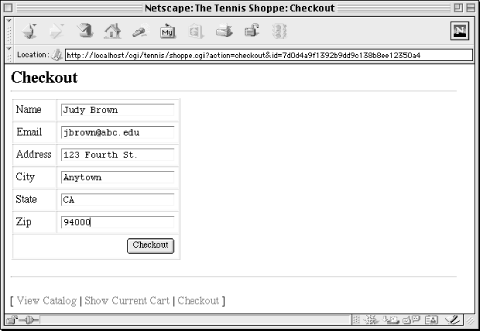
Figure 11-4. The shoppe.cgi checkout page
The send_email function sends a the completed order information to our sales folks. We use our unindent function from Chapter 5, "CGI.pm" so we can indent our email message in the code and still format it properly when we send it.
As we've seen in the last two sections, passing a session identifier from document to document can get a bit tedious. We either have to embed the information in an existing HTML file, or construct one containing the identifier entirely on the fly. In the next section, we'll look at client-side persistent cookies, where the browser allows us to store information on the client side. That way, we don't have to pass information from document to document.
 |  |  |
| 11. Maintaining State |  | 11.3. Client-Side Cookies |

Copyright © 2001 O'Reilly & Associates. All rights reserved.