
4.4. The Request
We've seen how the servlet finds out about the server and about the client. Now it's time to move on to the really important stuff: how a servlet finds out what the client wants.
4.4.1. Request Parameters
Each access to a servlet can have any number of request parameters associated with it. These parameters are typically name/value pairs that tell the servlet any extra information it needs to handle the request. Please don't confuse these request parameters with init parameters, which are associated with the servlet itself.
An HTTP servlet gets its request parameters as part of its query string (for GET requests) or as encoded post data (for POST requests). A servlet used as a server-side include has its parameters supplied by <PARAM> tags. Other types of servlets can receive their parameters in other ways.
Fortunately, even though a servlet can receive parameters in a number of different ways, every servlet retrieves its parameters the same way, using getParameter() and getParameterValues() :
public String ServletRequest.getParameter(String name)
public String[] ServletRequest.getParameterValues(String name)
getParameter() returns the value of the named parameter as a String or null if the parameter was not specified.[3] The value is guaranteed to be in its normal, decoded form. If the parameter has multiple values, the value returned is server-dependent. If there's any chance a parameter could have more than one value, you should use the getParameterValues() method instead. This method returns all the values of the named parameter as an array of String objects or null if the parameter was not specified. A single value is returned in an array of length 1.
[3] The getParameter() method was deprecated in the Java Web Server 1.1 in favor of getParameterValues(). However, after quite a lot of public protest, Sun took getParameter() off the deprecation list in the final release of Servlet API 2.0. It was the first Java method to be undeprecated!
One word of warning: if the parameter information came in as encoded POST data, it may not be available if the POST data has already been read manually using the getReader() or getInputStream() method of ServletRequest (because POST data can be read only once).
The possible uses for request parameters are unlimited. They are a general-purpose way to tell a servlet what to do, how to do it, or both. For a simple example, let's look at how a dictionary servlet might use getParameter() to find out the word it needs to look up.
An HTML file could contain this form asking the user for a word to look up:
<FORM METHOD=GET ACTION="/servlet/Dictionary">
Word to look up: <INPUT TYPE=TEXT NAME="word"><P>
Another word? <INPUT TYPE=TEXT NAME="word"><P>
<INPUT TYPE=SUBMIT><P>
</FORM>
Or the HTML file could contain this server-side include:
<SERVLET CODE=Dictionary>
<PARAM NAME=word VALUE=obfuscate>
<PARAM NAME=word VALUE=onomatopoeia>
</SERVLET>
No matter what the HTML looks like or whether the servlet handles GET requests, POST requests, or server-side include requests or is part of a filter chain, you can use code like the following to retrieve the servlet's parameters:
String word = req.getParameter("word");
String definition = getDefinition(word);
out.println(word + ": " + definition);
While this code works fine, it can handle only one word per request. To handle multiple values for word, the servlet can use the getParameterValues() method instead:
String[] words = req.getParameterValues("word");
if (words != null) {
  for (int i = 0; i < words.length; i++) {
    String definition = getDefinition(words[i]);
    out.println(words[i] + ": " + definition);
    out.println("<HR>");
  }
}
In addition to getting parameter values, a servlet can access parameter names using getParameterNames() :
public Enumeration ServletRequest.getParameterNames()
This method returns all the parameter names as an Enumeration of String object or an empty Enumeration if the servlet has no parameters. The method is most often used for debugging.
Finally, a servlet can retrieve the raw query string of the request with getQueryString():
public String ServletRequest.getQueryString()
This method returns the raw query string (encoded GET parameter information) of the request or null if there was no query string. This low-level information is rarely useful for handling form data. It's best for handling a single unnamed value, as in "/servlet/Sqrt?576", where the returned query string is "576".
Example 4-7shows the use of these methods with a servlet that prints its query string, then prints the name and value for all its parameters.
Example 4-7. Snooping parameters
import java.io.*;
import java.util.*;
import javax.servlet.*;
import javax.servlet.http.*;

public class ParameterSnoop extends HttpServlet {

  public void doGet(HttpServletRequest req, HttpServletResponse res)
                               throws ServletException, IOException {
    res.setContentType("text/plain");
    PrintWriter out = res.getWriter();

    out.println("Query String:");
    out.println(req.getQueryString());
    out.println();

    out.println("Request Parameters:");
    Enumeration enum = req.getParameterNames();
    while (enum.hasMoreElements()) {
      String name = (String) enum.nextElement();
      String values[] = req.getParameterValues(name);
      if (values != null) {
        for (int i = 0; i < values.length; i++) {
          out.println(name + " (" + i + "): " + values[i]);
        }
      }
    }
  }
}
This servlet's output is shown in Figure 4-2.
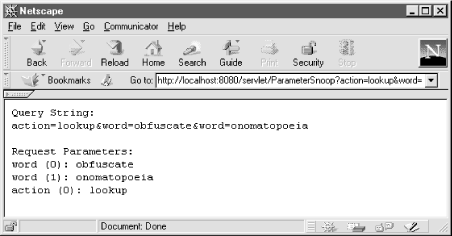
Figure 4-2. The snooped parameters
4.4.2. Generating a License Key
Now we're ready to write a servlet that generates a KeyedServerLock license key for any given host and port number. A key from this servlet can be used to unlock the KeyedServerLock servlet. So, how will this servlet know the host and port number of the servlet it needs to unlock? Why, with request parameters, of course. Example 4-8shows the code.
Example 4-8. Unlocking KeyedServerLock
import java.io.*;
import java.net.*;
import java.util.*;
import javax.servlet.*;
import javax.servlet.http.*;

public class KeyedServerUnlock extends HttpServlet {

  public void doGet(HttpServletRequest req, HttpServletResponse res)
                               throws ServletException, IOException {
    PrintWriter out = res.getWriter();

    // Get the host and port
    String host = req.getParameter("host");
    String port = req.getParameter("port");

    // Convert the port to an integer
    int numericPort;
    try {
      numericPort = Integer.parseInt(port);
    }
    catch (NumberFormatException e) {
      numericPort = 80;  // default
    }

    // Generate and print the key
    // Any KeyGenerationException is caught and displayed
    try {
      long key = generateKey(host, numericPort);
      out.println(host + ":" + numericPort + " has the key " + key);
    }
    catch (KeyGenerationException e) {
      out.println("Could not generate key: " + e.getMessage());
    }
  }

  // This method contains the algorithm used to match a key with
  // a server host and port. This example implementation is extremely
  // weak and should not be used by commercial sites.
  //
  // Throws a KeyGenerationException because anything more specific
  // would be tied to the chosen algorithm.
  //
  private long generateKey(String host, int port) throws KeyGenerationException {

    // The key must be a 64-bit number equal to the logical not (~)
    // of the 32-bit IP address concatenated by the 32-bit port number.

    byte hostIP[];
    try {
      hostIP = InetAddress.getByName(host).getAddress();
    }
    catch (UnknownHostException e) {
      throw new KeyGenerationException(e.getMessage());
    }

    // Get the 32-bit IP address
    long servercode = 0;
    for (int i = 0; i < 4; i++) {
      servercode <<= 8;
      servercode |= (hostIP[i] & 255);
    }

    // Concatentate the 32-bit port number
    servercode <<= 32;
    servercode |= port;

    // The key is the logical not
    return ~servercode;
  }
}

class KeyGenerationException extends Exception {

  public KeyGenerationException() {
    super();
  }

  public KeyGenerationException(String msg) {
    super(msg);
  }
}
This servlet can either generate a full page (for handling GET requests) or act as a server-side include.
4.4.3. Path Information
In addition to parameters, an HTTP request can include something called "extra path information" or a "virtual path." In general, this extra path information is used to indicate a file on the server that the servlet should use for something. This path information is encoded in the URL of an HTTP request. An example URL looks like this:
http://server:port/servlet/ViewFile/index.html
This invokes the ViewFile servlet, passing "/index.html" as extra path information. A servlet can access this path information, and it can also translate the "/index.html" string into the real path of the index.html file. What is the real path of "/index.html"? It's the full file system path to the file--what the server would return if the client asked for "/index.html" directly. This probably turns out to be document_root/index.html, but, of course, the server could have special aliasing that changes this.
Besides being specified explicitly in a URL, this extra path information can also be encoded in the ACTION parameter of an HTML form:
<FORM METHOD=GET ACTION="/servlet/Dictionary/dict/definitions.txt">
Word to look up: <INPUT TYPE=TEXT NAME="word"><P>
<INPUT TYPE=SUBMIT><P>
</FORM>
This form invokes the Dictionary servlet to handle its submissions and passes the Dictionary the extra path information "/dict/definitions.txt". The Dictionary servlet can then know to look up word definitions using the definitions.txt file, the same file the client would see if it requested "/dict/definitions.txt", probably server_root/public_html/dict/definitions.txt.
4.4.3.1. Getting path information
A servlet can use the getPathInfo() method to get extra path information:
public String HttpServletRequest.getPathInfo()
This method returns the extra path information associated with the request or null if none was given. An example path is "/dict/definitions.txt". The path information by itself, however, is only marginally useful. A servlet usually needs to know the actual file system location of the file given in the path info, which is where getPathTranslated() comes in:
public String HttpServletRequest.getPathTranslated()
This method returns the extra path information translated to a real file system path or null if there is no extra path information. The returned path does not necessarily point to an existing file or directory. An example translated path is "C:\JavaWebServer1.1.1\public_html\dict\definitions.txt".
Example 4-9 shows a servlet that uses these two methods to print the extra path information it receives and the resulting translation to a real path.
Example 4-9. Showing where the path leads
import java.io.*;
import java.util.*;
import javax.servlet.*;
import javax.servlet.http.*;

public class FileLocation extends HttpServlet {

  public void doGet(HttpServletRequest req, HttpServletResponse res)
                               throws ServletException, IOException {
    res.setContentType("text/plain");
    PrintWriter out = res.getWriter();

    if (req.getPathInfo() != null) {
      out.println("The file \"" + req.getPathInfo() + "\"");
      out.println("Is stored at \"" + req.getPathTranslated() + "\"");
    }
  }
}
Some example output of this servlet might be:
The file "/index.html"
Is stored at "/usr/JavaWebServer1.1.1/public_html/index.html"
4.4.3.2. Ad hoc path translations
Sometimes a servlet needs to translate a path that wasn't passed in as extra path information. You can use the getRealPath() method for this task:
public String ServletRequest.getRealPath(String path)
This method returns the real path of any given "virtual path" or null if the translation cannot be performed. If the given path is "/", the method returns the document root (the place where documents are stored) for the server. If the given path is getPathInfo() , the method returns the same real path as would be returned by getPathTranslated() . This method can be used by generic servlets as well as HTTP servlets. There is no CGI counterpart.
4.4.3.3. Getting MIME types
Once a servlet has the path to a file, it often needs to discover the type of the file. Use getMimeType() to do this:
public String ServletContext.getMimeType(String file)
This method returns the MIME type of the given file or null if it isn't known. Some implementations return "text/plain" if the given file doesn't exist. Common MIME types are "text/html", "text/plain", "image/gif", and "image/jpeg".
The following code fragment finds the MIME type of the extra path information:
String type = getServletContext().getMimeType(req.getPathTranslated())
4.4.4. Serving Files
The Java Web Server itself uses servlets to handle every request. Besides being a showcase for the ability of servlets, this gives the server a modular design that allows the wholesale replacement of certain aspects of its functionality. For example, all files are served by the com.sun.server.http.FileServlet servlet, registered under the name file and charged with the responsibility to handle the "/" alias (meaning it's the default handler for requests). But there's nothing to say that Sun's FileServlet cannot be replaced. In fact, it can be, either by registering another servlet under the name file or by changing the "/" alias to use another servlet. Furthermore, it's not all that hard to write a replacement for file, using the methods we've just seen.
Example 4-10 shows a ViewFile servlet that uses the getPathTranslated() and getMimeType() methods to return whatever file is given by the extra path information.
Example 4-10. Dynamically returning static files
import java.io.*;
import java.util.*;
import javax.servlet.*;
import javax.servlet.http.*;

import com.oreilly.servlet.ServletUtils;

public class ViewFile extends HttpServlet {

  public void doGet(HttpServletRequest req, HttpServletResponse res)
                               throws ServletException, IOException {
    // Use a ServletOutputStream because we may pass binary information
    ServletOutputStream out = res.getOutputStream();

    // Get the file to view
    String file = req.getPathTranslated();

    // No file, nothing to view
    if (file == null) {
      out.println("No file to view");
      return;
    }

    // Get and set the type of the file
    String contentType = getServletContext().getMimeType(file);
    res.setContentType(contentType);

    // Return the file
    try {
      ServletUtils.returnFile(file, out);
    }
    catch (FileNotFoundException e) {
      out.println("File not found");
    }
    catch (IOException e) {
      out.println("Problem sending file: " + e.getMessage());
    }
  }
}
This servlet first uses getPathTranslated() to get the name of file it needs to display. Then it uses getMimeType() to find the content type of this file and sets the response content type to match. Last, it returns the file using the returnFile() method found in the com.oreilly.servlet.ServletUtils utility class:
// Send the contents of the file to the output stream
public static void returnFile(String filename, OutputStream out)
                           throws FileNotFoundException, IOException {
  // A FileInputStream is for bytes
  FileInputStream fis = null;
  try {
    fis = new FileInputStream(filename);
    byte[] buf = new byte[4 * 1024];  // 4K buffer
    int bytesRead;
    while ((bytesRead = fis.read(buf)) != -1) {
      out.write(buf, 0, bytesRead);
    }
  }
  finally {
    if (fis != null) fis.close();
  }
}
The servlet's error handling is basic--it returns a page that describes the error. This is acceptable for our simple example (and really more than many programs seem capable of), but we'll learn a better way using status codes in the next chapter.
This servlet can be used directly with a URL like this.
http://server:port/servlet/ViewFile/index.html
Or, if you use it as a replacement for the "file" servlet, it is automatically invoked even for a URL like this.
http://server:port/index.html
Just beware that this servlet is a "proof of concept" example and does not have the full functionality of the com.sun.server.http.FileServlet servlet.
4.4.5. Determining What Was Requested
A servlet can use several methods to find out exactly what file or servlet the client requested. After all, only the most conceited servlet would always assume itself to be the direct target of a request. A servlet may be nothing more than a single link in a long servlet chain.
No method directly returns the original Uniform Resource Locator ( URL) used by the client to make a request. The javax.servlet.http.HttpUtils class, however, provides a getRequestURL() method that does about the same thing:[4]
[4] Why isn't there a method that directly returns the original URL shown in the browser? Because the browser never sends the full URL. The port number, for example, is used by the client to make its HTTP connection, but it isn't included in the request made to the web server answering on that port.
public static StringBuffer HttpUtils.getRequestURL(HttpServletRequest req)
This method reconstructs the request URL based on information available in the HttpServletRequest object. It returns a StringBuffer that includes the scheme (such as HTTP), server name, server port, and extra path information. The reconstructed URL should look almost identical to the URL used by the client. Differences between the original and reconstructed URLs should be minor (that is, a space encoded by the client as "%20" might be encoded by the server as a "+"). Because this method returns a StringBuffer, the request URL can be modified efficiently (for example, by appending query parameters). This method is often used for creating redirect messages and reporting errors.
Most of the time, however, a servlet doesn't really need the request URL. It just needs the request URI, which is returned by getRequestURI():
public String HttpServletRequest.getRequestURI()
This method returns the Universal Resource Identifier (URI) of the request. For normal HTTP servlets, a request URI can be thought of as a URL minus the scheme, host, port, and query string, but including any extra path information.[5]Table 4-2 shows the request URIs for several request URLs.
[5]Technically, what is referred to here as a request URI could more formally be called a "request URL path". This is because a URI is, in the most precise sense, a general purpose identifier for a resource. A URL is one type of URI; a URN (Uniform Resource Name) is another. For more information on URIs, URLs, and URNs, see RFC 1630 at http://www.ietf.org/rfc/rfc1630.txt.
Table 4-2. URLs and Their URIs
|
Request URL |
Its URI Component |
|---|---|
|
http://server:port/servlet/Classname |
/servlet/Classname |
|
http://server:port/servlet/registeredName |
/servlet/registeredName |
|
http://server:port/servlet/Classname?var=val |
/servlet/Classname [6] |
|
http://server:port/servlet/Classname/pathinfo |
/servlet/Classname/pathinfo |
|
http://server:port/servlet/Classname/pathinfo?var=val |
/servlet/Classname/pathinfo |
|
http://server:port/ssi.shtml (SSI) |
/ssi.shtml |
|
http://server:port/alias.html (alias to a servlet) |
/alias.html |
[6] Several servlet engines (including the Java Web Server 1.1.1) have a bug where getRequestURI() erroneously includes the query string. The JSDK 2.0 servlet runner behaves correctly.
For servlets in a chain, the request URI is always that of the first servlet in the chain.
In some situations it is enough for a servlet to know the servlet name under which it was invoked. You can retrieve this information with getServletPath() :
public String HttpServletRequest.getServletPath()
This method returns the part of the URI that refers to the servlet being invoked or null if the URI does not directly point to a servlet. The servlet path does not include extra path information. Table 4-3 shows the servlet names for several request URLs.
Table 4-3. URLs and Their Servlet Paths
|
Request URL |
Its Servlet Path |
|---|---|
|
http://server:port/servlet/Classname |
/servlet/Classname |
|
http://server:port/servlet/registeredName |
/servlet/registeredName |
|
http://server:port/servlet/Classname?var=val |
/servlet/Classname |
|
http://server:port/servlet/Classname/pathinfo |
/servlet/Classname |
|
http://server:port/servlet/Classname/pathinfo?var=val |
/servlet/Classname |
|
http://server:port/ssi.shtml (SSI) |
null |
|
http://server:port/alias.html (alias to a servlet) |
/alias.html |
For servlets in a filter chain, the servlet path is always the same as the path of the first servlet in the chain. If the request URI does not point at a servlet, getServletPath() returns null. It does not matter that a servlet (such as the file servlet) may have handled the request behind the scenes or that the request eventually ended up in a servlet.
For example, if the client requests the page /index.html and the content goes through the Deblink servlet from Chapter 2, "HTTP Servlet Basics", the Deblink servlet has a null servlet path--the original request was for a static file, not a servlet. If, however, the client requests /alias.html--which is a direct alias to a servlet--both that servlet and the Deblink servlet have a servlet path of /alias.html.
A servlet invoked as a server-side include behaves similarly. If it is embedded in a static file, it too has a null servlet path. The only way for it to have a non-null servlet path is if it is part of a servlet chain started by a servlet.
4.4.6. An Improved Counter
We can make use of the request URI information to improve our counter servlet. The counter example from Chapter 3, "The Servlet Life Cycle" could count only its own accesses. A real counter has to be able to count accesses to pages other than itself. There are two elegant ways to accomplish this: use the counter as an SSI servlet embedded in a page or use the counter in a servlet chain where it can replace any instances of the <COUNT> tag with the appropriate number. For each approach, a servlet can use the getRequestURI() method to associate a separate count with each requested URI.
Example 4-11 shows a GenericCounter servlet superclass that knows how to manage a hashtable that stores counts for different URIs. Example 4-12 and Example 4-13 show servlets that subclass GenericCounter to act as a server-side include counter and a chain-based counter, respectively.[7]
[7]For Example 4-12, please note that the Java Web Server 1.1.1 has a bug where the PrintWriter returned by getWriter() doesn't generate output for servlets used as server side includes. See Chapter 2, "HTTP Servlet Basics" for more information.
Example 4-11. A generic counter superclass
import java.io.*;
import java.util.*;
import javax.servlet.*;
import javax.servlet.http.*;

public class GenericCounter extends HttpServlet {

  private Hashtable counts = new Hashtable();

  public void init(ServletConfig config) throws ServletException {
    // Always call super.init(config) first
    super.init(config);

    // Try to load the initial page counts from the saved persistent state
    try {
      FileReader fileReader = new FileReader(getClass().getName() + ".counts");
      BufferedReader bufferedReader = new BufferedReader(fileReader);
      String line = null;
      String uri = null;
      String count = null;
      int[] holder = null;  // holder for the count, to make it an object
      while ((line = bufferedReader.readLine()) != null) {
        StringTokenizer tokenizer = new StringTokenizer(line);
        if (tokenizer.countTokens() < 2) continue;  // bogus line
        uri = tokenizer.nextToken();
        count = tokenizer.nextToken();
        // Store the uri/count pair in the counts hashtable
        // The count is saved as an int[1] to make it an "object"
        try {
          holder = new int[1];
          holder[0] = Integer.parseInt(count);
          counts.put(uri, holder);
        }
        catch (NumberFormatException e) { }  // bogus line
      }
    }
    catch (FileNotFoundException e) { }  // no saved state
    catch (IOException e) { }            // problem during read
  }

  // Increment and return the count for the given URI
  public int incrementAndGetCount(String uri) {
    int[] holder = (int[])counts.get(uri);
    if (holder == null) {
      // Initialize the count to 0
      holder = new int[1];
      holder[0] = 0;
      counts.put(uri, holder);  // save the holder
    }
    holder[0]++;               // increment
    return holder[0];
  }

  public void destroy() {
    // Try to save the accumulated count
    try {
      FileWriter fileWriter = new FileWriter(getClass().getName() + ".counts");
      BufferedWriter bufferedWriter = new BufferedWriter(fileWriter);
      Enumeration keys = counts.keys();
      Enumeration elements = counts.elements();
      String output = null;
      while (keys.hasMoreElements() && elements.hasMoreElements()) {
         String name = (String) keys.nextElement();
         int[] val = (int[]) elements.nextElement();
         bufferedWriter.write(name + " " + val[0] + "\n");
      }
      bufferedWriter.close();
      fileWriter.close();
      return;
    }
    catch (IOException e) { }  // problem during write
  }
}
Example 4-12. A server-side include counter
import java.io.*;
import javax.servlet.*;
import javax.servlet.http.*;

public class SSICounter extends GenericCounter {

  public void doGet(HttpServletRequest req, HttpServletResponse res)
                               throws ServletException, IOException {
    PrintWriter out = res.getWriter();

    // Fetch the page we're on.
    String uri = req.getRequestURI();

    // Get and increment the count for that page
    int count = incrementAndGetCount(uri);

    // Fulfull our purpose: print the count
    out.println(count);
  }
}
Example 4-13. A chain-based counter that replaces <COUNT> with the hit count
import java.io.*;
import javax.servlet.*;
import javax.servlet.http.*;

public class ChainCounter extends GenericCounter {

  public void doGet(HttpServletRequest req, HttpServletResponse res)
                               throws ServletException, IOException {

    String contentType = req.getContentType();
    res.setContentType(contentType);

    PrintWriter out = res.getWriter();

    // Fetch the page we're on.
    String uri = req.getRequestURI();

    // Get and increment the count
    int count = incrementAndGetCount(uri);

    // Prepare to read the input
    BufferedReader reader = req.getReader();

    String line = null;
    while ((line = reader.readLine()) != null) {
      line = replace(line, "<COUNT>", "" + count);  // case sensitive
      out.println(line);
    }
  }

  public void doPost(HttpServletRequest req, HttpServletResponse res)
                                throws ServletException, IOException {
    doGet(req, res);
  }

  private String replace(String line, String oldString, String newString) {
    int index = 0;
    while ((index = line.indexOf(oldString, index)) >= 0) {
      line = line.substring(0, index) +
             newString +
             line.substring(index + oldString.length());
      index += newString.length();
    }
    return line;
  }
}
4.4.7. How It Was Requested
Besides knowing what was requested, a servlet has several ways of finding out details about how it was requested. The getScheme() method returns the scheme used to make this request:
public String ServletRequest.getScheme()
Examples include "http", "https", and "ftp", as well as the newer Java-specific schemes "jdbc" and "rmi". There is no direct CGI counterpart (though some CGI implementations have a SERVER_URL variable that includes the scheme). For HTTP servlets, this method indicates whether the request was made over a secure connection using the Secure Sockets Layer (SSL), as indicated by the scheme "https", or if it was an insecure request, as indicated by the scheme "http".
The getProtocol() method returns the protocol and version number used to make the request:
public String ServletRequest.getProtocol()
The protocol and version number are separated by a slash. The method returns null if no protocol could be determined. For HTTP servlets, the protocol is usually vHTTP/1.0v or vHTTP/1.1". HTTP servlets can use the protocol version to determine if it's okay with the client to use the new features in HTTP Version 1.1.
To find out what method was used for a request, a servlet uses getMethod() :
public String HttpServletRequest.getMethod()
This method returns the HTTP method used to make the request. Examples include "GET", "POST", and "HEAD". The service() method of the HttpServlet implementation uses this method in its dispatching of requests.
4.4.8. Request Headers
HTTP requests and responses can have a number of associated HTTP "headers". These headers provide some extra information about the request (or response). The HTTP Version 1.0 protocol defines literally dozens of possible headers; the HTTP Version 1.1 protocol includes even more. A description of all the headers extends beyond the scope of this book; we discuss only the headers most often accessed by servlets. For a full list of HTTP headers and their uses, we recommend Web Client Programming by Clinton Wong (O'Reilly) or Webmaster in a Nutshell by Stephen Spainhour and Valerie Quercia (O'Reilly).
A servlet rarely needs to read the HTTP headers accompanying a request. Many of the headers associated with a request are handled by the server itself. Take, for example, how a server restricts access to its documents. The server uses HTTP headers, and servlets need not know the details. When a server receives a request for a restricted page, it checks that the request includes an appropriate Authorization header that contains a valid username and a password. If it doesn't, the server itself issues a response containing a WWW-Authenticate header, to tell the browser its access to a resource was denied. When the client sends a request that includes the proper Authorization header, the server grants the access and gives any servlet invoked access to the user's name via the getRemoteUser() call.
Other headers are used by servlets, but indirectly. A good example is the Last-Modified and If-Last-Modified pair discussed in Chapter 3, "The Servlet Life Cycle". The server itself sees the If-Last-Modified header and calls the servlet's getLastModified() method to determine how to proceed.
There are a few HTTP headers that a servlet may want to read on occasion. These are listed in Table 4-4.
Table 4-4. Useful HTTP Request Headers
|
Header |
Usage |
|---|---|
|
Specifies the media ( MIME) types the client prefers to accept, separated by commas.[8] Each media type is divided into a type and subtype given as type/subtype. An asterisk (*) wildcard is allowed for the subtype (type/*) or for both the type and subtype (*/*). For example: Accept: image/gif, image/jpeg, text/*, */* A servlet can use this header to help determine what type of content to return. If this header is not passed as part of the request, the servlet can assume the client accepts all media types. |
|
|
Gives information about the client software. The format of the returned string is relatively free form, but it often includes the browser name and version as well as information about the machine on which it is running. Netscape 3.01 on an SGI Indy running IRIX 6.2 reports: User-Agent: Mozilla/3.01SC-SGI (X11; I; IRIX 6.2 IP22) Microsoft Internet Explorer 4.0 running on a Windows 95 machine reports: User-Agent: Mozilla/4.0 (compatible; MSIE 4.0; Windows 95) A servlet can use this header to keep statistics or to customize its response based on browser type. |
|
|
Gives the URL of the document that refers to the requested URL (that is, the document that contains the link the client followed to access this document).[9] For example: Referer: http://www.gamelan.com/pages/Gamelan.sites.home.html A servlet can use this header to keep statistics or, if there's some error in the request, to keep track of the documents with errors. |
|
|
Provides the client's authorization to access the requested URI, including a username and password encoded in Base64. Servlets can use this for custom authorization, as discussed in Chapter 8, "Security". |
[8] Some older browsers send a separate Accept header for each media type. This can confuse some servlet engines, including the Java Web Server.
[9] The properly-spelled Referrer header gives you nothing.
4.4.8.1. Accessing header values
HTTP header values are accessed through the HttpServletRequest object. A header value can be retrieved as a String, a long (representing a Date), or an int, using getHeader() , getDateHeader() , and getIntHeader() , respectively:
public String HttpServletRequest.getHeader(String name)
public long HttpServletRequest.getDateHeader(String name)
public int HttpServletRequest.getIntHeader(String name)
getHeader() returns the value of the named header as a String or null if the header was not sent as part of the request. The name is case insensitive, as it is for all these methods. Headers of all types can be retrieved with this method.
getDateHeader() returns the value of the named header as a long (representing a Date) that specifies the number of milliseconds since the epoch) or -1 if the header was not sent as part of the request. This method throws an IllegalArgumentException when called on a header whose value cannot be converted to a Date. The method is useful for handling headers like Last-Modified and If-Modified-Since.
getIntHeader() returns the value of the named header as an int or -1 if the header was not sent as part of the request. This method throws a NumberFormatException when called on a header whose value cannot be converted to an int.
A servlet can also get the names of all the headers it can access using getHeaderNames() :
public Enumeration HttpServletRequest.getHeaderNames()
This method returns the names of all the headers as an Enumeration of String objects. It returns an empty Enumeration if there were no headers. The Servlet API gives servlet engine implementations the right to not allow headers to be accessed in this way, in which case this method returns null.
Example 4-14 demonstrates the use of these methods in a servlet that prints information about its HTTP request headers.
Example 4-14. Snooping headers
import java.io.*;
import java.util.*;
import javax.servlet.*;
import javax.servlet.http.*;

public class HeaderSnoop extends HttpServlet {

  public void doGet(HttpServletRequest req, HttpServletResponse res)
                               throws ServletException, IOException {
    res.setContentType("text/plain");
    PrintWriter out = res.getWriter();

    out.println("Request Headers:");
    out.println();
    Enumeration enum = req.getHeaderNames();
    while (enum.hasMoreElements()) {
      String name = (String) enum.nextElement();
      String value = req.getHeader(name);
      if (value != null) {
        out.println(name + ": " + value);
      }
    }
  }
}
Some example output from this servlet might look like this:
Request Headers:

Connection: Keep-Alive
If-Modified-Since: Saturday, 13-Jun-98 20:50:31 GMT; length=297
User-Agent: Mozilla/4.05 [en] (X11; I; IRIX 6.2 IP22)
Host: localhost:8080
Accept: image/gif, image/x-xbitmap, image/jpeg, image/pjpeg, image/png, */*
Accept-Language: en
Accept-Charset: iso-8859-1,*,utf-8
Cookie: jwssessionid=A3KBB1YAAAAABQDGPM5QAAA
4.4.8.2. Headers in servlet chains
Servlet chains add an interesting twist to how servlets handle headers. Unlike all other servlets, a servlet in the middle or at the end of a servlet chain reads header values not from the client's request, but from the previous servlet's response.
The power and flexibility of this approach comes from the fact that a servlet can intelligently process a previous servlet's output, not only in body content, but in header values. For example, it can add extra headers to the response or change the value of existing headers. It can even suppress the previous servlet's headers.
But power comes with responsibilities: unless a chained servlet specifically reads the previous servlet's response headers and sends them as part of its own response, the headers are not passed on and will not be seen by the client. A well-behaved chained servlet always passes on the previous servlet's headers, unless it has a specific reason to do otherwise.
The code shown in Example 4-15 uses getHeaderNames() in combination with getHeader() and setHeader() to pass on the headers from the previous servlet to the client (or possibly to another servlet in the chain). The only header given special treatment is the Content-Length header. This header's value reports the length of the response in bytes--a value that is likely to change during the chaining process and so not appropriate to send on. Note that you haven't seen the setHeader() method before. It can be used to, well, set a header.
Example 4-15. Passing on the headers
Enumeration enum = req.getHeaderNames();
if (enum != null) {  // to be safe across all implementations
  while (enum.hasMoreElements()) {
    String header = (String)enum.nextElement();
    if ("Content-Length").equalsIgnoreCase(header))
      continue;
    String value = req.getHeader(header);
    res.setHeader(header, value);
  }
}
An HTTP servlet designed to function in a chain should include code similar to this early on in its handling of a request, so as to pass on the appropriate headers.
4.4.9. Wading the Input Stream
Each request handled by a servlet has an input stream associated with it. Just as a servlet can write to a PrintWriter or OutputStream associated with its response object, it can read from a Reader or InputStream associated with its request object. The data read from the input stream can be of any content type and of any length. The input stream has three purposes:
-
To pass a chained servlet the response body from the previous servlet
-
To pass an HTTP servlet the content associated with a POST request
-
To pass a non-HTTP servlet the raw data sent by the client
To read character data from the input stream, you should use getReader() to retrieve the input stream as a BufferedReader object:
public BufferedReader ServletRequest.getReader() throws IOException
The advantage of using a BufferedReader for reading character-based data is that it should translate charsets as appropriate. This method throws an IllegalStateException if getInputStream() has been called before on this same request. It throws an UnsupportedEncodingException if the character encoding of the input is unsupported or unknown.
To read binary data from the input stream, use getInputStream() to retrieve the input stream as a ServletInputStream object:
public ServletInputStream ServletRequest.getInputStream() throws IOException
A ServletInputStream is a direct subclass of InputStream and can be treated as a normal InputStream, with the added ability to efficiently read input a line at a time into an array of bytes. The method throws an IllegalStateException if getReader() has been called before on this same request. Once you have the ServletInputStream, you can read a line from it using readLine() :
public int ServletInputStream.readLine(byte b[], int off, int len)
  throws IOException
This method reads bytes from the input stream into the byte array b, starting at an offset in the array given by off. It stops reading when it encounters an '\n' or when it has read len number of bytes. The ending '\n' character is read into the buffer as well. The method returns the number of bytes read or -1 if the end of the stream is reached.
A servlet can also check the content type and the length of the data being sent via the input stream, using getContentType() and getContentLength() , respectively:
public String ServletRequest.getContentType()
public int ServletRequest.getContentLength()
getContentType() returns the media type of the content being sent via the input stream or null if the type is not known (such as when there is no data). getContentLength() returns the length, in bytes, of the content being sent via the input stream or -1 if this not known.
4.4.9.1. Chaining servlets using the input stream
A servlet in a servlet chain receives its response body from the previous servlet in the chain through its input stream. This use was first shown in the Deblink servlet in Chapter 2, "HTTP Servlet Basics". The pertinent section is shown again here:
String contentType = req.getContentType();  // get the incoming type
if (contentType == null) return;  // nothing incoming, nothing to do
res.setContentType(contentType);  // set outgoing type to be incoming type

BufferedReader br = req.getReader();

String line = null;
while ((line = br.readLine()) != null) {
  line = replace(line, "<BLINK>", "");
  line = replace(line, "</BLINK>", "");
  out.println(line);
}
Notice the use of getContentType() to retrieve the content type of the previous servlet's output. Also notice that getContentLength() is not used. We don't need to use it because all read() and readLine() methods indicate that they have reached the end of the stream with special return values. In fact, it's better not to use getContentLength() in a servlet chain because it is unsupported in many servlet engine implementations. Presumably the reason is that the server may choose to tie the output stream of one servlet directly to the input stream of the next servlet, giving no chance to determine a total content length.
4.4.9.2. Handling POST requests using the input stream
It is a rare occurrence when a servlet handling a POST request is forced to use its input stream to access the POST data. Typically, the POST data is nothing more than encoded parameter information, which a servlet can conveniently retrieve with its getParameter() method.
A servlet can identify this type of POST request by checking the content type of the input stream. If it is of type application/x-www-form-urlencoded, the data can be retrieved with getParameter() and similar methods. Example 4-16 demonstrates a servlet that keys off the input stream's content type to handle POST requests.
Example 4-16. Reading parameters passed by POST
import java.io.*;
import java.util.*;
import javax.servlet.*;
import javax.servlet.http.*;

public class PostParams extends HttpServlet {

  public void doPost(HttpServletRequest req, HttpServletResponse res)
                                throws ServletException, IOException {
    res.setContentType("text/plain");
    PrintWriter out = res.getWriter();

    if ("application/x-www-form-urlencoded".equals(req.getContentType())) {
      Enumeration enum = req.getParameterNames();
      while (enum.hasMoreElements()) {
        String name = (String) enum.nextElement();
        String values[] = req.getParameterValues(name);
        if (values != null) {
          for (int i = 0; i < values.length; i++) {
            out.println(name + " (" + i + "): " + values[i]);
          }
        }
      }
    }
  }
}
In case you were wondering, the odd arrangement of code that checks the request's content type is arranged to avoid a NullPointerException if the getContentType() call returns null.
A servlet may wish to call the getContentLength() method before calling getParameter() to prevent denial of service attacks. A rogue client may send an absurdly large amount of data as part of a POST request, hoping to slow the server to a crawl as the servlet's getParameter() method churns over the data. A servlet can use getContentLength() to verify that the length is reasonable, perhaps less than 4K, as a preventive measure.
4.4.9.3. Receiving files using the input stream
A servlet can also receive a file upload using its input stream. Before we see how, it's important to note that file uploading is experimental and not supported in all browsers. Netscape first supported file uploads with Netscape Navigator 3; Microsoft first supported it with Internet Explorer 4.
The full file upload specification is contained in experimental RFC 1867, available at http://www.ietf.org/rfc/rfc1867.txt. The short summary is that any number of files and parameters can be sent as form data in a single POST request. The POST request is formatted differently than standard application/x-www-form-urlencoded form data and indicates this fact by setting its content type to multipart/form-data.
It's fairly simple to write the client half of a file upload. The following HTML generates a form that asks for a user's name and a file to upload. Note the addition of the ENCTYPE attribute and the use of a FILE input type:
<FORM ACTION="/servlet/UploadTest" ENCTYPE="multipart/form-data" METHOD=POST>
What is your name? <INPUT TYPE=TEXT NAME=submitter> <BR>
Which file do you want to upload? <INPUT TYPE=FILE NAME=file> <BR>
<INPUT TYPE=SUBMIT>
</FORM>
A user receiving this form sees a page that looks something like Figure 4-3. A filename can be entered in the text area, or it can be selected by browsing. After selection, the user submits the form as usual.
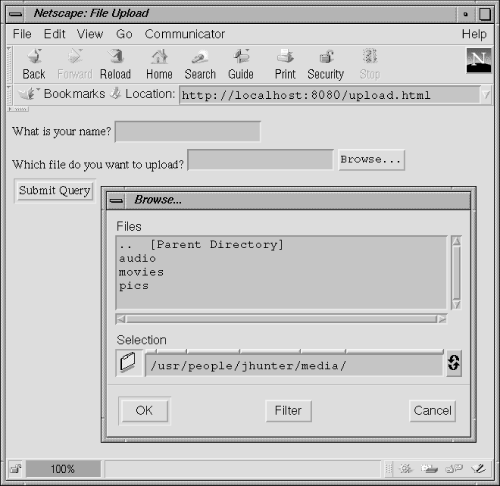
Figure 4-3. Choosing a file to upload
The server's responsibilities during a file upload are slightly more complicated. From the receiving servlet's perspective, the submission is nothing more than a raw data stream in its input stream--a data stream formatted according to the multipart/form-data content type given in RFC 1867. The Servlet API, lamentably, provides no methods to aid in the parsing of the data. To simplify your life (and ours since we don't want to explain RFC 1867), Jason has written a utility class that does the work for you. It's named MultipartRequest and is shown in Example 4-18 later in this section.
MultipartRequest wraps around a ServletRequest and presents a simple API to the servlet programmer. The class has two constructors:
public MultipartRequest(ServletRequest request, String saveDirectory,
                        int maxPostSize) throws IOException
public MultipartRequest(ServletRequest request,
                        String saveDirectory) throws IOException
Each of these methods creates a new MultipartRequest object to handle the specified request, saving any uploaded files to saveDirectory. Both constructors actually parse the multipart/form-data content and throw an IOException if there's any problem. The constructor that takes a maxPostSize parameter also throws an IOException if the uploaded content is larger than maxPostSize. The second constructor assumes a default maxPostSize of 1 MB.
The MultipartRequest class has six public methods that let you get at information about the request. You'll notice that many of these methods are modeled after ServletRequest methods. Use getParameterNames() to retrieve the names of all the request parameters:
public Enumeration MultipartRequest.getParameterNames()
This method returns the names of all the parameters as an Enumeration of String objects or an empty Enumeration if there are no parameters.
To get the value of a named parameter, use getParameter():
public String MultipartRequest.getParameter(String name)
This method returns the value of the named parameter as a String or null if the parameter was not given. The value is guaranteed to be in its normal, decoded form. If the parameter has multiple values, only the last one is returned.
Use getFileNames() to get a list of all the uploaded files:
public Enumeration MultipartRequest.getFileNames()
This method returns the names of all the uploaded files as an Enumeration of String objects, or an empty Enumeration if there are no uploaded files. Note that each filename is the name specified by the HTML form's name attribute, not by the user. Once you have the name of a file, you can get its file system name using getFilesystemName() :
public String MultipartRequest.getFilesystemName(String name)
This method returns the file system name of the specified file or null if the file was not included in the upload. A file system name is the name specified by the user. It is also the name under which the file is actually saved. You can get the content type of the file with getContentType() :
public String MultipartRequest.getContentType(String name)
This method returns the content type of the specified file (as supplied by the client browser) or null if the file was not included in the upload. Finally, you can get a java.io.File object for the file with getFile() :
public File MultipartRequest.getFile(String name)
This method returns a File object for the specified file saved on the server's file system or null if the file was not included in the upload.
Example 4-17 shows how a servlet uses MultipartRequest. The servlet does nothing but display the statistics for what was uploaded. Notice that it does not delete the files it saves.
Example 4-17. Handling a file upload
import java.io.*;
import java.util.*;
import javax.servlet.*;
import javax.servlet.http.*;

import com.oreilly.servlet.MultipartRequest;

public class UploadTest extends HttpServlet {

  public void doPost(HttpServletRequest req, HttpServletResponse res)
                                throws ServletException, IOException {
    res.setContentType("text/html");
    PrintWriter out = res.getWriter();

    try {
      // Blindly take it on faith this is a multipart/form-data request

      // Construct a MultipartRequest to help read the information.
      // Pass in the request, a directory to save files to, and the
      // maximum POST size we should attempt to handle.
      // Here we (rudely) write to the server root and impose 5 Meg limit.
      MultipartRequest multi =
        new MultipartRequest(req, ".", 5 * 1024 * 1024);

      out.println("<HTML>");
      out.println("<HEAD><TITLE>UploadTest</TITLE></HEAD>");
      out.println("<BODY>");
      out.println("<H1>UploadTest</H1>");

      // Print the parameters we received
      out.println("<H3>Params:</H3>");
      out.println("<PRE>");
      Enumeration params = multi.getParameterNames();
      while (params.hasMoreElements()) {
        String name = (String)params.nextElement();
        String value = multi.getParameter(name);
        out.println(name + " = " + value);
      }
      out.println("</PRE>");

      // Show which files we received
      out.println("<H3>Files:</H3>");
      out.println("<PRE>");
      Enumeration files = multi.getFileNames();
      while (files.hasMoreElements()) {
        String name = (String)files.nextElement();
        String filename = multi.getFilesystemName(name);
        String type = multi.getContentType(name);
        File f = multi.getFile(name);
        out.println("name: " + name);
        out.println("filename: " + filename);
        out.println("type: " + type);
        if (f != null) {
          out.println("length: " + f.length());
          out.println();
        }
        out.println("</PRE>");
      }
    }
    catch (Exception e) {
      out.println("<PRE>");
      e.printStackTrace(out);
      out.println("</PRE>");
    }
    out.println("</BODY></HTML>");
  }
}
The servlet passes its request object to the MultipartRequest constructor, along with a directory relative to the server root where the uploaded files are to be saved (because large files may not fit in memory) and a maximum POST size of 5 MB. The servlet then uses MultipartRequest to iterate over the parameters that were sent. Notice that the MultipartRequest API for handling parameters matches that of ServletRequest. Finally, the servlet uses its MultipartRequest to iterate over the files that were sent. For each file, it gets the file's name (as specified on the form), file system name (as specified by the user), and content type. It also gets a File reference and uses it to display the length of the saved file. If there are any problems, the servlet reports the exception to the user.
Example 4-18 shows the code for MultipartRequest. This class could be written more elegantly using a regular expression library, as discussed in Chapter 13, "Odds and Ends" ; however, not doing so allows this class to be self-contained and works just as well. We aren't going to elaborate on the class here--you should read the comments if you want to understand everything that is going on. This class uses some of the techniques that we've covered in this chapter, so it is a good review of the material. You should also feel free to skip this example for now and come back to it later if you'd like.
Example 4-18. The MultipartRequest class
package com.oreilly.servlet;

import java.io.*;
import java.util.*;
import javax.servlet.*;

public class MultipartRequest {

  private static final int DEFAULT_MAX_POST_SIZE = 1024 * 1024;  // 1 Meg

  private ServletRequest req;
  private File dir;
  private int maxSize;

  private Hashtable parameters = new Hashtable();  // name - value
  private Hashtable files = new Hashtable();       // name - UploadedFile

  public MultipartRequest(ServletRequest request,
                          String saveDirectory) throws IOException {
    this(request, saveDirectory, DEFAULT_MAX_POST_SIZE);
  }

  public MultipartRequest(ServletRequest request,
                          String saveDirectory,
                          int maxPostSize) throws IOException {
    // Sanity check values
    if (request == null)
      throw new IllegalArgumentException("request cannot be null");
    if (saveDirectory == null)
      throw new IllegalArgumentException("saveDirectory cannot be null");
    if (maxPostSize <= 0) {
      throw new IllegalArgumentException("maxPostSize must be positive");
    }

    // Save the request, dir, and max size
    req = request;
    dir = new File(saveDirectory);
    maxSize = maxPostSize;

    // Check saveDirectory is truly a directory
    if (!dir.isDirectory())
      throw new IllegalArgumentException("Not a directory: " + saveDirectory);

    // Check saveDirectory is writable
    if (!dir.canWrite())
      throw new IllegalArgumentException("Not writable: " + saveDirectory);

    // Now parse the request saving data to "parameters" and "files";
    // write the file contents to the saveDirectory
    readRequest();
  }

  public Enumeration getParameterNames() {
    return parameters.keys();
  }

  public Enumeration getFileNames() {
    return files.keys();
  }

  public String getParameter(String name) {
    try {
      String param = (String)parameters.get(name);
      if (param.equals("")) return null;
      return param;
    }
    catch (Exception e) {
      return null;
    }
  }

  public String getFilesystemName(String name) {
    try {
      UploadedFile file = (UploadedFile)files.get(name);
      return file.getFilesystemName();  // may be null
    }
    catch (Exception e) {
      return null;
    }
  }

  public String getContentType(String name) {
    try {
      UploadedFile file = (UploadedFile)files.get(name);
      return file.getContentType();  // may be null
    }
    catch (Exception e) {
      return null;
    }
  }

  public File getFile(String name) {
    try {
      UploadedFile file = (UploadedFile)files.get(name);
      return file.getFile();  // may be null
    }
    catch (Exception e) {
      return null;
    }
  }

  protected void readRequest() throws IOException {
    // Check the content type to make sure it's "multipart/form-data"
    String type = req.getContentType();
    if (type == null ||
        !type.toLowerCase().startsWith("multipart/form-data")) {
      throw new IOException("Posted content type isn't multipart/form-data");
    }

    // Check the content length to prevent denial of service attacks
    int length = req.getContentLength();
    if (length > maxSize) {
      throw new IOException("Posted content length of " + length +
                            " exceeds limit of " + maxSize);
    }

    // Get the boundary string; it's included in the content type.
    // Should look something like "------------------------12012133613061"
    String boundary = extractBoundary(type);
    if (boundary == null) {
      throw new IOException("Separation boundary was not specified");
    }

    // Construct the special input stream we'll read from
    MultipartInputStreamHandler in =
      new MultipartInputStreamHandler(req.getInputStream(), boundary, length);

    // Read the first line, should be the first boundary
    String line = in.readLine();
    if (line == null) {
      throw new IOException("Corrupt form data: premature ending");
    }

    // Verify that the line is the boundary
    if (!line.startsWith(boundary)) {
      throw new IOException("Corrupt form data: no leading boundary");
    }

    // Now that we're just beyond the first boundary, loop over each part
    boolean done = false;
    while (!done) {
      done = readNextPart(in, boundary);
    }
  }

  protected boolean readNextPart(MultipartInputStreamHandler in,
                                 String boundary) throws IOException {
    // Read the first line, should look like this:
    // content-disposition: form-data; name="field1"; filename="file1.txt"
    String line = in.readLine();
    if (line == null) {
      // No parts left, we're done
      return true;
    }

    // Parse the content-disposition line
    String[] dispInfo = extractDispositionInfo(line);
    String disposition = dispInfo[0];
    String name = dispInfo[1];
    String filename = dispInfo[2];

    // Now onto the next line. This will either be empty
    // or contain a Content-Type and then an empty line.
    line = in.readLine();
    if (line == null) {
      // No parts left, we're done
      return true;
    }

    // Get the content type, or null if none specified
    String contentType = extractContentType(line);
    if (contentType != null) {
      // Eat the empty line
      line = in.readLine();
      if (line == null || line.length() > 0) {  // line should be empty
        throw new
          IOException("Malformed line after content type: " + line);
      }
    }
    else {
      // Assume a default content type
      contentType = "application/octet-stream";
    }

    // Now, finally, we read the content (end after reading the boundary)
    if (filename == null) {
      // This is a parameter
      String value = readParameter(in, boundary);
      parameters.put(name, value);
    }
    else {
      // This is a file
      readAndSaveFile(in, boundary, filename);
      if (filename.equals("unknown")) {
        files.put(name, new UploadedFile(null, null, null));
      }
      else {
        files.put(name,
          new UploadedFile(dir.toString(), filename, contentType));
      }
    }
    return false;  // there's more to read
  }

  protected String readParameter(MultipartInputStreamHandler in,
                                 String boundary) throws IOException {
    StringBuffer sbuf = new StringBuffer();
    String line;

    while ((line = in.readLine()) != null) {
      if (line.startsWith(boundary)) break;
      sbuf.append(line + "\r\n");  // add the \r\n in case there are many lines
    }

    if (sbuf.length() == 0) {
      return null;  // nothing read
    }

    sbuf.setLength(sbuf.length() - 2);  // cut off the last line's \r\n
    return sbuf.toString();  // no URL decoding needed
  }

  protected void readAndSaveFile(MultipartInputStreamHandler in,
                                 String boundary,
                                 String filename) throws IOException {
    File f = new File(dir + File.separator + filename);
    FileOutputStream fos = new FileOutputStream(f);
    BufferedOutputStream out = new BufferedOutputStream(fos, 8 * 1024); // 8K

    byte[] bbuf = new byte[8 * 1024];  // 8K
    int result;
    String line;

    // ServletInputStream.readLine() has the annoying habit of
    // adding a \r\n to the end of the last line.
    // Since we want a byte-for-byte transfer, we have to cut those chars.
    boolean rnflag = false;
    while ((result = in.readLine(bbuf, 0, bbuf.length)) != -1) {
      // Check for boundary
      if (result > 2 && bbuf[0] == '-' && bbuf[1] == '-') { // quick pre-check
        line = new String(bbuf, 0, result, "ISO-8859-1");
        if (line.startsWith(boundary)) break;
      }
      // Are we supposed to write \r\n for the last iteration?
      if (rnflag) {
        out.write('\r'); out.write('\n');
        rnflag = false;
      }
      // Write the buffer, postpone any ending \r\n
      if (result >= 2 &&
          bbuf[result - 2] == '\r' &&
          bbuf[result - 1] == '\n') {
        out.write(bbuf, 0, result - 2);  // skip the last 2 chars
        rnflag = true;  // make a note to write them on the next iteration
      }
      else {
        out.write(bbuf, 0, result);
      }
    }
    out.flush();
    out.close();
    fos.close();
  }

  private String extractBoundary(String line) {
    int index = line.indexOf("boundary=");
    if (index == -1) {
      return null;
    }
    String boundary = line.substring(index + 9);  // 9 for "boundary="

    // The real boundary is always preceded by an extra "--"
    boundary = "--" + boundary;

    return boundary;
  }

  private String[] extractDispositionInfo(String line) throws IOException {
    // Return the line's data as an array: disposition, name, filename
    String[] retval = new String[3];

    // Convert the line to a lowercase string without the ending \r\n
    // Keep the original line for error messages and for variable names.
    String origline = line;
    line = origline.toLowerCase();

    // Get the content disposition, should be "form-data"
    int start = line.indexOf("content-disposition: ");
    int end = line.indexOf(";");
    if (start == -1 || end == -1) {
      throw new IOException("Content disposition corrupt: " + origline);
    }
    String disposition = line.substring(start + 21, end);
    if (!disposition.equals("form-data")) {
      throw new IOException("Invalid content disposition: " + disposition);
    }

    // Get the field name
    start = line.indexOf("name=\"", end);  // start at last semicolon
    end = line.indexOf("\"", start + 7);   // skip name=\"
    if (start == -1 || end == -1) {
      throw new IOException("Content disposition corrupt: " + origline);
    }
    String name = origline.substring(start + 6, end);

    // Get the filename, if given
    String filename = null;
    start = line.indexOf("filename=\"", end + 2);  // start after name
    end = line.indexOf("\"", start + 10);          // skip filename=\"
    if (start != -1 && end != -1) {                // note the !=
      filename = origline.substring(start + 10, end);
      // The filename may contain a full path. Cut to just the filename.
      int slash =
        Math.max(filename.lastIndexOf('/'), filename.lastIndexOf('\\'));
      if (slash > -1) {
        filename = filename.substring(slash + 1);  // past last slash
      }
      if (filename.equals("")) filename = "unknown"; // sanity check
    }

    // Return a String array: disposition, name, filename
    retval[0] = disposition;
    retval[1] = name;
    retval[2] = filename;
    return retval;
  }

  private String extractContentType(String line) throws IOException {
    String contentType = null;

    // Convert the line to a lowercase string
    String origline = line;
    line = origline.toLowerCase();

    // Get the content type, if any
    if (line.startsWith("content-type")) {
      int start = line.indexOf(" ");
      if (start == -1) {
        throw new IOException("Content type corrupt: " + origline);
      }
      contentType = line.substring(start + 1);
    }
    else if (line.length() != 0) {  // no content type, so should be empty
      throw new IOException("Malformed line after disposition: " + origline);
    }

    return contentType;
  }
}


// A class to hold information about an uploaded file.
//
class UploadedFile {

  private String dir;
  private String filename;
  private String type;

  UploadedFile(String dir, String filename, String type) {
    this.dir = dir;
    this.filename = filename;
    this.type = type;
  }

  public String getContentType() {
    return type;
  }

  public String getFilesystemName() {
    return filename;
  }

  public File getFile() {
    if (dir == null || filename == null) {
      return null;
    }
    else {
      return new File(dir + File.separator + filename);
    }
  }
}


// A class to aid in reading multipart/form-data from a ServletInputStream.
// It keeps track of how many bytes have been read and detects when the
// Content-Length limit has been reached. This is necessary because some
// servlet engines are slow to notice the end of stream.
//
class MultipartInputStreamHandler {

  ServletInputStream in;
  String boundary;
  int totalExpected;
  int totalRead = 0;
  byte[] buf = new byte[8 * 1024];

  public MultipartInputStreamHandler(ServletInputStream in,
                                     String boundary,
                                     int totalExpected) {
    this.in = in;
    this.boundary = boundary;
    this.totalExpected = totalExpected;
  }

  public String readLine() throws IOException {
    StringBuffer sbuf = new StringBuffer();
    int result;
    String line;

    do {
      result = this.readLine(buf, 0, buf.length);  // this.readLine() does +=
      if (result != -1) {
        sbuf.append(new String(buf, 0, result, "ISO-8859-1"));
      }
    } while (result == buf.length);  // loop only if the buffer was filled

    if (sbuf.length() == 0) {
      return null;  // nothing read, must be at the end of stream
    }

    sbuf.setLength(sbuf.length() - 2);  // cut off the trailing \r\n
    return sbuf.toString();
  }

  public int readLine(byte b[], int off, int len) throws IOException {
    if (totalRead >= totalExpected) {
      return -1;
    }
    else {
      int result = in.readLine(b, off, len);
      if (result > 0) {
        totalRead += result;
      }
      return result;
    }
  }
}
4.4.10. Extra Attributes
Sometimes a servlet needs to know something about a request that's not available via any of the previously mentioned methods. In these cases, there is one last alternative, the getAttribute() method. Remember how ServletContext has a getAttribute() method that returns server-specific attributes about the server itself? ServletRequest also has a getAttribute() method:
public Object ServletRequest.getAttribute(String name)
This method returns the value of a server-specific attribute for the request or null if the server does not support the named request attribute. This method allows a server to provide a servlet with custom information about a request. For example, the Java Web Server makes three attributes available: javax.net.ssl.cipher_suite, javax.net.ssl.peer_certificates, and javax.net.ssl.session. A servlet running in the Java Web Server can use these attributes to inspect the details of an SSL connection with the client.
Example 4-19 shows a code snippet that uses getAttribute() to query the server on the details of its SSL connection. Remember, these attributes are server-specific and may not be available in servers other than the Java Web Server.
Example 4-19. Getting the attributes available in the Java Web Server
import javax.security.cert.X509Certificate;
import javax.net.ssl.SSLSession;

out.println("<PRE>");

// Display the cipher suite in use
String cipherSuite =
  (String) req.getAttribute("javax.net.ssl.cipher_suite");
out.println("Cipher Suite: " + cipherSuite);

// Display the client's certificates, if there are any
if (cipherSuite != null) {
  X509Certificate[] certChain =
    (X509Certificate[]) req.getAttribute("javax.net.ssl.peer_certificates");
  if (certChain != null) {
    for (int i = 0; i < certChain.length; i++) {
      out.println ("Client Certificate [" + i + "] = "
                      + certChain[i].toString());
    }
  }
}

out.println("</PRE>");
The servlet's output on receiving a VeriSign certificate is shown below. What it means is discussed in Chapter 8, "Security".
Cipher Suite:  SSL_RSA_EXPORT_WITH_RC4_40_MD5
Client Certificate [0] = [
  X.509v3 certificate,
  Subject is OID.1.2.840.113549.1.9.1=#160F6A68756E746572407367692E636F6D,
CN=Jason Hunter, OU=Digital ID Class 1 - Netscape,
OU="www.verisign.com/repository/CPS Incorp. by Ref.,LIAB.LTD(c)96",
OU=VeriSign Class 1 CA - Individual Subscriber, O="VeriSign, Inc.",
L=Internet
  Key:  algorithm = [RSA], exponent = 0x    010001, modulus =
    b35ed5e7 45fc5328 e3f5ce70 838cc25d 0a0efd41 df4d3e1b 64f70617 528546c8
    fae46995 9922a093 7a54584d d466bee7 e7b5c259 c7827489 6478e1a9 3a16d45f
  Validity  until
  Issuer is OU=VeriSign Class 1 CA - Individual Subscriber, O="VeriSign,
Inc.",
    L=Internet
  Issuer signature used [MD5withRSA]
  Serial number =     20556dc0 9e31dfa4 ada6e10d 77954704
]
Client Certificate [1] = [
  X.509v3 certificate,
  Subject is OU=VeriSign Class 1 CA - Individual Subscriber, O="VeriSign,
Inc.", L=Internet
  Key:  algorithm = [RSA], exponent = 0x    010001, modulus =
    b614a6cf 4dd0050d d8ca23d0 6faab429 92638e2c f86f96d7 2e9d764b 11b1368d
    57c9c3fd 1cc6bafe 1e08ba33 ca95eabe e35bcd06 a8b7791d 442aed73 f2b15283
    68107064 91d73e6b f9f75d9d 14439b6e 97459881 47d12dcb ddbb72d7 4c3f71aa
    e240f254 39bc16ee cf7cecba db3f6c2a b316b186 129dae93 34d5b8d5 d0f73ea9
  Validity  until
  Issuer is OU=Class 1 Public Primary Certification Authority, O="VeriSign,
Inc.", C=US
  Issuer signature used [MD2withRSA]
  Serial number =     521f351d f2707e00 2bbeca59 8704d539
]
Servers are free to provide whatever attributes they choose, or even no attributes at all. The only rules are that attribute names should follow the same convention as package names, with the package names java.* and javax.* reserved for use by the Java Software division of Sun Microsystems (formerly known as JavaSoft) and com.sun.* reserved for use by Sun Microsystems. You should see your server's documentation for a list of its attributes. There is no getAttributeNames() method to help.
 |  |  |
| 4.3. The Client |  | 5. Sending HTML Information |

Copyright © 2001 O'Reilly & Associates. All rights reserved.