You can install Serviceguard on an HP-UX guest
to provide high availability for the applications running on the guest.
In this type of configuration, the guest is configured as a node in
a Serviceguard cluster. Depending on the configuration of the cluster,
the application configured as a Serviceguard package can fail over:
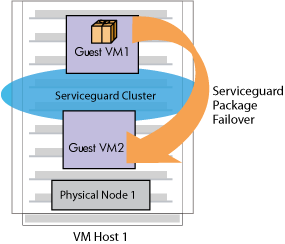
From one guest to another guest in the same VM Host
system
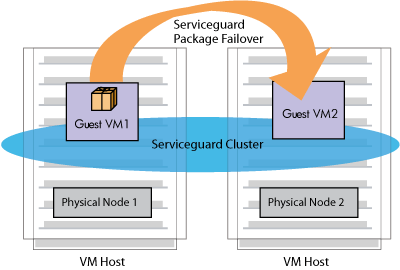
From one guest to another guest in another VM Host
system
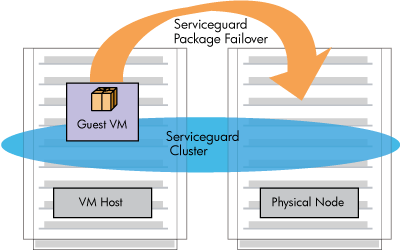
From the guest on a VM Host system to a separate physical
server or nPar
You can even mix and match VMs as Serviceguard
Nodes configurations to meet your specific requirements. The following
sections describe the VMs as Serviceguard Nodes configurations.
Cluster in a Box |
 |
Figure 11-1 shows the configuration of an application package that can fail
over to another guest on the same VM Host system.
In this configuration, the primary node and the
adoptive node are guests running on the same VM Host system. This
cluster does not provide protection against single point of failure
(SPOF), because both the primary cluster member and the adoptive cluster
member are guests on the same physical machine. However, this configuration
is useful in testing environments.
If you are running more than one guest on the
VM Host system, and you need to share the same storage among the guests,
you must change the SHARE attribute of the shared disk to YES using
the hpvmdevmgmt command. For example:
# hpvmdevmgmt -m gdev:/dev/rdisk/disk1:attr:SHARE=YES |
For more information about using the hpvmdevmgmt command, see Section .
Application Failover from Virtual Machine to Virtual Machine |
|
Figure 11-2 shows the configuration of an application package that can fail
over to a guest running on a different VM Host system.
In this configuration, the Serviceguard nodes
are guests running on either separate hard partitions (nPars) or HP
Integrity servers. Note that Integrity VM does not run on soft partitions
(vPars).
Application Failover from Virtual Machine to Physical Machine |
|
Figure 11-3 shows the configuration of an application package
that can fail over to a physical node or partition that is not running
Integrity VM software. In this case, the physical node may be a discreet
physical system, a hard partition (nPar), or a soft partition (vPar).
The Serviceguard cluster consists of a VM Host
system and a Serviceguard node that is not running Integrity VM. The
application configured as a Serviceguard package can fail over to
the physical node. Alternatively, you can run the application on the
physical node and configure the guest on the VM Host system as the
adoptive node.
Configuring VMs as Serviceguard Nodes |
|
To configure a Serviceguard cluster that allows
an application to fail over from one guest to another, perform the
following procedure:
Install Serviceguard on the HP-UX guests that will
run the application.
For the virtual machine and physical node cluster,
install Serviceguard on the physical node.
Ensure that each guest has access to a quorum server
or cluster lock disk.
Use the hpvmstatus command to make
sure the guest is running and to verify the guest name.
Use the cmquerycl command to specify
the nodes to be included in the cluster and to generate a template
for the cluster configuration file. For example, to set up a cluster
named gcluster that includes nodes host1 and host2, enter the following command:
# cmquerycl -v -C /etc/cmcluster/gcluster.config -n host1 -n host2 -q quorum-server-host |
Include the -q option if a quorum server is used
on the cluster.
Edit the /etc/cmcluster/cluster-name.config file (where cluster-name is the name of the cluster specified in the cmquerycl command). For details about modifying the information in the cluster
configuration file, see the Managing Serviceguard manual.
Use the following command to verify the contents of
the file:
# cmcheckconf -k -v -C /etc/cmcluster/gcluster.config |
This command ensures that the cluster is configured
properly.
Generate the binary configuration file and distribute
it using the following command:
# cmapplyconf -k -v -C /etc/cmcluster/gcluster.config |
Start the cluster using the following command:
This procedure provides a simple example of creating
guest application packages. For information about how to set up your
Serviceguard configuration, see the Managing Serviceguard manual.

 Printable version