
Chapter 23. The javax.swing Package
This large package contains the most important classes and interfaces of Swing. Swing is a core part of Java 1.2 and is also available as a standard extension to Java 1.1. The GUI component classes are at the heart of Swing. These classes have names that begin with the letter J. Figure 23-1 shows the hierarchy of Swing components in javax.swing. Note that this diagram does not show the fact that all the Swing components implement javax.accessibility.Accessible; see the individual class synopses for this information.
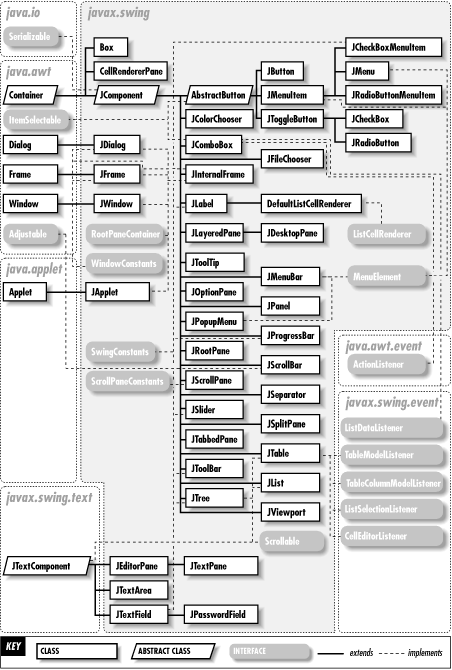
Figure 23-1. Components of the javax.swing package
Most Swing components rely on a model object to hold their state information. Various interfaces define the methods that these state objects must implement, and various abstract and concrete classes implement these interfaces. These model interfaces and classes are recognizable by the word "Model" in their names. Figure 23-2 shows the model objects and layout managers in javax.swing.
Classes with the word "Manager" in their names typically manage some important part of the Swing user-interface or application environment. Other important classes and interfaces defined by this package include: Action, Icon, KeyStroke, Timer, and SwingUtilities. Figure 23-3 shows the rest of the classes and interfaces in javax.swing.
All Swing components are accessible, which means that they implement the javax.accessiblity.Accessible interface and define getAccessibleContext() methods. This method returns a javax.accessibility.AccessibleContext object that provides support to accessibility tools, such as screen readers for the vision impaired. Each accessible component has its own specific subclass of AccessibleContext, which is typically defined as a protected inner class of the component. These AccessibleContext inner classes have been omitted from this chapter and from Figure 23-1 because they contain little useful information and they detract from other, more important classes. Practically everything you need to know about an AccessibleContext subclass can be found in the single-line inner class synopsis that appears in the containing class, the accessible flag of the containing class, and in Chapter 22, "The javax.accessibility Package".
See Chapter 2, "Swing and AWTArchitecture", for an overview of GUI programming in Java, and see Chapter 3, "Swing Programming Topics", for detailed explanations of many important Swing components and capabilities.
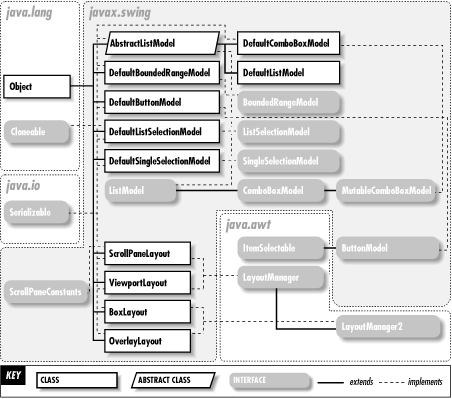
Figure 23-2. Models and layout managers of the java.swing package
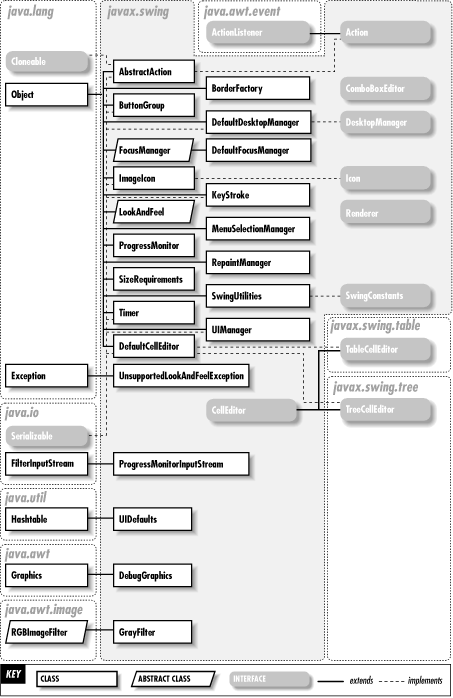
Figure 23-3. Other classes and interfaces of the javax.swing package
| AbstractAction | Java 1.2 | |
|
||
| javax.swing | cloneable serializable | |

This class implements all the methods of the Action interface except for the crucial actionPerformed() method that provides the substance of the action. Subclassing AbstractAction is one of the easiest ways to define Action objects for your application. Note the one- and two-argument constructors. These constructors automatically define name and icon attributes for the action and are simpler than using putValue().
| public abstract class AbstractAction implements Action, Cloneable, Serializable { | ||
| // | Public Constructors | |
| public AbstractAction (); | ||
| public AbstractAction (String name); | ||
| public AbstractAction (String name, Icon icon); | ||
| // | Event Registration Methods (by event name) | |
| public void addPropertyChangeListener (java.beans.PropertyChangeListener listener); | Implements:Action synchronized | |
| public void removePropertyChangeListener (java.beans.PropertyChangeListener listener); | Implements:Action synchronized | |
| // | Methods Implementing Action | |
| public void addPropertyChangeListener (java.beans.PropertyChangeListener listener); | synchronized | |
| public Object getValue (String key); | ||
| public boolean isEnabled (); | ||
| public void putValue (String key, Object newValue); | synchronized | |
| public void removePropertyChangeListener (java.beans.PropertyChangeListener listener); | synchronized | |
| public void setEnabled (boolean newValue); | synchronized | |
| // | Methods Implementing ActionListener | |
| public abstract void actionPerformed (java.awt.event.ActionEvent e); | ||
| // | Protected Methods Overriding Object | |
| protected Object clone () throws CloneNotSupportedException; | ||
| // | Protected Instance Methods | |
| protected void firePropertyChange (String propertyName, Object oldValue, Object newValue); | ||
| // | Protected Instance Fields | |
| protected javax.swing.event.SwingPropertyChangeSupport changeSupport ; | ||
| protected boolean enabled ; | ||
| } | ||
Hierarchy: Object-->AbstractAction(Action(java.awt.event.ActionListener(java.util.EventListener)),Cloneable,Serializable)
Subclasses: javax.swing.text.TextAction
| AbstractButton | Java 1.2 | |
|
||
| javax.swing | serializable swing component | |
This class serves as the superclass for Swing components with buttonlike behavior. Because it is a general-purpose class, it defines a large number of properties. Like Swing labels, Swing buttons can display text and/or an icon, and several properties specify the relative positioning of the text and icon. (See JLabel for details on these positioning properties.) Swing buttons can display different icons when in different states. In addition to the default icon, AbstractButton has properties that specify icons to be displayed when the button is pressed, selected, disabled, disabled and selected, rolled over, and rolled over and selected. If the rolloverIcon property is specified and if the rolloverEnabled property is true, the rolloverIcon is displayed when the mouse is over the button.
By default, an AbstractButton displays a single line of text in a single font. However, as of Swing 1.1.1 and Java 1.2.2, if the text property begins with "<html>", the button text is formatted as HTML and may contain multiple fonts and multiple lines.
A Swing button may be enabled and disabled with setEnabled(). Disabled buttons are typically displayed with grayed-out graphics, although some other disabled icon can also be specified. A mnemonic can be specified with setMnemonic(). This causes the mnemonic character to be underlined in the button's text and allows the button to be operated via the keyboard.
Swing buttons generate three types of events. A java.awt.event.ActionEvent is generated when any button is pushed. A java.awt.event.ItemEvent is generated when a toggle-type button is selected or deselected. And a javax.swing.event.ChangeEvent is generated when the button's internal state changes--for example, when the mouse pointer enters the button or when the user arms the button by pressing the mouse button.
| public abstract class AbstractButton extends JComponent implements java.awt.ItemSelectable, SwingConstants { | ||
| // | Public Constructors | |
| public AbstractButton (); | ||
| // | Public Constants | |
| public static final String BORDER_PAINTED_CHANGED_PROPERTY ; | ="borderPainted" | |
| public static final String CONTENT_AREA_FILLED_CHANGED_PROPERTY ; | ="contentAreaFilled" | |
| public static final String DISABLED_ICON_CHANGED_PROPERTY ; | ="disabledIcon" | |
| public static final String DISABLED_SELECTED_ICON_CHANGED_PROPERTY ; | ="disabledSelectedIcon" | |
| public static final String FOCUS_PAINTED_CHANGED_PROPERTY ; | ="focusPainted" | |
| public static final String HORIZONTAL_ALIGNMENT_CHANGED_PROPERTY ; | ="horizontalAlignment" | |
| public static final String HORIZONTAL_TEXT_POSITION_CHANGED_PROPERTY ; | ="horizontalTextPosition" | |
| public static final String ICON_CHANGED_PROPERTY ; | ="icon" | |
| public static final String MARGIN_CHANGED_PROPERTY ; | ="margin" | |
| public static final String MNEMONIC_CHANGED_PROPERTY ; | ="mnemonic" | |
| public static final String MODEL_CHANGED_PROPERTY ; | ="model" | |
| public static final String PRESSED_ICON_CHANGED_PROPERTY ; | ="pressedIcon" | |
| public static final String ROLLOVER_ENABLED_CHANGED_PROPERTY ; | ="rolloverEnabled" | |
| public static final String ROLLOVER_ICON_CHANGED_PROPERTY ; | ="rolloverIcon" | |
| public static final String ROLLOVER_SELECTED_ICON_CHANGED_PROPERTY ; | ="rolloverSelectedIcon" | |
| public static final String SELECTED_ICON_CHANGED_PROPERTY ; | ="selectedIcon" | |
| public static final String TEXT_CHANGED_PROPERTY ; | ="text" | |
| public static final String VERTICAL_ALIGNMENT_CHANGED_PROPERTY ; | ="verticalAlignment" | |
| public static final String VERTICAL_TEXT_POSITION_CHANGED_PROPERTY ; | ="verticalTextPosition" | |
| // | Inner Classes | |
| ; | ||
| ; | ||
| // | Event Registration Methods (by event name) | |
| public void addActionListener (java.awt.event.ActionListener l); | ||
| public void removeActionListener (java.awt.event.ActionListener l); | ||
| public void addChangeListener (javax.swing.event.ChangeListener l); | ||
| public void removeChangeListener (javax.swing.event.ChangeListener l); | ||
| public void addItemListener (java.awt.event.ItemListener l); | Implements:ItemSelectable | |
| public void removeItemListener (java.awt.event.ItemListener l); | Implements:ItemSelectable | |
| // | Property Accessor Methods (by property name) | |
| public String getActionCommand (); | ||
| public void setActionCommand (String actionCommand); | ||
| public boolean isBorderPainted (); | ||
| public void setBorderPainted (boolean b); | bound | |
| public boolean isContentAreaFilled (); | ||
| public void setContentAreaFilled (boolean b); | bound | |
| public Icon getDisabledIcon (); | ||
| public void setDisabledIcon (Icon disabledIcon); | bound | |
| public Icon getDisabledSelectedIcon (); | ||
| public void setDisabledSelectedIcon (Icon disabledSelectedIcon); | ||
| public boolean isFocusPainted (); | ||
| public void setFocusPainted (boolean b); | bound | |
| public int getHorizontalAlignment (); | ||
| public void setHorizontalAlignment (int alignment); | bound | |
| public int getHorizontalTextPosition (); | ||
| public void setHorizontalTextPosition (int textPosition); | bound | |
| public Icon getIcon (); | ||
| public void setIcon (Icon defaultIcon); | bound | |
| public java.awt.Insets getMargin (); | ||
| public void setMargin (java.awt.Insets m); | bound | |
| public int getMnemonic (); | ||
| public void setMnemonic (int mnemonic); | bound | |
| public void setMnemonic (char mnemonic); | ||
| public ButtonModel getModel (); | ||
| public void setModel (ButtonModel newModel); | bound | |
| public Icon getPressedIcon (); | ||
| public void setPressedIcon (Icon pressedIcon); | bound | |
| public boolean isRolloverEnabled (); | ||
| public void setRolloverEnabled (boolean b); | bound | |
| public Icon getRolloverIcon (); | ||
| public void setRolloverIcon (Icon rolloverIcon); | bound | |
| public Icon getRolloverSelectedIcon (); | ||
| public void setRolloverSelectedIcon (Icon rolloverSelectedIcon); | bound | |
| public boolean isSelected (); | ||
| public void setSelected (boolean b); | ||
| public Icon getSelectedIcon (); | ||
| public void setSelectedIcon (Icon selectedIcon); | bound | |
| public Object[ ] getSelectedObjects (); | Implements:ItemSelectable synchronized | |
| public String getText (); | ||
| public void setText (String text); | bound preferred | |
| public javax.swing.plaf.ButtonUI getUI (); | ||
| public void setUI (javax.swing.plaf.ButtonUI ui); | ||
| public int getVerticalAlignment (); | ||
| public void setVerticalAlignment (int alignment); | bound | |
| public int getVerticalTextPosition (); | ||
| public void setVerticalTextPosition (int textPosition); | bound | |
| // | Public Instance Methods | |
| public void doClick (); | ||
| public void doClick (int pressTime); | ||
| // | Methods Implementing ItemSelectable | |
| public void addItemListener (java.awt.event.ItemListener l); | ||
| public Object[ ] getSelectedObjects (); | synchronized | |
| public void removeItemListener (java.awt.event.ItemListener l); | ||
| // | Public Methods Overriding JComponent | |
| public void setEnabled (boolean b); | ||
| public void updateUI (); | empty | |
| // | Protected Methods Overriding JComponent | |
| protected void paintBorder (java.awt.Graphics g); | ||
| protected String paramString (); | ||
| // | Protected Instance Methods | |
| protected int checkHorizontalKey (int key, String exception); | ||
| protected int checkVerticalKey (int key, String exception); | ||
| protected java.awt.event.ActionListener createActionListener (); | ||
| protected javax.swing.event.ChangeListener createChangeListener (); | ||
| protected java.awt.event.ItemListener createItemListener (); | ||
| protected void fireActionPerformed (java.awt.event.ActionEvent event); | ||
| protected void fireItemStateChanged (java.awt.event.ItemEvent event); | ||
| protected void fireStateChanged (); | ||
| protected void init (String text, Icon icon); | ||
| // | Protected Instance Fields | |
| protected java.awt.event.ActionListener actionListener ; | ||
| protected transient javax.swing.event.ChangeEvent changeEvent ; | ||
| protected javax.swing.event.ChangeListener changeListener ; | ||
| protected java.awt.event.ItemListener itemListener ; | ||
| protected ButtonModel model ; | ||
| // | Deprecated Public Methods | |
| # | public String getLabel (); | |
| # | public void setLabel (String label); | bound |
| } | ||
Hierarchy: Object-->Component(java.awt.image.ImageObserver,java.awt.MenuContainer,Serializable)-->Container-->JComponent(Serializable)-->AbstractButton(java.awt.ItemSelectable,SwingConstants)
Subclasses: JButton, JMenuItem, JToggleButton
Passed To: ButtonGroup.{add(), remove()}
| AbstractButton.ButtonChangeListener | Java 1.2 | |
|
||
| javax.swing | serializable | |
This protected inner class is a simple Serializable implementation of javax.swing. event.ChangeListener that AbstractButton uses internally to receive change notifications from its ButtonModel. Application-level code never needs to use this class.
| protected class AbstractButton.ButtonChangeListener implements javax.swing.event.ChangeListener, Serializable { | ||
| // | No Constructor | |
| // | Methods Implementing ChangeListener | |
| public void stateChanged (javax.swing.event.ChangeEvent e); | ||
| } | ||
| AbstractListModel | Java 1.2 | |
|
||
| javax.swing | serializable model | |
This abstract class provides a partial implementation of the ListModel interface. Subclassing AbstractListModel is usually easier than implementing ListModel from scratch. Note, however, that the DefaultListModel class is a usually an adequate ListModel implementation, so you shouldn't need to subclass AbstractListModel very often. Furthermore, the JList component provides convenience methods that often make it unnecessary to work with any kind of ListModel at all.
| public abstract class AbstractListModel implements ListModel, Serializable { | ||
| // | Public Constructors | |
| public AbstractListModel (); | ||
| // | Event Registration Methods (by event name) | |
| public void addListDataListener (javax.swing.event.ListDataListener l); | Implements:ListModel | |
| public void removeListDataListener (javax.swing.event.ListDataListener l); | Implements:ListModel | |
| // | Methods Implementing ListModel | |
| public void addListDataListener (javax.swing.event.ListDataListener l); | ||
| public abstract Object getElementAt (int index); | ||
| public abstract int getSize (); | ||
| public void removeListDataListener (javax.swing.event.ListDataListener l); | ||
| // | Protected Instance Methods | |
| protected void fireContentsChanged (Object source, int index0, int index1); | ||
| protected void fireIntervalAdded (Object source, int index0, int index1); | ||
| protected void fireIntervalRemoved (Object source, int index0, int index1); | ||
| // | Protected Instance Fields | |
| protected javax.swing.event.EventListenerList listenerList ; | ||
| } | ||
Hierarchy: Object-->AbstractListModel(ListModel,Serializable)
Subclasses: DefaultComboBoxModel, DefaultListModel
| Action | Java 1.2 | |
|
||
| javax.swing | event listener | |
An action is a single piece of application functionality, such as saving a file or printing a document. The actions performed by an application may be made available to the user in several different ways: in a pulldown or popup menu, in a toolbar, and from a keyboard binding, for example.
The Action interface extends java.awt.event.ActionListener and adds the ability to enable or disable the action. If an editor contains an empty document, its print action probably should not be enabled, for example. setEnabled() specifies whether the action is enabled. When an action is enabled or disabled, this change is broadcast by a java.beans.PropertyChangeEvent.
The Action interface also defines methods that associate attributes with an action. The putValue() method maps an arbitrary attribute name to an arbitrary attribute value. The getValue() method queries an attribute value. The constants defined by the Action interface specify predefined names for commonly used attributes. NAME and SMALL_ICON are the most commonly used. Finally, the actionPerformed() method, inherited from ActionListener, is responsible for performing the action.
JMenu, JPopupMenu, and JToolBar define methods that allow Action objects to be added to them. These methods query the action for its name and an icon that represents the action and use this information to present the action to the user. If the action is enabled, the component allows the user to invoke it. The JTextComponent and Keymap classes from the javax.swing.text package additionally provide techniques for mapping keystrokes to Action objects.
AbstractAction provides a useful starting point for defining your own Action classes.
| public abstract interface Action extends java.awt.event.ActionListener { | ||
| // | Public Constants | |
| public static final String DEFAULT ; | ="Default" | |
| public static final String LONG_DESCRIPTION ; | ="LongDescription" | |
| public static final String NAME ; | ="Name" | |
| public static final String SHORT_DESCRIPTION ; | ="ShortDescription" | |
| public static final String SMALL_ICON ; | ="SmallIcon" | |
| // | Event Registration Methods (by event name) | |
| public abstract void addPropertyChangeListener (java.beans.PropertyChangeListener listener); | ||
| public abstract void removePropertyChangeListener (java.beans.PropertyChangeListener listener); | ||
| // | Public Instance Methods | |
| public abstract Object getValue (String key); | ||
| public abstract boolean isEnabled (); | ||
| public abstract void putValue (String key, Object value); | ||
| public abstract void setEnabled (boolean b); | ||
| } | ||
Hierarchy: (Action(java.awt.event.ActionListener(java.util.EventListener)))
Implementations: AbstractAction
Passed To: JMenu.{add(), insert()}, JPopupMenu.{add(), insert()}, JToolBar.add(), javax.swing.text.JTextComponent.loadKeymap(), javax.swing.text.Keymap.{addActionForKeyStroke(), getKeyStrokesForAction(), setDefaultAction()}, javax.swing.text.TextAction.augmentList()
Returned By: JTextField.getActions(), javax.swing.text.DefaultEditorKit.getActions(), javax.swing.text.EditorKit.getActions(), javax.swing.text.JTextComponent.getActions(), javax.swing.text.Keymap.{getAction(), getBoundActions(), getDefaultAction()}, javax.swing.text.StyledEditorKit.getActions(), javax.swing.text.TextAction.augmentList(), javax.swing.text.html.HTMLEditorKit.getActions()
| BorderFactory | Java 1.2 | |
|
||
| javax.swing | ||
The static methods of this class return various types of Border objects. These methods may return previously created shared objects, making their use more memory-efficient than creating unshared Border objects with the new operator. See the various classes of the javax.swing.border package for more information on the types of borders supported by Swing.
| public class BorderFactory { | ||
| // | No Constructor | |
| // | Public Class Methods | |
| public static javax.swing.border.Border createBevelBorder (int type); | ||
| public static javax.swing.border.Border createBevelBorder (int type, java.awt.Color highlight, java.awt.Color shadow); | ||
| public static javax.swing.border.Border createBevelBorder (int type, java.awt.Color highlightOuter, java.awt.Color highlightInner, java.awt.Color shadowOuter, java.awt.Color shadowInner); | ||
| public static javax.swing.border.CompoundBorder createCompoundBorder (); | ||
| public static javax.swing.border.CompoundBorder createCompoundBorder (javax.swing.border.Border outsideBorder, javax.swing.border.Border insideBorder); | ||
| public static javax.swing.border.Border createEmptyBorder (); | ||
| public static javax.swing.border.Border createEmptyBorder (int top, int left, int bottom, int right); | ||
| public static javax.swing.border.Border createEtchedBorder (); | ||
| public static javax.swing.border.Border createEtchedBorder (java.awt.Color highlight, java.awt.Color shadow); | ||
| public static javax.swing.border.Border createLineBorder (java.awt.Color color); | ||
| public static javax.swing.border.Border createLineBorder (java.awt.Color color, int thickness); | ||
| public static javax.swing.border.Border createLoweredBevelBorder (); | ||
| public static javax.swing.border.MatteBorder createMatteBorder (int top, int left, int bottom, int right, Icon tileIcon); | ||
| public static javax.swing.border.MatteBorder createMatteBorder (int top, int left, int bottom, int right, java.awt.Color color); | ||
| public static javax.swing.border.Border createRaisedBevelBorder (); | ||
| public static javax.swing.border.TitledBorder createTitledBorder (javax.swing.border.Border border); | ||
| public static javax.swing.border.TitledBorder createTitledBorder (String title); | ||
| public static javax.swing.border.TitledBorder createTitledBorder (javax.swing.border.Border border, String title); | ||
| public static javax.swing.border.TitledBorder createTitledBorder (javax.swing.border.Border border, String title, int titleJustification, int titlePosition); | ||
| public static javax.swing.border.TitledBorder createTitledBorder (javax.swing.border.Border border, String title, int titleJustification, int titlePosition, java.awt.Font titleFont); | ||
| public static javax.swing.border.TitledBorder createTitledBorder (javax.swing.border.Border border, String title, int titleJustification, int titlePosition, java.awt.Font titleFont, java.awt.Color titleColor); | ||
| } | ||
| BoundedRangeModel | Java 1.2 | |
|
||
| javax.swing | model | |
This interface defines the data model used by the JScrollBar, JSlider, and JProgressBar components. The model is defined by four integer properties that obey the following relationship:
minimum <= value <= value+extent <= maximum
The value property specifies the value currently displayed by the component. It must be between the values specified by the minimum and maximum properties. The extent property specifies the amount of data displayed. For JScrollBar components, this property specifies the size of the scrollbar thumb, or knob. Note the convenience method setRangeProperties() that sets all properties of the model at once.
When any value changes, interested listeners are notified with a javax.swing.event.ChangeEvent. One additional property defined by this interface is valueIsAdjusting. If this property is true, it means that a series of rapid property changes (such as those caused when the user drags the scrollbar) is in progress. This property is false for the last change in the series, so listeners can therefore choose to ignore transient changes that have this property set to true.
DefaultBoundedRangeModel is an implementation of this interface appropriate for most uses.
| public abstract interface BoundedRangeModel { | ||
| // | Event Registration Methods (by event name) | |
| public abstract void addChangeListener (javax.swing.event.ChangeListener x); | ||
| public abstract void removeChangeListener (javax.swing.event.ChangeListener x); | ||
| // | Property Accessor Methods (by property name) | |
| public abstract int getExtent (); | ||
| public abstract void setExtent (int newExtent); | ||
| public abstract int getMaximum (); | ||
| public abstract void setMaximum (int newMaximum); | ||
| public abstract int getMinimum (); | ||
| public abstract void setMinimum (int newMinimum); | ||
| public abstract int getValue (); | ||
| public abstract void setValue (int newValue); | ||
| public abstract boolean getValueIsAdjusting (); | ||
| public abstract void setValueIsAdjusting (boolean b); | ||
| // | Public Instance Methods | |
| public abstract void setRangeProperties (int value, int extent, int min, int max, boolean adjusting); | ||
| } | ||
Implementations: DefaultBoundedRangeModel
Passed To: JProgressBar.{JProgressBar(), setModel()}, JScrollBar.setModel(), JSlider.{JSlider(), setModel()}
Returned By: JProgressBar.getModel(), JScrollBar.getModel(), JSlider.getModel(), JTextField.getHorizontalVisibility()
Type Of: JProgressBar.model, JScrollBar.model, JSlider.sliderModel
| Box | Java 1.2 | |
|
||
| javax.swing | serializable accessible swing component | |
This class is a container that uses the BoxLayout layout manager to arrange its children in a row or a column. Pass one of the constants BoxLayout.X_AXIS or BoxLayout.Y_AXIS to the constructor to create a horizontal or vertical box or use the static methods createHorizontalBox() and createVerticalBox(). A horizontal box attempts to lay out its children from left to right, one next to the other, at their preferred widths and tries to make each child as tall as the tallest child. A vertical box does the opposite: it lays out its children from top to bottom, trying both to maintain the preferred height of each child and to make all children as wide as the widest child.
The arrangement of children in a Box is often improved with the use of struts and glue: invisible components that exist only to improve the appearance of a layout. A horizontal strut has 0 height and has a specified value as its minimum, preferred, and maximum width. A vertical strut has 0 width and a fixed height. Struts are useful for inserting fixed amounts of space between components in a Box. Use createHorizontalStrut() and createVerticalStrut() to create struts.
Glue is a component with a preferred width or height of 0 but with an infinite maximum width or height. Glue is used to specify where extra space in a layout should go. For example, if you have three fixed-sized JButton components in a row that is wider than the sum of the button widths, placing glue between them forces them to be evenly spaced. Use createHorizontalGlue() and createVerticalGlue() to create glue components.
| public class Box extends Container implements Accessible { | ||
| // | Public Constructors | |
| public Box (int axis); | ||
| // | Inner Classes | |
| ; | ||
| ; | ||
| // | Public Class Methods | |
| public static Component createGlue (); | ||
| public static Box createHorizontalBox (); | ||
| public static Component createHorizontalGlue (); | ||
| public static Component createHorizontalStrut (int width); | ||
| public static Component createRigidArea (java.awt.Dimension d); | ||
| public static Box createVerticalBox (); | ||
| public static Component createVerticalGlue (); | ||
| public static Component createVerticalStrut (int height); | ||
| // | Property Accessor Methods (by property name) | |
| public AccessibleContext getAccessibleContext (); | Implements:Accessible | |
| public void setLayout (java.awt.LayoutManager l); | Overrides:Container | |
| // | Methods Implementing Accessible | |
| public AccessibleContext getAccessibleContext (); | ||
| // | Protected Instance Fields | |
| protected AccessibleContext accessibleContext ; | ||
| } | ||
Hierarchy: Object-->Component(java.awt.image.ImageObserver,java.awt.MenuContainer,Serializable)-->Container-->Box(Accessible)
Returned By: Box.{createHorizontalBox(), createVerticalBox()}
| Box.Filler | Java 1.2 | |
|
||
| javax.swing | serializable accessible swing component | |
This class implements the invisible component used to create struts and glue for use with the Box container. It allows you to create an invisible component with any specified minimum, preferred, and maximum sizes.
| public static class Box.Filler extends Component implements Accessible { | ||
| // | Public Constructors | |
| public Filler (java.awt.Dimension min, java.awt.Dimension pref, java.awt.Dimension max); | ||
| // | Inner Classes | |
| ; | ||
| // | Property Accessor Methods (by property name) | |
| public AccessibleContext getAccessibleContext (); | Implements:Accessible | |
| public java.awt.Dimension getMaximumSize (); | Overrides:Component | |
| public java.awt.Dimension getMinimumSize (); | Overrides:Component | |
| public java.awt.Dimension getPreferredSize (); | Overrides:Component | |
| // | Public Instance Methods | |
| public void changeShape (java.awt.Dimension min, java.awt.Dimension pref, java.awt.Dimension max); | ||
| // | Methods Implementing Accessible | |
| public AccessibleContext getAccessibleContext (); | ||
| // | Protected Instance Fields | |
| protected AccessibleContext accessibleContext ; | ||
| } | ||
| BoxLayout | Java 1.2 | |
|
||
| javax.swing | serializable layout manager | |
This class is a layout manager that arranges its children into a row or a column. It is the layout manager used by the Box container. See Box for details.
| public class BoxLayout implements java.awt.LayoutManager2, Serializable { | ||
| // | Public Constructors | |
| public BoxLayout (Container target, int axis); | ||
| // | Public Constants | |
| public static final int X_AXIS ; | =0 | |
| public static final int Y_AXIS ; | =1 | |
| // | Methods Implementing LayoutManager | |
| public void addLayoutComponent (String name, Component comp); | empty | |
| public void layoutContainer (Container target); | ||
| public java.awt.Dimension minimumLayoutSize (Container target); | ||
| public java.awt.Dimension preferredLayoutSize (Container target); | ||
| public void removeLayoutComponent (Component comp); | empty | |
| // | Methods Implementing LayoutManager2 | |
| public void addLayoutComponent (Component comp, Object constraints); | empty | |
| public float getLayoutAlignmentX (Container target); | ||
| public float getLayoutAlignmentY (Container target); | ||
| public void invalidateLayout (Container target); | ||
| public java.awt.Dimension maximumLayoutSize (Container target); | ||
| } | ||
Hierarchy: Object-->BoxLayout(java.awt.LayoutManager2(java.awt.LayoutManager),Serializable)
| ButtonGroup | Java 1.2 | |
|
||
| javax.swing | serializable | |
This class enforces mutual exclusion (radio behavior) for a group of toggle buttons. Once buttons are added to a ButtonGroup with the add() method, mutual exclusion is automatic, and no further action is necessary.
| public class ButtonGroup implements Serializable { | ||
| // | Public Constructors | |
| public ButtonGroup (); | ||
| // | Property Accessor Methods (by property name) | |
| public java.util.Enumeration getElements (); | ||
| public ButtonModel getSelection (); | default:null | |
| // | Public Instance Methods | |
| public void add (AbstractButton b); | ||
| public boolean isSelected (ButtonModel m); | ||
| public void remove (AbstractButton b); | ||
| public void setSelected (ButtonModel m, boolean b); | ||
| // | Protected Instance Fields | |
| protected java.util.Vector buttons ; | ||
| } | ||
Hierarchy: Object-->ButtonGroup(Serializable)
Passed To: ButtonModel.setGroup(), DefaultButtonModel.setGroup()
Type Of: DefaultButtonModel.group
| ButtonModel | Java 1.2 | |
|
||
| javax.swing | model | |
This interface defines the model for Swing buttons. This model consists of five boolean properties that specify the current selection state of the button and three other properties that specify an optional mnemonic, ButtonGroup, and action command (a string passed with a java.awt.event.ActionEvent) for the button.
| public abstract interface ButtonModel extends java.awt.ItemSelectable { | ||
| // | Event Registration Methods (by event name) | |
| public abstract void addActionListener (java.awt.event.ActionListener l); | ||
| public abstract void removeActionListener (java.awt.event.ActionListener l); | ||
| public abstract void addChangeListener (javax.swing.event.ChangeListener l); | ||
| public abstract void removeChangeListener (javax.swing.event.ChangeListener l); | ||
| public abstract void addItemListener (java.awt.event.ItemListener l); | ||
| public abstract void removeItemListener (java.awt.event.ItemListener l); | ||
| // | Property Accessor Methods (by property name) | |
| public abstract String getActionCommand (); | ||
| public abstract void setActionCommand (String s); | ||
| public abstract boolean isArmed (); | ||
| public abstract void setArmed (boolean b); | ||
| public abstract boolean isEnabled (); | ||
| public abstract void setEnabled (boolean b); | ||
| public abstract int getMnemonic (); | ||
| public abstract void setMnemonic (int key); | ||
| public abstract boolean isPressed (); | ||
| public abstract void setPressed (boolean b); | ||
| public abstract boolean isRollover (); | ||
| public abstract void setRollover (boolean b); | ||
| public abstract boolean isSelected (); | ||
| public abstract void setSelected (boolean b); | ||
| // | Public Instance Methods | |
| public abstract void setGroup (ButtonGroup group); | ||
| } | ||
Hierarchy: (ButtonModel(java.awt.ItemSelectable))
Implementations: DefaultButtonModel
Passed To: AbstractButton.setModel(), ButtonGroup.{isSelected(), setSelected()}, JMenu.setModel()
Returned By: AbstractButton.getModel(), ButtonGroup.getSelection()
Type Of: AbstractButton.model
| CellEditor | Java 1.2 | |
|
||
| javax.swing | ||
This interface defines general methods that must be implemented by any cell editor object. isCellEditable() should return true if the cell is editable and if the specified event is an appropriate event to trigger an edit. (For example, some programs might require a double-click to edit a cell.) shouldSelectCell() should return true if the given event should cause the cell to become selected or false otherwise. However, this is only a minor secondary purpose of the method. Despite its name, the primary purpose of shouldSelectCell() is to cause the cell editor to begin editing the cell. The editor can use the specified event to set the initial state (e.g., cursor position) of the editor.
getCellEditorValue() returns the value being edited. cancelCellEditing() cancels an edit. stopCellEditing() instructs the editor to stop editing and accept a partially edited value. An editor may return false if it cannot accept the current value (because the partial value is not valid, for example). If the editor stops or cancels editing itself, it sends a javax.swing.event.ChangeEvent to any registered javax.swing.event.CellEditorListener objects.
javax.swing.table.TableCellEditor and javax.swing.tree.TreeCellEditor are table- and tree-specific cell editor interfaces; DefaultCellEditor is an implementation of both those interfaces.
| public abstract interface CellEditor { | ||
| // | Event Registration Methods (by event name) | |
| public abstract void addCellEditorListener (javax.swing.event.CellEditorListener l); | ||
| public abstract void removeCellEditorListener (javax.swing.event.CellEditorListener l); | ||
| // | Public Instance Methods | |
| public abstract void cancelCellEditing (); | ||
| public abstract Object getCellEditorValue (); | ||
| public abstract boolean isCellEditable (java.util.EventObject anEvent); | ||
| public abstract boolean shouldSelectCell (java.util.EventObject anEvent); | ||
| public abstract boolean stopCellEditing (); | ||
| } | ||
Implementations: javax.swing.table.TableCellEditor, javax.swing.tree.TreeCellEditor
| CellRendererPane | Java 1.2 | |
|
||
| javax.swing | serializable accessible swing component | |
This class is used by Swing components that rely on cell renderer interfaces, such as ListCellRenderer, javax.swing.table.TableCellRenderer, and javax.swing.tree.TreeCellRenderer. The methods of this class are used to paint a single cell renderer component at various specified locations within a container.
| public class CellRendererPane extends Container implements Accessible { | ||
| // | Public Constructors | |
| public CellRendererPane (); | ||
| // | Inner Classes | |
| ; | ||
| // | Property Accessor Methods (by property name) | |
| public AccessibleContext getAccessibleContext (); | Implements:Accessible default:AccessibleCellRendererPane | |
| // | Public Instance Methods | |
| public void paintComponent (java.awt.Graphics g, Component c, Container p, java.awt.Rectangle r); | ||
| public void paintComponent (java.awt.Graphics g, Component c, Container p, int x, int y, int w, int h); | ||
| public void paintComponent (java.awt.Graphics g, Component c, Container p, int x, int y, int w, int h, boolean shouldValidate); | ||
| // | Methods Implementing Accessible | |
| public AccessibleContext getAccessibleContext (); | default:AccessibleCellRendererPane | |
| // | Public Methods Overriding Container | |
| public void invalidate (); | empty | |
| public void paint (java.awt.Graphics g); | empty | |
| public void update (java.awt.Graphics g); | empty | |
| // | Protected Methods Overriding Container | |
| protected void addImpl (Component x, Object constraints, int index); | ||
| // | Protected Instance Fields | |
| protected AccessibleContext accessibleContext ; | ||
| } | ||
Hierarchy: Object-->Component(java.awt.image.ImageObserver,java.awt.MenuContainer,Serializable)-->Container-->CellRendererPane(Accessible)
| ComboBoxEditor | Java 1.2 | |
|
||
| javax.swing | ||
This interface defines the methods that must be implemented by an object that wishes to serve as the editor object for a JComboBox component. It is typically implemented as part of a pluggable look-and-feel and is not normally used by application programmers.
| public abstract interface ComboBoxEditor { | ||
| // | Event Registration Methods (by event name) | |
| public abstract void addActionListener (java.awt.event.ActionListener l); | ||
| public abstract void removeActionListener (java.awt.event.ActionListener l); | ||
| // | Public Instance Methods | |
| public abstract Component getEditorComponent (); | ||
| public abstract Object getItem (); | ||
| public abstract void selectAll (); | ||
| public abstract void setItem (Object anObject); | ||
| } | ||
Passed To: JComboBox.{configureEditor(), setEditor()}
Returned By: JComboBox.getEditor()
Type Of: JComboBox.editor
| ComboBoxModel | Java 1.2 | |
|
||
| javax.swing | model | |
This interface defines the basic model used by the JComboBox component. The JComboBox allows the user to select a value from a list or type a value directly. Therefore, ComboBoxModel extends ListModel to add support for a selected item, in addition to the list of items that ListModel already supports. See also MutableComboBoxModel and DefaultComboBoxModel.
| public abstract interface ComboBoxModel extends ListModel { | ||
| // | Public Instance Methods | |
| public abstract Object getSelectedItem (); | ||
| public abstract void setSelectedItem (Object anItem); | ||
| } | ||
Hierarchy: (ComboBoxModel(ListModel))
Implementations: MutableComboBoxModel
Passed To: JComboBox.{JComboBox(), setModel()}, JComboBox.KeySelectionManager.selectionForKey()
Returned By: JComboBox.getModel()
Type Of: JComboBox.dataModel
| DebugGraphics | Java 1.2 | |
|
||
| javax.swing | ||
This subclass of java.awt.Graphics reimplements most of the methods of its superclass to facilitate debugging of drawing operations. Instances of this class are rarely used directly; programs can enable graphics debugging by calling setDebugGraphicsOptions() on any Swing component.
| public class DebugGraphics extends java.awt.Graphics { | ||
| // | Public Constructors | |
| public DebugGraphics (); | ||
| public DebugGraphics (java.awt.Graphics graphics); | ||
| public DebugGraphics (java.awt.Graphics graphics, JComponent component); | ||
| // | Public Constants | |
| public static final int BUFFERED_OPTION ; | =4 | |
| public static final int FLASH_OPTION ; | =2 | |
| public static final int LOG_OPTION ; | =1 | |
| public static final int NONE_OPTION ; | =-1 | |
| // | Public Class Methods | |
| public static java.awt.Color flashColor (); | ||
| public static int flashCount (); | ||
| public static int flashTime (); | ||
| public static java.io.PrintStream logStream (); | ||
| public static void setFlashColor (java.awt.Color flashColor); | ||
| public static void setFlashCount (int flashCount); | ||
| public static void setFlashTime (int flashTime); | ||
| public static void setLogStream (java.io.PrintStream stream); | ||
| // | Property Accessor Methods (by property name) | |
| public java.awt.Shape getClip (); | Overrides:Graphics | |
| public void setClip (java.awt.Shape clip); | Overrides:Graphics | |
| public void setClip (int x, int y, int width, int height); | Overrides:Graphics | |
| public java.awt.Rectangle getClipBounds (); | Overrides:Graphics | |
| public java.awt.Color getColor (); | Overrides:Graphics | |
| public void setColor (java.awt.Color aColor); | Overrides:Graphics | |
| public int getDebugOptions (); | default:0 | |
| public void setDebugOptions (int options); | ||
| public boolean isDrawingBuffer (); | default:false | |
| public java.awt.Font getFont (); | Overrides:Graphics | |
| public void setFont (java.awt.Font aFont); | Overrides:Graphics | |
| public java.awt.FontMetrics getFontMetrics (); | Overrides:Graphics | |
| public java.awt.FontMetrics getFontMetrics (java.awt.Font f); | Overrides:Graphics | |
| // | Public Methods Overriding Graphics | |
| public void clearRect (int x, int y, int width, int height); | ||
| public void clipRect (int x, int y, int width, int height); | ||
| public void copyArea (int x, int y, int width, int height, int destX, int destY); | ||
| public java.awt.Graphics create (); | ||
| public java.awt.Graphics create (int x, int y, int width, int height); | ||
| public void dispose (); | ||
| public void draw3DRect (int x, int y, int width, int height, boolean raised); | ||
| public void drawArc (int x, int y, int width, int height, int startAngle, int arcAngle); | ||
| public void drawBytes (byte[ ] data, int offset, int length, int x, int y); | ||
| public void drawChars (char[ ] data, int offset, int length, int x, int y); | ||
| public boolean drawImage (java.awt.Image img, int x, int y, java.awt.image.ImageObserver observer); | ||
| public boolean drawImage (java.awt.Image img, int x, int y, java.awt.Color bgcolor, java.awt.image.ImageObserver observer); | ||
| public boolean drawImage (java.awt.Image img, int x, int y, int width, int height, java.awt.image.ImageObserver observer); | ||
| public boolean drawImage (java.awt.Image img, int x, int y, int width, int height, java.awt.Color bgcolor, java.awt.image.ImageObserver observer); | ||
| public boolean drawImage (java.awt.Image img, int dx1, int dy1, int dx2, int dy2, int sx1, int sy1, int sx2, int sy2, java.awt.image.ImageObserver observer); | ||
| public boolean drawImage (java.awt.Image img, int dx1, int dy1, int dx2, int dy2, int sx1, int sy1, int sx2, int sy2, java.awt.Color bgcolor, java.awt.image.ImageObserver observer); | ||
| public void drawLine (int x1, int y1, int x2, int y2); | ||
| public void drawOval (int x, int y, int width, int height); | ||
| public void drawPolygon (int[ ] xPoints, int[ ] yPoints, int nPoints); | ||
| public void drawPolyline (int[ ] xPoints, int[ ] yPoints, int nPoints); | ||
| public void drawRect (int x, int y, int width, int height); | ||
| public void drawRoundRect (int x, int y, int width, int height, int arcWidth, int arcHeight); | ||
| public void drawString (java.text.AttributedCharacterIterator iterator, int x, int y); | ||
| public void drawString (String aString, int x, int y); | ||
| public void fill3DRect (int x, int y, int width, int height, boolean raised); | ||
| public void fillArc (int x, int y, int width, int height, int startAngle, int arcAngle); | ||
| public void fillOval (int x, int y, int width, int height); | ||
| public void fillPolygon (int[ ] xPoints, int[ ] yPoints, int nPoints); | ||
| public void fillRect (int x, int y, int width, int height); | ||
| public void fillRoundRect (int x, int y, int width, int height, int arcWidth, int arcHeight); | ||
| public void setPaintMode (); | ||
| public void setXORMode (java.awt.Color aColor); | ||
| public void translate (int x, int y); | ||
| } | ||
Hierarchy: Object-->java.awt.Graphics-->DebugGraphics
| DefaultBoundedRangeModel | Java 1.2 | |
|
||
| javax.swing | serializable model | |
This class is an implementation of the BoundedRangeModel appropriate for most uses. See BoundedRangeModel for details.
| public class DefaultBoundedRangeModel implements BoundedRangeModel, Serializable { | ||
| // | Public Constructors | |
| public DefaultBoundedRangeModel (); | ||
| public DefaultBoundedRangeModel (int value, int extent, int min, int max); | ||
| // | Event Registration Methods (by event name) | |
| public void addChangeListener (javax.swing.event.ChangeListener l); | Implements:BoundedRangeModel | |
| public void removeChangeListener (javax.swing.event.ChangeListener l); | Implements:BoundedRangeModel | |
| // | Methods Implementing BoundedRangeModel | |
| public void addChangeListener (javax.swing.event.ChangeListener l); | ||
| public int getExtent (); | default:0 | |
| public int getMaximum (); | default:100 | |
| public int getMinimum (); | default:0 | |
| public int getValue (); | default:0 | |
| public boolean getValueIsAdjusting (); | default:false | |
| public void removeChangeListener (javax.swing.event.ChangeListener l); | ||
| public void setExtent (int n); | ||
| public void setMaximum (int n); | ||
| public void setMinimum (int n); | ||
| public void setRangeProperties (int newValue, int newExtent, int newMin, int newMax, boolean adjusting); | ||
| public void setValue (int n); | ||
| public void setValueIsAdjusting (boolean b); | ||
| // | Public Methods Overriding Object | |
| public String toString (); | ||
| // | Protected Instance Methods | |
| protected void fireStateChanged (); | ||
| // | Protected Instance Fields | |
| protected transient javax.swing.event.ChangeEvent changeEvent ; | ||
| protected javax.swing.event.EventListenerList listenerList ; | ||
| } | ||
Hierarchy: Object-->DefaultBoundedRangeModel(BoundedRangeModel,Serializable)
| DefaultButtonModel | Java 1.2 | |
|
||
| javax.swing | serializable model | |
This class is a straightforward implementation of the ButtonModel interface that is suitable for most uses. It is the default model for JButton and JMenuItem.
| public class DefaultButtonModel implements ButtonModel, Serializable { | ||
| // | Public Constructors | |
| public DefaultButtonModel (); | ||
| // | Public Constants | |
| public static final int ARMED ; | =1 | |
| public static final int ENABLED ; | =8 | |
| public static final int PRESSED ; | =4 | |
| public static final int ROLLOVER ; | =16 | |
| public static final int SELECTED ; | =2 | |
| // | Event Registration Methods (by event name) | |
| public void addActionListener (java.awt.event.ActionListener l); | Implements:ButtonModel | |
| public void removeActionListener (java.awt.event.ActionListener l); | Implements:ButtonModel | |
| public void addChangeListener (javax.swing.event.ChangeListener l); | Implements:ButtonModel | |
| public void removeChangeListener (javax.swing.event.ChangeListener l); | Implements:ButtonModel | |
| public void addItemListener (java.awt.event.ItemListener l); | Implements:ButtonModel | |
| public void removeItemListener (java.awt.event.ItemListener l); | Implements:ButtonModel | |
| // | Methods Implementing ButtonModel | |
| public void addActionListener (java.awt.event.ActionListener l); | ||
| public void addChangeListener (javax.swing.event.ChangeListener l); | ||
| public void addItemListener (java.awt.event.ItemListener l); | ||
| public String getActionCommand (); | default:null | |
| public int getMnemonic (); | default:0 | |
| public boolean isArmed (); | default:false | |
| public boolean isEnabled (); | default:true | |
| public boolean isPressed (); | default:false | |
| public boolean isRollover (); | default:false | |
| public boolean isSelected (); | default:false | |
| public void removeActionListener (java.awt.event.ActionListener l); | ||
| public void removeChangeListener (javax.swing.event.ChangeListener l); | ||
| public void removeItemListener (java.awt.event.ItemListener l); | ||
| public void setActionCommand (String actionCommand); | ||
| public void setArmed (boolean b); | ||
| public void setEnabled (boolean b); | ||
| public void setGroup (ButtonGroup group); | ||
| public void setMnemonic (int key); | ||
| public void setPressed (boolean b); | ||
| public void setRollover (boolean b); | ||
| public void setSelected (boolean b); | ||
| // | Methods Implementing ItemSelectable | |
| public Object[ ] getSelectedObjects (); | constant default:null | |
| // | Protected Instance Methods | |
| protected void fireActionPerformed (java.awt.event.ActionEvent e); | ||
| protected void fireItemStateChanged (java.awt.event.ItemEvent e); | ||
| protected void fireStateChanged (); | ||
| // | Protected Instance Fields | |
| protected String actionCommand ; | ||
| protected transient javax.swing.event.ChangeEvent changeEvent ; | ||
| protected ButtonGroup group ; | ||
| protected javax.swing.event.EventListenerList listenerList ; | ||
| protected int mnemonic ; | ||
| protected int stateMask ; | ||
| } | ||
Hierarchy: Object-->DefaultButtonModel(ButtonModel(java.awt.ItemSelectable),Serializable)
Subclasses: JToggleButton.ToggleButtonModel
| DefaultCellEditor | Java 1.2 | |
|
||
| javax.swing | serializable | |
This class implements both the javax.swing.table.TableCellEditor and the javax.swing.tree.TreeCellEditor interfaces. It is the default editor class used by JTable. Instances of this class can be created to use a specified JTextField, JCheckBox, or JComboBox as the editor component.
| public class DefaultCellEditor implements Serializable, javax.swing.table.TableCellEditor, javax.swing.tree.TreeCellEditor { | ||
| // | Public Constructors | |
| public DefaultCellEditor (JComboBox comboBox); | ||
| public DefaultCellEditor (JTextField textField); | ||
| public DefaultCellEditor (JCheckBox checkBox); | ||
| // | Inner Classes | |
| ; | ||
| // | Event Registration Methods (by event name) | |
| public void addCellEditorListener (javax.swing.event.CellEditorListener l); | Implements:CellEditor | |
| public void removeCellEditorListener (javax.swing.event.CellEditorListener l); | Implements:CellEditor | |
| // | Public Instance Methods | |
| public int getClickCountToStart (); | ||
| public Component getComponent (); | ||
| public void setClickCountToStart (int count); | ||
| // | Methods Implementing CellEditor | |
| public void addCellEditorListener (javax.swing.event.CellEditorListener l); | ||
| public void cancelCellEditing (); | ||
| public Object getCellEditorValue (); | ||
| public boolean isCellEditable (java.util.EventObject anEvent); | ||
| public void removeCellEditorListener (javax.swing.event.CellEditorListener l); | ||
| public boolean shouldSelectCell (java.util.EventObject anEvent); | ||
| public boolean stopCellEditing (); | ||
| // | Methods Implementing TableCellEditor | |
| public Component getTableCellEditorComponent (JTable table, Object value, boolean isSelected, int row, int column); | ||
| // | Methods Implementing TreeCellEditor | |
| public Component getTreeCellEditorComponent (JTree tree, Object value, boolean isSelected, boolean expanded, boolean leaf, int row); | ||
| // | Protected Instance Methods | |
| protected void fireEditingCanceled (); | ||
| protected void fireEditingStopped (); | ||
| // | Protected Instance Fields | |
| protected transient javax.swing.event.ChangeEvent changeEvent ; | ||
| protected int clickCountToStart ; | ||
| protected DefaultCellEditor.EditorDelegate delegate ; | ||
| protected JComponent editorComponent ; | ||
| protected javax.swing.event.EventListenerList listenerList ; | ||
| } | ||
Hierarchy: Object-->DefaultCellEditor(Serializable,javax.swing.table.TableCellEditor(CellEditor),javax.swing.tree.TreeCellEditor(CellEditor))
| DefaultCellEditor.EditorDelegate | Java 1.2 | |
|
||
| javax.swing | serializable | |
This DefaultCellEditor class can use a JTextField, JComboBox, or JCheckBox as the cell editor component. This protected inner class is used internally by DefaultCellEditor to encapsulate the differences between these three editor components. Application-level code never needs to use this class.
| protected class DefaultCellEditor.EditorDelegate implements java.awt.event.ActionListener, java.awt.event.ItemListener, Serializable { | ||
| // | Protected Constructors | |
| protected EditorDelegate (); | ||
| // | Property Accessor Methods (by property name) | |
| public Object getCellEditorValue (); | constant | |
| // | Public Instance Methods | |
| public void cancelCellEditing (); | empty | |
| public boolean isCellEditable (java.util.EventObject anEvent); | constant | |
| public void setValue (Object x); | empty | |
| public boolean startCellEditing (java.util.EventObject anEvent); | constant | |
| public boolean stopCellEditing (); | constant | |
| // | Methods Implementing ActionListener | |
| public void actionPerformed (java.awt.event.ActionEvent e); | ||
| // | Methods Implementing ItemListener | |
| public void itemStateChanged (java.awt.event.ItemEvent e); | ||
| // | Protected Instance Fields | |
| protected Object value ; | ||
| } | ||
Type Of: DefaultCellEditor.delegate
| DefaultComboBoxModel | Java 1.2 | |
|
||
| javax.swing | serializable model | |
This MutableComboBoxModel implementation is the default model object used by the JComboBox component. In addition to the methods of the MutableComboBoxModel, ComboBoxModel, and ListModel interfaces, DefaultComboBoxModel also implements methods to remove all elements from the list and to find a specified element in the list.
| public class DefaultComboBoxModel extends AbstractListModel implements MutableComboBoxModel, Serializable { | ||
| // | Public Constructors | |
| public DefaultComboBoxModel (); | ||
| public DefaultComboBoxModel (Object[ ] items); | ||
| public DefaultComboBoxModel (java.util.Vector v); | ||
| // | Public Instance Methods | |
| public int getIndexOf (Object anObject); | ||
| public void removeAllElements (); | ||
| // | Methods Implementing ComboBoxModel | |
| public Object getSelectedItem (); | default:null | |
| public void setSelectedItem (Object anObject); | ||
| // | Methods Implementing ListModel | |
| public Object getElementAt (int index); | ||
| public int getSize (); | default:0 | |
| // | Methods Implementing MutableComboBoxModel | |
| public void addElement (Object anObject); | ||
| public void insertElementAt (Object anObject, int index); | ||
| public void removeElement (Object anObject); | ||
| public void removeElementAt (int index); | ||
| } | ||
Hierarchy: Object-->AbstractListModel(ListModel,Serializable)-->DefaultComboBoxModel(MutableComboBoxModel(ComboBoxModel(ListModel)),Serializable)
| DefaultDesktopManager | Java 1.2 | |
|
||
| javax.swing | serializable | |
This class is a simple default implementation of the DesktopManager interface. It can be used as a starting point for pluggable look-and-feel DesktopManager implementations. It is also used to manage JInternalFrame components that are not within a JDesktopPane. Appliations typically do not need to use this class.
| public class DefaultDesktopManager implements DesktopManager, Serializable { | ||
| // | Public Constructors | |
| public DefaultDesktopManager (); | ||
| // | Methods Implementing DesktopManager | |
| public void activateFrame (JInternalFrame f); | ||
| public void beginDraggingFrame (JComponent f); | ||
| public void beginResizingFrame (JComponent f, int direction); | ||
| public void closeFrame (JInternalFrame f); | ||
| public void deactivateFrame (JInternalFrame f); | ||
| public void deiconifyFrame (JInternalFrame f); | ||
| public void dragFrame (JComponent f, int newX, int newY); | ||
| public void endDraggingFrame (JComponent f); | ||
| public void endResizingFrame (JComponent f); | ||
| public void iconifyFrame (JInternalFrame f); | ||
| public void maximizeFrame (JInternalFrame f); | ||
| public void minimizeFrame (JInternalFrame f); | ||
| public void openFrame (JInternalFrame f); | ||
| public void resizeFrame (JComponent f, int newX, int newY, int newWidth, int newHeight); | ||
| public void setBoundsForFrame (JComponent f, int newX, int newY, int newWidth, int newHeight); | ||
| // | Protected Instance Methods | |
| protected java.awt.Rectangle getBoundsForIconOf (JInternalFrame f); | ||
| protected java.awt.Rectangle getPreviousBounds (JInternalFrame f); | ||
| protected void removeIconFor (JInternalFrame f); | ||
| protected void setPreviousBounds (JInternalFrame f, java.awt.Rectangle r); | ||
| protected void setWasIcon (JInternalFrame f, Boolean value); | ||
| protected boolean wasIcon (JInternalFrame f); | ||
| } | ||
Hierarchy: Object-->DefaultDesktopManager(DesktopManager,Serializable)
| DefaultFocusManager | Java 1.2 | |
|
||
| javax.swing | ||
This class is the default FocusManager used by Swing components. It uses the Tab and Shift-Tab keys to move focus forward and backward.
| public class DefaultFocusManager extends FocusManager { | ||
| // | Public Constructors | |
| public DefaultFocusManager (); | ||
| // | Public Instance Methods | |
| public boolean compareTabOrder (Component a, Component b); | ||
| public Component getComponentAfter (Container aContainer, Component aComponent); | ||
| public Component getComponentBefore (Container aContainer, Component aComponent); | ||
| public Component getFirstComponent (Container aContainer); | ||
| public Component getLastComponent (Container aContainer); | ||
| // | Public Methods Overriding FocusManager | |
| public void focusNextComponent (Component aComponent); | ||
| public void focusPreviousComponent (Component aComponent); | ||
| public void processKeyEvent (Component focusedComponent, java.awt.event.KeyEvent anEvent); | ||
| } | ||
Hierarchy: Object-->FocusManager-->DefaultFocusManager
| DefaultListCellRenderer | Java 1.2 | |
|
||
| javax.swing | serializable accessible swing component | |
This class is the default ListCellRenderer used by the JList component to render the items of the list. This class extends JLabel and uses JLabel features to render list items. Since JList uses this class by default, you should not have to instantiate or use it directly.
| public class DefaultListCellRenderer extends JLabel implements ListCellRenderer, Serializable { | ||
| // | Public Constructors | |
| public DefaultListCellRenderer (); | ||
| // | Inner Classes | |
| ; | ||
| // | Methods Implementing ListCellRenderer | |
| public Component getListCellRendererComponent (JList list, Object value, int index, boolean isSelected, boolean cellHasFocus); | ||
| // | Protected Class Fields | |
| protected static javax.swing.border.Border noFocusBorder ; | ||
| } | ||
Hierarchy: Object-->Component(java.awt.image.ImageObserver,java.awt.MenuContainer,Serializable)-->Container-->JComponent(Serializable)-->JLabel(Accessible,SwingConstants)-->DefaultListCellRenderer(ListCellRenderer,Serializable)
Subclasses: DefaultListCellRenderer.UIResource
| DefaultListCellRenderer.UIResource | Java 1.2 | |
|
||
| javax.swing | serializable accessible swing component | |
This class is a trivial wrapper around DefaultListCellRenderer. It implements the empty javax.swing.plaf.UIResource marker interface in order to distinguish cell renderers supplied by a look-and-feel from cell renderers supplied by the user. Like all classes that implement UIResource, this class is used by implementors of custom look-and-feels. Applications do not need to use this class.
| public static class DefaultListCellRenderer.UIResource extends DefaultListCellRenderer implements javax.swing.plaf.UIResource { | ||
| // | Public Constructors | |
| public UIResource (); | ||
| } | ||
| DefaultListModel | Java 1.2 | |
|
||
| javax.swing | serializable model | |
This class is a ListModel implementation that is based on AbstractListModel, with the addition of java.util.Vector methods for modifying the values contained in the list. This class is suitable for most uses of the JList component, but you may on occasion want to implement a custom ListModel, probably by subclassing AbstractListModel.
| public class DefaultListModel extends AbstractListModel { | ||
| // | Public Constructors | |
| public DefaultListModel (); | ||
| // | Property Accessor Methods (by property name) | |
| public boolean isEmpty (); | default:true | |
| public int getSize (); | Overrides:AbstractListModel default:0 | |
| public void setSize (int newSize); | ||
| // | Public Instance Methods | |
| public void add (int index, Object element); | ||
| public void addElement (Object obj); | ||
| public int capacity (); | ||
| public void clear (); | ||
| public boolean contains (Object elem); | ||
| public void copyInto (Object[ ] anArray); | ||
| public Object elementAt (int index); | ||
| public java.util.Enumeration elements (); | ||
| public void ensureCapacity (int minCapacity); | ||
| public Object firstElement (); | ||
| public Object get (int index); | ||
| public int indexOf (Object elem); | ||
| public int indexOf (Object elem, int index); | ||
| public void insertElementAt (Object obj, int index); | ||
| public Object lastElement (); | ||
| public int lastIndexOf (Object elem); | ||
| public int lastIndexOf (Object elem, int index); | ||
| public Object remove (int index); | ||
| public void removeAllElements (); | ||
| public boolean removeElement (Object obj); | ||
| public void removeElementAt (int index); | ||
| public void removeRange (int fromIndex, int toIndex); | ||
| public Object set (int index, Object element); | ||
| public void setElementAt (Object obj, int index); | ||
| public int size (); | ||
| public Object[ ] toArray (); | ||
| public void trimToSize (); | ||
| // | Public Methods Overriding AbstractListModel | |
| public Object getElementAt (int index); | ||
| // | Public Methods Overriding Object | |
| public String toString (); | ||
| } | ||
Hierarchy: Object-->AbstractListModel(ListModel,Serializable)-->DefaultListModel
| DefaultListSelectionModel | Java 1.2 | |
|
||
| javax.swing | cloneable serializable model | |
This class is the default implementation of the ListSelectionModel interface. It is used by JList and JTable components. Typical applications do not need to explicitly use this class or the ListSelectionModel interface.
| public class DefaultListSelectionModel implements Cloneable, ListSelectionModel, Serializable { | ||
| // | Public Constructors | |
| public DefaultListSelectionModel (); | ||
| // | Event Registration Methods (by event name) | |
| public void addListSelectionListener (javax.swing.event.ListSelectionListener l); | Implements:ListSelectionModel | |
| public void removeListSelectionListener (javax.swing.event.ListSelectionListener l); | Implements:ListSelectionModel | |
| // | Public Instance Methods | |
| public boolean isLeadAnchorNotificationEnabled (); | default:true | |
| public void setLeadAnchorNotificationEnabled (boolean flag); | ||
| // | Methods Implementing ListSelectionModel | |
| public void addListSelectionListener (javax.swing.event.ListSelectionListener l); | ||
| public void addSelectionInterval (int index0, int index1); | ||
| public void clearSelection (); | ||
| public int getAnchorSelectionIndex (); | default:-1 | |
| public int getLeadSelectionIndex (); | default:-1 | |
| public int getMaxSelectionIndex (); | default:-1 | |
| public int getMinSelectionIndex (); | default:-1 | |
| public int getSelectionMode (); | default:2 | |
| public boolean getValueIsAdjusting (); | default:false | |
| public void insertIndexInterval (int index, int length, boolean before); | ||
| public boolean isSelectedIndex (int index); | ||
| public boolean isSelectionEmpty (); | default:true | |
| public void removeIndexInterval (int index0, int index1); | ||
| public void removeListSelectionListener (javax.swing.event.ListSelectionListener l); | ||
| public void removeSelectionInterval (int index0, int index1); | ||
| public void setAnchorSelectionIndex (int anchorIndex); | ||
| public void setLeadSelectionIndex (int leadIndex); | ||
| public void setSelectionInterval (int index0, int index1); | ||
| public void setSelectionMode (int selectionMode); | ||
| public void setValueIsAdjusting (boolean isAdjusting); | ||
| // | Public Methods Overriding Object | |
| public Object clone () throws CloneNotSupportedException; | ||
| public String toString (); | ||
| // | Protected Instance Methods | |
| protected void fireValueChanged (boolean isAdjusting); | ||
| protected void fireValueChanged (int firstIndex, int lastIndex); | ||
| protected void fireValueChanged (int firstIndex, int lastIndex, boolean isAdjusting); | ||
| // | Protected Instance Fields | |
| protected boolean leadAnchorNotificationEnabled ; | ||
| protected javax.swing.event.EventListenerList listenerList ; | ||
| } | ||
Hierarchy: Object-->DefaultListSelectionModel(Cloneable,ListSelectionModel,Serializable)
Type Of: javax.swing.tree.DefaultTreeSelectionModel.listSelectionModel
| DefaultSingleSelectionModel | Java 1.2 | |
|
||
| javax.swing | serializable model | |
This class is the default implementation of the SingleSelectionModel interface. It is used by JMenuBar, JPopupMenu, and JTabbedPane.
| public class DefaultSingleSelectionModel implements Serializable, SingleSelectionModel { | ||
| // | Public Constructors | |
| public DefaultSingleSelectionModel (); | ||
| // | Event Registration Methods (by event name) | |
| public void addChangeListener (javax.swing.event.ChangeListener l); | Implements:SingleSelectionModel | |
| public void removeChangeListener (javax.swing.event.ChangeListener l); | Implements:SingleSelectionModel | |
| // | Methods Implementing SingleSelectionModel | |
| public void addChangeListener (javax.swing.event.ChangeListener l); | ||
| public void clearSelection (); | ||
| public int getSelectedIndex (); | default:-1 | |
| public boolean isSelected (); | default:false | |
| public void removeChangeListener (javax.swing.event.ChangeListener l); | ||
| public void setSelectedIndex (int index); | ||
| // | Protected Instance Methods | |
| protected void fireStateChanged (); | ||
| // | Protected Instance Fields | |
| protected transient javax.swing.event.ChangeEvent changeEvent ; | ||
| protected javax.swing.event.EventListenerList listenerList ; | ||
| } | ||
Hierarchy: Object-->DefaultSingleSelectionModel(Serializable,SingleSelectionModel)
| DesktopManager | Java 1.2 | |
|
||
| javax.swing | ||
This interface defines the methods that must be defined by a pluggable look-and-feel to manage JInternalFrame windows within a JDesktopPane container. Application programmers do not need to use this class.
| public abstract interface DesktopManager { | ||
| // | Public Instance Methods | |
| public abstract void activateFrame (JInternalFrame f); | ||
| public abstract void beginDraggingFrame (JComponent f); | ||
| public abstract void beginResizingFrame (JComponent f, int direction); | ||
| public abstract void closeFrame (JInternalFrame f); | ||
| public abstract void deactivateFrame (JInternalFrame f); | ||
| public abstract void deiconifyFrame (JInternalFrame f); | ||
| public abstract void dragFrame (JComponent f, int newX, int newY); | ||
| public abstract void endDraggingFrame (JComponent f); | ||
| public abstract void endResizingFrame (JComponent f); | ||
| public abstract void iconifyFrame (JInternalFrame f); | ||
| public abstract void maximizeFrame (JInternalFrame f); | ||
| public abstract void minimizeFrame (JInternalFrame f); | ||
| public abstract void openFrame (JInternalFrame f); | ||
| public abstract void resizeFrame (JComponent f, int newX, int newY, int newWidth, int newHeight); | ||
| public abstract void setBoundsForFrame (JComponent f, int newX, int newY, int newWidth, int newHeight); | ||
| } | ||
Implementations: DefaultDesktopManager
Passed To: JDesktopPane.setDesktopManager()
Returned By: JDesktopPane.getDesktopManager()
| FocusManager | Java 1.2 | |
|
||
| javax.swing | ||
This abstract class defines three instance methods that must be implemented by an object that wants to manage keyboard focus for an application. It also defines static methods that manipulate the installed focus manager. Applications that mix AWT components with Swing components should call disableSwingFocusManager() to disable Swing's focus management and rely on the AWT focus manager. Call setCurrentManager() to replace the current focus manager with a custom manager of your own.
| public abstract class FocusManager { | ||
| // | Public Constructors | |
| public FocusManager (); | ||
| // | Public Constants | |
| public static final String FOCUS_MANAGER_CLASS_PROPERTY ; | ="FocusManagerClassName" | |
| // | Public Class Methods | |
| public static void disableSwingFocusManager (); | ||
| public static FocusManager getCurrentManager (); | ||
| public static boolean isFocusManagerEnabled (); | ||
| public static void setCurrentManager (FocusManager aFocusManager); | ||
| // | Public Instance Methods | |
| public abstract void focusNextComponent (Component aComponent); | ||
| public abstract void focusPreviousComponent (Component aComponent); | ||
| public abstract void processKeyEvent (Component focusedComponent, java.awt.event.KeyEvent anEvent); | ||
| } | ||
Subclasses: DefaultFocusManager
Passed To: FocusManager.setCurrentManager()
Returned By: FocusManager.getCurrentManager()
| GrayFilter | Java 1.2 | |
|
||
| javax.swing | cloneable | |
This class is a java.awt.image.ImageFilter that converts a color image to a grayscale image, suitable for use as an icon that represents a disabled action or an unavailable option. In addition to the usual ImageFilter methods, GrayFilter provides the static createDisabledImage() method, which is all that most applications ever need to use. The AbstractButton and JLabel classes use GrayFilter to automatically create a grayscale version of an image, if no disabled image is explicitly provided.
| public class GrayFilter extends java.awt.image.RGBImageFilter { | ||
| // | Public Constructors | |
| public GrayFilter (boolean b, int p); | ||
| // | Public Class Methods | |
| public static java.awt.Image createDisabledImage (java.awt.Image i); | ||
| // | Public Methods Overriding RGBImageFilter | |
| public int filterRGB (int x, int y, int rgb); | ||
| } | ||
Hierarchy: Object-->java.awt.image.ImageFilter(Cloneable,java.awt.image.ImageConsumer)-->java.awt.image.RGBImageFilter-->GrayFilter
| Icon | Java 1.2 | |
|
||
| javax.swing | ||
This interface defines the Swing notion of an icon: an object that knows how to draw a graphic of a fixed width and height at a fixed location. Icons are most commonly implemented with images; see ImageIcon.
| public abstract interface Icon { | ||
| // | Public Instance Methods | |
| public abstract int getIconHeight (); | ||
| public abstract int getIconWidth (); | ||
| public abstract void paintIcon (Component c, java.awt.Graphics g, int x, int y); | ||
| } | ||
Implementations: ImageIcon, javax.swing.plaf.IconUIResource
Passed To: Too many methods to list.
Returned By: Too many methods to list.
Type Of: JInternalFrame.frameIcon, JOptionPane.icon, javax.swing.border.MatteBorder.tileIcon, javax.swing.tree.DefaultTreeCellEditor.editingIcon, javax.swing.tree.DefaultTreeCellRenderer.{closedIcon, leafIcon, openIcon}
| ImageIcon | Java 1.2 | |
|
||
| javax.swing | serializable | |
This class is an implementation of the Icon interface that uses an Image to draw the icon. The various constructors allow the image to be specified as an Image object, as a URL, as a file name, or as an array of binary data. Every ImageIcon can have a short textual description that may be used for accessibility (e.g., to describe the icon to a blind user).
| public class ImageIcon implements Icon, Serializable { | ||
| // | Public Constructors | |
| public ImageIcon (); | ||
| public ImageIcon (java.awt.Image image); | ||
| public ImageIcon (String filename); | ||
| public ImageIcon (java.net.URL location); | ||
| public ImageIcon (byte[ ] imageData); | ||
| public ImageIcon (String filename, String description); | ||
| public ImageIcon (java.net.URL location, String description); | ||
| public ImageIcon (byte[ ] imageData, String description); | ||
| public ImageIcon (java.awt.Image image, String description); | ||
| // | Protected Constants | |
| protected static final Component component ; | ||
| protected static final java.awt.MediaTracker tracker ; | ||
| // | Property Accessor Methods (by property name) | |
| public String getDescription (); | default:null | |
| public void setDescription (String description); | ||
| public int getIconHeight (); | Implements:Icon default:-1 | |
| public int getIconWidth (); | Implements:Icon default:-1 | |
| public java.awt.Image getImage (); | default:null | |
| public void setImage (java.awt.Image image); | ||
| public int getImageLoadStatus (); | default:0 | |
| public java.awt.image.ImageObserver getImageObserver (); | default:null | |
| public void setImageObserver (java.awt.image.ImageObserver observer); | ||
| // | Methods Implementing Icon | |
| public int getIconHeight (); | default:-1 | |
| public int getIconWidth (); | default:-1 | |
| public void paintIcon (Component c, java.awt.Graphics g, int x, int y); | synchronized | |
| // | Protected Instance Methods | |
| protected void loadImage (java.awt.Image image); | ||
| } | ||
Hierarchy: Object-->ImageIcon(Icon,Serializable)
| JApplet | Java 1.2 | |
|
||
| javax.swing | serializable accessible swing component bean container | |
This class is the Swing version of its superclass, java.applet.Applet. It creates a JRootPane as its sole child, and, like JFrame, JDialog, and similar classes, it implements RootPaneContainer. Calling add() or setLayout() on a JApplet raises an exception. Instead, call getContentPane() to obtain a reference to an internal container on which you can call add() and setLayout(). The default layout manager for this content pane is a BorderLayout. Because JApplet is a RootPaneContainer, it can display a Swing menubar. Use setJMenuBar() and getJMenuBar().
| public class JApplet extends java.applet.Applet implements Accessible, RootPaneContainer { | ||
| // | Public Constructors | |
| public JApplet (); | ||
| // | Inner Classes | |
| ; | ||
| // | Property Accessor Methods (by property name) | |
| public AccessibleContext getAccessibleContext (); | Implements:Accessible default:AccessibleJApplet | |
| public Container getContentPane (); | Implements:RootPaneContainer default:JPanel | |
| public void setContentPane (Container contentPane); | Implements:RootPaneContainer hidden | |
| public Component getGlassPane (); | Implements:RootPaneContainer default:JPanel | |
| public void setGlassPane (Component glassPane); | Implements:RootPaneContainer hidden | |
| public JMenuBar getJMenuBar (); | default:null | |
| public void setJMenuBar (JMenuBar menuBar); | hidden | |
| public JLayeredPane getLayeredPane (); | Implements:RootPaneContainer | |
| public void setLayeredPane (JLayeredPane layeredPane); | Implements:RootPaneContainer hidden | |
| public void setLayout (java.awt.LayoutManager manager); | Overrides:Container | |
| public JRootPane getRootPane (); | Implements:RootPaneContainer | |
| // | Methods Implementing Accessible | |
| public AccessibleContext getAccessibleContext (); | default:AccessibleJApplet | |
| // | Methods Implementing RootPaneContainer | |
| public Container getContentPane (); | default:JPanel | |
| public Component getGlassPane (); | default:JPanel | |
| public JLayeredPane getLayeredPane (); | ||
| public JRootPane getRootPane (); | ||
| public void setContentPane (Container contentPane); | hidden | |
| public void setGlassPane (Component glassPane); | hidden | |
| public void setLayeredPane (JLayeredPane layeredPane); | hidden | |
| // | Public Methods Overriding Container | |
| public void remove (Component comp); | ||
| public void update (java.awt.Graphics g); | ||
| // | Protected Methods Overriding Container | |
| protected void addImpl (Component comp, Object constraints, int index); | ||
| protected String paramString (); | ||
| // | Protected Methods Overriding Component | |
| protected void processKeyEvent (java.awt.event.KeyEvent e); | ||
| // | Protected Instance Methods | |
| protected JRootPane createRootPane (); | ||
| protected boolean isRootPaneCheckingEnabled (); | ||
| protected void setRootPane (JRootPane root); | hidden | |
| protected void setRootPaneCheckingEnabled (boolean enabled); | ||
| // | Protected Instance Fields | |
| protected AccessibleContext accessibleContext ; | ||
| protected JRootPane rootPane ; | ||
| protected boolean rootPaneCheckingEnabled ; | ||
| } | ||
Hierarchy: Object-->Component(java.awt.image.ImageObserver,java.awt.MenuContainer,Serializable)-->Container-->java.awt.Panel-->java.applet.Applet-->JApplet(Accessible,RootPaneContainer)
| JButton | Java 1.2 | |
|
||
| javax.swing | serializable accessible(action,value) swing component | |
This class implements a push button. The constructors allow a textual label and/or an icon to be specified for the button. isDefaultButton() checks to see if the button is the default button registered with the setDefaultButton() method of JRootPane. A JButton generates a java.awt.event.ActionEvent when clicked. Most of the interesting properties and methods of JButton are implemented by AbstractButton. The default JButton model is DefaultButtonModel.
| public class JButton extends AbstractButton implements Accessible { | ||
| // | Public Constructors | |
| public JButton (); | ||
| public JButton (Icon icon); | ||
| public JButton (String text); | ||
| public JButton (String text, Icon icon); | ||
| // | Inner Classes | |
| ; | ||
| // | Property Accessor Methods (by property name) | |
| public AccessibleContext getAccessibleContext (); | Implements:Accessible default:AccessibleJButton expert | |
| public boolean isDefaultButton (); | default:false | |
| public boolean isDefaultCapable (); | default:true | |
| public void setDefaultCapable (boolean defaultCapable); | bound | |
| public String getUIClassID (); | Overrides:JComponent default:"ButtonUI" expert | |
| // | Methods Implementing Accessible | |
| public AccessibleContext getAccessibleContext (); | default:AccessibleJButton expert | |
| // | Public Methods Overriding AbstractButton | |
| public void updateUI (); | ||
| // | Protected Methods Overriding AbstractButton | |
| protected String paramString (); | ||
| } | ||
Hierarchy: Object-->Component(java.awt.image.ImageObserver,java.awt.MenuContainer,Serializable)-->Container-->JComponent(Serializable)-->AbstractButton(java.awt.ItemSelectable,SwingConstants)-->JButton(Accessible)
Passed To: JRootPane.setDefaultButton(), JToolBar.createActionChangeListener()
Returned By: JRootPane.getDefaultButton(), JToolBar.add()
Type Of: JRootPane.defaultButton
| JCheckBox | Java 1.2 | |
|
||
| javax.swing | serializable accessible(action,value) swing component | |
This class implements a check button: a toggle button with default graphics that indicate that the button does not have mutually exclusive behavior. Because JCheckBox supplies its own default and selected icons, you typically do not use the constructors that take Icon arguments. The initial selection state of a JCheckBox can be specified in the call to the constructor. The state can also be set with setSelected() and queried with isSelected(). Use JRadioButton and ButtonGroup instead of JCheckBox if you want to display a set of mutually exclusive choices. The default JCheckBox model is JToggleButton.ToggleButtonModel. Note that java.awt.Checkbox is spelled with a lowercase b, while JCheckBox has an uppercase B.
| public class JCheckBox extends JToggleButton implements Accessible { | ||
| // | Public Constructors | |
| public JCheckBox (); | ||
| public JCheckBox (Icon icon); | ||
| public JCheckBox (String text); | ||
| public JCheckBox (String text, Icon icon); | ||
| public JCheckBox (Icon icon, boolean selected); | ||
| public JCheckBox (String text, boolean selected); | ||
| public JCheckBox (String text, Icon icon, boolean selected); | ||
| // | Inner Classes | |
| ; | ||
| // | Property Accessor Methods (by property name) | |
| public AccessibleContext getAccessibleContext (); | Implements:Accessible default:AccessibleJCheckBox expert | |
| public String getUIClassID (); | Overrides:JToggleButton default:"CheckBoxUI" expert | |
| // | Methods Implementing Accessible | |
| public AccessibleContext getAccessibleContext (); | default:AccessibleJCheckBox expert | |
| // | Public Methods Overriding JToggleButton | |
| public void updateUI (); | ||
| // | Protected Methods Overriding JToggleButton | |
| protected String paramString (); | ||
| } | ||
Hierarchy: Object-->Component(java.awt.image.ImageObserver,java.awt.MenuContainer,Serializable)-->Container-->JComponent(Serializable)-->AbstractButton(java.awt.ItemSelectable,SwingConstants)-->JToggleButton(Accessible)-->JCheckBox(Accessible)
Passed To: DefaultCellEditor.DefaultCellEditor()
| JCheckBoxMenuItem | Java 1.2 | |
|
||
| javax.swing | serializable accessible(action,value) swing component | |
This class implements a check button that appears within a pulldown or popup menu. Its use is similar to that of JCheckBox. Use isSelected() to query the selection state of the menu item and setSelected() to select or deselect the item. For menu items with mutually-exclusive selection behavior, use JRadioButtonMenuItem instead. The default JCheckBoxMenuItem model is JToggleButton.ToggleButtonModel.
| public class JCheckBoxMenuItem extends JMenuItem implements Accessible, SwingConstants { | ||
| // | Public Constructors | |
| public JCheckBoxMenuItem (); | ||
| public JCheckBoxMenuItem (String text); | ||
| public JCheckBoxMenuItem (Icon icon); | ||
| public JCheckBoxMenuItem (String text, Icon icon); | ||
| public JCheckBoxMenuItem (String text, boolean b); | ||
| public JCheckBoxMenuItem (String text, Icon icon, boolean b); | ||
| // | Inner Classes | |
| ; | ||
| // | Property Accessor Methods (by property name) | |
| public AccessibleContext getAccessibleContext (); | Implements:Accessible default:AccessibleJCheckBoxMenuItem | |
| public Object[ ] getSelectedObjects (); | Overrides:AbstractButton synchronized default:null | |
| public boolean getState (); | default:false | |
| public void setState (boolean b); | synchronized hidden | |
| public String getUIClassID (); | Overrides:JMenuItem | |
| // | Methods Implementing Accessible | |
| public AccessibleContext getAccessibleContext (); | default:AccessibleJCheckBoxMenuItem | |
| // | Protected Methods Overriding JMenuItem | |
| protected String paramString (); | ||
| // | Public Methods Overriding JComponent | |
| public void requestFocus (); | empty | |
| } | ||
Hierarchy: Object-->Component(java.awt.image.ImageObserver,java.awt.MenuContainer,Serializable)-->Container-->JComponent(Serializable)-->AbstractButton(java.awt.ItemSelectable,SwingConstants)-->JMenuItem(Accessible,MenuElement)-->JCheckBoxMenuItem(Accessible,SwingConstants)
| JColorChooser | Java 1.2 | |
|
||
| javax.swing | serializable accessible swing component | |
This component allows the user to select a color. The easiest way to use it is to call the static showDialog() method, specifying a parent Component for the dialog, a title, and an initial default color. The method creates a JColorChooser in a modal JDialog and blocks until the user dismisses the dialog. If the user dismisses the dialog with the OK button, the method returns the selected color. If the user dismisses the dialog with the Cancel button, or in any other way, showDialog() returns null.
If you need more control over the color selection dialog, you can call createDialog(). This static method creates a JDialog that contains the JColorChooser component you specify. It allows you to specify java.awt.event.ActionListener objects to respond to the OK and Cancel buttons. It does not automatically display the dialog for you, nor does it wait for the user to make a selection.
You can also create and manipulate a JColorChooser on your own, placing it in any dialog or other container. You can register a java.beans.PropertyChangeListener object (with the inherited addPropertyChangeListener() method) to receive notification when the color property changes.
JColorChooser is highly customizable. You can specify how colors are selected by specifying a custom subclass of javax.swing.colorchooser.AbstractColorChooserPanel to addChooserPanel() or setChooserPanels(). And you can customize the way that colors are previewed by specifying an appropriate component to setPreviewPanel(). The default JColorChooser model is a javax.swing.colorchooser.DefaultColorSelectionModel.
| public class JColorChooser extends JComponent implements Accessible { | ||
| // | Public Constructors | |
| public JColorChooser (); | ||
| public JColorChooser (java.awt.Color initialColor); | ||
| public JColorChooser (javax.swing.colorchooser.ColorSelectionModel model); | ||
| // | Public Constants | |
| public static final String CHOOSER_PANELS_PROPERTY ; | ="chooserPanels" | |
| public static final String PREVIEW_PANEL_PROPERTY ; | ="previewPanel" | |
| public static final String SELECTION_MODEL_PROPERTY ; | ="selectionModel" | |
| // | Inner Classes | |
| ; | ||
| // | Public Class Methods | |
| public static JDialog createDialog (Component c, String title, boolean modal, JColorChooser chooserPane, java.awt.event.ActionListener okListener, java.awt.event.ActionListener cancelListener); | ||
| public static java.awt.Color showDialog (Component component, String title, java.awt.Color initialColor); | ||
| // | Property Accessor Methods (by property name) | |
| public AccessibleContext getAccessibleContext (); | Implements:Accessible default:AccessibleJColorChooser | |
| public javax.swing.colorchooser.AbstractColorChooserPanel[ ] getChooserPanels (); | ||
| public void setChooserPanels (javax.swing.colorchooser.AbstractColorChooserPanel[ ] panels); | bound hidden | |
| public java.awt.Color getColor (); | ||
| public void setColor (int c); | ||
| public void setColor (java.awt.Color color); | ||
| public void setColor (int r, int g, int b); | ||
| public JComponent getPreviewPanel (); | default:null | |
| public void setPreviewPanel (JComponent preview); | bound hidden | |
| public javax.swing.colorchooser.ColorSelectionModel getSelectionModel (); | default:DefaultColorSelectionModel | |
| public void setSelectionModel (javax.swing.colorchooser.ColorSelectionModel newModel); | bound hidden | |
| public javax.swing.plaf.ColorChooserUI getUI (); | ||
| public void setUI (javax.swing.plaf.ColorChooserUI ui); | bound hidden | |
| public String getUIClassID (); | Overrides:JComponent default:"ColorChooserUI" | |
| // | Public Instance Methods | |
| public void addChooserPanel (javax.swing.colorchooser.AbstractColorChooserPanel panel); | ||
| public javax.swing.colorchooser.AbstractColorChooserPanel removeChooserPanel (javax.swing.colorchooser.AbstractColorChooserPanel panel); | ||
| // | Methods Implementing Accessible | |
| public AccessibleContext getAccessibleContext (); | default:AccessibleJColorChooser | |
| // | Public Methods Overriding JComponent | |
| public void updateUI (); | ||
| // | Protected Methods Overriding JComponent | |
| protected String paramString (); | ||
| // | Protected Instance Fields | |
| protected AccessibleContext accessibleContext ; | ||
| } | ||
Hierarchy: Object-->Component(java.awt.image.ImageObserver,java.awt.MenuContainer,Serializable)-->Container-->JComponent(Serializable)-->JColorChooser(Accessible)
Passed To: JColorChooser.createDialog(), javax.swing.colorchooser.AbstractColorChooserPanel.{installChooserPanel(), uninstallChooserPanel()}
| JComboBox | Java 1.2 | |
|
||
| javax.swing | serializable accessible(action) swing component | |
This class implements a combo box: a combination of a popup list of selectable items and an item editor that displays the selected value and, optionally, allows the user to enter an item that does not appear on the list. The editor is usually a text field, but a JComboBox can be configured to use another component as its ComboBoxEditor.
Typically, you create a JComboBox by passing a Vector or array of objects to a constructor. Alternatively, you can create an empty JComboBox and add items to it with addItem(). You can set and query the selection with setSelectedItem(), setSelectedIndex(), getSelectedItem(), and getSelectedIndex(). The JComboBox generates a java.awt.event.ActionEvent when the selection changes. The default JComboBox model is a private implementation of the ComboBoxModel interface. If you want to implement keyboard shortcuts for a JComboBox, implement the JComboBox.KeySelectionManager interface and pass an instance to the setKeySelectionManager() method.
| public class JComboBox extends JComponent implements Accessible, java.awt.event.ActionListener, java.awt.ItemSelectable, javax.swing.event.ListDataListener { | ||
| // | Public Constructors | |
| public JComboBox (); | ||
| public JComboBox (java.util.Vector items); | ||
| public JComboBox (ComboBoxModel aModel); | ||
| public JComboBox (Object[ ] items); | ||
| // | Inner Classes | |
| ; | ||
| ; | ||
| // | Event Registration Methods (by event name) | |
| public void addActionListener (java.awt.event.ActionListener l); | ||
| public void removeActionListener (java.awt.event.ActionListener l); | ||
| public void addItemListener (java.awt.event.ItemListener aListener); | Implements:ItemSelectable | |
| public void removeItemListener (java.awt.event.ItemListener aListener); | Implements:ItemSelectable | |
| // | Property Accessor Methods (by property name) | |
| public AccessibleContext getAccessibleContext (); | Implements:Accessible default:AccessibleJComboBox | |
| public String getActionCommand (); | default:"comboBoxChanged" | |
| public void setActionCommand (String aCommand); | ||
| public boolean isEditable (); | default:false | |
| public void setEditable (boolean aFlag); | preferred | |
| public ComboBoxEditor getEditor (); | ||
| public void setEditor (ComboBoxEditor anEditor); | expert | |
| public boolean isFocusTraversable (); | Overrides:JComponent default:false | |
| public int getItemCount (); | default:0 | |
| public JComboBox.KeySelectionManager getKeySelectionManager (); | default:null | |
| public void setKeySelectionManager (JComboBox.KeySelectionManager aManager); | expert | |
| public boolean isLightWeightPopupEnabled (); | default:true | |
| public void setLightWeightPopupEnabled (boolean aFlag); | expert | |
| public int getMaximumRowCount (); | default:8 | |
| public void setMaximumRowCount (int count); | preferred | |
| public ComboBoxModel getModel (); | default:DefaultComboBoxModel | |
| public void setModel (ComboBoxModel aModel); | bound | |
| public boolean isPopupVisible (); | default:false | |
| public void setPopupVisible (boolean v); | ||
| public ListCellRenderer getRenderer (); | ||
| public void setRenderer (ListCellRenderer aRenderer); | expert | |
| public int getSelectedIndex (); | default:-1 | |
| public void setSelectedIndex (int anIndex); | preferred | |
| public Object getSelectedItem (); | default:null | |
| public void setSelectedItem (Object anObject); | preferred | |
| public Object[ ] getSelectedObjects (); | Implements:ItemSelectable | |
| public javax.swing.plaf.ComboBoxUI getUI (); | ||
| public void setUI (javax.swing.plaf.ComboBoxUI ui); | expert | |
| public String getUIClassID (); | Overrides:JComponent default:"ComboBoxUI" | |
| // | Public Instance Methods | |
| public void addItem (Object anObject); | ||
| public void configureEditor (ComboBoxEditor anEditor, Object anItem); | ||
| public Object getItemAt (int index); | ||
| public void hidePopup (); | ||
| public void insertItemAt (Object anObject, int index); | ||
| public void removeAllItems (); | ||
| public void removeItem (Object anObject); | ||
| public void removeItemAt (int anIndex); | ||
| public boolean selectWithKeyChar (char keyChar); | ||
| public void showPopup (); | ||
| // | Methods Implementing Accessible | |
| public AccessibleContext getAccessibleContext (); | default:AccessibleJComboBox | |
| // | Methods Implementing ActionListener | |
| public void actionPerformed (java.awt.event.ActionEvent e); | ||
| // | Methods Implementing ItemSelectable | |
| public void addItemListener (java.awt.event.ItemListener aListener); | ||
| public Object[ ] getSelectedObjects (); | ||
| public void removeItemListener (java.awt.event.ItemListener aListener); | ||
| // | Methods Implementing ListDataListener | |
| public void contentsChanged (javax.swing.event.ListDataEvent e); | ||
| public void intervalAdded (javax.swing.event.ListDataEvent e); | ||
| public void intervalRemoved (javax.swing.event.ListDataEvent e); | ||
| // | Public Methods Overriding JComponent | |
| public void processKeyEvent (java.awt.event.KeyEvent e); | ||
| public void setEnabled (boolean b); | preferred | |
| public void updateUI (); | ||
| // | Protected Methods Overriding JComponent | |
| protected String paramString (); | ||
| // | Protected Instance Methods | |
| protected JComboBox.KeySelectionManager createDefaultKeySelectionManager (); | ||
| protected void fireActionEvent (); | ||
| protected void fireItemStateChanged (java.awt.event.ItemEvent e); | ||
| protected void installAncestorListener (); | ||
| protected void selectedItemChanged (); | ||
| // | Protected Instance Fields | |
| protected String actionCommand ; | ||
| protected ComboBoxModel dataModel ; | ||
| protected ComboBoxEditor editor ; | ||
| protected boolean isEditable ; | ||
| protected JComboBox.KeySelectionManager keySelectionManager ; | ||
| protected boolean lightWeightPopupEnabled ; | ||
| protected int maximumRowCount ; | ||
| protected ListCellRenderer renderer ; | ||
| protected Object selectedItemReminder ; | ||
| } | ||
Hierarchy: Object-->Component(java.awt.image.ImageObserver,java.awt.MenuContainer,Serializable)-->Container-->JComponent(Serializable)-->JComboBox(Accessible,java.awt.event.ActionListener(java.util.EventListener),java.awt.ItemSelectable,javax.swing.event.ListDataListener(java.util.EventListener))
Passed To: DefaultCellEditor.DefaultCellEditor(), javax.swing.plaf.ComboBoxUI.{isFocusTraversable(), isPopupVisible(), setPopupVisible()}
| JComboBox.KeySelectionManager | Java 1.2 | |
|
||
| javax.swing | ||
This interface defines the method that must be implemented to bind characters to items in a JComboBox. Given a character, selectionForKey() should return the index of the item that should be selected or -1 if the character does not correspond to an item in the list.
| public abstract static interface JComboBox.KeySelectionManager { | ||
| // | Public Instance Methods | |
| public abstract int selectionForKey (char aKey, ComboBoxModel aModel); | ||
| } | ||
Passed To: JComboBox.setKeySelectionManager()
Returned By: JComboBox.{createDefaultKeySelectionManager(), getKeySelectionManager()}
Type Of: JComboBox.keySelectionManager
| JComponent | Java 1.2 | |
|
||
| javax.swing | serializable swing component | |
JComponent is the root of the Swing component hierarchy. It inherits the properties and methods of java.awt.Component and java.awt.Container, including such commonly used properties as foreground, background, font, cursor, enabled, and visible.
In addition to these inherited properties, JComponent defines a number of new properties that are commonly used. The border property specifies a Border object that displays a border (or a blank space) around the component. doubleBuffered specifies whether the JComponent should automatically use double-buffering to reduce flickering during redraws. opaque specifies whether the component draws its background or lets its parent' background show through. toolTipText specifies the text to appear in a tooltip when the mouse pointer lingers over the component.
In addition to the standard get/set property accessor methods, JComponent also defines getClientProperty() and putClientProperty(). In effect, every JComponent maintains a hashtable that maps arbitrary property names to values. You can use this to associate arbitrary data with any Swing component. It is also occasionally used to specify properties that are specific to certain look-and-feels.
| public abstract class JComponent extends Container implements Serializable { | ||
| // | Public Constructors | |
| public JComponent (); | ||
| // | Public Constants | |
| public static final String TOOL_TIP_TEXT_KEY ; | ="ToolTipText" | |
| public static final int UNDEFINED_CONDITION ; | =-1 | |
| public static final int WHEN_ANCESTOR_OF_FOCUSED_COMPONENT ; | =1 | |
| public static final int WHEN_FOCUSED ; | =0 | |
| public static final int WHEN_IN_FOCUSED_WINDOW ; | =2 | |
| // | Inner Classes | |
| ; | ||
| // | Public Class Methods | |
| public static boolean isLightweightComponent (Component c); | ||
| // | Event Registration Methods (by event name) | |
| public void addAncestorListener (javax.swing.event.AncestorListener listener); | ||
| public void removeAncestorListener (javax.swing.event.AncestorListener listener); | ||
| public void addPropertyChangeListener (java.beans.PropertyChangeListener listener); | Overrides:Component synchronized | |
| public void removePropertyChangeListener (java.beans.PropertyChangeListener listener); | Overrides:Component synchronized | |
| public void addVetoableChangeListener (java.beans.VetoableChangeListener listener); | synchronized | |
| public void removeVetoableChangeListener (java.beans.VetoableChangeListener listener); | synchronized | |
| // | Property Accessor Methods (by property name) | |
| public AccessibleContext getAccessibleContext (); | ||
| public float getAlignmentX (); | Overrides:Container | |
| public void setAlignmentX (float alignmentX); | ||
| public float getAlignmentY (); | Overrides:Container | |
| public void setAlignmentY (float alignmentY); | ||
| public boolean getAutoscrolls (); | ||
| public void setAutoscrolls (boolean autoscrolls); | expert | |
| public void setBackground (java.awt.Color bg); | Overrides:Component bound preferred | |
| public javax.swing.border.Border getBorder (); | ||
| public void setBorder (javax.swing.border.Border border); | bound preferred | |
| public int getDebugGraphicsOptions (); | ||
| public void setDebugGraphicsOptions (int debugOptions); | preferred | |
| public boolean isDoubleBuffered (); | Overrides:Component | |
| public void setDoubleBuffered (boolean aFlag); | ||
| public void setEnabled (boolean enabled); | Overrides:Component bound preferred | |
| public boolean isFocusCycleRoot (); | constant | |
| public boolean isFocusTraversable (); | Overrides:Component | |
| public void setForeground (java.awt.Color fg); | Overrides:Component bound preferred | |
| public java.awt.Graphics getGraphics (); | Overrides:Component | |
| public int getHeight (); | Overrides:Component | |
| public java.awt.Insets getInsets (); | Overrides:Container | |
| public java.awt.Insets getInsets (java.awt.Insets insets); | expert | |
| public boolean isManagingFocus (); | constant | |
| public java.awt.Dimension getMaximumSize (); | Overrides:Container | |
| public void setMaximumSize (java.awt.Dimension maximumSize); | bound | |
| public java.awt.Dimension getMinimumSize (); | Overrides:Container | |
| public void setMinimumSize (java.awt.Dimension minimumSize); | bound | |
| public Component getNextFocusableComponent (); | ||
| public void setNextFocusableComponent (Component aComponent); | expert | |
| public boolean isOpaque (); | Overrides:Component | |
| public void setOpaque (boolean isOpaque); | ||
| public boolean isOptimizedDrawingEnabled (); | constant | |
| public boolean isPaintingTile (); | ||
| public java.awt.Dimension getPreferredSize (); | Overrides:Container | |
| public void setPreferredSize (java.awt.Dimension preferredSize); | bound preferred | |
| public KeyStroke[ ] getRegisteredKeyStrokes (); | ||
| public boolean isRequestFocusEnabled (); | ||
| public void setRequestFocusEnabled (boolean aFlag); | expert | |
| public JRootPane getRootPane (); | ||
| public String getToolTipText (); | ||
| public String getToolTipText (java.awt.event.MouseEvent event); | ||
| public void setToolTipText (String text); | preferred | |
| public Container getTopLevelAncestor (); | ||
| public String getUIClassID (); | expert | |
| public boolean isValidateRoot (); | constant | |
| public void setVisible (boolean aFlag); | Overrides:Component | |
| public java.awt.Rectangle getVisibleRect (); | ||
| public int getWidth (); | Overrides:Component | |
| public int getX (); | Overrides:Component | |
| public int getY (); | Overrides:Component | |
| // | Public Instance Methods | |
| public void computeVisibleRect (java.awt.Rectangle visibleRect); | ||
| public JToolTip createToolTip (); | ||
| public void firePropertyChange (String propertyName, long oldValue, long newValue); | ||
| public void firePropertyChange (String propertyName, int oldValue, int newValue); | ||
| public void firePropertyChange (String propertyName, boolean oldValue, boolean newValue); | ||
| public void firePropertyChange (String propertyName, short oldValue, short newValue); | ||
| public void firePropertyChange (String propertyName, char oldValue, char newValue); | ||
| public void firePropertyChange (String propertyName, byte oldValue, byte newValue); | ||
| public void firePropertyChange (String propertyName, float oldValue, float newValue); | ||
| public void firePropertyChange (String propertyName, double oldValue, double newValue); | ||
| public java.awt.event.ActionListener getActionForKeyStroke (KeyStroke aKeyStroke); | ||
| public final Object getClientProperty (Object key); | ||
| public int getConditionForKeyStroke (KeyStroke aKeyStroke); | ||
| public java.awt.Point getToolTipLocation (java.awt.event.MouseEvent event); | constant | |
| public void grabFocus (); | ||
| public void paintImmediately (java.awt.Rectangle r); | ||
| public void paintImmediately (int x, int y, int w, int h); | ||
| public final void putClientProperty (Object key, Object value); | ||
| public void registerKeyboardAction (java.awt.event.ActionListener anAction, KeyStroke aKeyStroke, int aCondition); | ||
| public void registerKeyboardAction (java.awt.event.ActionListener anAction, String aCommand, KeyStroke aKeyStroke, int aCondition); | ||
| public void repaint (java.awt.Rectangle r); | ||
| public boolean requestDefaultFocus (); | ||
| public void resetKeyboardActions (); | ||
| public void revalidate (); | ||
| public void scrollRectToVisible (java.awt.Rectangle aRect); | ||
| public void setFont (java.awt.Font font); | bound preferred | |
| public void unregisterKeyboardAction (KeyStroke aKeyStroke); | ||
| public void updateUI (); | empty | |
| // | Public Methods Overriding Container | |
| public void addNotify (); | ||
| public void paint (java.awt.Graphics g); | ||
| public void removeNotify (); | ||
| public void update (java.awt.Graphics g); | ||
| // | Protected Methods Overriding Container | |
| protected String paramString (); | ||
| // | Public Methods Overriding Component | |
| public void addPropertyChangeListener (String propertyName, java.beans.PropertyChangeListener listener); | synchronized | |
| public boolean contains (int x, int y); | ||
| public java.awt.Rectangle getBounds (java.awt.Rectangle rv); | ||
| public java.awt.Point getLocation (java.awt.Point rv); | ||
| public java.awt.Dimension getSize (java.awt.Dimension rv); | ||
| public boolean hasFocus (); | ||
| public void removePropertyChangeListener (String propertyName, java.beans.PropertyChangeListener listener); | synchronized | |
| public void repaint (long tm, int x, int y, int width, int height); | ||
| public void requestFocus (); | ||
| public void reshape (int x, int y, int w, int h); | ||
| // | Protected Methods Overriding Component | |
| protected void firePropertyChange (String propertyName, Object oldValue, Object newValue); | ||
| protected void processFocusEvent (java.awt.event.FocusEvent e); | ||
| protected void processKeyEvent (java.awt.event.KeyEvent e); | ||
| protected void processMouseMotionEvent (java.awt.event.MouseEvent e); | ||
| // | Protected Instance Methods | |
| protected void fireVetoableChange (String propertyName, Object oldValue, Object newValue) throws java.beans.PropertyVetoException; | ||
| protected java.awt.Graphics getComponentGraphics (java.awt.Graphics g); | ||
| protected void paintBorder (java.awt.Graphics g); | ||
| protected void paintChildren (java.awt.Graphics g); | ||
| protected void paintComponent (java.awt.Graphics g); | ||
| protected void processComponentKeyEvent (java.awt.event.KeyEvent e); | empty | |
| protected void setUI (javax.swing.plaf.ComponentUI newUI); | bound | |
| // | Protected Instance Fields | |
| protected AccessibleContext accessibleContext ; | ||
| protected javax.swing.event.EventListenerList listenerList ; | ||
| protected transient javax.swing.plaf.ComponentUI ui ; | ||
| } | ||
Hierarchy: Object-->Component(java.awt.image.ImageObserver,java.awt.MenuContainer,Serializable)-->Container-->JComponent(Serializable)
Subclasses: Too many classes to list.
Passed To: Too many methods to list.
Returned By: JColorChooser.getPreviewPanel(), JFileChooser.getAccessory(), JToolTip.getComponent(), javax.swing.colorchooser.ColorChooserComponentFactory.getPreviewPanel(), javax.swing.event.AncestorEvent.getComponent()
Type Of: DefaultCellEditor.editorComponent
| JComponent.AccessibleJComponent | Java 1.2 | |
|
||
| javax.swing | serializable accessible context | |
This class provides default accessibility support for Swing components. It is typically subclassed by component developers; application programmers never need to use it.
| public abstract class JComponent.AccessibleJComponent extends AccessibleContext implements AccessibleComponent, Serializable { | ||
| // | Protected Constructors | |
| protected AccessibleJComponent (); | ||
| // | Inner Classes | |
| ; | ||
| // | Event Registration Methods (by event name) | |
| public void addFocusListener (java.awt.event.FocusListener l); | Implements:AccessibleComponent | |
| public void removeFocusListener (java.awt.event.FocusListener l); | Implements:AccessibleComponent | |
| public void addPropertyChangeListener (java.beans.PropertyChangeListener listener); | Overrides:AccessibleContext | |
| public void removePropertyChangeListener (java.beans.PropertyChangeListener listener); | Overrides:AccessibleContext | |
| // | Methods Implementing AccessibleComponent | |
| public void addFocusListener (java.awt.event.FocusListener l); | ||
| public boolean contains (java.awt.Point p); | ||
| public Accessible getAccessibleAt (java.awt.Point p); | ||
| public java.awt.Color getBackground (); | ||
| public java.awt.Rectangle getBounds (); | ||
| public java.awt.Cursor getCursor (); | ||
| public java.awt.Font getFont (); | ||
| public java.awt.FontMetrics getFontMetrics (java.awt.Font f); | ||
| public java.awt.Color getForeground (); | ||
| public java.awt.Point getLocation (); | ||
| public java.awt.Point getLocationOnScreen (); | ||
| public java.awt.Dimension getSize (); | ||
| public boolean isEnabled (); | ||
| public boolean isFocusTraversable (); | ||
| public boolean isShowing (); | ||
| public boolean isVisible (); | ||
| public void removeFocusListener (java.awt.event.FocusListener l); | ||
| public void requestFocus (); | ||
| public void setBackground (java.awt.Color c); | ||
| public void setBounds (java.awt.Rectangle r); | ||
| public void setCursor (java.awt.Cursor cursor); | ||
| public void setEnabled (boolean b); | ||
| public void setFont (java.awt.Font f); | ||
| public void setForeground (java.awt.Color c); | ||
| public void setLocation (java.awt.Point p); | ||
| public void setSize (java.awt.Dimension d); | ||
| public void setVisible (boolean b); | ||
| // | Public Methods Overriding AccessibleContext | |
| public Accessible getAccessibleChild (int i); | ||
| public int getAccessibleChildrenCount (); | ||
| public AccessibleComponent getAccessibleComponent (); | ||
| public String getAccessibleDescription (); | ||
| public int getAccessibleIndexInParent (); | ||
| public String getAccessibleName (); | ||
| public Accessible getAccessibleParent (); | ||
| public AccessibleRole getAccessibleRole (); | ||
| public AccessibleStateSet getAccessibleStateSet (); | ||
| public java.util.Locale getLocale (); | ||
| // | Protected Instance Methods | |
| protected String getBorderTitle (javax.swing.border.Border b); | ||
| // | Protected Instance Fields | |
| protected java.awt.event.ContainerListener accessibleContainerHandler ; | ||
| } | ||
Subclasses: Too many classes to list.
| JDesktopPane | Java 1.2 | |
|
||
| javax.swing | serializable accessible swing component | |
This class is a container for JInternalFrame windows. It provides window management functionality appropriate for the currently installed look-and-feel.
| public class JDesktopPane extends JLayeredPane implements Accessible { | ||
| // | Public Constructors | |
| public JDesktopPane (); | ||
| // | Inner Classes | |
| ; | ||
| // | Property Accessor Methods (by property name) | |
| public AccessibleContext getAccessibleContext (); | Implements:Accessible default:AccessibleJDesktopPane | |
| public JInternalFrame[ ] getAllFrames (); | ||
| public DesktopManager getDesktopManager (); | default:DefaultDesktopManager | |
| public void setDesktopManager (DesktopManager d); | ||
| public boolean isOpaque (); | Overrides:JComponent constant default:true | |
| public javax.swing.plaf.DesktopPaneUI getUI (); | ||
| public void setUI (javax.swing.plaf.DesktopPaneUI ui); | ||
| public String getUIClassID (); | Overrides:JComponent default:"DesktopPaneUI" | |
| // | Public Instance Methods | |
| public JInternalFrame[ ] getAllFramesInLayer (int layer); | ||
| // | Methods Implementing Accessible | |
| public AccessibleContext getAccessibleContext (); | default:AccessibleJDesktopPane | |
| // | Protected Methods Overriding JLayeredPane | |
| protected String paramString (); | ||
| // | Public Methods Overriding JComponent | |
| public void updateUI (); | ||
| } | ||
Hierarchy: Object-->Component(java.awt.image.ImageObserver,java.awt.MenuContainer,Serializable)-->Container-->JComponent(Serializable)-->JLayeredPane(Accessible)-->JDesktopPane(Accessible)
Returned By: JInternalFrame.getDesktopPane(), JInternalFrame.JDesktopIcon.getDesktopPane(), JOptionPane.getDesktopPaneForComponent()
| JDialog | Java 1.2 | |
|
||
| javax.swing | serializable accessible swing component bean container | |
This class is used to display Swing dialog boxes. Every JDialog component has an automatically created JRootPane as its single child. Components must not be added directly to the JDialog component. Instead, they should be added to the container returned by getContentPane() method. The default layout manager of this content pane is java.awt.BorderLayout. Unlike its java.awt.Dialog superclass, JDialog can display a menubar. Specify one with setJMenuBar(). setDefaultCloseOperation() specifies how the JDialog should behave when the user attempts to close it. The argument should be one of the constants defined by the WindowConstants interface. The default is HIDE_ON_CLOSE. JDialog uses a native window. Use JInternalFrame for lightweight dialogs.
| public class JDialog extends java.awt.Dialog implements Accessible, RootPaneContainer, WindowConstants { | ||
| // | Public Constructors | |
| public JDialog (); | ||
| public JDialog (java.awt.Dialog owner); | ||
| public JDialog (java.awt.Frame owner); | ||
| public JDialog (java.awt.Dialog owner, String title); | ||
| public JDialog (java.awt.Frame owner, boolean modal); | ||
| public JDialog (java.awt.Frame owner, String title); | ||
| public JDialog (java.awt.Dialog owner, boolean modal); | ||
| public JDialog (java.awt.Frame owner, String title, boolean modal); | ||
| public JDialog (java.awt.Dialog owner, String title, boolean modal); | ||
| // | Inner Classes | |
| ; | ||
| // | Property Accessor Methods (by property name) | |
| public AccessibleContext getAccessibleContext (); | Implements:Accessible default:AccessibleJDialog | |
| public Container getContentPane (); | Implements:RootPaneContainer default:JPanel | |
| public void setContentPane (Container contentPane); | Implements:RootPaneContainer hidden | |
| public int getDefaultCloseOperation (); | default:1 | |
| public void setDefaultCloseOperation (int operation); | preferred | |
| public Component getGlassPane (); | Implements:RootPaneContainer default:JPanel | |
| public void setGlassPane (Component glassPane); | Implements:RootPaneContainer hidden | |
| public JMenuBar getJMenuBar (); | default:null | |
| public void setJMenuBar (JMenuBar menu); | hidden | |
| public JLayeredPane getLayeredPane (); | Implements:RootPaneContainer | |
| public void setLayeredPane (JLayeredPane layeredPane); | Implements:RootPaneContainer hidden | |
| public void setLayout (java.awt.LayoutManager manager); | Overrides:Container | |
| public JRootPane getRootPane (); | Implements:RootPaneContainer | |
| // | Public Instance Methods | |
| public void setLocationRelativeTo (Component c); | ||
| // | Methods Implementing Accessible | |
| public AccessibleContext getAccessibleContext (); | default:AccessibleJDialog | |
| // | Methods Implementing RootPaneContainer | |
| public Container getContentPane (); | default:JPanel | |
| public Component getGlassPane (); | default:JPanel | |
| public JLayeredPane getLayeredPane (); | ||
| public JRootPane getRootPane (); | ||
| public void setContentPane (Container contentPane); | hidden | |
| public void setGlassPane (Component glassPane); | hidden | |
| public void setLayeredPane (JLayeredPane layeredPane); | hidden | |
| // | Protected Methods Overriding Dialog | |
| protected String paramString (); | ||
| // | Protected Methods Overriding Window | |
| protected void processWindowEvent (java.awt.event.WindowEvent e); | ||
| // | Public Methods Overriding Container | |
| public void remove (Component comp); | ||
| public void update (java.awt.Graphics g); | ||
| // | Protected Methods Overriding Container | |
| protected void addImpl (Component comp, Object constraints, int index); | ||
| // | Protected Methods Overriding Component | |
| protected void processKeyEvent (java.awt.event.KeyEvent e); | ||
| // | Protected Instance Methods | |
| protected JRootPane createRootPane (); | ||
| protected void dialogInit (); | ||
| protected boolean isRootPaneCheckingEnabled (); | ||
| protected void setRootPane (JRootPane root); | hidden | |
| protected void setRootPaneCheckingEnabled (boolean enabled); | hidden | |
| // | Protected Instance Fields | |
| protected AccessibleContext accessibleContext ; | ||
| protected JRootPane rootPane ; | ||
| protected boolean rootPaneCheckingEnabled ; | ||
| } | ||
Hierarchy: Object-->Component(java.awt.image.ImageObserver,java.awt.MenuContainer,Serializable)-->Container-->java.awt.Window-->java.awt.Dialog-->JDialog(Accessible,RootPaneContainer,WindowConstants)
Returned By: JColorChooser.createDialog(), JOptionPane.createDialog()
| JEditorPane | Java 1.2 | |
|
||
| javax.swing | serializable accessible(text,hypertext) swing component | |
This class is a subclass of javax.swing.text.JTextComponent that can be easily configured to display and edit different formatted-text content types using a javax.swing.text.EditorKit object. To configure a JEditorPane, call setEditorKit() to specify an appropriate editor kit for the desired content type. Alternatively, use the static registerEditorKitForContentType() to register a mapping between content types and their corresponding editor kits and then call setContentType(). With such a mapping in place, you may also use setPage() to specify a URL to be displayed. The JEditorPane determines the content type of the URL, installs an appropriate EditorKit, and loads the contents of the URL into the JEditorPane. Swing comes with two predefined EditorKit subclasses: javax.swing.text.html.HTMLEditorKit and javax.swing.text.rtf.RTFEditorKit.
| public class JEditorPane extends javax.swing.text.JTextComponent { | ||
| // | Public Constructors | |
| public JEditorPane (); | ||
| public JEditorPane (String url) throws java.io.IOException; | ||
| public JEditorPane (java.net.URL initialPage) throws java.io.IOException; | ||
| public JEditorPane (String type, String text); | ||
| // | Inner Classes | |
| ; | ||
| ; | ||
| ; | ||
| // | Public Class Methods | |
| public static javax.swing.text.EditorKit createEditorKitForContentType (String type); | ||
| public static void registerEditorKitForContentType (String type, String classname); | ||
| public static void registerEditorKitForContentType (String type, String classname, ClassLoader loader); | ||
| // | Event Registration Methods (by event name) | |
| public void addHyperlinkListener (javax.swing.event.HyperlinkListener listener); | synchronized | |
| public void removeHyperlinkListener (javax.swing.event.HyperlinkListener listener); | synchronized | |
| // | Property Accessor Methods (by property name) | |
| public AccessibleContext getAccessibleContext (); | Overrides:JTextComponent default:AccessibleJEditorPane | |
| public final String getContentType (); | default:"text/plain" | |
| public final void setContentType (String type); | ||
| public final javax.swing.text.EditorKit getEditorKit (); | ||
| public void setEditorKit (javax.swing.text.EditorKit kit); | bound expert | |
| public boolean isManagingFocus (); | Overrides:JComponent constant default:true | |
| public java.net.URL getPage (); | default:null | |
| public void setPage (java.net.URL page) throws java.io.IOException; | bound expert | |
| public void setPage (String url) throws java.io.IOException; | ||
| public java.awt.Dimension getPreferredSize (); | Overrides:JComponent | |
| public boolean getScrollableTracksViewportHeight (); | Overrides:JTextComponent default:false | |
| public boolean getScrollableTracksViewportWidth (); | Overrides:JTextComponent default:false | |
| public String getText (); | Overrides:JTextComponent default:"" | |
| public void setText (String t); | Overrides:JTextComponent | |
| public String getUIClassID (); | Overrides:JComponent default:"EditorPaneUI" | |
| // | Public Instance Methods | |
| public void fireHyperlinkUpdate (javax.swing.event.HyperlinkEvent e); | ||
| public javax.swing.text.EditorKit getEditorKitForContentType (String type); | ||
| public void read (java.io.InputStream in, Object desc) throws java.io.IOException; | ||
| public void setEditorKitForContentType (String type, javax.swing.text.EditorKit k); | ||
| // | Public Methods Overriding JTextComponent | |
| public void replaceSelection (String content); | ||
| // | Protected Methods Overriding JTextComponent | |
| protected String paramString (); | ||
| protected void processComponentKeyEvent (java.awt.event.KeyEvent e); | ||
| // | Protected Instance Methods | |
| protected javax.swing.text.EditorKit createDefaultEditorKit (); | ||
| protected java.io.InputStream getStream (java.net.URL page) throws java.io.IOException; | ||
| protected void scrollToReference (String reference); | ||
| } | ||
Hierarchy: Object-->Component(java.awt.image.ImageObserver,java.awt.MenuContainer,Serializable)-->Container-->JComponent(Serializable)-->javax.swing.text.JTextComponent(Accessible,Scrollable)-->JEditorPane
Subclasses: JTextPane
Passed To: javax.swing.text.EditorKit.{deinstall(), install()}, javax.swing.text.StyledEditorKit.{deinstall(), install()}, javax.swing.text.StyledEditorKit.StyledTextAction.{getStyledDocument(), getStyledEditorKit(), setCharacterAttributes(), setParagraphAttributes()}, javax.swing.text.html.HTMLEditorKit.{deinstall(), install()}, javax.swing.text.html.HTMLEditorKit.HTMLTextAction.{getHTMLDocument(), getHTMLEditorKit()}, javax.swing.text.html.HTMLEditorKit.InsertHTMLTextAction.{insertAtBoundry(), insertHTML()}, javax.swing.text.html.HTMLEditorKit.LinkController.activateLink()
Returned By: javax.swing.text.StyledEditorKit.StyledTextAction.getEditor()
| JFileChooser | Java 1.2 | |
|
||
| javax.swing | serializable accessible swing component | |
This component allows the user to select a file. After creating a JFileChooser component, and setting any desired properties, the easiest way to use it is to call showOpenDialog() or showSaveDialog(). These methods display the JFileChooser in a modal dialog box, using the component you specify as its parent. They also customize the "Okay" button to read Open or Save (or locale-appropriate equivalents). You can also call showDialog() and explicitly specify the text to appear in the "Okay" button. The methods return APPROVE_OPTION if the user selects a file and clicks the Save or Open button. They return CANCEL_OPTION if the user clicks the Cancel button or otherwise dismisses the dialog. They return ERROR_OPTION if some sort of error or exception occurs during file selection. When the return value is APPROVE_OPTION, you can call getSelectedFile() to obtain a File object that represents the file the user selected.
Other commonly used JFileChooser properties are currentDirectory, which specifies the initial or most recently selected directory displayed by the JFileChooser, and fileSelectionMode, which specifies whether the JFileChooser should allow the user to choose a file, a directory, or either. The legal values for the fileSelectionMode property are FILES_ONLY, DIRECTORIES_ONLY, and FILES_AND_DIRECTORIES.
You can selectively filter files, so that only certain choices are displayed to the user, by passing a javax.swing.filechooser.FileFilter object to setFileFilter(). This allows you, for example, to tell the JFileChooser to display only files that have an extension of .htm or .html. The default FileFilter is one that display all files. You can obtain an instance of it by calling getAcceptAllFileFilter(). You can provide a set of file filters for the user to choose from by setting the choosableFileFilters property to an array of FileFilter objects.
In addition to file filters, JFileChooser provides another powerful way to customize the file selection dialog. The accessory property allows you to specify a JComponent file selection accessory to be displayed within the JFileChooser. Such accessories are typically used as file previewers. For example, you might write an accessory to display a thumbnail version of a selected image file. The accessory object must register a PropertyChangeListener on the JFileChooser, so that it can receive notification of changes in the selectedFile property.
| public class JFileChooser extends JComponent implements Accessible { | ||
| // | Public Constructors | |
| public JFileChooser (); | ||
| public JFileChooser (javax.swing.filechooser.FileSystemView fsv); | ||
| public JFileChooser (java.io.File currentDirectory); | ||
| public JFileChooser (String currentDirectoryPath); | ||
| public JFileChooser (java.io.File currentDirectory, javax.swing.filechooser.FileSystemView fsv); | ||
| public JFileChooser (String currentDirectoryPath, javax.swing.filechooser.FileSystemView fsv); | ||
| // | Public Constants | |
| public static final String ACCESSORY_CHANGED_PROPERTY ; | ="AccessoryChangedProperty" | |
| public static final String APPROVE_BUTTON_MNEMONIC_CHANGED_PROPERTY ; | ="ApproveButtonMnemonicChangedProperty" | |
| public static final String APPROVE_BUTTON_TEXT_CHANGED_PROPERTY ; | ="ApproveButtonTextChangedProperty" | |
| public static final String APPROVE_BUTTON_TOOL_TIP_TEXT_CHANGED_PROPERTY ; | ="ApproveButtonToolTipTextChangedProperty" | |
| public static final int APPROVE_OPTION ; | =0 | |
| public static final String APPROVE_SELECTION ; | ="ApproveSelection" | |
| public static final int CANCEL_OPTION ; | =1 | |
| public static final String CANCEL_SELECTION ; | ="CancelSelection" | |
| public static final String CHOOSABLE_FILE_FILTER_CHANGED_PROPERTY ; | ="ChoosableFileFilterChangedProperty" | |
| public static final int CUSTOM_DIALOG ; | =2 | |
| public static final String DIALOG_TITLE_CHANGED_PROPERTY ; | ="DialogTitleChangedProperty" | |
| public static final String DIALOG_TYPE_CHANGED_PROPERTY ; | ="DialogTypeChangedProperty" | |
| public static final int DIRECTORIES_ONLY ; | =1 | |
| public static final String DIRECTORY_CHANGED_PROPERTY ; | ="directoryChanged" | |
| public static final int ERROR_OPTION ; | =-1 | |
| public static final String FILE_FILTER_CHANGED_PROPERTY ; | ="fileFilterChanged" | |
| public static final String FILE_HIDING_CHANGED_PROPERTY ; | ="FileHidingChanged" | |
| public static final String FILE_SELECTION_MODE_CHANGED_PROPERTY ; | ="fileSelectionChanged" | |
| public static final String FILE_SYSTEM_VIEW_CHANGED_PROPERTY ; | ="FileSystemViewChanged" | |
| public static final String FILE_VIEW_CHANGED_PROPERTY ; | ="fileViewChanged" | |
| public static final int FILES_AND_DIRECTORIES ; | =2 | |
| public static final int FILES_ONLY ; | =0 | |
| public static final String MULTI_SELECTION_ENABLED_CHANGED_PROPERTY ; | ="fileFilterChanged" | |
| public static final int OPEN_DIALOG ; | =0 | |
| public static final int SAVE_DIALOG ; | =1 | |
| public static final String SELECTED_FILE_CHANGED_PROPERTY ; | ="SelectedFileChangedProperty" | |
| public static final String SELECTED_FILES_CHANGED_PROPERTY ; | ="SelectedFilesChangedProperty" | |
| // | Inner Classes | |
| ; | ||
| // | Event Registration Methods (by event name) | |
| public void addActionListener (java.awt.event.ActionListener l); | ||
| public void removeActionListener (java.awt.event.ActionListener l); | ||
| // | Property Accessor Methods (by property name) | |
| public javax.swing.filechooser.FileFilter getAcceptAllFileFilter (); | ||
| public AccessibleContext getAccessibleContext (); | Implements:Accessible default:AccessibleJFileChooser | |
| public JComponent getAccessory (); | default:null | |
| public void setAccessory (JComponent newAccessory); | bound preferred | |
| public int getApproveButtonMnemonic (); | default:0 | |
| public void setApproveButtonMnemonic (int mnemonic); | bound preferred | |
| public void setApproveButtonMnemonic (char mnemonic); | ||
| public String getApproveButtonText (); | default:null | |
| public void setApproveButtonText (String approveButtonText); | bound preferred | |
| public String getApproveButtonToolTipText (); | default:null | |
| public void setApproveButtonToolTipText (String toolTipText); | bound preferred | |
| public javax.swing.filechooser.FileFilter[ ] getChoosableFileFilters (); | ||
| public java.io.File getCurrentDirectory (); | ||
| public void setCurrentDirectory (java.io.File dir); | bound preferred | |
| public String getDialogTitle (); | default:null | |
| public void setDialogTitle (String dialogTitle); | bound preferred | |
| public int getDialogType (); | default:0 | |
| public void setDialogType (int dialogType); | bound preferred | |
| public boolean isDirectorySelectionEnabled (); | default:false | |
| public javax.swing.filechooser.FileFilter getFileFilter (); | ||
| public void setFileFilter (javax.swing.filechooser.FileFilter filter); | bound preferred | |
| public boolean isFileHidingEnabled (); | default:true | |
| public void setFileHidingEnabled (boolean b); | bound preferred | |
| public boolean isFileSelectionEnabled (); | default:true | |
| public int getFileSelectionMode (); | default:0 | |
| public void setFileSelectionMode (int mode); | bound preferred | |
| public javax.swing.filechooser.FileSystemView getFileSystemView (); | ||
| public void setFileSystemView (javax.swing.filechooser.FileSystemView fsv); | bound expert | |
| public javax.swing.filechooser.FileView getFileView (); | default:null | |
| public void setFileView (javax.swing.filechooser.FileView fileView); | bound preferred | |
| public boolean isMultiSelectionEnabled (); | default:false | |
| public void setMultiSelectionEnabled (boolean b); | bound | |
| public java.io.File getSelectedFile (); | default:null | |
| public void setSelectedFile (java.io.File file); | bound preferred | |
| public java.io.File[ ] getSelectedFiles (); | ||
| public void setSelectedFiles (java.io.File[ ] selectedFiles); | bound | |
| public javax.swing.plaf.FileChooserUI getUI (); | ||
| public String getUIClassID (); | Overrides:JComponent default:"FileChooserUI" expert | |
| // | Public Instance Methods | |
| public boolean accept (java.io.File f); | ||
| public void addChoosableFileFilter (javax.swing.filechooser.FileFilter filter); | bound preferred | |
| public void approveSelection (); | ||
| public void cancelSelection (); | ||
| public void changeToParentDirectory (); | ||
| public void ensureFileIsVisible (java.io.File f); | ||
| public String getDescription (java.io.File f); | ||
| public Icon getIcon (java.io.File f); | ||
| public String getName (java.io.File f); | ||
| public String getTypeDescription (java.io.File f); | ||
| public boolean isTraversable (java.io.File f); | ||
| public boolean removeChoosableFileFilter (javax.swing.filechooser.FileFilter f); | ||
| public void rescanCurrentDirectory (); | ||
| public void resetChoosableFileFilters (); | ||
| public int showDialog (Component parent, String approveButtonText); | ||
| public int showOpenDialog (Component parent); | ||
| public int showSaveDialog (Component parent); | ||
| // | Methods Implementing Accessible | |
| public AccessibleContext getAccessibleContext (); | default:AccessibleJFileChooser | |
| // | Public Methods Overriding JComponent | |
| public void updateUI (); | ||
| // | Protected Methods Overriding JComponent | |
| protected String paramString (); | ||
| // | Protected Instance Methods | |
| protected void fireActionPerformed (String command); | ||
| protected void setup (javax.swing.filechooser.FileSystemView view); | ||
| // | Protected Instance Fields | |
| protected AccessibleContext accessibleContext ; | ||
| } | ||
Hierarchy: Object-->Component(java.awt.image.ImageObserver,java.awt.MenuContainer,Serializable)-->Container-->JComponent(Serializable)-->JFileChooser(Accessible)
Passed To: javax.swing.plaf.FileChooserUI.{ensureFileIsVisible(), getAcceptAllFileFilter(), getApproveButtonText(), getDialogTitle(), getFileView(), rescanCurrentDirectory()}
| JFrame | Java 1.2 | |
|
||
| javax.swing | serializable accessible swing component bean container | |
This class is used to display the main window (or windows) of a Swing application. Every JFrame has a single automatically created JRootPane child. You should not add children directly to the JFrame, but instead call getContentPane() and add children to the container returned by that method. Similarly, if you set a layout manager, you should do so on the container returned by getContentPane(). The default layout manager for this container is an instance of java.awt.BorderLayout.
The JFrame has two other features of interest. First, setJMenuBar() automatically places a specified menubar at the top of the window, leaving the content pane free for other application content. Second, setDefaultCloseOperation() specifies how the window should respond when the user attempts to close it (e.g., by typing Alt-F4 in Windows). The argument to this method should be one of the constants defined by javax.swing.WindowConstants. The default is HIDE_ON_CLOSE. In addition to these features, JFrame also inherits useful methods from java.awt.Frame, including setCursor(), setIconImage(), setResizable(), and setTitle().
JFrame uses a heavyweight native window. To create a lightweight window that appears entirely within the confines of a containing window, you can use JInternalFrame.
| public class JFrame extends java.awt.Frame implements Accessible, RootPaneContainer, WindowConstants { | ||
| // | Public Constructors | |
| public JFrame (); | ||
| public JFrame (String title); | ||
| // | Inner Classes | |
| ; | ||
| // | Property Accessor Methods (by property name) | |
| public AccessibleContext getAccessibleContext (); | Implements:Accessible default:AccessibleJFrame | |
| public Container getContentPane (); | Implements:RootPaneContainer default:JPanel | |
| public void setContentPane (Container contentPane); | Implements:RootPaneContainer hidden | |
| public int getDefaultCloseOperation (); | default:1 | |
| public void setDefaultCloseOperation (int operation); | preferred | |
| public Component getGlassPane (); | Implements:RootPaneContainer default:JPanel | |
| public void setGlassPane (Component glassPane); | Implements:RootPaneContainer hidden | |
| public JMenuBar getJMenuBar (); | default:null | |
| public void setJMenuBar (JMenuBar menubar); | hidden | |
| public JLayeredPane getLayeredPane (); | Implements:RootPaneContainer | |
| public void setLayeredPane (JLayeredPane layeredPane); | Implements:RootPaneContainer hidden | |
| public void setLayout (java.awt.LayoutManager manager); | Overrides:Container | |
| public JRootPane getRootPane (); | Implements:RootPaneContainer | |
| // | Methods Implementing Accessible | |
| public AccessibleContext getAccessibleContext (); | default:AccessibleJFrame | |
| // | Methods Implementing RootPaneContainer | |
| public Container getContentPane (); | default:JPanel | |
| public Component getGlassPane (); | default:JPanel | |
| public JLayeredPane getLayeredPane (); | ||
| public JRootPane getRootPane (); | ||
| public void setContentPane (Container contentPane); | hidden | |
| public void setGlassPane (Component glassPane); | hidden | |
| public void setLayeredPane (JLayeredPane layeredPane); | hidden | |
| // | Protected Methods Overriding Frame | |
| protected String paramString (); | ||
| // | Protected Methods Overriding Window | |
| protected void processWindowEvent (java.awt.event.WindowEvent e); | ||
| // | Public Methods Overriding Container | |
| public void remove (Component comp); | ||
| public void update (java.awt.Graphics g); | ||
| // | Protected Methods Overriding Container | |
| protected void addImpl (Component comp, Object constraints, int index); | ||
| // | Protected Methods Overriding Component | |
| protected void processKeyEvent (java.awt.event.KeyEvent e); | ||
| // | Protected Instance Methods | |
| protected JRootPane createRootPane (); | ||
| protected void frameInit (); | ||
| protected boolean isRootPaneCheckingEnabled (); | ||
| protected void setRootPane (JRootPane root); | hidden | |
| protected void setRootPaneCheckingEnabled (boolean enabled); | hidden | |
| // | Protected Instance Fields | |
| protected AccessibleContext accessibleContext ; | ||
| protected JRootPane rootPane ; | ||
| protected boolean rootPaneCheckingEnabled ; | ||
| } | ||
Hierarchy: Object-->Component(java.awt.image.ImageObserver,java.awt.MenuContainer,Serializable)-->Container-->java.awt.Window-->java.awt.Frame(java.awt.MenuContainer)-->JFrame(Accessible,RootPaneContainer,WindowConstants)
| JInternalFrame | Java 1.2 | |
|
||
| javax.swing | serializable accessible(value) swing component bean container | |
This class is a lightweight Swing component that simulates a heavyweight native window, complete with titlebar and other window decorations appropriate to the installed look-and-feel. Because it is a lightweight component, with no native window of its own, a JInternalFrame is constrained to stay within the bounds of its container. This container is typically a JDesktopPane. Within a JDesktopPane, a JInternalFrame can be moved, resized, iconified, and maximized, much like a JFrame can be.
JInternalFrame is like JFrame in many ways. A JInternalFrame has a JRootPane as its only child. Components should not be added directly to a JInternalFrame, but rather to the container returned by getContentPane(). setJMenuBar() specifies a menubar for the lightweight window, and setDefaultCloseOperation() specifies how it should respond when the user closes it. See JFrame for more on these two methods.
setTitle() sets the title displayed in the internal frame's titlebar. setFrameIcon() specifies a small image to be displayed in the titlebar and possibly also in the iconified representation of the JInternalFrame. setIconifiable() specifies whether the user is allowed to iconify the window, setIcon() actually iconifies or deiconifies the window, and isIcon() queries whether the window is currently iconified. setDesktopIcon() specifies the internal JInternalFrame.JDesktopIcon object used to represent the iconified version of the JInternalFrame. This last method should not be used by application-level code.
Similarly, setMaximizable() specifies whether the user can maximize the window, and setMaximum() maximizes the window. setResizable() specifies whether the window can be resized. setSelected() selects or deselects the window, and toFront() and toBack() move the window to the top and bottom of the stacking order relative to other JInternalFrame windows. Finally, as with all components, setVisible() makes the window visible or invisible.
| public class JInternalFrame extends JComponent implements Accessible, RootPaneContainer, WindowConstants { | ||
| // | Public Constructors | |
| public JInternalFrame (); | ||
| public JInternalFrame (String title); | ||
| public JInternalFrame (String title, boolean resizable); | ||
| public JInternalFrame (String title, boolean resizable, boolean closable); | ||
| public JInternalFrame (String title, boolean resizable, boolean closable, boolean maximizable); | ||
| public JInternalFrame (String title, boolean resizable, boolean closable, boolean maximizable, boolean iconifiable); | ||
| // | Public Constants | |
| public static final String CONTENT_PANE_PROPERTY ; | ="contentPane" | |
| public static final String FRAME_ICON_PROPERTY ; | ="frameIcon" | |
| public static final String GLASS_PANE_PROPERTY ; | ="glassPane" | |
| public static final String IS_CLOSED_PROPERTY ; | ="closed" | |
| public static final String IS_ICON_PROPERTY ; | ="icon" | |
| public static final String IS_MAXIMUM_PROPERTY ; | ="maximum" | |
| public static final String IS_SELECTED_PROPERTY ; | ="selected" | |
| public static final String LAYERED_PANE_PROPERTY ; | ="layeredPane" | |
| public static final String MENU_BAR_PROPERTY ; | ="menuBar" | |
| public static final String ROOT_PANE_PROPERTY ; | ="rootPane" | |
| public static final String TITLE_PROPERTY ; | ="title" | |
| // | Inner Classes | |
| ; | ||
| ; | ||
| // | Event Registration Methods (by event name) | |
| public void addInternalFrameListener (javax.swing.event.InternalFrameListener l); | ||
| public void removeInternalFrameListener (javax.swing.event.InternalFrameListener l); | ||
| // | Property Accessor Methods (by property name) | |
| public AccessibleContext getAccessibleContext (); | Implements:Accessible default:AccessibleJInternalFrame | |
| public boolean isClosable (); | default:false | |
| public void setClosable (boolean b); | bound preferred | |
| public boolean isClosed (); | default:false | |
| public void setClosed (boolean b) throws java.beans.PropertyVetoException; | bound constrained | |
| public Container getContentPane (); | Implements:RootPaneContainer default:JPanel | |
| public void setContentPane (Container c); | Implements:RootPaneContainer bound hidden | |
| public int getDefaultCloseOperation (); | default:1 | |
| public void setDefaultCloseOperation (int operation); | ||
| public JInternalFrame.JDesktopIcon getDesktopIcon (); | ||
| public void setDesktopIcon (JInternalFrame.JDesktopIcon d); | bound | |
| public JDesktopPane getDesktopPane (); | default:null | |
| public Icon getFrameIcon (); | ||
| public void setFrameIcon (Icon icon); | bound | |
| public Component getGlassPane (); | Implements:RootPaneContainer default:JPanel | |
| public void setGlassPane (Component glass); | Implements:RootPaneContainer hidden | |
| public boolean isIcon (); | default:false | |
| public void setIcon (boolean b) throws java.beans.PropertyVetoException; | bound constrained | |
| public boolean isIconifiable (); | default:false | |
| public void setIconifiable (boolean b); | ||
| public JMenuBar getJMenuBar (); | default:null | |
| public void setJMenuBar (JMenuBar m); | preferred | |
| public int getLayer (); | default:0 | |
| public void setLayer (Integer layer); | expert | |
| public JLayeredPane getLayeredPane (); | Implements:RootPaneContainer | |
| public void setLayeredPane (JLayeredPane layered); | Implements:RootPaneContainer bound hidden | |
| public void setLayout (java.awt.LayoutManager manager); | Overrides:Container | |
| public boolean isMaximizable (); | default:false | |
| public void setMaximizable (boolean b); | bound preferred | |
| public boolean isMaximum (); | default:false | |
| public void setMaximum (boolean b) throws java.beans.PropertyVetoException; | constrained | |
| public boolean isResizable (); | default:false | |
| public void setResizable (boolean b); | bound preferred | |
| public JRootPane getRootPane (); | Implements:RootPaneContainer | |
| public boolean isSelected (); | default:false | |
| public void setSelected (boolean selected) throws java.beans.PropertyVetoException; | bound constrained | |
| public String getTitle (); | default:"" | |
| public void setTitle (String title); | ||
| public javax.swing.plaf.InternalFrameUI getUI (); | ||
| public void setUI (javax.swing.plaf.InternalFrameUI ui); | expert | |
| public String getUIClassID (); | Overrides:JComponent default:"InternalFrameUI" | |
| public final String getWarningString (); | constant default:null | |
| // | Public Instance Methods | |
| public void dispose (); | ||
| public void moveToBack (); | ||
| public void moveToFront (); | ||
| public void pack (); | ||
| public void toBack (); | ||
| public void toFront (); | ||
| // | Methods Implementing Accessible | |
| public AccessibleContext getAccessibleContext (); | default:AccessibleJInternalFrame | |
| // | Methods Implementing RootPaneContainer | |
| public Container getContentPane (); | default:JPanel | |
| public Component getGlassPane (); | default:JPanel | |
| public JLayeredPane getLayeredPane (); | ||
| public JRootPane getRootPane (); | ||
| public void setContentPane (Container c); | bound hidden | |
| public void setGlassPane (Component glass); | hidden | |
| public void setLayeredPane (JLayeredPane layered); | bound hidden | |
| // | Public Methods Overriding JComponent | |
| public void reshape (int x, int y, int width, int height); | ||
| public void setVisible (boolean b); | ||
| public void updateUI (); | ||
| // | Protected Methods Overriding JComponent | |
| protected void paintComponent (java.awt.Graphics g); | ||
| protected String paramString (); | ||
| // | Public Methods Overriding Container | |
| public void remove (Component comp); | ||
| // | Protected Methods Overriding Container | |
| protected void addImpl (Component comp, Object constraints, int index); | ||
| // | Public Methods Overriding Component | |
| public void show (); | ||
| // | Protected Instance Methods | |
| protected JRootPane createRootPane (); | ||
| protected void fireInternalFrameEvent (int id); | ||
| protected boolean isRootPaneCheckingEnabled (); | ||
| protected void setRootPane (JRootPane root); | hidden | |
| protected void setRootPaneCheckingEnabled (boolean enabled); | ||
| // | Protected Instance Fields | |
| protected boolean closable ; | ||
| protected JInternalFrame.JDesktopIcon desktopIcon ; | ||
| protected Icon frameIcon ; | ||
| protected boolean iconable ; | ||
| protected boolean isClosed ; | ||
| protected boolean isIcon ; | ||
| protected boolean isMaximum ; | ||
| protected boolean isSelected ; | ||
| protected boolean maximizable ; | ||
| protected boolean resizable ; | ||
| protected JRootPane rootPane ; | ||
| protected boolean rootPaneCheckingEnabled ; | ||
| protected String title ; | ||
| // | Deprecated Public Methods | |
| # | public JMenuBar getMenuBar (); | default:null |
| # | public void setMenuBar (JMenuBar m); | |
| } | ||
Hierarchy: Object-->Component(java.awt.image.ImageObserver,java.awt.MenuContainer,Serializable)-->Container-->JComponent(Serializable)-->JInternalFrame(Accessible,RootPaneContainer,WindowConstants)
Passed To: Too many methods to list.
Returned By: JDesktopPane.{getAllFrames(), getAllFramesInLayer()}, JInternalFrame.JDesktopIcon.getInternalFrame(), JOptionPane.createInternalFrame()
| JInternalFrame.JDesktopIcon | Java 1.2 | |
|
||
| javax.swing | serializable accessible swing component | |
This inner class represents an iconified version of a JInternalFrame to be displayed by a JDesktopPane. The appearance of the JDesktopIcon is left entirely to the current look-and-feel, and JDesktopIcon does not define any properties you can set to change its appearance. JDesktopIcon may be removed in future versions of Swing; it should not be used by application-level code.
| public static class JInternalFrame.JDesktopIcon extends JComponent implements Accessible { | ||
| // | Public Constructors | |
| public JDesktopIcon (JInternalFrame f); | ||
| // | Inner Classes | |
| ; | ||
| // | Property Accessor Methods (by property name) | |
| public AccessibleContext getAccessibleContext (); | Implements:Accessible | |
| public JDesktopPane getDesktopPane (); | ||
| public JInternalFrame getInternalFrame (); | ||
| public void setInternalFrame (JInternalFrame f); | ||
| public javax.swing.plaf.DesktopIconUI getUI (); | ||
| public void setUI (javax.swing.plaf.DesktopIconUI ui); | ||
| public String getUIClassID (); | Overrides:JComponent | |
| // | Methods Implementing Accessible | |
| public AccessibleContext getAccessibleContext (); | ||
| // | Public Methods Overriding JComponent | |
| public void updateUI (); | ||
| } | ||
Passed To: JInternalFrame.setDesktopIcon()
Returned By: JInternalFrame.getDesktopIcon()
Type Of: JInternalFrame.desktopIcon
| JLabel | Java 1.2 | |
|
||
| javax.swing | serializable accessible swing component | |
This class displays a short string of text and/or an Icon. JLabel is a display-only component with no behavior, so the displayed text and/or icon does not respond to any input events. JLabel does not maintain any state and therefore does not use a model. By default, a JLabel displays a single line of text in a single font. However, as of Swing 1.1.1 and Java 1.2.2, if the text property begins with "<html>", the label is formatted as HTML text and may contain multiple fonts and multiple lines.
The icon, text, and font properties need no explanation. disabledIcon specifies an alternate icon to display when the JLabel is disabled. By default, a grayscale version of the regular icon is used. horizontalAlignment and verticalAlignment specify the justification of the label, and horizontalTextPosition and verticalTextPosition specify the position of the text relative to the icon. Each of these properties should be set to one of the LEFT, CENTER, RIGHT, TOP, or BOTTOM constants defined by the SwingConstants interface. The iconTextGap property specifies the number of pixels between the text and the icon.
Although JLabel does not have any behavior of its own, it can display a mnemonic character. If the displayedMnemonic property is set, the specified character is underlined in the label. If the labelFor property refers to another component, the JLabel requests keyboard focus for that component when the mnemonic is used. This is useful for labeling JTextField components, for example.
| public class JLabel extends JComponent implements Accessible, SwingConstants { | ||
| // | Public Constructors | |
| public JLabel (); | ||
| public JLabel (Icon image); | ||
| public JLabel (String text); | ||
| public JLabel (Icon image, int horizontalAlignment); | ||
| public JLabel (String text, int horizontalAlignment); | ||
| public JLabel (String text, Icon icon, int horizontalAlignment); | ||
| // | Inner Classes | |
| ; | ||
| // | Property Accessor Methods (by property name) | |
| public AccessibleContext getAccessibleContext (); | Implements:Accessible default:AccessibleJLabel expert | |
| public Icon getDisabledIcon (); | default:null | |
| public void setDisabledIcon (Icon disabledIcon); | bound | |
| public int getDisplayedMnemonic (); | default:0 | |
| public void setDisplayedMnemonic (int key); | bound | |
| public void setDisplayedMnemonic (char aChar); | ||
| public int getHorizontalAlignment (); | default:10 | |
| public void setHorizontalAlignment (int alignment); | bound | |
| public int getHorizontalTextPosition (); | default:11 | |
| public void setHorizontalTextPosition (int textPosition); | bound expert | |
| public Icon getIcon (); | default:null | |
| public void setIcon (Icon icon); | bound preferred | |
| public int getIconTextGap (); | default:4 | |
| public void setIconTextGap (int iconTextGap); | bound | |
| public Component getLabelFor (); | default:null | |
| public void setLabelFor (Component c); | bound | |
| public String getText (); | default:"" | |
| public void setText (String text); | bound preferred | |
| public javax.swing.plaf.LabelUI getUI (); | ||
| public void setUI (javax.swing.plaf.LabelUI ui); | expert | |
| public String getUIClassID (); | Overrides:JComponent default:"LabelUI" | |
| public int getVerticalAlignment (); | default:0 | |
| public void setVerticalAlignment (int alignment); | bound | |
| public int getVerticalTextPosition (); | default:0 | |
| public void setVerticalTextPosition (int textPosition); | bound expert | |
| // | Methods Implementing Accessible | |
| public AccessibleContext getAccessibleContext (); | default:AccessibleJLabel expert | |
| // | Public Methods Overriding JComponent | |
| public void updateUI (); | ||
| // | Protected Methods Overriding JComponent | |
| protected String paramString (); | ||
| // | Protected Instance Methods | |
| protected int checkHorizontalKey (int key, String message); | ||
| protected int checkVerticalKey (int key, String message); | ||
| // | Protected Instance Fields | |
| protected Component labelFor ; | ||
| } | ||
Hierarchy: Object-->Component(java.awt.image.ImageObserver,java.awt.MenuContainer,Serializable)-->Container-->JComponent(Serializable)-->JLabel(Accessible,SwingConstants)
Subclasses: DefaultListCellRenderer, javax.swing.table.DefaultTableCellRenderer, javax.swing.tree.DefaultTreeCellRenderer
| JLayeredPane | Java 1.2 | |
|
||
| javax.swing | serializable accessible swing component | |
This class is a Swing container that layers its children according to a specified stacking order. When you add a child to a JLayeredPane, you specify an Integer as the constraints argument to the add() methods. This Integer object specifies the layer number for the child, where higher numbers are nearer the top of the stack. JLayeredPane defines a number of _LAYER constants as predefined layers. The layer of a child can also be set with setLayer(). If multiple children are in the same layer, their relative stacking order is determined by their insertion order. This position within a layer can be modified with setPosition(), moveToFront(), and moveToBack(). JLayeredPane is typically used without a layout manager; children have their size and position explicitly set.
All JFrame, JDialog, JApplet, and JInternalFrame objects contain a JRootPane which, in turn, contains a JLayeredPane. This internal JLayeredPane is used to correctly layer lightweight menus, dialogs, floating palettes, internal frames, and so forth.
| public class JLayeredPane extends JComponent implements Accessible { | ||
| // | Public Constructors | |
| public JLayeredPane (); | ||
| // | Public Constants | |
| public static final Integer DEFAULT_LAYER ; | ||
| public static final Integer DRAG_LAYER ; | ||
| public static final Integer FRAME_CONTENT_LAYER ; | ||
| public static final String LAYER_PROPERTY ; | ="layeredContainerLayer" | |
| public static final Integer MODAL_LAYER ; | ||
| public static final Integer PALETTE_LAYER ; | ||
| public static final Integer POPUP_LAYER ; | ||
| // | Inner Classes | |
| ; | ||
| // | Public Class Methods | |
| public static int getLayer (JComponent c); | ||
| public static JLayeredPane getLayeredPaneAbove (Component c); | ||
| public static void putLayer (JComponent c, int layer); | ||
| // | Property Accessor Methods (by property name) | |
| public AccessibleContext getAccessibleContext (); | Implements:Accessible default:AccessibleJLayeredPane | |
| public boolean isOptimizedDrawingEnabled (); | Overrides:JComponent default:true | |
| // | Public Instance Methods | |
| public int getComponentCountInLayer (int layer); | ||
| public Component[ ] getComponentsInLayer (int layer); | ||
| public int getIndexOf (Component c); | ||
| public int getLayer (Component c); | ||
| public int getPosition (Component c); | ||
| public int highestLayer (); | ||
| public int lowestLayer (); | ||
| public void moveToBack (Component c); | ||
| public void moveToFront (Component c); | ||
| public void setLayer (Component c, int layer); | ||
| public void setLayer (Component c, int layer, int position); | ||
| public void setPosition (Component c, int position); | ||
| // | Methods Implementing Accessible | |
| public AccessibleContext getAccessibleContext (); | default:AccessibleJLayeredPane | |
| // | Public Methods Overriding JComponent | |
| public void paint (java.awt.Graphics g); | ||
| // | Protected Methods Overriding JComponent | |
| protected String paramString (); | ||
| // | Public Methods Overriding Container | |
| public void remove (int index); | ||
| // | Protected Methods Overriding Container | |
| protected void addImpl (Component comp, Object constraints, int index); | ||
| // | Protected Instance Methods | |
| protected java.util.Hashtable getComponentToLayer (); | ||
| protected Integer getObjectForLayer (int layer); | ||
| protected int insertIndexForLayer (int layer, int position); | ||
| } | ||
Hierarchy: Object-->Component(java.awt.image.ImageObserver,java.awt.MenuContainer,Serializable)-->Container-->JComponent(Serializable)-->JLayeredPane(Accessible)
Subclasses: JDesktopPane
Passed To: JApplet.setLayeredPane(), JDialog.setLayeredPane(), JFrame.setLayeredPane(), JInternalFrame.setLayeredPane(), JRootPane.setLayeredPane(), JWindow.setLayeredPane(), RootPaneContainer.setLayeredPane()
Returned By: JApplet.getLayeredPane(), JDialog.getLayeredPane(), JFrame.getLayeredPane(), JInternalFrame.getLayeredPane(), JLayeredPane.getLayeredPaneAbove(), JRootPane.{createLayeredPane(), getLayeredPane()}, JWindow.getLayeredPane(), RootPaneContainer.getLayeredPane()
Type Of: JRootPane.layeredPane
| JList | Java 1.2 | |
|
||
| javax.swing | serializable accessible(selection) swing component | |
This class displays a list of items (typically strings) and allows the user to select one or more of them. The objects to be displayed are stored in a ListModel object. Two JList constructors allow list items to be specified as a static array or Vector of objects, however. For a dynamic list of elements, you may want to use your own instance of DefaultListModel, which maintains a Vector-like list of objects. By default, JList displays lists of strings. To display other types of list items, define an appropriate ListCellRenderer class and pass an instance of it to setCellRenderer().
The selection state of the JList is maintained by a ListSelectionModel object. By default, JList uses a DefaultListSelectionModel object. Application programmers rarely need to work with the ListSelectionModel directly because JList provides a number of methods to query and set the selection state. setSelectionMode() specifies the types of selections allowed by the JList. Its argument should be one of the three constants defined by ListSelectionModel. SINGLE_SELECTION allows only a single item to be selected, while SINGLE_INTERVAL_SELECTION allows multiple items in a single contiguous block to be selected and MULTIPLE_INTERVAL_SELECTION allows any number of items, contiguous or not, to be selected.
JList generates a javax.swing.event.ListSelectionEvent when the selection state changes and sends it to the valueChanged() methods of any registered javax.swing.event.ListSelectionListener objects.
| public class JList extends JComponent implements Accessible, Scrollable { | ||
| // | Public Constructors | |
| public JList (); | ||
| public JList (Object[ ] listData); | ||
| public JList (ListModel dataModel); | ||
| public JList (java.util.Vector listData); | ||
| // | Inner Classes | |
| ; | ||
| // | Event Registration Methods (by event name) | |
| public void addListSelectionListener (javax.swing.event.ListSelectionListener listener); | ||
| public void removeListSelectionListener (javax.swing.event.ListSelectionListener listener); | ||
| // | Property Accessor Methods (by property name) | |
| public AccessibleContext getAccessibleContext (); | Implements:Accessible default:AccessibleJList | |
| public int getAnchorSelectionIndex (); | default:-1 | |
| public ListCellRenderer getCellRenderer (); | default:DefaultListCellRenderer.UIResource | |
| public void setCellRenderer (ListCellRenderer cellRenderer); | bound | |
| public int getFirstVisibleIndex (); | default:-1 | |
| public int getFixedCellHeight (); | default:-1 | |
| public void setFixedCellHeight (int height); | bound | |
| public int getFixedCellWidth (); | default:-1 | |
| public void setFixedCellWidth (int width); | bound | |
| public int getLastVisibleIndex (); | default:-1 | |
| public int getLeadSelectionIndex (); | default:-1 | |
| public int getMaxSelectionIndex (); | default:-1 | |
| public int getMinSelectionIndex (); | default:-1 | |
| public ListModel getModel (); | ||
| public void setModel (ListModel model); | bound | |
| public java.awt.Dimension getPreferredScrollableViewportSize (); | Implements:Scrollable | |
| public Object getPrototypeCellValue (); | default:null | |
| public void setPrototypeCellValue (Object prototypeCellValue); | bound | |
| public boolean getScrollableTracksViewportHeight (); | Implements:Scrollable default:false | |
| public boolean getScrollableTracksViewportWidth (); | Implements:Scrollable default:false | |
| public int getSelectedIndex (); | default:-1 | |
| public void setSelectedIndex (int index); | ||
| public int[ ] getSelectedIndices (); | ||
| public void setSelectedIndices (int[ ] indices); | ||
| public Object getSelectedValue (); | default:null | |
| public Object[ ] getSelectedValues (); | ||
| public java.awt.Color getSelectionBackground (); | default:ColorUIResource | |
| public void setSelectionBackground (java.awt.Color selectionBackground); | bound | |
| public boolean isSelectionEmpty (); | default:true | |
| public java.awt.Color getSelectionForeground (); | default:ColorUIResource | |
| public void setSelectionForeground (java.awt.Color selectionForeground); | bound | |
| public int getSelectionMode (); | default:2 | |
| public void setSelectionMode (int selectionMode); | ||
| public ListSelectionModel getSelectionModel (); | default:DefaultListSelectionModel | |
| public void setSelectionModel (ListSelectionModel selectionModel); | bound | |
| public javax.swing.plaf.ListUI getUI (); | ||
| public void setUI (javax.swing.plaf.ListUI ui); | ||
| public String getUIClassID (); | Overrides:JComponent default:"ListUI" | |
| public boolean getValueIsAdjusting (); | default:false | |
| public void setValueIsAdjusting (boolean b); | ||
| public int getVisibleRowCount (); | default:8 | |
| public void setVisibleRowCount (int visibleRowCount); | bound | |
| // | Public Instance Methods | |
| public void addSelectionInterval (int anchor, int lead); | ||
| public void clearSelection (); | ||
| public void ensureIndexIsVisible (int index); | ||
| public java.awt.Rectangle getCellBounds (int index1, int index2); | ||
| public java.awt.Point indexToLocation (int index); | ||
| public boolean isSelectedIndex (int index); | ||
| public int locationToIndex (java.awt.Point location); | ||
| public void removeSelectionInterval (int index0, int index1); | ||
| public void setListData (Object[ ] listData); | ||
| public void setListData (java.util.Vector listData); | ||
| public void setSelectedValue (Object anObject, boolean shouldScroll); | ||
| public void setSelectionInterval (int anchor, int lead); | ||
| // | Methods Implementing Accessible | |
| public AccessibleContext getAccessibleContext (); | default:AccessibleJList | |
| // | Methods Implementing Scrollable | |
| public java.awt.Dimension getPreferredScrollableViewportSize (); | ||
| public int getScrollableBlockIncrement (java.awt.Rectangle visibleRect, int orientation, int direction); | ||
| public boolean getScrollableTracksViewportHeight (); | default:false | |
| public boolean getScrollableTracksViewportWidth (); | default:false | |
| public int getScrollableUnitIncrement (java.awt.Rectangle visibleRect, int orientation, int direction); | ||
| // | Public Methods Overriding JComponent | |
| public void updateUI (); | ||
| // | Protected Methods Overriding JComponent | |
| protected String paramString (); | ||
| // | Protected Instance Methods | |
| protected ListSelectionModel createSelectionModel (); | ||
| protected void fireSelectionValueChanged (int firstIndex, int lastIndex, boolean isAdjusting); | ||
| } | ||
Hierarchy: Object-->Component(java.awt.image.ImageObserver,java.awt.MenuContainer,Serializable)-->Container-->JComponent(Serializable)-->JList(Accessible,Scrollable)
Passed To: DefaultListCellRenderer.getListCellRendererComponent(), JList.AccessibleJList.AccessibleJListChild.AccessibleJListChild(), ListCellRenderer.getListCellRendererComponent(), javax.swing.plaf.ListUI.{getCellBounds(), indexToLocation(), locationToIndex()}
| JMenu | Java 1.2 | |
|
||
| javax.swing | serializable accessible(action,selection,value) swing component | |
This class implements a pulldown menu in a menubar or a pull-right menu nested within another menu. As a subclass of JMenuItem, JMenu is effectively a menu button with an associated JPopupMenu that appears when the button is activated. Menu items can be added to a JMenu with the add(), insert(), addSeparator(), and insertSeparator() methods. Note that you can add String and Action objects in addition to regular JMenuItem objects. In these cases, an appropriate JMenuItem is automatically created for the String or Action. JMenu generates a javax.swing.event.MenuEvent when it is selected and when its menu is popped up or down. The default JMenu model is DefaultButtonModel.
| public class JMenu extends JMenuItem implements Accessible, MenuElement { | ||
| // | Public Constructors | |
| public JMenu (); | ||
| public JMenu (String s); | ||
| public JMenu (String s, boolean b); | ||
| // | Inner Classes | |
| ; | ||
| ; | ||
| // | Event Registration Methods (by event name) | |
| public void addMenuListener (javax.swing.event.MenuListener l); | ||
| public void removeMenuListener (javax.swing.event.MenuListener l); | ||
| // | Property Accessor Methods (by property name) | |
| public void setAccelerator (KeyStroke keyStroke); | Overrides:JMenuItem hidden | |
| public AccessibleContext getAccessibleContext (); | Implements:Accessible default:AccessibleJMenu | |
| public Component getComponent (); | Implements:MenuElement default:JMenu | |
| public int getDelay (); | default:200 | |
| public void setDelay (int d); | expert | |
| public int getItemCount (); | default:0 | |
| public int getMenuComponentCount (); | default:0 | |
| public Component[ ] getMenuComponents (); | ||
| public void setModel (ButtonModel newModel); | Overrides:AbstractButton bound expert hidden | |
| public JPopupMenu getPopupMenu (); | ||
| public boolean isPopupMenuVisible (); | default:false | |
| public void setPopupMenuVisible (boolean b); | expert hidden | |
| public boolean isSelected (); | Overrides:AbstractButton default:false | |
| public void setSelected (boolean b); | Overrides:AbstractButton expert hidden | |
| public MenuElement[ ] getSubElements (); | Implements:MenuElement | |
| public boolean isTearOff (); | ||
| public boolean isTopLevelMenu (); | default:false | |
| public String getUIClassID (); | Overrides:JMenuItem default:"MenuUI" | |
| // | Public Instance Methods | |
| public JMenuItem add (String s); | ||
| public JMenuItem add (JMenuItem menuItem); | ||
| public JMenuItem add (Action a); | ||
| public void addSeparator (); | ||
| public JMenuItem getItem (int pos); | ||
| public Component getMenuComponent (int n); | ||
| public void insert (String s, int pos); | ||
| public JMenuItem insert (JMenuItem mi, int pos); | ||
| public JMenuItem insert (Action a, int pos); | ||
| public void insertSeparator (int index); | ||
| public boolean isMenuComponent (Component c); | ||
| public void remove (JMenuItem item); | ||
| public void setMenuLocation (int x, int y); | ||
| // | Methods Implementing Accessible | |
| public AccessibleContext getAccessibleContext (); | default:AccessibleJMenu | |
| // | Methods Implementing MenuElement | |
| public Component getComponent (); | default:JMenu | |
| public MenuElement[ ] getSubElements (); | ||
| public void menuSelectionChanged (boolean isIncluded); | ||
| // | Public Methods Overriding JMenuItem | |
| public void updateUI (); | ||
| // | Protected Methods Overriding JMenuItem | |
| protected String paramString (); | ||
| // | Public Methods Overriding AbstractButton | |
| public void doClick (int pressTime); | ||
| // | Protected Methods Overriding JComponent | |
| protected void processKeyEvent (java.awt.event.KeyEvent e); | ||
| // | Public Methods Overriding Container | |
| public Component add (Component c); | ||
| public void remove (Component c); | ||
| public void remove (int pos); | ||
| public void removeAll (); | ||
| // | Protected Instance Methods | |
| protected java.beans.PropertyChangeListener createActionChangeListener (JMenuItem b); | ||
| protected JMenu.WinListener createWinListener (JPopupMenu p); | ||
| protected void fireMenuCanceled (); | ||
| protected void fireMenuDeselected (); | ||
| protected void fireMenuSelected (); | ||
| // | Protected Instance Fields | |
| protected JMenu.WinListener popupListener ; | ||
| } | ||
Hierarchy: Object-->Component(java.awt.image.ImageObserver,java.awt.MenuContainer,Serializable)-->Container-->JComponent(Serializable)-->AbstractButton(java.awt.ItemSelectable,SwingConstants)-->JMenuItem(Accessible,MenuElement)-->JMenu(Accessible,MenuElement)
Passed To: JMenuBar.{add(), setHelpMenu()}
Returned By: JMenuBar.{add(), getHelpMenu(), getMenu()}
| JMenu.WinListener | Java 1.2 | |
|
||
| javax.swing | serializable | |
This protected inner class is a java.awt.event.WindowListener that is used internally by JMenu to determine when the popup window containing the menu items closes. Application-level code never needs to use this class.
| protected class JMenu.WinListener extends java.awt.event.WindowAdapter implements Serializable { | ||
| // | Public Constructors | |
| public WinListener (JPopupMenu p); | ||
| // | Public Methods Overriding WindowAdapter | |
| public void windowClosing (java.awt.event.WindowEvent e); | ||
| } | ||
Returned By: JMenu.createWinListener()
Type Of: JMenu.popupListener
| JMenuBar | Java 1.2 | |
|
||
| javax.swing | serializable accessible(selection) swing component | |
This class implements a menu bar. JMenu objects are placed in a JMenuBar with the add() method and can be removed with the remove() methods. A Help menu should be singled out for special treatment (typically by placing it at the right-hand edge of the menu bar) with setHelpMenu(). JMenuBar uses a SingleSelectionModel object to keep track of which of its JMenuItem children (if any) is currently selected. By default, JMenuBar uses a DefaultSingleSelectionModel model object.
In AWT, the MenuBar class is not a Component. In Swing, JMenuBar is a JComponent and can be laid out in an application like any other component. Note, however, that JFrame, JDialog, JApplet, and JInternalFrame all have setJMenuBar() methods that automatically position a JMenuBar at the top of the window. This is the easiest and most common way to lay out a menu bar.
| public class JMenuBar extends JComponent implements Accessible, MenuElement { | ||
| // | Public Constructors | |
| public JMenuBar (); | ||
| // | Inner Classes | |
| ; | ||
| // | Property Accessor Methods (by property name) | |
| public AccessibleContext getAccessibleContext (); | Implements:Accessible default:AccessibleJMenuBar | |
| public boolean isBorderPainted (); | default:true | |
| public void setBorderPainted (boolean b); | bound | |
| public Component getComponent (); | Implements:MenuElement default:JMenuBar | |
| public JMenu getHelpMenu (); | ||
| public void setHelpMenu (JMenu menu); | ||
| public boolean isManagingFocus (); | Overrides:JComponent constant default:true | |
| public java.awt.Insets getMargin (); | ||
| public void setMargin (java.awt.Insets m); | bound | |
| public int getMenuCount (); | default:0 | |
| public boolean isSelected (); | default:false | |
| public void setSelected (Component sel); | ||
| public SingleSelectionModel getSelectionModel (); | default:DefaultSingleSelectionModel | |
| public void setSelectionModel (SingleSelectionModel model); | bound | |
| public MenuElement[ ] getSubElements (); | Implements:MenuElement | |
| public javax.swing.plaf.MenuBarUI getUI (); | ||
| public void setUI (javax.swing.plaf.MenuBarUI ui); | ||
| public String getUIClassID (); | Overrides:JComponent default:"MenuBarUI" | |
| // | Public Instance Methods | |
| public JMenu add (JMenu c); | ||
| public Component getComponentAtIndex (int i); | ||
| public int getComponentIndex (Component c); | ||
| public JMenu getMenu (int index); | ||
| // | Methods Implementing Accessible | |
| public AccessibleContext getAccessibleContext (); | default:AccessibleJMenuBar | |
| // | Methods Implementing MenuElement | |
| public Component getComponent (); | default:JMenuBar | |
| public MenuElement[ ] getSubElements (); | ||
| public void menuSelectionChanged (boolean isIncluded); | empty | |
| public void processKeyEvent (java.awt.event.KeyEvent e, MenuElement[ ] path, MenuSelectionManager manager); | empty | |
| public void processMouseEvent (java.awt.event.MouseEvent event, MenuElement[ ] path, MenuSelectionManager manager); | empty | |
| // | Public Methods Overriding JComponent | |
| public void addNotify (); | ||
| public void removeNotify (); | ||
| public void updateUI (); | ||
| // | Protected Methods Overriding JComponent | |
| protected void paintBorder (java.awt.Graphics g); | ||
| protected String paramString (); | ||
| } | ||
Hierarchy: Object-->Component(java.awt.image.ImageObserver,java.awt.MenuContainer,Serializable)-->Container-->JComponent(Serializable)-->JMenuBar(Accessible,MenuElement)
Passed To: JApplet.setJMenuBar(), JDialog.setJMenuBar(), JFrame.setJMenuBar(), JInternalFrame.{setJMenuBar(), setMenuBar()}, JRootPane.{setJMenuBar(), setMenuBar()}
Returned By: JApplet.getJMenuBar(), JDialog.getJMenuBar(), JFrame.getJMenuBar(), JInternalFrame.{getJMenuBar(), getMenuBar()}, JRootPane.{getJMenuBar(), getMenuBar()}
Type Of: JRootPane.menuBar
| JMenuItem | Java 1.2 | |
|
||
| javax.swing | serializable accessible(action,value) swing component | |
This class implements an item in a pulldown or popup menu. As a subclass of AbstractButton, it shares most of the properties of JButton. One new feature is that it allows an accelerator to be specified. An accelerator is a keyboard binding for the menu item. Like all Swing buttons, JMenuItem also supports a mnemonic. Accelerators differ from mnemonics in two important ways, however. First, accelerators can be used at any time, while menu item mnemonics can be used only when the menu that contains them is displayed. Second, accelerators are specified with a KeyStroke object, rather than a simple character. This allows complex bindings that include function keys and arbitrary modifier keys.
In addition to its AbstractButton functionality, JMenuItem also implements the MenuElement interface. The default JMenuItem model is DefaultButtonModel, and the UI delegate class is MenuItemUI.
| public class JMenuItem extends AbstractButton implements Accessible, MenuElement { | ||
| // | Public Constructors | |
| public JMenuItem (); | ||
| public JMenuItem (Icon icon); | ||
| public JMenuItem (String text); | ||
| public JMenuItem (String text, Icon icon); | ||
| public JMenuItem (String text, int mnemonic); | ||
| // | Inner Classes | |
| ; | ||
| // | Event Registration Methods (by event name) | |
| public void addMenuDragMouseListener (javax.swing.event.MenuDragMouseListener l); | ||
| public void removeMenuDragMouseListener (javax.swing.event.MenuDragMouseListener l); | ||
| public void addMenuKeyListener (javax.swing.event.MenuKeyListener l); | ||
| public void removeMenuKeyListener (javax.swing.event.MenuKeyListener l); | ||
| // | Property Accessor Methods (by property name) | |
| public KeyStroke getAccelerator (); | default:null | |
| public void setAccelerator (KeyStroke keyStroke); | bound preferred | |
| public AccessibleContext getAccessibleContext (); | Implements:Accessible default:AccessibleJMenuItem | |
| public boolean isArmed (); | default:false | |
| public void setArmed (boolean b); | hidden | |
| public Component getComponent (); | Implements:MenuElement default:JMenuItem | |
| public MenuElement[ ] getSubElements (); | Implements:MenuElement | |
| public String getUIClassID (); | Overrides:JComponent default:"MenuItemUI" | |
| // | Public Instance Methods | |
| public void processMenuDragMouseEvent (javax.swing.event.MenuDragMouseEvent e); | ||
| public void processMenuKeyEvent (javax.swing.event.MenuKeyEvent e); | ||
| public void setUI (javax.swing.plaf.MenuItemUI ui); | bound expert hidden | |
| // | Methods Implementing Accessible | |
| public AccessibleContext getAccessibleContext (); | default:AccessibleJMenuItem | |
| // | Methods Implementing MenuElement | |
| public Component getComponent (); | default:JMenuItem | |
| public MenuElement[ ] getSubElements (); | ||
| public void menuSelectionChanged (boolean isIncluded); | ||
| public void processKeyEvent (java.awt.event.KeyEvent e, MenuElement[ ] path, MenuSelectionManager manager); | ||
| public void processMouseEvent (java.awt.event.MouseEvent e, MenuElement[ ] path, MenuSelectionManager manager); | ||
| // | Public Methods Overriding AbstractButton | |
| public void setEnabled (boolean b); | bound preferred | |
| public void updateUI (); | ||
| // | Protected Methods Overriding AbstractButton | |
| protected void init (String text, Icon icon); | ||
| protected String paramString (); | ||
| // | Protected Instance Methods | |
| protected void fireMenuDragMouseDragged (javax.swing.event.MenuDragMouseEvent event); | ||
| protected void fireMenuDragMouseEntered (javax.swing.event.MenuDragMouseEvent event); | ||
| protected void fireMenuDragMouseExited (javax.swing.event.MenuDragMouseEvent event); | ||
| protected void fireMenuDragMouseReleased (javax.swing.event.MenuDragMouseEvent event); | ||
| protected void fireMenuKeyPressed (javax.swing.event.MenuKeyEvent event); | ||
| protected void fireMenuKeyReleased (javax.swing.event.MenuKeyEvent event); | ||
| protected void fireMenuKeyTyped (javax.swing.event.MenuKeyEvent event); | ||
| } | ||
Hierarchy: Object-->Component(java.awt.image.ImageObserver,java.awt.MenuContainer,Serializable)-->Container-->JComponent(Serializable)-->AbstractButton(java.awt.ItemSelectable,SwingConstants)-->JMenuItem(Accessible,MenuElement)
Subclasses: JCheckBoxMenuItem, JMenu, JRadioButtonMenuItem
Passed To: JMenu.{add(), createActionChangeListener(), insert(), remove()}, JPopupMenu.{add(), createActionChangeListener()}
Returned By: JMenu.{add(), getItem(), insert()}, JPopupMenu.add()
| JOptionPane | Java 1.2 | |
|
||
| javax.swing | serializable accessible swing component bean container | |
This component is used to display various types of simple dialog boxes to the user (yes, its name is misleading). It is almost always used through one of the showXXXDialog() static methods. The fact that there are more than 20 of these methods demonstrates the highly-configurable nature of this class. The showInternalXXXDialog() methods display dialogs in lightweight JInternalFrame windows. The other static methods display methods in heavyweight JDialog windows.
You can create and display a simple message dialog with showMessageDialog() and showInternalMessageDialog(). These methods display a dialog box that contains the specified message, an optional icon, and an Okay button that dismisses the dialog. The dialog is modal, meaning it blocks, returning only when the user has dismissed the dialog. The parentComponent argument specifies the component that serves as the parent of the dialog (the dialog typically pops up over this component), while title specifies a string to appear in the titlebar of the dialog. The message argument is more complex. It is declared as an Object. You typically pass a String value, which is automatically displayed in a JLabel. However, you can also specify an Icon, which is also displayed in a JLabel, or any JComponent, which is displayed as is. Furthermore, instead of specifying a single message object, you can specify an array of objects that contains any combination of strings, icons, and components. The messageType argument must be one of the constants WARNING_MESSAGE, QUESTION_MESSAGE, INFO_MESSAGE, ERROR_MESSAGE, or PLAIN_MESSAGE. These constants specify the basic type of message you are displaying. The current look-and-feel may customize the appearance of the dialog based on this value. Typically, the customization is limited to the display of one of a standard set of icons. If you'd like to override the default icon for the dialog, you can also explicitly specify an icon argument.
The showConfirmDialog() and showInternalConfirmDialog() methods are much like showMessageDialog() and showInternalMessageDialog(), except that they ask the user to make a choice and provide several push buttons that represent the options available to the user. (It is the options represented by these buttons from which the name JOptionPane derives.) For example, showConfirmDialog() can be used to display a dialog that asks "Do you really want to quit?" and allows the user to respond by pushing either a Yes button or a No button. The parentComponent, title, message, messageType, and icon arguments to these methods are the same as for the message dialogs. The confirm dialogs add an optionType argument and a return value. optionType specifies which buttons should appear in the dialog. It should be one of the constants DEFAULT_OPTION, YES_NO_OPTION, YES_NO_CANCEL_OPTION, or OK_CANCEL_OPTION. DEFAULT_OPTION provides a single Okay button; the others provide buttons as indicated by their names. Like the message dialogs, the confirm dialogs are modal, and the static methods that display them block until the user has dismissed the dialog. Since confirm dialogs present choices to the user, they have return values that indicate the choice the user selected. This return value is one of the constants OK_OPTION, CANCEL_OPTION, YES_OPTION, NO_OPTION, or CLOSED_OPTION. This last value indicates that the user closed the dialog window without selecting any of the available buttons; typically, it should be treated as a CANCEL_OPTION response.
showOptionDialog() and showInternalOptionDialog() are generalizations of the confirm dialog. They take an options argument, which specifies what buttons to display in the dialog box, and an initialValue argument, which specifies which of these buttons should be the default button. The options argument is an array of objects. Typically, you specify string values that the JOptionPane displays in JButton components. You can provide arbitrary components in the options array, but if you do so, you must arrange for each component to update the state of the JOptionPane by calling its setValue() method when selected.
The final category of dialogs are the input dialogs, created with showInputDialog() and showInternalInputDialog(). Most versions of these methods take the same arguments as the message dialogs. However, in addition to displaying a message, they also contain a JTextField in which the user can enter whatever input value is requested. These dialogs are modal, and the methods that display them block until the user has dismissed the dialog. If the user dismisses the dialog with the Okay button, the methods return the user's input as a String. If the user dismisses the dialog with the Cancel button, these methods return null. One version of both showInputDialog() and showInternalInputDialog() are different. These methods take additional selectionValues and initialSelectionValue arguments. Instead of asking the user to enter a string, they ask the user to choose among the values contained in the selectionValues array (presenting initialSelectionValue as the default value). The display of these values is left to the current look-and-feel, although they are typically displayed using a JComboBox or JList component. The selectionValues array typically contains strings, but it may also contain Icon objects or other objects that can be meaningfully displayed by JList and JComboBox components. When you pass an array of selectionValues to showInputDialog() or showInternalInputDialog(), the return value is the value the user has chosen or null, if the user selected the Cancel button.
Instead of using one of the static methods to display a JOptionPane dialog, you can also create a JOptionPane component, set properties as desired, and then create a dialog to contain it by calling the createDialog() or createInternalFrame() instance method.
| public class JOptionPane extends JComponent implements Accessible { | ||
| // | Public Constructors | |
| public JOptionPane (); | ||
| public JOptionPane (Object message); | ||
| public JOptionPane (Object message, int messageType); | ||
| public JOptionPane (Object message, int messageType, int optionType); | ||
| public JOptionPane (Object message, int messageType, int optionType, Icon icon); | ||
| public JOptionPane (Object message, int messageType, int optionType, Icon icon, Object[ ] options); | ||
| public JOptionPane (Object message, int messageType, int optionType, Icon icon, Object[ ] options, Object initialValue); | ||
| // | Public Constants | |
| public static final int CANCEL_OPTION ; | =2 | |
| public static final int CLOSED_OPTION ; | =-1 | |
| public static final int DEFAULT_OPTION ; | =-1 | |
| public static final int ERROR_MESSAGE ; | =0 | |
| public static final String ICON_PROPERTY ; | ="icon" | |
| public static final int INFORMATION_MESSAGE ; | =1 | |
| public static final String INITIAL_SELECTION_VALUE_PROPERTY ; | ="initialSelectionValue" | |
| public static final String INITIAL_VALUE_PROPERTY ; | ="initialValue" | |
| public static final String INPUT_VALUE_PROPERTY ; | ="inputValue" | |
| public static final String MESSAGE_PROPERTY ; | ="message" | |
| public static final String MESSAGE_TYPE_PROPERTY ; | ="messageType" | |
| public static final int NO_OPTION ; | =1 | |
| public static final int OK_CANCEL_OPTION ; | =2 | |
| public static final int OK_OPTION ; | =0 | |
| public static final String OPTION_TYPE_PROPERTY ; | ="optionType" | |
| public static final String OPTIONS_PROPERTY ; | ="options" | |
| public static final int PLAIN_MESSAGE ; | =-1 | |
| public static final int QUESTION_MESSAGE ; | =3 | |
| public static final String SELECTION_VALUES_PROPERTY ; | ="selectionValues" | |
| public static final Object UNINITIALIZED_VALUE ; | ||
| public static final String VALUE_PROPERTY ; | ="value" | |
| public static final String WANTS_INPUT_PROPERTY ; | ="wantsInput" | |
| public static final int WARNING_MESSAGE ; | =2 | |
| public static final int YES_NO_CANCEL_OPTION ; | =1 | |
| public static final int YES_NO_OPTION ; | =0 | |
| public static final int YES_OPTION ; | =0 | |
| // | Inner Classes | |
| ; | ||
| // | Public Class Methods | |
| public static JDesktopPane getDesktopPaneForComponent (Component parentComponent); | ||
| public static java.awt.Frame getFrameForComponent (Component parentComponent); | ||
| public static java.awt.Frame getRootFrame (); | ||
| public static void setRootFrame (java.awt.Frame newRootFrame); | ||
| public static int showConfirmDialog (Component parentComponent, Object message); | ||
| public static int showConfirmDialog (Component parentComponent, Object message, String title, int optionType); | ||
| public static int showConfirmDialog (Component parentComponent, Object message, String title, int optionType, int messageType); | ||
| public static int showConfirmDialog (Component parentComponent, Object message, String title, int optionType, int messageType, Icon icon); | ||
| public static String showInputDialog (Object message); | ||
| public static String showInputDialog (Component parentComponent, Object message); | ||
| public static String showInputDialog (Component parentComponent, Object message, String title, int messageType); | ||
| public static Object showInputDialog (Component parentComponent, Object message, String title, int messageType, Icon icon, Object[ ] selectionValues, Object initialSelectionValue); | ||
| public static int showInternalConfirmDialog (Component parentComponent, Object message); | ||
| public static int showInternalConfirmDialog (Component parentComponent, Object message, String title, int optionType); | ||
| public static int showInternalConfirmDialog (Component parentComponent, Object message, String title, int optionType, int messageType); | ||
| public static int showInternalConfirmDialog (Component parentComponent, Object message, String title, int optionType, int messageType, Icon icon); | ||
| public static String showInternalInputDialog (Component parentComponent, Object message); | ||
| public static String showInternalInputDialog (Component parentComponent, Object message, String title, int messageType); | ||
| public static Object showInternalInputDialog (Component parentComponent, Object message, String title, int messageType, Icon icon, Object[ ] selectionValues, Object initialSelectionValue); | ||
| public static void showInternalMessageDialog (Component parentComponent, Object message); | ||
| public static void showInternalMessageDialog (Component parentComponent, Object message, String title, int messageType); | ||
| public static void showInternalMessageDialog (Component parentComponent, Object message, String title, int messageType, Icon icon); | ||
| public static int showInternalOptionDialog (Component parentComponent, Object message, String title, int optionType, int messageType, Icon icon, Object[ ] options, Object initialValue); | ||
| public static void showMessageDialog (Component parentComponent, Object message); | ||
| public static void showMessageDialog (Component parentComponent, Object message, String title, int messageType); | ||
| public static void showMessageDialog (Component parentComponent, Object message, String title, int messageType, Icon icon); | ||
| public static int showOptionDialog (Component parentComponent, Object message, String title, int optionType, int messageType, Icon icon, Object[ ] options, Object initialValue); | ||
| // | Property Accessor Methods (by property name) | |
| public AccessibleContext getAccessibleContext (); | Implements:Accessible default:AccessibleJOptionPane expert | |
| public Icon getIcon (); | default:null | |
| public void setIcon (Icon newIcon); | bound preferred | |
| public Object getInitialSelectionValue (); | default:null | |
| public void setInitialSelectionValue (Object newValue); | bound | |
| public Object getInitialValue (); | default:null | |
| public void setInitialValue (Object newInitialValue); | bound preferred | |
| public Object getInputValue (); | ||
| public void setInputValue (Object newValue); | bound preferred | |
| public int getMaxCharactersPerLineCount (); | default:2147483647 | |
| public Object getMessage (); | ||
| public void setMessage (Object newMessage); | bound preferred | |
| public int getMessageType (); | default:-1 | |
| public void setMessageType (int newType); | bound preferred | |
| public Object[ ] getOptions (); | default:null | |
| public void setOptions (Object[ ] newOptions); | bound | |
| public int getOptionType (); | default:-1 | |
| public void setOptionType (int newType); | bound preferred | |
| public Object[ ] getSelectionValues (); | default:null | |
| public void setSelectionValues (Object[ ] newValues); | bound | |
| public javax.swing.plaf.OptionPaneUI getUI (); | ||
| public void setUI (javax.swing.plaf.OptionPaneUI ui); | bound hidden | |
| public String getUIClassID (); | Overrides:JComponent default:"OptionPaneUI" | |
| public Object getValue (); | ||
| public void setValue (Object newValue); | bound preferred | |
| public boolean getWantsInput (); | default:false | |
| public void setWantsInput (boolean newValue); | ||
| // | Public Instance Methods | |
| public JDialog createDialog (Component parentComponent, String title); | ||
| public JInternalFrame createInternalFrame (Component parentComponent, String title); | ||
| public void selectInitialValue (); | ||
| // | Methods Implementing Accessible | |
| public AccessibleContext getAccessibleContext (); | default:AccessibleJOptionPane expert | |
| // | Public Methods Overriding JComponent | |
| public void updateUI (); | ||
| // | Protected Methods Overriding JComponent | |
| protected String paramString (); | ||
| // | Protected Instance Fields | |
| protected transient Icon icon ; | ||
| protected transient Object initialSelectionValue ; | ||
| protected transient Object initialValue ; | ||
| protected transient Object inputValue ; | ||
| protected transient Object message ; | ||
| protected int messageType ; | ||
| protected transient Object[ ] options ; | ||
| protected int optionType ; | ||
| protected transient Object[ ] selectionValues ; | ||
| protected transient Object value ; | ||
| protected boolean wantsInput ; | ||
| } | ||
Hierarchy: Object-->Component(java.awt.image.ImageObserver,java.awt.MenuContainer,Serializable)-->Container-->JComponent(Serializable)-->JOptionPane(Accessible)
Passed To: javax.swing.plaf.OptionPaneUI.{containsCustomComponents(), selectInitialValue()}
| JPanel | Java 1.2 | |
|
||
| javax.swing | serializable accessible swing component | |
This component is a lightweight container that is commonly used to group other components within graphical user interfaces. Use setLayout() to specify a java.awt.LayoutManager to control the arrangement of components within the JPanel. Various JPanel() constructors make it easy to set the values of the inherited layout and doubleBuffered properties.
| public class JPanel extends JComponent implements Accessible { | ||
| // | Public Constructors | |
| public JPanel (); | ||
| public JPanel (boolean isDoubleBuffered); | ||
| public JPanel (java.awt.LayoutManager layout); | ||
| public JPanel (java.awt.LayoutManager layout, boolean isDoubleBuffered); | ||
| // | Inner Classes | |
| ; | ||
| // | Property Accessor Methods (by property name) | |
| public AccessibleContext getAccessibleContext (); | Implements:Accessible default:AccessibleJPanel | |
| public String getUIClassID (); | Overrides:JComponent default:"PanelUI" expert | |
| // | Methods Implementing Accessible | |
| public AccessibleContext getAccessibleContext (); | default:AccessibleJPanel | |
| // | Public Methods Overriding JComponent | |
| public void updateUI (); | ||
| // | Protected Methods Overriding JComponent | |
| protected String paramString (); | ||
| } | ||
Hierarchy: Object-->Component(java.awt.image.ImageObserver,java.awt.MenuContainer,Serializable)-->Container-->JComponent(Serializable)-->JPanel(Accessible)
Subclasses: javax.swing.colorchooser.AbstractColorChooserPanel
| JPasswordField | Java 1.2 | |
|
||
| javax.swing | serializable accessible(text) swing component | |
This JTextField subclass is designed for entering passwords and other sensitive data. It does not display the characters of the entered text, preventing it from being read by onlookers. Use setEchoChar() to specify the character that should appear (e.g., an asterisk) in place of the characters entered by the user.
JPasswordField overrides and deprecates the getText() method of JTextField. Instead, use getPassword() to obtain the user's input. This method returns an array of characters instead of an immutable String object. This means that after you use the password, you can set the elements of the array to 0 for additional security.
| public class JPasswordField extends JTextField { | ||
| // | Public Constructors | |
| public JPasswordField (); | ||
| public JPasswordField (String text); | ||
| public JPasswordField (int columns); | ||
| public JPasswordField (String text, int columns); | ||
| public JPasswordField (javax.swing.text.Document doc, String txt, int columns); | ||
| // | Inner Classes | |
| ; | ||
| // | Property Accessor Methods (by property name) | |
| public AccessibleContext getAccessibleContext (); | Overrides:JTextField default:AccessibleJPasswordField | |
| public char getEchoChar (); | default:* | |
| public void setEchoChar (char c); | ||
| public char[ ] getPassword (); | ||
| public String getUIClassID (); | Overrides:JTextField default:"PasswordFieldUI" | |
| // | Public Instance Methods | |
| public boolean echoCharIsSet (); | ||
| // | Protected Methods Overriding JTextField | |
| protected String paramString (); | ||
| // | Public Methods Overriding JTextComponent | |
| public void copy (); | ||
| public void cut (); | ||
| // | Deprecated Public Methods | |
| # | public String getText (); | Overrides:JTextComponent default:"" |
| # | public String getText (int offs, int len) throws javax.swing.text.BadLocationException; | Overrides:JTextComponent |
| } | ||
Hierarchy: Object-->Component(java.awt.image.ImageObserver,java.awt.MenuContainer,Serializable)-->Container-->JComponent(Serializable)-->javax.swing.text.JTextComponent(Accessible,Scrollable)-->JTextField(SwingConstants)-->JPasswordField
| JPopupMenu | Java 1.2 | |
|
||
| javax.swing | serializable accessible swing component | |
This component displays a menu of choices in a popup window. It is used both for standalone popup menus that are posted when the user clicks the right mouse button and for the pulldown and pull-right menus that appear when the user selects a JMenu component. JPopupMenu uses a SingleSelectionModel to maintain its selection state.
After you create a JPopupMenu object, you can add items to it with the add() and addSeparator() methods. The java.awt.event.ActionListener of a menu item is notified when that item is selected. After adding items to the menu, you can pop it up at a specified location with the show() method. This is usually done only after calling the isPopupTrigger() method of a java.awt.event.MouseEvent object. The menu automatically pops itself down when the user selects an item or stops interacting with it. Call setLightWeightPopupEnabled() to specify whether the popup should use a lightweight window or a heavyweight native window. Call the static setDefaultLightWeightPopupEnabled() to specify a default behavior for all popup menus.
| public class JPopupMenu extends JComponent implements Accessible, MenuElement { | ||
| // | Public Constructors | |
| public JPopupMenu (); | ||
| public JPopupMenu (String label); | ||
| // | Inner Classes | |
| ; | ||
| ; | ||
| // | Public Class Methods | |
| public static boolean getDefaultLightWeightPopupEnabled (); | ||
| public static void setDefaultLightWeightPopupEnabled (boolean aFlag); | ||
| // | Event Registration Methods (by event name) | |
| public void addPopupMenuListener (javax.swing.event.PopupMenuListener l); | ||
| public void removePopupMenuListener (javax.swing.event.PopupMenuListener l); | ||
| // | Property Accessor Methods (by property name) | |
| public AccessibleContext getAccessibleContext (); | Implements:Accessible default:AccessibleJPopupMenu | |
| public boolean isBorderPainted (); | default:true | |
| public void setBorderPainted (boolean b); | ||
| public Component getComponent (); | Implements:MenuElement default:JPopupMenu | |
| public Component getInvoker (); | default:null | |
| public void setInvoker (Component invoker); | expert | |
| public String getLabel (); | default:null | |
| public void setLabel (String label); | bound | |
| public boolean isLightWeightPopupEnabled (); | default:true | |
| public void setLightWeightPopupEnabled (boolean aFlag); | expert | |
| public java.awt.Insets getMargin (); | ||
| public SingleSelectionModel getSelectionModel (); | default:DefaultSingleSelectionModel | |
| public void setSelectionModel (SingleSelectionModel model); | expert | |
| public MenuElement[ ] getSubElements (); | Implements:MenuElement | |
| public javax.swing.plaf.PopupMenuUI getUI (); | ||
| public void setUI (javax.swing.plaf.PopupMenuUI ui); | bound expert hidden | |
| public String getUIClassID (); | Overrides:JComponent default:"PopupMenuUI" | |
| public boolean isVisible (); | Overrides:Component default:false | |
| public void setVisible (boolean b); | Overrides:JComponent | |
| // | Public Instance Methods | |
| public JMenuItem add (Action a); | ||
| public JMenuItem add (JMenuItem menuItem); | ||
| public JMenuItem add (String s); | ||
| public void addSeparator (); | ||
| public Component getComponentAtIndex (int i); | ||
| public int getComponentIndex (Component c); | ||
| public void insert (Action a, int index); | ||
| public void insert (Component component, int index); | ||
| public void pack (); | ||
| public void setPopupSize (java.awt.Dimension d); | ||
| public void setPopupSize (int width, int height); | ||
| public void setSelected (Component sel); | expert hidden | |
| public void show (Component invoker, int x, int y); | ||
| // | Methods Implementing Accessible | |
| public AccessibleContext getAccessibleContext (); | default:AccessibleJPopupMenu | |
| // | Methods Implementing MenuElement | |
| public Component getComponent (); | default:JPopupMenu | |
| public MenuElement[ ] getSubElements (); | ||
| public void menuSelectionChanged (boolean isIncluded); | ||
| public void processKeyEvent (java.awt.event.KeyEvent e, MenuElement[ ] path, MenuSelectionManager manager); | empty | |
| public void processMouseEvent (java.awt.event.MouseEvent event, MenuElement[ ] path, MenuSelectionManager manager); | empty | |
| // | Public Methods Overriding JComponent | |
| public void updateUI (); | ||
| // | Protected Methods Overriding JComponent | |
| protected void paintBorder (java.awt.Graphics g); | ||
| protected String paramString (); | ||
| // | Public Methods Overriding Container | |
| public void remove (Component comp); | ||
| public void remove (int pos); | ||
| // | Public Methods Overriding Component | |
| public void setLocation (int x, int y); | ||
| // | Protected Instance Methods | |
| protected java.beans.PropertyChangeListener createActionChangeListener (JMenuItem b); | ||
| protected void firePopupMenuCanceled (); | ||
| protected void firePopupMenuWillBecomeInvisible (); | ||
| protected void firePopupMenuWillBecomeVisible (); | ||
| } | ||
Hierarchy: Object-->Component(java.awt.image.ImageObserver,java.awt.MenuContainer,Serializable)-->Container-->JComponent(Serializable)-->JPopupMenu(Accessible,MenuElement)
Passed To: JMenu.createWinListener(), JMenu.WinListener.WinListener()
Returned By: JMenu.getPopupMenu()
| JPopupMenu.Separator | Java 1.2 | |
|
||
| javax.swing | serializable accessible swing component | |
This inner class is a JSeparator component customized for use in JPopupMenu components. The addSeparator() method of JPopupMenu returns an instance of this class. This class is a trivial subclass of JSeparator that does nothing except to override the UI delegate class name and ensure that the separator is never vertical. Application-level code never needs to use this class.
| public static class JPopupMenu.Separator extends JSeparator { | ||
| // | Public Constructors | |
| public Separator (); | ||
| // | Property Accessor Methods (by property name) | |
| public String getUIClassID (); | Overrides:JSeparator | |
| } | ||
| JProgressBar | Java 1.2 | |
|
||
| javax.swing | serializable accessible(value) swing component | |
This class implements a progress bar: a component that graphically displays a non-adjustable integer value. It is typically used to display a program's progress on some time consuming task, but can also be used to simulate the display of a graphic equalizer, for example. ProgressMonitor is a useful class that displays a JProgressBar in a dialog box.
Like JScrollBar and JSlider, JProgressBar uses a BoundedRangeModel to maintain its state. The value property is the most important; it specifies the currently displayed value. JProgressBar fires a javax.swing.event.ChangeEvent when its value property changes. value must be between the minimum and maximum values. The orientation property should be one of the HORIZONTAL or VERTICAL constants defined by SwingConstants. Set the borderPainted property to false if you do not want the JProgressBar to display a border around itself.
| public class JProgressBar extends JComponent implements Accessible, SwingConstants { | ||
| // | Public Constructors | |
| public JProgressBar (); | ||
| public JProgressBar (BoundedRangeModel newModel); | ||
| public JProgressBar (int orient); | ||
| public JProgressBar (int min, int max); | ||
| public JProgressBar (int orient, int min, int max); | ||
| // | Inner Classes | |
| ; | ||
| // | Event Registration Methods (by event name) | |
| public void addChangeListener (javax.swing.event.ChangeListener l); | ||
| public void removeChangeListener (javax.swing.event.ChangeListener l); | ||
| // | Property Accessor Methods (by property name) | |
| public AccessibleContext getAccessibleContext (); | Implements:Accessible default:AccessibleJProgressBar expert | |
| public boolean isBorderPainted (); | default:true | |
| public void setBorderPainted (boolean b); | bound | |
| public int getMaximum (); | default:100 | |
| public void setMaximum (int n); | preferred | |
| public int getMinimum (); | default:0 | |
| public void setMinimum (int n); | preferred | |
| public BoundedRangeModel getModel (); | default:DefaultBoundedRangeModel | |
| public void setModel (BoundedRangeModel newModel); | expert | |
| public int getOrientation (); | default:0 | |
| public void setOrientation (int newOrientation); | bound preferred | |
| public double getPercentComplete (); | default:0.0 | |
| public String getString (); | default:"0%" | |
| public void setString (String s); | bound | |
| public boolean isStringPainted (); | default:false | |
| public void setStringPainted (boolean b); | bound | |
| public javax.swing.plaf.ProgressBarUI getUI (); | ||
| public void setUI (javax.swing.plaf.ProgressBarUI ui); | expert | |
| public String getUIClassID (); | Overrides:JComponent default:"ProgressBarUI" expert | |
| public int getValue (); | default:0 | |
| public void setValue (int n); | preferred | |
| // | Methods Implementing Accessible | |
| public AccessibleContext getAccessibleContext (); | default:AccessibleJProgressBar expert | |
| // | Public Methods Overriding JComponent | |
| public void updateUI (); | ||
| // | Protected Methods Overriding JComponent | |
| protected void paintBorder (java.awt.Graphics g); | ||
| protected String paramString (); | ||
| // | Protected Instance Methods | |
| protected javax.swing.event.ChangeListener createChangeListener (); | ||
| protected void fireStateChanged (); | ||
| // | Protected Instance Fields | |
| protected transient javax.swing.event.ChangeEvent changeEvent ; | ||
| protected javax.swing.event.ChangeListener changeListener ; | ||
| protected BoundedRangeModel model ; | ||
| protected int orientation ; | ||
| protected boolean paintBorder ; | ||
| protected boolean paintString ; | ||
| protected String progressString ; | ||
| } | ||
Hierarchy: Object-->Component(java.awt.image.ImageObserver,java.awt.MenuContainer,Serializable)-->Container-->JComponent(Serializable)-->JProgressBar(Accessible,SwingConstants)
| JRadioButton | Java 1.2 | |
|
||
| javax.swing | serializable accessible(action,value) swing component | |
This class implements a radio button: a toggle button with default graphics that indicate mutually exclusive behavior. Because JRadioButton supplies its own default and selected icons, you typically do not use the constructors that take Icon arguments. The selection state of a JRadioButton is stored in a JToggleButton.ToggleButtonModel object by default. The initial selection state can be specified in the call to the constructor. The current state can be set with setSelected() and queried with isSelected().
The default graphics of the JRadioButton are designed to indicate to the user that the button represents one of a group of mutually exclusive choices. (The name "radio button" refers to the mechanical station-preset buttons on old-style car radios: only one button could be pressed at a time.) JRadioButton does not implement or enforce mutual exclusion; this is done by adding JRadioButton components to a ButtonGroup object.
| public class JRadioButton extends JToggleButton implements Accessible { | ||
| // | Public Constructors | |
| public JRadioButton (); | ||
| public JRadioButton (Icon icon); | ||
| public JRadioButton (String text); | ||
| public JRadioButton (String text, Icon icon); | ||
| public JRadioButton (Icon icon, boolean selected); | ||
| public JRadioButton (String text, boolean selected); | ||
| public JRadioButton (String text, Icon icon, boolean selected); | ||
| // | Inner Classes | |
| ; | ||
| // | Property Accessor Methods (by property name) | |
| public AccessibleContext getAccessibleContext (); | Implements:Accessible default:AccessibleJRadioButton expert | |
| public String getUIClassID (); | Overrides:JToggleButton default:"RadioButtonUI" expert | |
| // | Methods Implementing Accessible | |
| public AccessibleContext getAccessibleContext (); | default:AccessibleJRadioButton expert | |
| // | Public Methods Overriding JToggleButton | |
| public void updateUI (); | ||
| // | Protected Methods Overriding JToggleButton | |
| protected String paramString (); | ||
| } | ||
Hierarchy: Object-->Component(java.awt.image.ImageObserver,java.awt.MenuContainer,Serializable)-->Container-->JComponent(Serializable)-->AbstractButton(java.awt.ItemSelectable,SwingConstants)-->JToggleButton(Accessible)-->JRadioButton(Accessible)
| JRadioButtonMenuItem | Java 1.2 | |
|
||
| javax.swing | serializable accessible(action,value) swing component | |
This class implements a radio button that appears within a pulldown or popup menu. Its use is similar to that of JRadioButton. Use isSelected() to query the selection state of the menu item and setSelected() to select or deselect the item. By default, the selection state is stored in a JToggleButton.ToggleButtonModel object. Note that JRadioButtonMenuItem, like JRadioButton, does not implement mutually exclusive selection behavior on its own. Each JRadioButtonMenuItem in a mutually exclusive selection group must be added to a corresponding ButtonGroup object. It is this ButtonGroup that enforces mutual exclusion.
| public class JRadioButtonMenuItem extends JMenuItem implements Accessible { | ||
| // | Public Constructors | |
| public JRadioButtonMenuItem (); | ||
| public JRadioButtonMenuItem (Icon icon); | ||
| public JRadioButtonMenuItem (String text); | ||
| public JRadioButtonMenuItem (String text, Icon icon); | ||
| public JRadioButtonMenuItem (Icon icon, boolean selected); | ||
| public JRadioButtonMenuItem (String text, boolean b); | ||
| public JRadioButtonMenuItem (String text, Icon icon, boolean selected); | ||
| // | Inner Classes | |
| ; | ||
| // | Property Accessor Methods (by property name) | |
| public AccessibleContext getAccessibleContext (); | Implements:Accessible default:AccessibleJRadioButtonMenuItem | |
| public String getUIClassID (); | Overrides:JMenuItem | |
| // | Methods Implementing Accessible | |
| public AccessibleContext getAccessibleContext (); | default:AccessibleJRadioButtonMenuItem | |
| // | Protected Methods Overriding JMenuItem | |
| protected String paramString (); | ||
| // | Public Methods Overriding JComponent | |
| public void requestFocus (); | empty | |
| } | ||
Hierarchy: Object-->Component(java.awt.image.ImageObserver,java.awt.MenuContainer,Serializable)-->Container-->JComponent(Serializable)-->AbstractButton(java.awt.ItemSelectable,SwingConstants)-->JMenuItem(Accessible,MenuElement)-->JRadioButtonMenuItem(Accessible)
| JRootPane | Java 1.2 | |
|
||
| javax.swing | serializable accessible swing component | |
This component is used internally by all the top-level Swing containers: JWindow, JFrame, JDialog, JApplet, and JInternalFrame. Most applications can simply use these top-level containers; they never need to use JRootPane directly.
JRootPane is a container that manages a fixed hierarchy of children, including a content pane and an optional menubar. You cannot add children directly to a JRootPane; instead, you must add them to the container returned by its getContentPane() method. Each of the top-level Swing containers that uses a JRootPane also provides a getContentPane() method that returns the content pane of its JRootPane. Similarly, to add a menubar to a JRootPane or top-level container that uses JRootPane, you can use the setJMenuBar() method. JRootPane has a custom layout manager that manages its various children. You should not try to set your own layout manager on a JRootPane--instead, set it on the content pane.
The content pane and menubar are not actually direct children of the JRootPane. Instead, they are children of a JLayeredPane that is itself a child of the JRootPane. The JLayeredPane of a JRootPane provides the layering features required for Swing to implement modal dialogs, floating palettes, popup menus, tooltips, and drag-and-drop-style graphical effects. These features are used internally by Swing; only very advanced applications need to use them directly.
In addition to its JLayeredPane, a JRootPane also contains another child, known as the glass pane. This child fills the entire JRootPane and sits on top of the JLayeredPane. The glass pane either must be hidden or must be a transparent component. Otherwise it obscures all other contents of the JRootPane. The glass pane can be used both to intercept mouse events destined for other components within the JRootPane and for the temporary display of graphics on top of the components of a JRootPane. Again, these glass pane features are used internally by Swing, and only advanced applications need to use them directly.
| public class JRootPane extends JComponent implements Accessible { | ||
| // | Public Constructors | |
| public JRootPane (); | ||
| // | Inner Classes | |
| ; | ||
| ; | ||
| // | Property Accessor Methods (by property name) | |
| public AccessibleContext getAccessibleContext (); | Implements:Accessible default:AccessibleJRootPane | |
| public Container getContentPane (); | default:JPanel | |
| public void setContentPane (Container content); | ||
| public JButton getDefaultButton (); | default:null | |
| public void setDefaultButton (JButton defaultButton); | ||
| public boolean isFocusCycleRoot (); | Overrides:JComponent constant default:true | |
| public Component getGlassPane (); | default:JPanel | |
| public void setGlassPane (Component glass); | ||
| public JMenuBar getJMenuBar (); | default:null | |
| public void setJMenuBar (JMenuBar menu); | ||
| public JLayeredPane getLayeredPane (); | ||
| public void setLayeredPane (JLayeredPane layered); | ||
| public boolean isValidateRoot (); | Overrides:JComponent constant default:true | |
| // | Methods Implementing Accessible | |
| public AccessibleContext getAccessibleContext (); | default:AccessibleJRootPane | |
| // | Public Methods Overriding JComponent | |
| public void addNotify (); | ||
| public void removeNotify (); | ||
| // | Protected Methods Overriding JComponent | |
| protected String paramString (); | ||
| // | Public Methods Overriding Container | |
| public Component findComponentAt (int x, int y); | ||
| // | Protected Methods Overriding Container | |
| protected void addImpl (Component comp, Object constraints, int index); | ||
| // | Protected Instance Methods | |
| protected Container createContentPane (); | ||
| protected Component createGlassPane (); | ||
| protected JLayeredPane createLayeredPane (); | ||
| protected java.awt.LayoutManager createRootLayout (); | ||
| // | Protected Instance Fields | |
| protected Container contentPane ; | ||
| protected JButton defaultButton ; | ||
| protected JRootPane.DefaultAction defaultPressAction ; | ||
| protected JRootPane.DefaultAction defaultReleaseAction ; | ||
| protected Component glassPane ; | ||
| protected JLayeredPane layeredPane ; | ||
| protected JMenuBar menuBar ; | ||
| // | Deprecated Public Methods | |
| # | public JMenuBar getMenuBar (); | default:null |
| # | public void setMenuBar (JMenuBar menu); | |
| } | ||
Hierarchy: Object-->Component(java.awt.image.ImageObserver,java.awt.MenuContainer,Serializable)-->Container-->JComponent(Serializable)-->JRootPane(Accessible)
Passed To: JApplet.setRootPane(), JDialog.setRootPane(), JFrame.setRootPane(), JInternalFrame.setRootPane(), JWindow.setRootPane()
Returned By: JApplet.{createRootPane(), getRootPane()}, JComponent.getRootPane(), JDialog.{createRootPane(), getRootPane()}, JFrame.{createRootPane(), getRootPane()}, JInternalFrame.{createRootPane(), getRootPane()}, JWindow.{createRootPane(), getRootPane()}, RootPaneContainer.getRootPane(), SwingUtilities.getRootPane()
Type Of: JApplet.rootPane, JDialog.rootPane, JFrame.rootPane, JInternalFrame.rootPane, JWindow.rootPane
| JRootPane.RootLayout | Java 1.2 | |
|
||
| javax.swing | serializable layout manager | |
This protected inner class is a custom java.awt.LayoutManager that is responsible for the layout of the children of a JRootPane. Application-level code never needs to use this class.
| protected class JRootPane.RootLayout implements java.awt.LayoutManager2, Serializable { | ||
| // | Protected Constructors | |
| protected RootLayout (); | ||
| // | Methods Implementing LayoutManager | |
| public void addLayoutComponent (String name, Component comp); | empty | |
| public void layoutContainer (Container parent); | ||
| public java.awt.Dimension minimumLayoutSize (Container parent); | ||
| public java.awt.Dimension preferredLayoutSize (Container parent); | ||
| public void removeLayoutComponent (Component comp); | empty | |
| // | Methods Implementing LayoutManager2 | |
| public void addLayoutComponent (Component comp, Object constraints); | empty | |
| public float getLayoutAlignmentX (Container target); | constant | |
| public float getLayoutAlignmentY (Container target); | constant | |
| public void invalidateLayout (Container target); | empty | |
| public java.awt.Dimension maximumLayoutSize (Container target); | ||
| } | ||
| JScrollBar | Java 1.2 | |
|
||
| javax.swing | serializable accessible(value) swing component | |
This class implements a scrollbar component that can be used to scroll the visible region of some entity, within a maximum and a minimum range. The minimum and maximum properties specify the range within which scrolling takes place. The value property specifies the current value of the scrollbar--the beginning of the visible region. visibleAmount specifies how much of the range is visible at once and also specifies the size of the displayed thumb, or knob, of the scrollbar. The values of these properties are all stored in a BoundedRangeModel object. JScrollBar uses DefaultBoundedRangeModel by default. (The visibleAmount property corresponds to the extent property of BoundedRangeModel.) The orientation property specifies whether the JScrollBar is a horizontal or a vertical scrollbar. Use either the HORIZONTAL or the VERTICAL constant defined by the SwingConstants interface. unitIncrement specifies the amount by which the scrollbar thumb should move when the user clicks on the arrows at either end of the scrollbar. The default is 1. The blockIncrement property specifies the amount that the scrollbar should move when the user scrolls a block at a time (how this is accomplished varies in different look-and-feels).
JScrollBar fires a java.awt.event.AdjustmentEvent when one of the value, minimum, maximum, visibleAmount, or valueIsAdjusting properties changes. Some programs may prefer to instead handle the javax.swing.event.ChangeEvent events generated by the model of the JScrollBar. In either case, if the valueIsAdjusting property of the JScrollBar or its model is true, the change is one in a series of changes. Listeners that prefer not to track these transient changes can ignore events when valueIsAdjusting is true.
| public class JScrollBar extends JComponent implements Accessible, java.awt.Adjustable { | ||
| // | Public Constructors | |
| public JScrollBar (); | ||
| public JScrollBar (int orientation); | ||
| public JScrollBar (int orientation, int value, int extent, int min, int max); | ||
| // | Inner Classes | |
| ; | ||
| // | Event Registration Methods (by event name) | |
| public void addAdjustmentListener (java.awt.event.AdjustmentListener l); | Implements:Adjustable | |
| public void removeAdjustmentListener (java.awt.event.AdjustmentListener l); | Implements:Adjustable | |
| // | Property Accessor Methods (by property name) | |
| public AccessibleContext getAccessibleContext (); | Implements:Accessible default:AccessibleJScrollBar | |
| public int getBlockIncrement (); | Implements:Adjustable default:10 | |
| public int getBlockIncrement (int direction); | ||
| public void setBlockIncrement (int blockIncrement); | Implements:Adjustable bound preferred | |
| public int getMaximum (); | Implements:Adjustable default:100 | |
| public void setMaximum (int maximum); | Implements:Adjustable preferred | |
| public java.awt.Dimension getMaximumSize (); | Overrides:JComponent | |
| public int getMinimum (); | Implements:Adjustable default:0 | |
| public void setMinimum (int minimum); | Implements:Adjustable preferred | |
| public java.awt.Dimension getMinimumSize (); | Overrides:JComponent | |
| public BoundedRangeModel getModel (); | default:DefaultBoundedRangeModel | |
| public void setModel (BoundedRangeModel newModel); | bound expert | |
| public int getOrientation (); | Implements:Adjustable default:1 | |
| public void setOrientation (int orientation); | bound preferred | |
| public javax.swing.plaf.ScrollBarUI getUI (); | ||
| public String getUIClassID (); | Overrides:JComponent default:"ScrollBarUI" | |
| public int getUnitIncrement (); | Implements:Adjustable default:1 | |
| public int getUnitIncrement (int direction); | ||
| public void setUnitIncrement (int unitIncrement); | Implements:Adjustable bound preferred | |
| public int getValue (); | Implements:Adjustable default:0 | |
| public void setValue (int value); | Implements:Adjustable preferred | |
| public boolean getValueIsAdjusting (); | default:false | |
| public void setValueIsAdjusting (boolean b); | expert | |
| public int getVisibleAmount (); | Implements:Adjustable default:10 | |
| public void setVisibleAmount (int extent); | Implements:Adjustable preferred | |
| // | Public Instance Methods | |
| public void setValues (int newValue, int newExtent, int newMin, int newMax); | ||
| // | Methods Implementing Accessible | |
| public AccessibleContext getAccessibleContext (); | default:AccessibleJScrollBar | |
| // | Public Methods Overriding JComponent | |
| public void setEnabled (boolean x); | ||
| public void updateUI (); | ||
| // | Protected Methods Overriding JComponent | |
| protected String paramString (); | ||
| // | Protected Instance Methods | |
| protected void fireAdjustmentValueChanged (int id, int type, int value); | ||
| // | Protected Instance Fields | |
| protected int blockIncrement ; | ||
| protected BoundedRangeModel model ; | ||
| protected int orientation ; | ||
| protected int unitIncrement ; | ||
| } | ||
Hierarchy: Object-->Component(java.awt.image.ImageObserver,java.awt.MenuContainer,Serializable)-->Container-->JComponent(Serializable)-->JScrollBar(Accessible,java.awt.Adjustable)
Subclasses: JScrollPane.ScrollBar
Passed To: JScrollPane.{setHorizontalScrollBar(), setVerticalScrollBar()}
Returned By: JScrollPane.{createHorizontalScrollBar(), createVerticalScrollBar(), getHorizontalScrollBar(), getVerticalScrollBar()}, ScrollPaneLayout.{getHorizontalScrollBar(), getVerticalScrollBar()}
Type Of: JScrollPane.{horizontalScrollBar, verticalScrollBar}, ScrollPaneLayout.{hsb, vsb}
| JScrollPane | Java 1.2 | |
|
||
| javax.swing | serializable accessible swing component bean container | |
This class is a container that allows a child component to be scrolled horizontally and vertically. The component to be scrolled is not a direct child of the JScrollPane, so it must not be added directly with the add() method. Instead, it is a child of a JViewport contained within the JScrollPane. You specify the component to be scrolled by passing it to the JScrollPane() constructor or to the setViewportView() method. Any type of component can be used within a JScrollPane, but components that implement the Scrollable interface work best. The horizontalScrollBarPolicy and verticalScrollBarPolicy properties control the policy for displaying scrollbars. The legal values are the various ALWAYS, AS_NEEDED, and NEVER constants defined by the ScrollPaneConstants interface. Another useful property is viewportBorder, which allows you to specify a border to appear around the JViewport that contains the component being scrolled.
In addition to the main scrolled component, JScrollPane supports column header and row header components. The column header appears above the main scrolling component and scrolls horizontally, but not vertically, so that it is always visible at the top of the JScrollPane. Similarly, the row header component scrolls vertically but not horizontally, so it is always visible at the left of the JScrollPane. Specify the row and column header components with setColumnHeaderView() and setRowHeaderView(). The JScrollPane can also display arbitrary components in each of its four corners. Use setCorner() to specify a component for a corner. The ScrollPaneConstants interface defines constants that specify which corner a component should appear in. Note that the space available in the corners of a JScrollPane is determined by the width of the scrollbars and the widths of the column and row headers, if any. The layout management of the scrollable JViewport, the scrollbars, the column and row headers, and the corners is provided by the ScrollPaneLayout class, a specialized java.awt.LayoutManager.
See also the JScrollBar and JViewport components, the ScrollPaneLayout layout manager, and the Scrollable and ScrollPaneConstants interfaces.
| public class JScrollPane extends JComponent implements Accessible, ScrollPaneConstants { | ||
| // | Public Constructors | |
| public JScrollPane (); | ||
| public JScrollPane (Component view); | ||
| public JScrollPane (int vsbPolicy, int hsbPolicy); | ||
| public JScrollPane (Component view, int vsbPolicy, int hsbPolicy); | ||
| // | Inner Classes | |
| ; | ||
| ; | ||
| // | Property Accessor Methods (by property name) | |
| public AccessibleContext getAccessibleContext (); | Implements:Accessible default:AccessibleJScrollPane | |
| public JViewport getColumnHeader (); | default:null | |
| public void setColumnHeader (JViewport columnHeader); | bound | |
| public JScrollBar getHorizontalScrollBar (); | default:ScrollBar | |
| public void setHorizontalScrollBar (JScrollBar horizontalScrollBar); | bound expert | |
| public int getHorizontalScrollBarPolicy (); | default:30 | |
| public void setHorizontalScrollBarPolicy (int policy); | bound preferred | |
| public void setLayout (java.awt.LayoutManager layout); | Overrides:Container hidden | |
| public boolean isOpaque (); | Overrides:JComponent default:false | |
| public JViewport getRowHeader (); | default:null | |
| public void setRowHeader (JViewport rowHeader); | bound expert | |
| public javax.swing.plaf.ScrollPaneUI getUI (); | ||
| public void setUI (javax.swing.plaf.ScrollPaneUI ui); | ||
| public String getUIClassID (); | Overrides:JComponent default:"ScrollPaneUI" hidden | |
| public boolean isValidateRoot (); | Overrides:JComponent constant default:true hidden | |
| public JScrollBar getVerticalScrollBar (); | default:ScrollBar | |
| public void setVerticalScrollBar (JScrollBar verticalScrollBar); | bound expert | |
| public int getVerticalScrollBarPolicy (); | default:20 | |
| public void setVerticalScrollBarPolicy (int policy); | bound preferred | |
| public JViewport getViewport (); | ||
| public void setViewport (JViewport viewport); | bound expert | |
| public javax.swing.border.Border getViewportBorder (); | default:null | |
| public void setViewportBorder (javax.swing.border.Border viewportBorder); | bound preferred | |
| public java.awt.Rectangle getViewportBorderBounds (); | ||
| // | Public Instance Methods | |
| public JScrollBar createHorizontalScrollBar (); | ||
| public JScrollBar createVerticalScrollBar (); | ||
| public Component getCorner (String key); | ||
| public void setColumnHeaderView (Component view); | ||
| public void setCorner (String key, Component corner); | ||
| public void setRowHeaderView (Component view); | ||
| public void setViewportView (Component view); | ||
| // | Methods Implementing Accessible | |
| public AccessibleContext getAccessibleContext (); | default:AccessibleJScrollPane | |
| // | Public Methods Overriding JComponent | |
| public void updateUI (); | ||
| // | Protected Methods Overriding JComponent | |
| protected String paramString (); | ||
| // | Protected Instance Methods | |
| protected JViewport createViewport (); | ||
| // | Protected Instance Fields | |
| protected JViewport columnHeader ; | ||
| protected JScrollBar horizontalScrollBar ; | ||
| protected int horizontalScrollBarPolicy ; | ||
| protected Component lowerLeft ; | ||
| protected Component lowerRight ; | ||
| protected JViewport rowHeader ; | ||
| protected Component upperLeft ; | ||
| protected Component upperRight ; | ||
| protected JScrollBar verticalScrollBar ; | ||
| protected int verticalScrollBarPolicy ; | ||
| protected JViewport viewport ; | ||
| } | ||
Hierarchy: Object-->Component(java.awt.image.ImageObserver,java.awt.MenuContainer,Serializable)-->Container-->JComponent(Serializable)-->JScrollPane(Accessible,ScrollPaneConstants)
Passed To: ScrollPaneLayout.{getViewportBorderBounds(), syncWithScrollPane()}
Returned By: JTable.createScrollPaneForTable()
| JScrollPane.ScrollBar | Java 1.2 | |
|
||
| javax.swing | serializable accessible(action) swing component | |
This protected inner class is a trivial subclass of JScrollBar that is used for the scrollbars of a JScrollPane. This subclass exists for two simple reasons: to implement the javax.swing.plaf.UIResource interface and to make the scrollbars work with the Scrollable interface. Application-level code never needs to use this class.
| protected class JScrollPane.ScrollBar extends JScrollBar implements javax.swing.plaf.UIResource { | ||
| // | Public Constructors | |
| public ScrollBar (int orientation); | ||
| // | Property Accessor Methods (by property name) | |
| public void setBlockIncrement (int blockIncrement); | Overrides:JScrollBar | |
| public void setUnitIncrement (int unitIncrement); | Overrides:JScrollBar | |
| // | Public Methods Overriding JScrollBar | |
| public int getBlockIncrement (int direction); | ||
| public int getUnitIncrement (int direction); | ||
| } | ||
| JSeparator | Java 1.2 | |
|
||
| javax.swing | serializable accessible swing component | |
This simple component draws a horizontal or vertical line that is as wide or as tall as the component itself. The orientation property is the only property of interest. It should be SwingConstants.HORIZONTAL or SwingConstants.VERTICAL. There are no properties controlling the thickness, color, or other attributes of the JSeparator. Separator objects are commonly used in JPopupMenu and JToolBar components. Note, however, that these components define addSeparator() methods and implement custom subclasses of JSeparator. These custom subclasses have their own UI delegate subclasses, which allows them to provide a visual appearance precisely tailored for menus and toolbars.
| public class JSeparator extends JComponent implements Accessible, SwingConstants { | ||
| // | Public Constructors | |
| public JSeparator (); | ||
| public JSeparator (int orientation); | ||
| // | Inner Classes | |
| ; | ||
| // | Property Accessor Methods (by property name) | |
| public AccessibleContext getAccessibleContext (); | Implements:Accessible default:AccessibleJSeparator | |
| public boolean isFocusTraversable (); | Overrides:JComponent constant default:false | |
| public int getOrientation (); | default:0 | |
| public void setOrientation (int orientation); | bound preferred | |
| public javax.swing.plaf.SeparatorUI getUI (); | ||
| public void setUI (javax.swing.plaf.SeparatorUI ui); | bound expert hidden | |
| public String getUIClassID (); | Overrides:JComponent default:"SeparatorUI" | |
| // | Methods Implementing Accessible | |
| public AccessibleContext getAccessibleContext (); | default:AccessibleJSeparator | |
| // | Public Methods Overriding JComponent | |
| public void updateUI (); | ||
| // | Protected Methods Overriding JComponent | |
| protected String paramString (); | ||
| } | ||
Hierarchy: Object-->Component(java.awt.image.ImageObserver,java.awt.MenuContainer,Serializable)-->Container-->JComponent(Serializable)-->JSeparator(Accessible,SwingConstants)
Subclasses: JPopupMenu.Separator, JToolBar.Separator
| JSlider | Java 1.2 | |
|
||
| javax.swing | serializable accessible(value) swing component | |
This class implements a component that allows the user to drag a knob, or pointer, in order to graphically adjust an integer value. The minimum and maximum properties specify the range of the slider, and the value property specifies the current value. extent specifies the width of the knob and also an adjustment increment. The values of these properties are maintained by a BoundedRangeModel object. By default, JSlider uses a DefaultBoundedRangeModel object. orientation specifies the orientation of the slider; it should be one of the SwingConstants values HORIZONTAL or VERTICAL. If the inverted property is true, the range is inverted to run from right to left or from top to bottom.
A JSlider can display optional tick marks and labels along its length. The paintTicks and paintLabels properties specify whether they should be displayed. majorTickSpacing and minorTickSpacing specify the spacing of long and short tick marks. Note that these spacings are measured in the coordinate space defined by the JSlider minimum and maximum value; they are not pixel spacings. If the snapToTicks property is set true, the user can only adjust the value property to a value at which a tick mark appears. If you set paintLabels and majorTickSpacing, the JSlider automatically displays a numeric label for each major tick mark. You can call createStandardLabels() to force this behavior, even when tick marks are not displayed. You can also specify custom labels by setting the labelTable property to a java.util.Dictionary that maps Integer coordinates to JComponent labels.
A JSlider fires a javax.swing.event.ChangeEvent when one of its value, maximum, minimum, extent, or valueIsAdjusting properties changes. If valueIsAdjusting is true when an event is fired, it means that the event is one of a series of changes. Listeners that do not want to track these rapid-fire transient changes can ignore them.
| public class JSlider extends JComponent implements Accessible, SwingConstants { | ||
| // | Public Constructors | |
| public JSlider (); | ||
| public JSlider (BoundedRangeModel brm); | ||
| public JSlider (int orientation); | ||
| public JSlider (int min, int max); | ||
| public JSlider (int min, int max, int value); | ||
| public JSlider (int orientation, int min, int max, int value); | ||
| // | Inner Classes | |
| ; | ||
| // | Event Registration Methods (by event name) | |
| public void addChangeListener (javax.swing.event.ChangeListener l); | ||
| public void removeChangeListener (javax.swing.event.ChangeListener l); | ||
| // | Property Accessor Methods (by property name) | |
| public AccessibleContext getAccessibleContext (); | Implements:Accessible default:AccessibleJSlider | |
| public int getExtent (); | default:0 | |
| public void setExtent (int extent); | expert | |
| public boolean getInverted (); | default:false | |
| public void setInverted (boolean b); | bound | |
| public java.util.Dictionary getLabelTable (); | default:null | |
| public void setLabelTable (java.util.Dictionary labels); | bound hidden | |
| public int getMajorTickSpacing (); | default:0 | |
| public void setMajorTickSpacing (int n); | bound | |
| public int getMaximum (); | default:100 | |
| public void setMaximum (int maximum); | preferred | |
| public int getMinimum (); | default:0 | |
| public void setMinimum (int minimum); | preferred | |
| public int getMinorTickSpacing (); | default:0 | |
| public void setMinorTickSpacing (int n); | bound | |
| public BoundedRangeModel getModel (); | default:DefaultBoundedRangeModel | |
| public void setModel (BoundedRangeModel newModel); | bound | |
| public int getOrientation (); | default:0 | |
| public void setOrientation (int orientation); | bound preferred | |
| public boolean getPaintLabels (); | default:false | |
| public void setPaintLabels (boolean b); | bound | |
| public boolean getPaintTicks (); | default:false | |
| public void setPaintTicks (boolean b); | bound | |
| public boolean getPaintTrack (); | default:true | |
| public void setPaintTrack (boolean b); | bound | |
| public boolean getSnapToTicks (); | default:false | |
| public void setSnapToTicks (boolean b); | bound | |
| public javax.swing.plaf.SliderUI getUI (); | ||
| public void setUI (javax.swing.plaf.SliderUI ui); | bound hidden | |
| public String getUIClassID (); | Overrides:JComponent default:"SliderUI" | |
| public int getValue (); | default:50 | |
| public void setValue (int n); | preferred | |
| public boolean getValueIsAdjusting (); | default:false | |
| public void setValueIsAdjusting (boolean b); | expert | |
| // | Public Instance Methods | |
| public java.util.Hashtable createStandardLabels (int increment); | ||
| public java.util.Hashtable createStandardLabels (int increment, int start); | ||
| // | Methods Implementing Accessible | |
| public AccessibleContext getAccessibleContext (); | default:AccessibleJSlider | |
| // | Public Methods Overriding JComponent | |
| public void updateUI (); | ||
| // | Protected Methods Overriding JComponent | |
| protected String paramString (); | ||
| // | Protected Instance Methods | |
| protected javax.swing.event.ChangeListener createChangeListener (); | ||
| protected void fireStateChanged (); | ||
| protected void updateLabelUIs (); | ||
| // | Protected Instance Fields | |
| protected transient javax.swing.event.ChangeEvent changeEvent ; | ||
| protected javax.swing.event.ChangeListener changeListener ; | ||
| protected int majorTickSpacing ; | ||
| protected int minorTickSpacing ; | ||
| protected int orientation ; | ||
| protected BoundedRangeModel sliderModel ; | ||
| protected boolean snapToTicks ; | ||
| } | ||
Hierarchy: Object-->Component(java.awt.image.ImageObserver,java.awt.MenuContainer,Serializable)-->Container-->JComponent(Serializable)-->JSlider(Accessible,SwingConstants)
| JSplitPane | Java 1.2 | |
|
||
| javax.swing | serializable accessible(value) swing component | |
This class is a container that splits itself horizontally or vertically to display two children. The orientation of the pane is specified by the orientation property, which should be set to either the HORIZONTAL_SPLIT or VERTICAL_SPLIT constant. The two children are specified by a pair of properties that depend on the orientation of the JSplitPane. If the orientation is HORIZONTAL_SPLIT, the children are specified with setLeftComponent() and setRightComponent(). For a VERTICAL_SPLITJSplitPane, the children are specified with setTopComponent() and setBottomComponent(). The position of the divider between the two panes of a JSplitPane can be set with setDividerLocation(). The argument can be an integer that specifies a pixel position or a double between 0.0 and 1.0 that specifies a percentage of the size of the JSplitPane.
JSplitPane allows the user to adjust the relative sizes of the two children by dragging the divider that appears between the children. The adjustment is constrained, however, so that a child is never made smaller than its specified minimum size. If the continuousLayout property is set to true, the children are resized continuously while the user drags the divider. If this property is false, however, the child components are not resized until the user finishes the drag. Although the divider location of a JSplitPane can be thought of in terms of the BoundedRangeModel, the JSplitPane implementation does not use a separate model object.
| public class JSplitPane extends JComponent implements Accessible { | ||
| // | Public Constructors | |
| public JSplitPane (); | ||
| public JSplitPane (int newOrientation); | ||
| public JSplitPane (int newOrientation, boolean newContinuousLayout); | ||
| public JSplitPane (int newOrientation, Component newLeftComponent, Component newRightComponent); | ||
| public JSplitPane (int newOrientation, boolean newContinuousLayout, Component newLeftComponent, Component newRightComponent); | ||
| // | Public Constants | |
| public static final String BOTTOM ; | ="bottom" | |
| public static final String CONTINUOUS_LAYOUT_PROPERTY ; | ="continuousLayout" | |
| public static final String DIVIDER ; | ="divider" | |
| public static final String DIVIDER_SIZE_PROPERTY ; | ="dividerSize" | |
| public static final int HORIZONTAL_SPLIT ; | =1 | |
| public static final String LAST_DIVIDER_LOCATION_PROPERTY ; | ="lastDividerLocation" | |
| public static final String LEFT ; | ="left" | |
| public static final String ONE_TOUCH_EXPANDABLE_PROPERTY ; | ="oneTouchExpandable" | |
| public static final String ORIENTATION_PROPERTY ; | ="orientation" | |
| public static final String RIGHT ; | ="right" | |
| public static final String TOP ; | ="top" | |
| public static final int VERTICAL_SPLIT ; | =0 | |
| // | Inner Classes | |
| ; | ||
| // | Property Accessor Methods (by property name) | |
| public AccessibleContext getAccessibleContext (); | Implements:Accessible default:AccessibleJSplitPane expert | |
| public Component getBottomComponent (); | default:JButton | |
| public void setBottomComponent (Component comp); | ||
| public boolean isContinuousLayout (); | default:false | |
| public void setContinuousLayout (boolean newContinuousLayout); | bound | |
| public int getDividerLocation (); | default:0 | |
| public void setDividerLocation (int location); | ||
| public void setDividerLocation (double proportionalLocation); | ||
| public int getDividerSize (); | default:8 | |
| public void setDividerSize (int newSize); | bound | |
| public int getLastDividerLocation (); | default:0 | |
| public void setLastDividerLocation (int newLastLocation); | bound | |
| public Component getLeftComponent (); | default:JButton preferred | |
| public void setLeftComponent (Component comp); | ||
| public int getMaximumDividerLocation (); | default:93 | |
| public int getMinimumDividerLocation (); | default:93 | |
| public boolean isOneTouchExpandable (); | default:false | |
| public void setOneTouchExpandable (boolean newValue); | bound | |
| public int getOrientation (); | default:1 | |
| public void setOrientation (int orientation); | bound | |
| public Component getRightComponent (); | default:JButton | |
| public void setRightComponent (Component comp); | preferred | |
| public Component getTopComponent (); | default:JButton | |
| public void setTopComponent (Component comp); | ||
| public javax.swing.plaf.SplitPaneUI getUI (); | expert | |
| public void setUI (javax.swing.plaf.SplitPaneUI ui); | ||
| public String getUIClassID (); | Overrides:JComponent default:"SplitPaneUI" expert | |
| public boolean isValidateRoot (); | Overrides:JComponent constant default:true hidden | |
| // | Public Instance Methods | |
| public void resetToPreferredSizes (); | ||
| // | Methods Implementing Accessible | |
| public AccessibleContext getAccessibleContext (); | default:AccessibleJSplitPane expert | |
| // | Public Methods Overriding JComponent | |
| public void updateUI (); | ||
| // | Protected Methods Overriding JComponent | |
| protected void paintChildren (java.awt.Graphics g); | ||
| protected String paramString (); | ||
| // | Public Methods Overriding Container | |
| public void remove (Component component); | ||
| public void remove (int index); | ||
| public void removeAll (); | ||
| // | Protected Methods Overriding Container | |
| protected void addImpl (Component comp, Object constraints, int index); | ||
| // | Protected Instance Fields | |
| protected boolean continuousLayout ; | ||
| protected int dividerSize ; | ||
| protected int lastDividerLocation ; | ||
| protected Component leftComponent ; | ||
| protected boolean oneTouchExpandable ; | ||
| protected int orientation ; | ||
| protected Component rightComponent ; | ||
| } | ||
Hierarchy: Object-->Component(java.awt.image.ImageObserver,java.awt.MenuContainer,Serializable)-->Container-->JComponent(Serializable)-->JSplitPane(Accessible)
Passed To: javax.swing.plaf.SplitPaneUI.{finishedPaintingChildren(), getDividerLocation(), getMaximumDividerLocation(), getMinimumDividerLocation(), resetToPreferredSizes(), setDividerLocation()}
| JTabbedPane | Java 1.2 | |
|
||
| javax.swing | serializable accessible(selection) swing component bean container | |
JTabbedPane is a container that can contain any number of children. It displays one child at a time, but displays a tab for each child. The user can click on these tabs to adjust the currently displayed child. JTabbedPane uses a SingleSelectionModel to keep track of the currently selected and displayed child. By default, the tabs appear at the top of the JTabbedPane. You can override this default, however, with setTabPlacement(). The argument to this method should be one of the TOP, BOTTOM, LEFT, or RIGHT constants defined by the SwingConstants interface.
Although you can add children to a JTabbedPane with the standard add() methods, this does not give you much flexibility in specifying the contents of the tab for that child. Instead, JTabbedPane provides several addTab() methods that allow you to specify the child along with the String, Icon, and tooltip text to use for its tab. A corresponding insertTab() method allows you to specify a child, the contents of its tab, and the position of the tab within the list of tabs. Use setSelectedComponent() or setSelectedIndex() to specify which child is currently displayed. setEnabledAt() allows you to enable or disable a tab, specified by its position within the list of tabs. setDisabledIconAt() allows you to specify an icon to display when a tab is disabled. Various other methods whose names end with "At" allow you to alter properties of individual tabs, specified by position.
| public class JTabbedPane extends JComponent implements Accessible, Serializable, SwingConstants { | ||
| // | Public Constructors | |
| public JTabbedPane (); | ||
| public JTabbedPane (int tabPlacement); | ||
| // | Inner Classes | |
| ; | ||
| ; | ||
| // | Event Registration Methods (by event name) | |
| public void addChangeListener (javax.swing.event.ChangeListener l); | ||
| public void removeChangeListener (javax.swing.event.ChangeListener l); | ||
| // | Property Accessor Methods (by property name) | |
| public AccessibleContext getAccessibleContext (); | Implements:Accessible default:AccessibleJTabbedPane | |
| public SingleSelectionModel getModel (); | default:DefaultSingleSelectionModel | |
| public void setModel (SingleSelectionModel model); | bound | |
| public Component getSelectedComponent (); | default:null | |
| public void setSelectedComponent (Component c); | preferred | |
| public int getSelectedIndex (); | default:-1 | |
| public void setSelectedIndex (int index); | preferred | |
| public int getTabCount (); | default:0 | |
| public int getTabPlacement (); | default:1 | |
| public void setTabPlacement (int tabPlacement); | bound preferred | |
| public int getTabRunCount (); | default:0 | |
| public javax.swing.plaf.TabbedPaneUI getUI (); | ||
| public void setUI (javax.swing.plaf.TabbedPaneUI ui); | bound hidden | |
| public String getUIClassID (); | Overrides:JComponent default:"TabbedPaneUI" | |
| // | Public Instance Methods | |
| public void addTab (String title, Component component); | ||
| public void addTab (String title, Icon icon, Component component); | ||
| public void addTab (String title, Icon icon, Component component, String tip); | ||
| public java.awt.Color getBackgroundAt (int index); | ||
| public java.awt.Rectangle getBoundsAt (int index); | ||
| public Component getComponentAt (int index); | ||
| public Icon getDisabledIconAt (int index); | ||
| public java.awt.Color getForegroundAt (int index); | ||
| public Icon getIconAt (int index); | ||
| public String getTitleAt (int index); | ||
| public int indexOfComponent (Component component); | ||
| public int indexOfTab (Icon icon); | ||
| public int indexOfTab (String title); | ||
| public void insertTab (String title, Icon icon, Component component, String tip, int index); | ||
| public boolean isEnabledAt (int index); | ||
| public void removeTabAt (int index); | ||
| public void setBackgroundAt (int index, java.awt.Color background); | preferred | |
| public void setComponentAt (int index, Component component); | ||
| public void setDisabledIconAt (int index, Icon disabledIcon); | preferred | |
| public void setEnabledAt (int index, boolean enabled); | ||
| public void setForegroundAt (int index, java.awt.Color foreground); | preferred | |
| public void setIconAt (int index, Icon icon); | preferred | |
| public void setTitleAt (int index, String title); | preferred | |
| // | Methods Implementing Accessible | |
| public AccessibleContext getAccessibleContext (); | default:AccessibleJTabbedPane | |
| // | Public Methods Overriding JComponent | |
| public String getToolTipText (java.awt.event.MouseEvent event); | ||
| public void updateUI (); | ||
| // | Protected Methods Overriding JComponent | |
| protected String paramString (); | ||
| // | Public Methods Overriding Container | |
| public Component add (Component component); | ||
| public void add (Component component, Object constraints); | ||
| public Component add (Component component, int index); | ||
| public Component add (String title, Component component); | ||
| public void add (Component component, Object constraints, int index); | ||
| public void remove (Component component); | ||
| public void removeAll (); | ||
| // | Protected Instance Methods | |
| protected javax.swing.event.ChangeListener createChangeListener (); | ||
| protected void fireStateChanged (); | ||
| // | Protected Instance Fields | |
| protected transient javax.swing.event.ChangeEvent changeEvent ; | ||
| protected javax.swing.event.ChangeListener changeListener ; | ||
| protected SingleSelectionModel model ; | ||
| protected int tabPlacement ; | ||
| } | ||
Hierarchy: Object-->Component(java.awt.image.ImageObserver,java.awt.MenuContainer,Serializable)-->Container-->JComponent(Serializable)-->JTabbedPane(Accessible,Serializable,SwingConstants)
Passed To: javax.swing.plaf.TabbedPaneUI.{getTabBounds(), getTabRunCount(), tabForCoordinate()}
| JTabbedPane.ModelListener | Java 1.2 | |
|
||
| javax.swing | serializable | |
This protected inner class is a trivial ChangeListener implementation used internally by JTabbedPane to listen for changes from its SingleSelectionModel. Applications never need to use this class, and it probably should not have been made part of the public API. If you want to use a different listener implementation, override the createChangeListener() method of JTabbedPane.
| protected class JTabbedPane.ModelListener implements javax.swing.event.ChangeListener, Serializable { | ||
| // | Protected Constructors | |
| protected ModelListener (); | ||
| // | Methods Implementing ChangeListener | |
| public void stateChanged (javax.swing.event.ChangeEvent e); | ||
| } | ||
| JTable | Java 1.2 | |
|
||
| javax.swing | serializable accessible(selection) swing component | |
JTable is a powerful and complex Swing component for displaying and editing tabular data. JTable relies on the auxiliary classes and interfaces in the javax.swing.table package. Two JTable constructors exist that make it easy to display tabular data that is stored in an Object[][] or in a Vector of rows, where each row is a Vector of cell values. These convenience constructors take an additional array or Vector of objects to be used as column headers for the table. If your data is not already in one of these pure tabular forms, you must provide a javax.swing.table.TableModel object that enables the JTable to find the value for each cell. You typically do this by subclassing javax.swing.table.AbstractTableModel.
When displaying a JTable that contains more than a few rows or columns, it is common to place the JTable within a JScrollPane. JTable components created with the convenience constructors or with a simple default subclass of AbstractTableModel are not editable. However, you can enable editing on a cell-by-cell basis by overriding the isCellEditable() and setValueAt() methods of the AbstractTableModel.
Unlike most Swing components, JTable relies on more than one associated model object. In addition to the TableModel object that contains table data, a JTable also uses a TableColumnModel object to keep track of the columns of the table and their ordering and selection state and a ListSelectionModel used to keep track of selected rows in the table.
The cell values returned by the TableModel are generic objects. By default, JTable knows how to display and edit String, Boolean, and Number values. If you want to display another type of objects, you can create a custom javax.swing.table.TableCellRenderer object and pass it to setDefaultRenderer(). If you want to allow users to edit values of this type, you can create a custom javax.swing.table.TableCellEditor and pass it to setDefaultEditor().
| public class JTable extends JComponent implements Accessible, javax.swing.event.CellEditorListener, javax.swing.event.ListSelectionListener, Scrollable, javax.swing.event.TableColumnModelListener, javax.swing.event.TableModelListener { | ||
| // | Public Constructors | |
| public JTable (); | ||
| public JTable (javax.swing.table.TableModel dm); | ||
| public JTable (int numRows, int numColumns); | ||
| public JTable (Object[ ][ ] rowData, Object[ ] columnNames); | ||
| public JTable (javax.swing.table.TableModel dm, javax.swing.table.TableColumnModel cm); | ||
| public JTable (java.util.Vector rowData, java.util.Vector columnNames); | ||
| public JTable (javax.swing.table.TableModel dm, javax.swing.table.TableColumnModel cm, ListSelectionModel sm); | ||
| // | Public Constants | |
| public static final int AUTO_RESIZE_ALL_COLUMNS ; | =4 | |
| public static final int AUTO_RESIZE_LAST_COLUMN ; | =3 | |
| public static final int AUTO_RESIZE_NEXT_COLUMN ; | =1 | |
| public static final int AUTO_RESIZE_OFF ; | =0 | |
| public static final int AUTO_RESIZE_SUBSEQUENT_COLUMNS ; | =2 | |
| // | Inner Classes | |
| ; | ||
| // | Property Accessor Methods (by property name) | |
| public AccessibleContext getAccessibleContext (); | Implements:Accessible default:AccessibleJTable | |
| public boolean getAutoCreateColumnsFromModel (); | default:true | |
| public void setAutoCreateColumnsFromModel (boolean createColumns); | ||
| public int getAutoResizeMode (); | default:2 | |
| public void setAutoResizeMode (int mode); | ||
| public javax.swing.table.TableCellEditor getCellEditor (); | default:null | |
| public javax.swing.table.TableCellEditor getCellEditor (int row, int column); | ||
| public void setCellEditor (javax.swing.table.TableCellEditor anEditor); | ||
| public boolean getCellSelectionEnabled (); | default:false | |
| public void setCellSelectionEnabled (boolean flag); | ||
| public int getColumnCount (); | default:0 | |
| public javax.swing.table.TableColumnModel getColumnModel (); | default:DefaultTableColumnModel | |
| public void setColumnModel (javax.swing.table.TableColumnModel newModel); | ||
| public boolean getColumnSelectionAllowed (); | default:false | |
| public void setColumnSelectionAllowed (boolean flag); | ||
| public boolean isEditing (); | default:false | |
| public int getEditingColumn (); | default:-1 | |
| public void setEditingColumn (int aColumn); | ||
| public int getEditingRow (); | default:-1 | |
| public void setEditingRow (int aRow); | ||
| public Component getEditorComponent (); | default:null | |
| public java.awt.Color getGridColor (); | default:ColorUIResource | |
| public void setGridColor (java.awt.Color newColor); | ||
| public java.awt.Dimension getIntercellSpacing (); | ||
| public void setIntercellSpacing (java.awt.Dimension newSpacing); | ||
| public boolean isManagingFocus (); | Overrides:JComponent constant default:true | |
| public javax.swing.table.TableModel getModel (); | default:DefaultTableModel | |
| public void setModel (javax.swing.table.TableModel newModel); | ||
| public java.awt.Dimension getPreferredScrollableViewportSize (); | Implements:Scrollable | |
| public void setPreferredScrollableViewportSize (java.awt.Dimension size); | ||
| public int getRowCount (); | default:0 | |
| public int getRowHeight (); | default:16 | |
| public void setRowHeight (int newHeight); | ||
| public int getRowMargin (); | default:1 | |
| public void setRowMargin (int rowMargin); | ||
| public boolean getRowSelectionAllowed (); | default:true | |
| public void setRowSelectionAllowed (boolean flag); | ||
| public boolean getScrollableTracksViewportHeight (); | Implements:Scrollable constant default:false | |
| public boolean getScrollableTracksViewportWidth (); | Implements:Scrollable default:true | |
| public int getSelectedColumn (); | default:-1 | |
| public int getSelectedColumnCount (); | default:0 | |
| public int[ ] getSelectedColumns (); | ||
| public int getSelectedRow (); | default:-1 | |
| public int getSelectedRowCount (); | default:0 | |
| public int[ ] getSelectedRows (); | ||
| public java.awt.Color getSelectionBackground (); | default:ColorUIResource | |
| public void setSelectionBackground (java.awt.Color selectionBackground); | bound | |
| public java.awt.Color getSelectionForeground (); | default:ColorUIResource | |
| public void setSelectionForeground (java.awt.Color selectionForeground); | bound | |
| public ListSelectionModel getSelectionModel (); | default:DefaultListSelectionModel | |
| public void setSelectionModel (ListSelectionModel newModel); | ||
| public boolean getShowHorizontalLines (); | default:true | |
| public void setShowHorizontalLines (boolean b); | ||
| public boolean getShowVerticalLines (); | default:true | |
| public void setShowVerticalLines (boolean b); | ||
| public javax.swing.table.JTableHeader getTableHeader (); | ||
| public void setTableHeader (javax.swing.table.JTableHeader newHeader); | ||
| public javax.swing.plaf.TableUI getUI (); | ||
| public void setUI (javax.swing.plaf.TableUI ui); | ||
| public String getUIClassID (); | Overrides:JComponent default:"TableUI" | |
| // | Public Instance Methods | |
| public void addColumn (javax.swing.table.TableColumn aColumn); | ||
| public void addColumnSelectionInterval (int index0, int index1); | ||
| public void addRowSelectionInterval (int index0, int index1); | ||
| public void clearSelection (); | ||
| public int columnAtPoint (java.awt.Point point); | ||
| public int convertColumnIndexToModel (int viewColumnIndex); | ||
| public int convertColumnIndexToView (int modelColumnIndex); | ||
| public void createDefaultColumnsFromModel (); | ||
| public boolean editCellAt (int row, int column); | ||
| public boolean editCellAt (int row, int column, java.util.EventObject e); | ||
| public java.awt.Rectangle getCellRect (int row, int column, boolean includeSpacing); | ||
| public javax.swing.table.TableCellRenderer getCellRenderer (int row, int column); | ||
| public javax.swing.table.TableColumn getColumn (Object identifier); | ||
| public Class getColumnClass (int column); | ||
| public String getColumnName (int column); | ||
| public javax.swing.table.TableCellEditor getDefaultEditor (Class columnClass); | ||
| public javax.swing.table.TableCellRenderer getDefaultRenderer (Class columnClass); | ||
| public Object getValueAt (int row, int column); | ||
| public boolean isCellEditable (int row, int column); | ||
| public boolean isCellSelected (int row, int column); | ||
| public boolean isColumnSelected (int column); | ||
| public boolean isRowSelected (int row); | ||
| public void moveColumn (int column, int targetColumn); | ||
| public Component prepareEditor (javax.swing.table.TableCellEditor editor, int row, int column); | ||
| public Component prepareRenderer (javax.swing.table.TableCellRenderer renderer, int row, int column); | ||
| public void removeColumn (javax.swing.table.TableColumn aColumn); | ||
| public void removeColumnSelectionInterval (int index0, int index1); | ||
| public void removeEditor (); | ||
| public void removeRowSelectionInterval (int index0, int index1); | ||
| public int rowAtPoint (java.awt.Point point); | ||
| public void selectAll (); | ||
| public void setColumnSelectionInterval (int index0, int index1); | ||
| public void setDefaultEditor (Class columnClass, javax.swing.table.TableCellEditor editor); | ||
| public void setDefaultRenderer (Class columnClass, javax.swing.table.TableCellRenderer renderer); | ||
| public void setRowSelectionInterval (int index0, int index1); | ||
| public void setSelectionMode (int selectionMode); | ||
| public void setShowGrid (boolean b); | ||
| public void setValueAt (Object aValue, int row, int column); | ||
| public void sizeColumnsToFit (int resizingColumn); | ||
| // | Methods Implementing Accessible | |
| public AccessibleContext getAccessibleContext (); | default:AccessibleJTable | |
| // | Methods Implementing CellEditorListener | |
| public void editingCanceled (javax.swing.event.ChangeEvent e); | ||
| public void editingStopped (javax.swing.event.ChangeEvent e); | ||
| // | Methods Implementing ListSelectionListener | |
| public void valueChanged (javax.swing.event.ListSelectionEvent e); | ||
| // | Methods Implementing Scrollable | |
| public java.awt.Dimension getPreferredScrollableViewportSize (); | ||
| public int getScrollableBlockIncrement (java.awt.Rectangle visibleRect, int orientation, int direction); | ||
| public boolean getScrollableTracksViewportHeight (); | constant default:false | |
| public boolean getScrollableTracksViewportWidth (); | default:true | |
| public int getScrollableUnitIncrement (java.awt.Rectangle visibleRect, int orientation, int direction); | ||
| // | Methods Implementing TableColumnModelListener | |
| public void columnAdded (javax.swing.event.TableColumnModelEvent e); | ||
| public void columnMarginChanged (javax.swing.event.ChangeEvent e); | ||
| public void columnMoved (javax.swing.event.TableColumnModelEvent e); | ||
| public void columnRemoved (javax.swing.event.TableColumnModelEvent e); | ||
| public void columnSelectionChanged (javax.swing.event.ListSelectionEvent e); | ||
| // | Methods Implementing TableModelListener | |
| public void tableChanged (javax.swing.event.TableModelEvent e); | ||
| // | Public Methods Overriding JComponent | |
| public void addNotify (); | ||
| public String getToolTipText (java.awt.event.MouseEvent event); | ||
| public void reshape (int x, int y, int width, int height); | ||
| public void updateUI (); | ||
| // | Protected Methods Overriding JComponent | |
| protected String paramString (); | ||
| // | Protected Instance Methods | |
| protected void configureEnclosingScrollPane (); | ||
| protected javax.swing.table.TableColumnModel createDefaultColumnModel (); | ||
| protected javax.swing.table.TableModel createDefaultDataModel (); | ||
| protected void createDefaultEditors (); | ||
| protected void createDefaultRenderers (); | ||
| protected ListSelectionModel createDefaultSelectionModel (); | ||
| protected javax.swing.table.JTableHeader createDefaultTableHeader (); | ||
| protected void initializeLocalVars (); | ||
| protected void resizeAndRepaint (); | ||
| // | Protected Instance Fields | |
| protected boolean autoCreateColumnsFromModel ; | ||
| protected int autoResizeMode ; | ||
| protected transient javax.swing.table.TableCellEditor cellEditor ; | ||
| protected boolean cellSelectionEnabled ; | ||
| protected javax.swing.table.TableColumnModel columnModel ; | ||
| protected javax.swing.table.TableModel dataModel ; | ||
| protected transient java.util.Hashtable defaultEditorsByColumnClass ; | ||
| protected transient java.util.Hashtable defaultRenderersByColumnClass ; | ||
| protected transient int editingColumn ; | ||
| protected transient int editingRow ; | ||
| protected transient Component editorComp ; | ||
| protected java.awt.Color gridColor ; | ||
| protected java.awt.Dimension preferredViewportSize ; | ||
| protected int rowHeight ; | ||
| protected int rowMargin ; | ||
| protected boolean rowSelectionAllowed ; | ||
| protected java.awt.Color selectionBackground ; | ||
| protected java.awt.Color selectionForeground ; | ||
| protected ListSelectionModel selectionModel ; | ||
| protected boolean showHorizontalLines ; | ||
| protected boolean showVerticalLines ; | ||
| protected javax.swing.table.JTableHeader tableHeader ; | ||
| // | Deprecated Public Methods | |
| # | public static JScrollPane createScrollPaneForTable (JTable aTable); | |
| # | public void sizeColumnsToFit (boolean lastColumnOnly); | |
| } | ||
Hierarchy: Object-->Component(java.awt.image.ImageObserver,java.awt.MenuContainer,Serializable)-->Container-->JComponent(Serializable)-->JTable(Accessible,javax.swing.event.CellEditorListener(java.util.EventListener),javax.swing.event.ListSelectionListener(java.util.EventListener),Scrollable,javax.swing.event.TableColumnModelListener(java.util.EventListener),javax.swing.event.TableModelListener(java.util.EventListener))
Passed To: DefaultCellEditor.getTableCellEditorComponent(), JTable.createScrollPaneForTable(), JTable.AccessibleJTable.AccessibleJTableCell.AccessibleJTableCell(), javax.swing.table.DefaultTableCellRenderer.getTableCellRendererComponent(), javax.swing.table.JTableHeader.setTable(), javax.swing.table.JTableHeader.AccessibleJTableHeader.AccessibleJTableHeaderEntry.AccessibleJTableHeaderEntry(), javax.swing.table.TableCellEditor.getTableCellEditorComponent(), javax.swing.table.TableCellRenderer.getTableCellRendererComponent()
Returned By: javax.swing.table.JTableHeader.getTable()
Type Of: javax.swing.table.JTableHeader.table
| JTextArea | Java 1.2 | |
|
||
| javax.swing | serializable accessible(text) swing component | |
JTextArea displays multiple lines of plain, unformatted text and allows the user to edit the text. The JTextArea API is designed to be similar to the java.awt.TextArea API.
You can specify the text to be displayed by passing a String to the JTextArea constructor or by using the setText() and getText() methods inherited from the superclass. Specify the number of rows and columns to be displayed by the JTextArea by passing these values to the constructor or by using the setRows() and setColumns() methods. The lineWrap property specifies whether long lines should wrap. The wrapStyleWord property specifies whether lines should wrap at word boundaries or at character boundaries. If you are displaying more than a few lines of text, you probably want to place your JTextArea within a JScrollPane to enable scrolling as needed.
JTextArea is a subclass of javax.swing.text.JTextComponent and inherits many features of that powerful text editor. Many of the most commonly used JTextArea methods are actually inherited from its superclass. They include the getText() and setText() methods already mentioned, as well as setEditable(), getCaretPosition(), and setCaretPosition(). Like its superclass, JTextArea uses a javax.swing.text.Document object as its model. Since a JTextArea displays only plain text, however, you can typically use a simple String object instead.
| public class JTextArea extends javax.swing.text.JTextComponent { | ||
| // | Public Constructors | |
| public JTextArea (); | ||
| public JTextArea (javax.swing.text.Document doc); | ||
| public JTextArea (String text); | ||
| public JTextArea (int rows, int columns); | ||
| public JTextArea (String text, int rows, int columns); | ||
| public JTextArea (javax.swing.text.Document doc, String text, int rows, int columns); | ||
| // | Inner Classes | |
| ; | ||
| // | Property Accessor Methods (by property name) | |
| public AccessibleContext getAccessibleContext (); | Overrides:JTextComponent default:AccessibleJTextArea | |
| public int getColumns (); | default:0 | |
| public void setColumns (int columns); | ||
| public int getLineCount (); | default:0 | |
| public boolean getLineWrap (); | default:false | |
| public void setLineWrap (boolean wrap); | bound preferred | |
| public boolean isManagingFocus (); | Overrides:JComponent constant default:true | |
| public java.awt.Dimension getPreferredScrollableViewportSize (); | Overrides:JTextComponent | |
| public java.awt.Dimension getPreferredSize (); | Overrides:JComponent | |
| public int getRows (); | default:0 | |
| public void setRows (int rows); | ||
| public boolean getScrollableTracksViewportWidth (); | Overrides:JTextComponent default:false | |
| public int getTabSize (); | default:8 | |
| public void setTabSize (int size); | bound preferred | |
| public String getUIClassID (); | Overrides:JComponent default:"TextAreaUI" | |
| public boolean getWrapStyleWord (); | default:false | |
| public void setWrapStyleWord (boolean word); | bound | |
| // | Public Instance Methods | |
| public void append (String str); | ||
| public int getLineEndOffset (int line) throws javax.swing.text.BadLocationException; | ||
| public int getLineOfOffset (int offset) throws javax.swing.text.BadLocationException; | ||
| public int getLineStartOffset (int line) throws javax.swing.text.BadLocationException; | ||
| public void insert (String str, int pos); | ||
| public void replaceRange (String str, int start, int end); | ||
| // | Public Methods Overriding JTextComponent | |
| public int getScrollableUnitIncrement (java.awt.Rectangle visibleRect, int orientation, int direction); | ||
| // | Protected Methods Overriding JTextComponent | |
| protected String paramString (); | ||
| protected void processComponentKeyEvent (java.awt.event.KeyEvent e); | ||
| // | Public Methods Overriding JComponent | |
| public void setFont (java.awt.Font f); | ||
| // | Protected Instance Methods | |
| protected javax.swing.text.Document createDefaultModel (); | ||
| protected int getColumnWidth (); | ||
| protected int getRowHeight (); | ||
| } | ||
Hierarchy: Object-->Component(java.awt.image.ImageObserver,java.awt.MenuContainer,Serializable)-->Container-->JComponent(Serializable)-->javax.swing.text.JTextComponent(Accessible,Scrollable)-->JTextArea
| JTextField | Java 1.2 | |
|
||
| javax.swing | serializable accessible(text) swing component | |
JTextField allows the user to enter and edit a single line of plain text. JTextField is designed to supersede java.awt.TextField, so it has a similar API. You can set and query the text with the setText() and getText() methods inherited from the superclass. Use setFont() to specify the font in which the text is displayed. Use setColumns() to set the number of characters in the field. Note that the specified number of columns is approximate unless you are using a monospaced font. Note that JTextField inherits a number of useful properties from its superclass. These include enabled, editable, caretPosition, and selectedText.
JTextField fires an ActionEvent to any registered ActionListener objects when the user types Enter. You can specify the action command text sent with the ActionEvent by calling setActionCommand().
| public class JTextField extends javax.swing.text.JTextComponent implements SwingConstants { | ||
| // | Public Constructors | |
| public JTextField (); | ||
| public JTextField (String text); | ||
| public JTextField (int columns); | ||
| public JTextField (String text, int columns); | ||
| public JTextField (javax.swing.text.Document doc, String text, int columns); | ||
| // | Public Constants | |
| public static final String notifyAction ; | ="notify-field-accept" | |
| // | Inner Classes | |
| ; | ||
| // | Event Registration Methods (by event name) | |
| public void addActionListener (java.awt.event.ActionListener l); | synchronized | |
| public void removeActionListener (java.awt.event.ActionListener l); | synchronized | |
| // | Property Accessor Methods (by property name) | |
| public AccessibleContext getAccessibleContext (); | Overrides:JTextComponent default:AccessibleJTextField | |
| public Action[ ] getActions (); | Overrides:JTextComponent | |
| public int getColumns (); | default:0 | |
| public void setColumns (int columns); | ||
| public int getHorizontalAlignment (); | default:2 | |
| public void setHorizontalAlignment (int alignment); | bound preferred | |
| public BoundedRangeModel getHorizontalVisibility (); | default:DefaultBoundedRangeModel | |
| public java.awt.Dimension getPreferredSize (); | Overrides:JComponent | |
| public int getScrollOffset (); | default:0 | |
| public void setScrollOffset (int scrollOffset); | ||
| public String getUIClassID (); | Overrides:JComponent default:"TextFieldUI" | |
| public boolean isValidateRoot (); | Overrides:JComponent constant default:true | |
| // | Public Instance Methods | |
| public void postActionEvent (); | ||
| public void setActionCommand (String command); | ||
| // | Protected Methods Overriding JTextComponent | |
| protected String paramString (); | ||
| // | Public Methods Overriding JComponent | |
| public void scrollRectToVisible (java.awt.Rectangle r); | ||
| public void setFont (java.awt.Font f); | ||
| // | Protected Instance Methods | |
| protected javax.swing.text.Document createDefaultModel (); | ||
| protected void fireActionPerformed (); | ||
| protected int getColumnWidth (); | ||
| } | ||
Hierarchy: Object-->Component(java.awt.image.ImageObserver,java.awt.MenuContainer,Serializable)-->Container-->JComponent(Serializable)-->javax.swing.text.JTextComponent(Accessible,Scrollable)-->JTextField(SwingConstants)
Subclasses: JPasswordField, javax.swing.tree.DefaultTreeCellEditor.DefaultTextField
Passed To: DefaultCellEditor.DefaultCellEditor()
| JTextPane | Java 1.2 | |
|
||
| javax.swing | serializable accessible(text) swing component | |
JTextPane is a component for displaying and editing multiline formatted text. When combined with a GUI that allows the user to select fonts, colors, paragraph styles, and so forth, it provides substantial word-processing functionality for any Java application. JTextPane works with documents that implement the javax.swing.text.StyledDocument interface, typically a DefaultStyledDocument. JTextPane also relies on javax.swing.text.StyledEditorKit to provide auxiliary configuration information.
JTextPane does not directly define methods for inserting styled text into the document. You must work directly with the StyledDocument to do that. JTextPane allows the user to edit text but does not provide any means for the user to specify or change the style of that text. Your application must provide additional GUI components (e.g., a menu of available styles or a dialog box for selecting a font) in order to allow the user to select styles.
Call setCharacterAttributes() to specify attributes, such as font size and style, that apply to individual characters. This method either sets the attributes of the currently selected text, or, if there is no selection, specifies attributes to be applied to text inserted in the future. The boolean replace argument indicates whether these attributes should replace the previous attributes or should augment them. setParagraphAttributes() is a similar method, but it sets attributes, such as margins and justification, that apply to entire paragraphs of text.
In addition to displaying formatted text, JTextPane can also display images and arbitrary components. JTextPane provides the insertComponent() and insertIcon() methods to make it easy to insert objects of these types without having to manipulate the StyledDocument object.
| public class JTextPane extends JEditorPane { | ||
| // | Public Constructors | |
| public JTextPane (); | ||
| public JTextPane (javax.swing.text.StyledDocument doc); | ||
| // | Property Accessor Methods (by property name) | |
| public javax.swing.text.AttributeSet getCharacterAttributes (); | default:LeafElement | |
| public void setDocument (javax.swing.text.Document doc); | Overrides:JTextComponent | |
| public final void setEditorKit (javax.swing.text.EditorKit kit); | Overrides:JEditorPane | |
| public javax.swing.text.MutableAttributeSet getInputAttributes (); | ||
| public javax.swing.text.Style getLogicalStyle (); | default:NamedStyle | |
| public void setLogicalStyle (javax.swing.text.Style s); | ||
| public javax.swing.text.AttributeSet getParagraphAttributes (); | default:BranchElement | |
| public boolean getScrollableTracksViewportWidth (); | Overrides:JEditorPane constant default:true | |
| public javax.swing.text.StyledDocument getStyledDocument (); | default:DefaultStyledDocument | |
| public void setStyledDocument (javax.swing.text.StyledDocument doc); | ||
| public String getUIClassID (); | Overrides:JEditorPane default:"TextPaneUI" | |
| // | Public Instance Methods | |
| public javax.swing.text.Style addStyle (String nm, javax.swing.text.Style parent); | ||
| public javax.swing.text.Style getStyle (String nm); | ||
| public void insertComponent (Component c); | ||
| public void insertIcon (Icon g); | ||
| public void removeStyle (String nm); | ||
| public void setCharacterAttributes (javax.swing.text.AttributeSet attr, boolean replace); | ||
| public void setParagraphAttributes (javax.swing.text.AttributeSet attr, boolean replace); | ||
| // | Public Methods Overriding JEditorPane | |
| public void replaceSelection (String content); | ||
| // | Protected Methods Overriding JEditorPane | |
| protected javax.swing.text.EditorKit createDefaultEditorKit (); | ||
| protected String paramString (); | ||
| // | Protected Instance Methods | |
| protected final javax.swing.text.StyledEditorKit getStyledEditorKit (); | ||
| } | ||
Hierarchy: Object-->Component(java.awt.image.ImageObserver,java.awt.MenuContainer,Serializable)-->Container-->JComponent(Serializable)-->javax.swing.text.JTextComponent(Accessible,Scrollable)-->JEditorPane-->JTextPane
| JToggleButton | Java 1.2 | |
|
||
| javax.swing | serializable accessible(action,value) swing component | |
This class implements a toggle button: a button that can be selected or deselected. The user can toggle between the selected and deselected states by clicking the button. Like all Swing buttons, a JToggleButton can display text and an icon. The selection state is typically indicated by the button border and background color. You can also call setIcon() and setSelectedIcon() to specify different icons for the default and selected states. By default, JToggleButton keeps track of its selection state with a JToggleButton.ToggleButtonModel object. JToggleButton is less commonly used than its subclasses JCheckBox and JRadioButton.
| public class JToggleButton extends AbstractButton implements Accessible { | ||
| // | Public Constructors | |
| public JToggleButton (); | ||
| public JToggleButton (Icon icon); | ||
| public JToggleButton (String text); | ||
| public JToggleButton (String text, Icon icon); | ||
| public JToggleButton (Icon icon, boolean selected); | ||
| public JToggleButton (String text, boolean selected); | ||
| public JToggleButton (String text, Icon icon, boolean selected); | ||
| // | Inner Classes | |
| ; | ||
| ; | ||
| // | Property Accessor Methods (by property name) | |
| public AccessibleContext getAccessibleContext (); | Implements:Accessible default:AccessibleJToggleButton expert | |
| public String getUIClassID (); | Overrides:JComponent default:"ToggleButtonUI" | |
| // | Methods Implementing Accessible | |
| public AccessibleContext getAccessibleContext (); | default:AccessibleJToggleButton expert | |
| // | Public Methods Overriding AbstractButton | |
| public void updateUI (); | ||
| // | Protected Methods Overriding AbstractButton | |
| protected String paramString (); | ||
| } | ||
Hierarchy: Object-->Component(java.awt.image.ImageObserver,java.awt.MenuContainer,Serializable)-->Container-->JComponent(Serializable)-->AbstractButton(java.awt.ItemSelectable,SwingConstants)-->JToggleButton(Accessible)
Subclasses: JCheckBox, JRadioButton
| JToggleButton.ToggleButtonModel | Java 1.2 | |
|
||
| javax.swing | serializable model | |
This class is the ButtonModel used by default by JToggleButton, JCheckBox, and JRadioButton components. It overrides several methods of DefaultButtonModel in order to delegate button selection state information to a ButtonGroup object. Applications typically never need to instantiate this class.
| public static class JToggleButton.ToggleButtonModel extends DefaultButtonModel { | ||
| // | Public Constructors | |
| public ToggleButtonModel (); | ||
| // | Public Methods Overriding DefaultButtonModel | |
| public boolean isSelected (); | default:false | |
| public void setPressed (boolean b); | ||
| public void setSelected (boolean b); | ||
| } | ||
| JToolBar | Java 1.2 | |
|
||
| javax.swing | serializable accessible swing component | |
JToolBar is a container that displays a row or column of children, typically JButton children, that represent application tools or actions. JToolBar has two special features that make it useful in applications. First, it has a special add() method that allows you to add an Action object, rather than a Component, to it. When you do this, an appropriate JButton is automatically created. This created button tracks the enabled state of the action, so if the action is disabled, the button becomes disabled as well. The JMenu class has this same ability to accept Action objects as children; the commonly used actions of an application frequently appear in both JMenu and JToolBar components of the application. A JToolBar can contain special separator components that serve to group related tools and separate unrelated tools. You can add a separator to a JToolBar with the special addSeparator() method.
The second special feature of JToolBar is that it is draggable. Unless this feature has been disabled with setFloatable(), a JToolBar displays a special grip that the user can use to drag the toolbar. If the user drags the toolbar out of the window in which it appears, it becomes a floating palette in a window of its own. Additionally, if the JToolBar is positioned against one edge of a container that uses a java.awt.BorderLayout layout manager and if there are no other components positioned against the edges, the user can drag the JToolBar to any other edge of the container. The conventional orientation and position for a JToolBar is a horizontal row of controls positioned just below the menubar at the top of a window. By dragging the JToolBar, however, a user can automatically convert it to a vertical toolbar positioned against the left edge of the window, for example.
JToolBar defines only a few interesting properties. As mentioned earlier, floatable specifies whether the user can drag the JToolBar. orientation specifies whether the JToolBar arranges its children into a horizontal or vertical bar. The value of this property should be one of the SwingConstants constants HORIZONTAL or VERTICAL. The default is HORIZONTAL. Finally, the margin property specifies the amount of space between the border of the toolbar and its children.
| public class JToolBar extends JComponent implements Accessible, SwingConstants { | ||
| // | Public Constructors | |
| public JToolBar (); | ||
| public JToolBar (int orientation); | ||
| // | Inner Classes | |
| ; | ||
| ; | ||
| // | Property Accessor Methods (by property name) | |
| public AccessibleContext getAccessibleContext (); | Implements:Accessible default:AccessibleJToolBar | |
| public boolean isBorderPainted (); | default:true | |
| public void setBorderPainted (boolean b); | bound expert | |
| public boolean isFloatable (); | default:true | |
| public void setFloatable (boolean b); | bound preferred | |
| public java.awt.Insets getMargin (); | ||
| public void setMargin (java.awt.Insets m); | bound expert | |
| public int getOrientation (); | default:0 | |
| public void setOrientation (int o); | bound preferred | |
| public javax.swing.plaf.ToolBarUI getUI (); | ||
| public void setUI (javax.swing.plaf.ToolBarUI ui); | bound expert hidden | |
| public String getUIClassID (); | Overrides:JComponent default:"ToolBarUI" | |
| // | Public Instance Methods | |
| public JButton add (Action a); | ||
| public void addSeparator (); | ||
| public void addSeparator (java.awt.Dimension size); | ||
| public Component getComponentAtIndex (int i); | ||
| public int getComponentIndex (Component c); | ||
| // | Methods Implementing Accessible | |
| public AccessibleContext getAccessibleContext (); | default:AccessibleJToolBar | |
| // | Public Methods Overriding JComponent | |
| public void updateUI (); | ||
| // | Protected Methods Overriding JComponent | |
| protected void paintBorder (java.awt.Graphics g); | ||
| protected String paramString (); | ||
| // | Public Methods Overriding Container | |
| public void remove (Component comp); | ||
| // | Protected Methods Overriding Container | |
| protected void addImpl (Component comp, Object constraints, int index); | ||
| // | Protected Instance Methods | |
| protected java.beans.PropertyChangeListener createActionChangeListener (JButton b); | ||
| } | ||
Hierarchy: Object-->Component(java.awt.image.ImageObserver,java.awt.MenuContainer,Serializable)-->Container-->JComponent(Serializable)-->JToolBar(Accessible,SwingConstants)
| JToolBar.Separator | Java 1.2 | |
|
||
| javax.swing | serializable accessible swing component | |
This subclass of JSeparator defines a visual separator component specially tuned for use within a JToolBar. Practically speaking, this class is no different than JSeparator. You should rarely need to explicitly create or work with a JToolBar.Separator. Just call JToolBar.addSeparator() as needed to create separators and add them to a JToolBar.
| public static class JToolBar.Separator extends JSeparator { | ||
| // | Public Constructors | |
| public Separator (); | ||
| public Separator (java.awt.Dimension size); | ||
| // | Property Accessor Methods (by property name) | |
| public java.awt.Dimension getMaximumSize (); | Overrides:JComponent | |
| public java.awt.Dimension getMinimumSize (); | Overrides:JComponent | |
| public java.awt.Dimension getPreferredSize (); | Overrides:JComponent | |
| public java.awt.Dimension getSeparatorSize (); | default:DimensionUIResource | |
| public void setSeparatorSize (java.awt.Dimension size); | ||
| public String getUIClassID (); | Overrides:JSeparator | |
| } | ||
| JToolTip | Java 1.2 | |
|
||
| javax.swing | serializable accessible swing component | |
JToolTip is the component used to display tooltips in Swing applications. To display a tooltip over a component, simply call setToolTipText() over that component. You rarely or never need to work with the JToolTip class itself. If you want to customize the appearance of the tooltip displayed by a component, you can override the createToolTip() method of that component, to return your own JToolTip object.
| public class JToolTip extends JComponent implements Accessible { | ||
| // | Public Constructors | |
| public JToolTip (); | ||
| // | Inner Classes | |
| ; | ||
| // | Property Accessor Methods (by property name) | |
| public AccessibleContext getAccessibleContext (); | Implements:Accessible default:AccessibleJToolTip | |
| public JComponent getComponent (); | default:null | |
| public void setComponent (JComponent c); | ||
| public String getTipText (); | default:null | |
| public void setTipText (String tipText); | bound preferred | |
| public javax.swing.plaf.ToolTipUI getUI (); | ||
| public String getUIClassID (); | Overrides:JComponent default:"ToolTipUI" | |
| // | Methods Implementing Accessible | |
| public AccessibleContext getAccessibleContext (); | default:AccessibleJToolTip | |
| // | Public Methods Overriding JComponent | |
| public void updateUI (); | ||
| // | Protected Methods Overriding JComponent | |
| protected String paramString (); | ||
| } | ||
Hierarchy: Object-->Component(java.awt.image.ImageObserver,java.awt.MenuContainer,Serializable)-->Container-->JComponent(Serializable)-->JToolTip(Accessible)
Returned By: JComponent.createToolTip()
| JTree | Java 1.2 | |
|
||
| javax.swing | serializable accessible(selection) swing component | |
JTree is a powerful Swing component for displaying hierarchical, tree-structured data in outline form. The user can expand and collapse the outline to show or hide the children of any node in the tree. The user can also select and optionally edit the values displayed in the tree.
JTree relies on the classes and interfaces in the javax.swing.tree package. Most importantly, it uses a TreeModel object to encapsulate the tree data it displays. If your data already has a hierarchical structure, you should implement a TreeModel class to serve as an intermediary between your data structures and the JTree component. If your data is not implicitly hierarchical, you can arrange it into a hierarchy by implementing the TreeNode or MutableTreeNode interface or by encapsulating your objects within DefaultMutableTreeNode objects that implement these interfaces for you. Once you have done this, you can rely on the default JTree model, DefaultTreeModel.
JTree also defines constructors that accept tree data in the form of an Object[], a Vector, or a Hashtable. If your data is relatively simple and you can express it in one of these forms, it is easy to use one of these constructors to display your data. If you specify a vector or object array, the elements of the vector or array become the nodes of the tree. If any of those elements are a vector, array, or hashtable, the contents of that element become the children of that node. If you specify a Hashtable, the keys of the hashtable become the nodes of the tree and the values of the hashtable become the children of those nodes. This is particularly useful, of course, if the hashtable values are arrays or vectors.
By default, tree nodes are not editable. You can change this, however, with the setEditable() method. The selection state and selection mode of a JTree is maintained by a javax.swing.tree.TreeSelectionModel object. By default, JTree uses a DefaultTreeSelectionModel object. You can set your own object with setSelectionModel(). Use the setSelectionMode() method of the TreeSelectionModel to specify the type of selection that is supported by the JTree. To disable selection in a JTree altogether, pass null to setSelectionModel().
JTree defines a number of methods for setting and querying the current selection state of the tree. It also defines methods for collapsing and expanding nodes and for querying nodes to determine whether they are expanded. These methods use two different techniques for referring to a particular node in the tree. One technique is to specify the integer row number at which the item appears. While this is a convenient way to refer to an item that the user has selected, for example, it does not map naturally to an item in the TreeModel. The other way to refer to an item in a JTree is with a javax.swing.tree.TreePath object. A TreePath is essentially an array of objects that contains the node itself and all of its ancestors up to the root of the tree. The first element in the array is the root, and the last element is the tree node that is being referred to. The methods getPathForRow() and getRowForPath() allow you to convert from one node representation to another. Related methods convert between X, Y coordinates (such as the coordinates contained in a MouseEvent) and the nearest TreePath or tree row.
JTree displays its nodes using a javax.swing.tree.TreeCellRenderer object. By default, it uses DefaultTreeCellRenderer, which displays any object in the tree in text form by calling its toString() method. If you want to display custom objects in a tree, you can implement your own TreeCellRenderer and pass an instance to setCellRenderer(). JTree does not allow its nodes to be edited by default, but when editing is enabled, it is done with a TreeCellEditor object. The DefaultTreeCellEditor allows editing of String and Boolean nodes. You can implement your own TreeCellEditor if you want to allow the user to edit other node types.
JTree defines quite a few methods for querying and setting the state of the tree. The purpose of most of these methods is fairly obvious. One thing to note is that different methods use the word "visible" to mean different things. The methods isVisible() and makeVisible() use "visible" to refer to a node that is displayed under an expanded parent. Under this definition, a node may be visible even if it is currently scrolled off the screen. All other methods, such as scrollPathToVisible(), use "visible" to mean that a node is actually on the screen and currently visible to the user.
JTree implements the Scrollable interface, and, unless you are displaying a very small, fixed-size tree, you should almost always place a JTree within a JScrollPane container. If you are using JTree to view a large amount of data, if all the nodes are of the same type, and if the TreeModel has an efficient implementation, you may get better performance by passing true to setLargeModel().
| public class JTree extends JComponent implements Accessible, Scrollable { | ||
| // | Public Constructors | |
| public JTree (); | ||
| public JTree (java.util.Vector value); | ||
| public JTree (javax.swing.tree.TreeNode root); | ||
| public JTree (java.util.Hashtable value); | ||
| public JTree (Object[ ] value); | ||
| public JTree (javax.swing.tree.TreeModel newModel); | ||
| public JTree (javax.swing.tree.TreeNode root, boolean asksAllowsChildren); | ||
| // | Public Constants | |
| public static final String CELL_EDITOR_PROPERTY ; | ="cellEditor" | |
| public static final String CELL_RENDERER_PROPERTY ; | ="cellRenderer" | |
| public static final String EDITABLE_PROPERTY ; | ="editable" | |
| public static final String INVOKES_STOP_CELL_EDITING_PROPERTY ; | ="messagesStopCellEditing" | |
| public static final String LARGE_MODEL_PROPERTY ; | ="largeModel" | |
| public static final String ROOT_VISIBLE_PROPERTY ; | ="rootVisible" | |
| public static final String ROW_HEIGHT_PROPERTY ; | ="rowHeight" | |
| public static final String SCROLLS_ON_EXPAND_PROPERTY ; | ="scrollsOnExpand" | |
| public static final String SELECTION_MODEL_PROPERTY ; | ="selectionModel" | |
| public static final String SHOWS_ROOT_HANDLES_PROPERTY ; | ="showsRootHandles" | |
| public static final String TREE_MODEL_PROPERTY ; | ="treeModel" | |
| public static final String VISIBLE_ROW_COUNT_PROPERTY ; | ="visibleRowCount" | |
| // | Inner Classes | |
| ; | ||
| ; | ||
| ; | ||
| ; | ||
| ; | ||
| // | Protected Class Methods | |
| protected static javax.swing.tree.TreeModel createTreeModel (Object value); | ||
| protected static javax.swing.tree.TreeModel getDefaultTreeModel (); | ||
| // | Event Registration Methods (by event name) | |
| public void addTreeExpansionListener (javax.swing.event.TreeExpansionListener tel); | ||
| public void removeTreeExpansionListener (javax.swing.event.TreeExpansionListener tel); | ||
| public void addTreeSelectionListener (javax.swing.event.TreeSelectionListener tsl); | ||
| public void removeTreeSelectionListener (javax.swing.event.TreeSelectionListener tsl); | ||
| public void addTreeWillExpandListener (javax.swing.event.TreeWillExpandListener tel); | ||
| public void removeTreeWillExpandListener (javax.swing.event.TreeWillExpandListener tel); | ||
| // | Property Accessor Methods (by property name) | |
| public AccessibleContext getAccessibleContext (); | Implements:Accessible default:AccessibleJTree | |
| public javax.swing.tree.TreeCellEditor getCellEditor (); | default:null | |
| public void setCellEditor (javax.swing.tree.TreeCellEditor cellEditor); | bound | |
| public javax.swing.tree.TreeCellRenderer getCellRenderer (); | default:DefaultTreeCellRenderer | |
| public void setCellRenderer (javax.swing.tree.TreeCellRenderer x); | bound | |
| public boolean isEditable (); | default:false | |
| public void setEditable (boolean flag); | bound | |
| public boolean isEditing (); | default:false | |
| public javax.swing.tree.TreePath getEditingPath (); | default:null | |
| public boolean isFixedRowHeight (); | default:false | |
| public boolean getInvokesStopCellEditing (); | default:false | |
| public void setInvokesStopCellEditing (boolean newValue); | bound | |
| public boolean isLargeModel (); | default:false | |
| public void setLargeModel (boolean newValue); | bound | |
| public Object getLastSelectedPathComponent (); | default:null | |
| public javax.swing.tree.TreePath getLeadSelectionPath (); | default:null | |
| public int getLeadSelectionRow (); | default:-1 | |
| public int getMaxSelectionRow (); | default:-1 | |
| public int getMinSelectionRow (); | default:-1 | |
| public javax.swing.tree.TreeModel getModel (); | default:DefaultTreeModel | |
| public void setModel (javax.swing.tree.TreeModel newModel); | bound | |
| public java.awt.Dimension getPreferredScrollableViewportSize (); | Implements:Scrollable | |
| public boolean isRootVisible (); | default:true | |
| public void setRootVisible (boolean rootVisible); | bound | |
| public int getRowCount (); | default:4 | |
| public int getRowHeight (); | default:0 | |
| public void setRowHeight (int rowHeight); | bound | |
| public boolean getScrollableTracksViewportHeight (); | Implements:Scrollable default:false | |
| public boolean getScrollableTracksViewportWidth (); | Implements:Scrollable default:false | |
| public boolean getScrollsOnExpand (); | default:true | |
| public void setScrollsOnExpand (boolean newValue); | ||
| public int getSelectionCount (); | default:0 | |
| public boolean isSelectionEmpty (); | default:true | |
| public javax.swing.tree.TreeSelectionModel getSelectionModel (); | default:DefaultTreeSelectionModel | |
| public void setSelectionModel (javax.swing.tree.TreeSelectionModel selectionModel); | bound | |
| public javax.swing.tree.TreePath getSelectionPath (); | default:null | |
| public void setSelectionPath (javax.swing.tree.TreePath path); | ||
| public javax.swing.tree.TreePath[ ] getSelectionPaths (); | default:null | |
| public void setSelectionPaths (javax.swing.tree.TreePath[ ] paths); | ||
| public int[ ] getSelectionRows (); | default:null | |
| public void setSelectionRows (int[ ] rows); | ||
| public boolean getShowsRootHandles (); | default:false | |
| public void setShowsRootHandles (boolean newValue); | bound | |
| public javax.swing.plaf.TreeUI getUI (); | ||
| public void setUI (javax.swing.plaf.TreeUI ui); | ||
| public String getUIClassID (); | Overrides:JComponent default:"TreeUI" | |
| public int getVisibleRowCount (); | default:20 | |
| public void setVisibleRowCount (int newCount); | bound | |
| // | Public Instance Methods | |
| public void addSelectionInterval (int index0, int index1); | ||
| public void addSelectionPath (javax.swing.tree.TreePath path); | ||
| public void addSelectionPaths (javax.swing.tree.TreePath[ ] paths); | ||
| public void addSelectionRow (int row); | ||
| public void addSelectionRows (int[ ] rows); | ||
| public void cancelEditing (); | ||
| public void clearSelection (); | ||
| public void collapsePath (javax.swing.tree.TreePath path); | ||
| public void collapseRow (int row); | ||
| public String convertValueToText (Object value, boolean selected, boolean expanded, boolean leaf, int row, boolean hasFocus); | ||
| public void expandPath (javax.swing.tree.TreePath path); | ||
| public void expandRow (int row); | ||
| public void fireTreeCollapsed (javax.swing.tree.TreePath path); | ||
| public void fireTreeExpanded (javax.swing.tree.TreePath path); | ||
| public void fireTreeWillCollapse (javax.swing.tree.TreePath path) throws javax.swing.tree.ExpandVetoException; | ||
| public void fireTreeWillExpand (javax.swing.tree.TreePath path) throws javax.swing.tree.ExpandVetoException; | ||
| public javax.swing.tree.TreePath getClosestPathForLocation (int x, int y); | ||
| public int getClosestRowForLocation (int x, int y); | ||
| public java.util.Enumeration getExpandedDescendants (javax.swing.tree.TreePath parent); | ||
| public java.awt.Rectangle getPathBounds (javax.swing.tree.TreePath path); | ||
| public javax.swing.tree.TreePath getPathForLocation (int x, int y); | ||
| public javax.swing.tree.TreePath getPathForRow (int row); | ||
| public java.awt.Rectangle getRowBounds (int row); | ||
| public int getRowForLocation (int x, int y); | ||
| public int getRowForPath (javax.swing.tree.TreePath path); | ||
| public boolean hasBeenExpanded (javax.swing.tree.TreePath path); | ||
| public boolean isCollapsed (int row); | ||
| public boolean isCollapsed (javax.swing.tree.TreePath path); | ||
| public boolean isExpanded (int row); | ||
| public boolean isExpanded (javax.swing.tree.TreePath path); | ||
| public boolean isPathEditable (javax.swing.tree.TreePath path); | ||
| public boolean isPathSelected (javax.swing.tree.TreePath path); | ||
| public boolean isRowSelected (int row); | ||
| public boolean isVisible (javax.swing.tree.TreePath path); | ||
| public void makeVisible (javax.swing.tree.TreePath path); | ||
| public void removeSelectionInterval (int index0, int index1); | ||
| public void removeSelectionPath (javax.swing.tree.TreePath path); | ||
| public void removeSelectionPaths (javax.swing.tree.TreePath[ ] paths); | ||
| public void removeSelectionRow (int row); | ||
| public void removeSelectionRows (int[ ] rows); | ||
| public void scrollPathToVisible (javax.swing.tree.TreePath path); | ||
| public void scrollRowToVisible (int row); | ||
| public void setSelectionInterval (int index0, int index1); | ||
| public void setSelectionRow (int row); | ||
| public void startEditingAtPath (javax.swing.tree.TreePath path); | ||
| public boolean stopEditing (); | ||
| public void treeDidChange (); | ||
| // | Methods Implementing Accessible | |
| public AccessibleContext getAccessibleContext (); | default:AccessibleJTree | |
| // | Methods Implementing Scrollable | |
| public java.awt.Dimension getPreferredScrollableViewportSize (); | ||
| public int getScrollableBlockIncrement (java.awt.Rectangle visibleRect, int orientation, int direction); | ||
| public boolean getScrollableTracksViewportHeight (); | default:false | |
| public boolean getScrollableTracksViewportWidth (); | default:false | |
| public int getScrollableUnitIncrement (java.awt.Rectangle visibleRect, int orientation, int direction); | ||
| // | Public Methods Overriding JComponent | |
| public String getToolTipText (java.awt.event.MouseEvent event); | ||
| public void updateUI (); | ||
| // | Protected Methods Overriding JComponent | |
| protected String paramString (); | ||
| // | Protected Instance Methods | |
| protected void clearToggledPaths (); | ||
| protected javax.swing.event.TreeModelListener createTreeModelListener (); | ||
| protected void fireValueChanged (javax.swing.event.TreeSelectionEvent e); | ||
| protected java.util.Enumeration getDescendantToggledPaths (javax.swing.tree.TreePath parent); | ||
| protected javax.swing.tree.TreePath[ ] getPathBetweenRows (int index0, int index1); | ||
| protected void removeDescendantToggledPaths (java.util.Enumeration toRemove); | ||
| protected void setExpandedState (javax.swing.tree.TreePath path, boolean state); | ||
| // | Protected Instance Fields | |
| protected transient javax.swing.tree.TreeCellEditor cellEditor ; | ||
| protected transient javax.swing.tree.TreeCellRenderer cellRenderer ; | ||
| protected boolean editable ; | ||
| protected boolean invokesStopCellEditing ; | ||
| protected boolean largeModel ; | ||
| protected boolean rootVisible ; | ||
| protected int rowHeight ; | ||
| protected boolean scrollsOnExpand ; | ||
| protected transient javax.swing.tree.TreeSelectionModel selectionModel ; | ||
| protected transient JTree.TreeSelectionRedirector selectionRedirector ; | ||
| protected boolean showsRootHandles ; | ||
| protected int toggleClickCount ; | ||
| protected transient javax.swing.tree.TreeModel treeModel ; | ||
| protected transient javax.swing.event.TreeModelListener treeModelListener ; | ||
| protected int visibleRowCount ; | ||
| } | ||
Hierarchy: Object-->Component(java.awt.image.ImageObserver,java.awt.MenuContainer,Serializable)-->Container-->JComponent(Serializable)-->JTree(Accessible,Scrollable)
Passed To: Too many methods to list.
Type Of: javax.swing.tree.DefaultTreeCellEditor.tree
| JTree.DynamicUtilTreeNode | Java 1.2 | |
|
||
| javax.swing | cloneable serializable | |
This subclass of javax.swing.tree.DefaultMutableTreeNode is used by the JTree constructors that accept tree data in the form of a Vector, Hashtable, or Object[]. The static createChildren() method is used to populate a node with the children contained in a specified Vector, Hashtable, or array. DynamicUtilTreeNode is dynamic in the sense that it dynamically creates children nodes when those nodes are requested for the first time.
| public static class JTree.DynamicUtilTreeNode extends javax.swing.tree.DefaultMutableTreeNode { | ||
| // | Public Constructors | |
| public DynamicUtilTreeNode (Object value, Object children); | ||
| // | Public Class Methods | |
| public static void createChildren (javax.swing.tree.DefaultMutableTreeNode parent, Object children); | ||
| // | Public Methods Overriding DefaultMutableTreeNode | |
| public java.util.Enumeration children (); | ||
| public javax.swing.tree.TreeNode getChildAt (int index); | ||
| public int getChildCount (); | ||
| public boolean isLeaf (); | ||
| // | Protected Instance Methods | |
| protected void loadChildren (); | ||
| // | Protected Instance Fields | |
| protected Object childValue ; | ||
| protected boolean hasChildren ; | ||
| protected boolean loadedChildren ; | ||
| } | ||
| JTree.EmptySelectionModel | Java 1.2 | |
|
||
| javax.swing | cloneable serializable model | |
This subclass of javax.swing.tree.DefaultTreeSelectionModel defines empty selection methods and is used to disable selection in a JTree. You never need to instantiate this class explicitly; simply pass null to the setSelectionModel() method of JTree.
| protected static class JTree.EmptySelectionModel extends javax.swing.tree.DefaultTreeSelectionModel { | ||
| // | Protected Constructors | |
| protected EmptySelectionModel (); | ||
| // | Protected Constants | |
| protected static final JTree.EmptySelectionModel sharedInstance ; | ||
| // | Public Class Methods | |
| public static JTree.EmptySelectionModel sharedInstance (); | ||
| // | Public Methods Overriding DefaultTreeSelectionModel | |
| public void addSelectionPaths (javax.swing.tree.TreePath[ ] paths); | empty | |
| public void removeSelectionPaths (javax.swing.tree.TreePath[ ] paths); | empty | |
| public void setSelectionPaths (javax.swing.tree.TreePath[ ] pPaths); | empty | |
| } | ||
Returned By: JTree.EmptySelectionModel.sharedInstance()
Type Of: JTree.EmptySelectionModel.sharedInstance
| JTree.TreeModelHandler | Java 1.2 | |
|
||
| javax.swing | ||
This class is a javax.swing.event.TreeModelListener used internally by JTree to track changes made to the tree data contained in the TreeModel. Applications never need to use this class.
| protected class JTree.TreeModelHandler implements javax.swing.event.TreeModelListener { | ||
| // | Protected Constructors | |
| protected TreeModelHandler (); | ||
| // | Methods Implementing TreeModelListener | |
| public void treeNodesChanged (javax.swing.event.TreeModelEvent e); | empty | |
| public void treeNodesInserted (javax.swing.event.TreeModelEvent e); | empty | |
| public void treeNodesRemoved (javax.swing.event.TreeModelEvent e); | ||
| public void treeStructureChanged (javax.swing.event.TreeModelEvent e); | ||
| } | ||
| JTree.TreeSelectionRedirector | Java 1.2 | |
|
||
| javax.swing | serializable | |
This javax.swing.event.TreeSelectionListener class is used internally by JTree to redirect javax.swing.tree.TreeSelectionEvent objects so that they appear to come from the JTree, rather than the TreeSelectionModel object. Applications never need to use this class.
| protected class JTree.TreeSelectionRedirector implements Serializable, javax.swing.event.TreeSelectionListener { | ||
| // | Protected Constructors | |
| protected TreeSelectionRedirector (); | ||
| // | Methods Implementing TreeSelectionListener | |
| public void valueChanged (javax.swing.event.TreeSelectionEvent e); | ||
| } | ||
Type Of: JTree.selectionRedirector
| JViewport | Java 1.2 | |
|
||
| javax.swing | serializable accessible swing component | |
This component displays a portion of the larger child component it contains. It defines methods for efficiently scrolling the child component within the viewable area. Pass true to setBackingStoreEnabled() to use an off-screen image to increase the efficiency of small scrolls. JViewport is used by JScrollPane, and most applications use JScrollPane instead of using JViewport directly.
| public class JViewport extends JComponent implements Accessible { | ||
| // | Public Constructors | |
| public JViewport (); | ||
| // | Inner Classes | |
| ; | ||
| ; | ||
| // | Event Registration Methods (by event name) | |
| public void addChangeListener (javax.swing.event.ChangeListener l); | ||
| public void removeChangeListener (javax.swing.event.ChangeListener l); | ||
| // | Property Accessor Methods (by property name) | |
| public AccessibleContext getAccessibleContext (); | Implements:Accessible default:AccessibleJViewport | |
| public boolean isBackingStoreEnabled (); | default:false | |
| public void setBackingStoreEnabled (boolean x); | ||
| public final void setBorder (javax.swing.border.Border border); | Overrides:JComponent | |
| public java.awt.Dimension getExtentSize (); | ||
| public void setExtentSize (java.awt.Dimension newExtent); | ||
| public final java.awt.Insets getInsets (); | Overrides:JComponent | |
| public final java.awt.Insets getInsets (java.awt.Insets insets); | Overrides:JComponent expert | |
| public boolean isOptimizedDrawingEnabled (); | Overrides:JComponent constant default:false | |
| public Component getView (); | default:null | |
| public void setView (Component view); | ||
| public java.awt.Point getViewPosition (); | ||
| public void setViewPosition (java.awt.Point p); | ||
| public java.awt.Rectangle getViewRect (); | ||
| public java.awt.Dimension getViewSize (); | ||
| public void setViewSize (java.awt.Dimension newSize); | ||
| // | Public Instance Methods | |
| public java.awt.Dimension toViewCoordinates (java.awt.Dimension size); | ||
| public java.awt.Point toViewCoordinates (java.awt.Point p); | ||
| // | Methods Implementing Accessible | |
| public AccessibleContext getAccessibleContext (); | default:AccessibleJViewport | |
| // | Public Methods Overriding JComponent | |
| public void paint (java.awt.Graphics g); | ||
| public void repaint (long tm, int x, int y, int w, int h); | ||
| public void reshape (int x, int y, int w, int h); | ||
| public void scrollRectToVisible (java.awt.Rectangle contentRect); | ||
| // | Protected Methods Overriding JComponent | |
| protected void firePropertyChange (String propertyName, Object oldValue, Object newValue); | ||
| protected String paramString (); | ||
| // | Public Methods Overriding Container | |
| public void remove (Component child); | ||
| // | Protected Methods Overriding Container | |
| protected void addImpl (Component child, Object constraints, int index); | ||
| // | Protected Instance Methods | |
| protected boolean computeBlit (int dx, int dy, java.awt.Point blitFrom, java.awt.Point blitTo, java.awt.Dimension blitSize, java.awt.Rectangle blitPaint); | ||
| protected java.awt.LayoutManager createLayoutManager (); | ||
| protected JViewport.ViewListener createViewListener (); | ||
| protected void fireStateChanged (); | ||
| // | Protected Instance Fields | |
| protected boolean backingStore ; | ||
| protected transient java.awt.Image backingStoreImage ; | ||
| protected boolean isViewSizeSet ; | ||
| protected java.awt.Point lastPaintPosition ; | ||
| protected boolean scrollUnderway ; | ||
| } | ||
Hierarchy: Object-->Component(java.awt.image.ImageObserver,java.awt.MenuContainer,Serializable)-->Container-->JComponent(Serializable)-->JViewport(Accessible)
Passed To: JScrollPane.{setColumnHeader(), setRowHeader(), setViewport()}
Returned By: JScrollPane.{createViewport(), getColumnHeader(), getRowHeader(), getViewport()}, ScrollPaneLayout.{getColumnHeader(), getRowHeader(), getViewport()}
Type Of: JScrollPane.{columnHeader, rowHeader, viewport}, JScrollPane.AccessibleJScrollPane.viewPort, ScrollPaneLayout.{colHead, rowHead, viewport}
| JViewport.ViewListener | Java 1.2 | |
|
||
| javax.swing | serializable | |
This ComponentListener is used internally by JViewport to detect changes to the child component. Applications never use this class directly.
| protected class JViewport.ViewListener extends java.awt.event.ComponentAdapter implements Serializable { | ||
| // | Protected Constructors | |
| protected ViewListener (); | ||
| // | Public Methods Overriding ComponentAdapter | |
| public void componentResized (java.awt.event.ComponentEvent e); | ||
| } | ||
Returned By: JViewport.createViewListener()
| JWindow | Java 1.2 | |
|
||
| javax.swing | serializable accessible swing component bean container | |
This class is the Swing analog of the java.awt.Window class. It is a basic heavyweight top-level window with no titlebar or other frame decorations. Most applications use JFrame and JDialog in preference to JWindow. Like JFrame and JDialog, JWindow is a RootPaneContainer, which means that it has an automatically created JRootPane as its single child. You are not allowed to add children or set a layout manager on the JWindow itself. Instead, you must use the container returned by the getContentPane().
| public class JWindow extends java.awt.Window implements Accessible, RootPaneContainer { | ||
| // | Public Constructors | |
| public JWindow (); | ||
| public JWindow (java.awt.Window owner); | ||
| public JWindow (java.awt.Frame owner); | ||
| // | Inner Classes | |
| ; | ||
| // | Property Accessor Methods (by property name) | |
| public AccessibleContext getAccessibleContext (); | Implements:Accessible default:AccessibleJWindow | |
| public Container getContentPane (); | Implements:RootPaneContainer default:JPanel | |
| public void setContentPane (Container contentPane); | Implements:RootPaneContainer hidden | |
| public Component getGlassPane (); | Implements:RootPaneContainer default:JPanel | |
| public void setGlassPane (Component glassPane); | Implements:RootPaneContainer hidden | |
| public JLayeredPane getLayeredPane (); | Implements:RootPaneContainer | |
| public void setLayeredPane (JLayeredPane layeredPane); | Implements:RootPaneContainer hidden | |
| public void setLayout (java.awt.LayoutManager manager); | Overrides:Container | |
| public JRootPane getRootPane (); | Implements:RootPaneContainer | |
| // | Methods Implementing Accessible | |
| public AccessibleContext getAccessibleContext (); | default:AccessibleJWindow | |
| // | Methods Implementing RootPaneContainer | |
| public Container getContentPane (); | default:JPanel | |
| public Component getGlassPane (); | default:JPanel | |
| public JLayeredPane getLayeredPane (); | ||
| public JRootPane getRootPane (); | ||
| public void setContentPane (Container contentPane); | hidden | |
| public void setGlassPane (Component glassPane); | hidden | |
| public void setLayeredPane (JLayeredPane layeredPane); | hidden | |
| // | Public Methods Overriding Container | |
| public void remove (Component comp); | ||
| // | Protected Methods Overriding Container | |
| protected void addImpl (Component comp, Object constraints, int index); | ||
| protected String paramString (); | ||
| // | Protected Instance Methods | |
| protected JRootPane createRootPane (); | ||
| protected boolean isRootPaneCheckingEnabled (); | ||
| protected void setRootPane (JRootPane root); | hidden | |
| protected void setRootPaneCheckingEnabled (boolean enabled); | hidden | |
| protected void windowInit (); | ||
| // | Protected Instance Fields | |
| protected AccessibleContext accessibleContext ; | ||
| protected JRootPane rootPane ; | ||
| protected boolean rootPaneCheckingEnabled ; | ||
| } | ||
Hierarchy: Object-->Component(java.awt.image.ImageObserver,java.awt.MenuContainer,Serializable)-->Container-->java.awt.Window-->JWindow(Accessible,RootPaneContainer)
| KeyStroke | Java 1.2 | |
|
||
| javax.swing | serializable | |
This class represents a single keystroke, specified either as a character or, more flexibly, as a keycode plus a set of keyboard modifiers. KeyStroke objects are immutable, and the KeyStroke class maintains a cache of the objects. There is no public KeyStroke constructor. Instead, call one of the static getKeyStroke() methods to obtain a reference to a KeyStroke object that represents the desired keystroke. Note that some versions of getKeyStroke() take a boolean argument that specifies whether the KeyStroke represents a key release event instead of a key press event. The keyCode argument to getKeyStroke() should be one of the VK_ virtual key constants defined by java.awt.event.KeyEvent. The modifiers argument should be a bitmask composed of the ALT_MASK, CTRL_MASK, META_MASK, and SHIFT_MASK constants defined by java.awt.Event.
See also the registerKeyboardAction() method of JComponent, the setAccelerator() method of JMenuItem, and javax.awt.swing.text.Keymap.
| public class KeyStroke implements Serializable { | ||
| // | No Constructor | |
| // | Public Class Methods | |
| public static KeyStroke getKeyStroke (char keyChar); | ||
| public static KeyStroke getKeyStroke (String s); | ||
| public static KeyStroke getKeyStroke (int keyCode, int modifiers); | ||
| public static KeyStroke getKeyStroke (int keyCode, int modifiers, boolean onKeyRelease); | ||
| public static KeyStroke getKeyStrokeForEvent (java.awt.event.KeyEvent anEvent); | ||
| // | Property Accessor Methods (by property name) | |
| public char getKeyChar (); | ||
| public int getKeyCode (); | ||
| public int getModifiers (); | ||
| public boolean isOnKeyRelease (); | ||
| // | Public Methods Overriding Object | |
| public boolean equals (Object anObject); | ||
| public int hashCode (); | ||
| public String toString (); | ||
| // | Deprecated Public Methods | |
| # | public static KeyStroke getKeyStroke (char keyChar, boolean onKeyRelease); | |
| } | ||
Hierarchy: Object-->KeyStroke(Serializable)
Passed To: JComponent.{getActionForKeyStroke(), getConditionForKeyStroke(), registerKeyboardAction(), unregisterKeyboardAction()}, JMenu.setAccelerator(), JMenuItem.setAccelerator(), javax.swing.text.JTextComponent.KeyBinding.KeyBinding(), javax.swing.text.Keymap.{addActionForKeyStroke(), getAction(), isLocallyDefined(), removeKeyStrokeBinding()}
Returned By: JComponent.getRegisteredKeyStrokes(), JMenuItem.getAccelerator(), KeyStroke.{getKeyStroke(), getKeyStrokeForEvent()}, javax.swing.text.Keymap.{getBoundKeyStrokes(), getKeyStrokesForAction()}
Type Of: javax.swing.text.JTextComponent.KeyBinding.key
| ListCellRenderer | Java 1.2 | |
|
||
| javax.swing | ||
This interface defines the method that must be implemented by any object that wants to be able to render items in a JList component. Most applications can rely on the default behavior of JList (to use a DefaultListCellRenderer) and never need to implement or use this interface. getListCellRendererComponent() is passed information about the list item that is to be rendered; it should return a lightweight java.awt.Component capable of rendering the list item. The JList object first positions this component at the desired location by calling its setBounds() method and then asks the component to draw itself by calling paint(). Note, however, that the component is never actually added to the component hierarchy.
| public abstract interface ListCellRenderer { | ||
| // | Public Instance Methods | |
| public abstract Component getListCellRendererComponent (JList list, Object value, int index, boolean isSelected, boolean cellHasFocus); | ||
| } | ||
Implementations: DefaultListCellRenderer
Passed To: JComboBox.setRenderer(), JList.setCellRenderer()
Returned By: JComboBox.getRenderer(), JList.getCellRenderer()
Type Of: JComboBox.renderer
| ListModel | Java 1.2 | |
|
||
| javax.swing | model | |
This interface defines the methods that must be implemented by any object that wants to maintain a list of values for display in a JList or similar component. A ListModel must be able to return the size of the list, return any numbered element of the list, and fire a ListDataEvent event to any registered ListDataListener objects whenever the contents of the list changes. ListModel implementations that represent immutable lists can provide dummy no-op implementations of the event registration methods. Most applications do not need to implement this interface; they can work with JList directly or use the DefaultListModel class.
| public abstract interface ListModel { | ||
| // | Event Registration Methods (by event name) | |
| public abstract void addListDataListener (javax.swing.event.ListDataListener l); | ||
| public abstract void removeListDataListener (javax.swing.event.ListDataListener l); | ||
| // | Public Instance Methods | |
| public abstract Object getElementAt (int index); | ||
| public abstract int getSize (); | ||
| } | ||
Implementations: AbstractListModel, ComboBoxModel
Passed To: JList.{JList(), setModel()}
Returned By: JList.getModel()
| ListSelectionModel | Java 1.2 | |
|
||
| javax.swing | model | |
This interface defines the methods that an object must implement if it wants to keep track of the selection state for a JList, JTable, or similar component. Most applications use DefaultListSelectionModel and never have to implement this interface.
| public abstract interface ListSelectionModel { | ||
| // | Public Constants | |
| public static final int MULTIPLE_INTERVAL_SELECTION ; | =2 | |
| public static final int SINGLE_INTERVAL_SELECTION ; | =1 | |
| public static final int SINGLE_SELECTION ; | =0 | |
| // | Event Registration Methods (by event name) | |
| public abstract void addListSelectionListener (javax.swing.event.ListSelectionListener x); | ||
| public abstract void removeListSelectionListener (javax.swing.event.ListSelectionListener x); | ||
| // | Property Accessor Methods (by property name) | |
| public abstract int getAnchorSelectionIndex (); | ||
| public abstract void setAnchorSelectionIndex (int index); | ||
| public abstract int getLeadSelectionIndex (); | ||
| public abstract void setLeadSelectionIndex (int index); | ||
| public abstract int getMaxSelectionIndex (); | ||
| public abstract int getMinSelectionIndex (); | ||
| public abstract boolean isSelectionEmpty (); | ||
| public abstract int getSelectionMode (); | ||
| public abstract void setSelectionMode (int selectionMode); | ||
| public abstract boolean getValueIsAdjusting (); | ||
| public abstract void setValueIsAdjusting (boolean valueIsAdjusting); | ||
| // | Public Instance Methods | |
| public abstract void addSelectionInterval (int index0, int index1); | ||
| public abstract void clearSelection (); | ||
| public abstract void insertIndexInterval (int index, int length, boolean before); | ||
| public abstract boolean isSelectedIndex (int index); | ||
| public abstract void removeIndexInterval (int index0, int index1); | ||
| public abstract void removeSelectionInterval (int index0, int index1); | ||
| public abstract void setSelectionInterval (int index0, int index1); | ||
| } | ||
Implementations: DefaultListSelectionModel
Passed To: JList.setSelectionModel(), JTable.{JTable(), setSelectionModel()}, javax.swing.table.DefaultTableColumnModel.setSelectionModel(), javax.swing.table.TableColumnModel.setSelectionModel()
Returned By: JList.{createSelectionModel(), getSelectionModel()}, JTable.{createDefaultSelectionModel(), getSelectionModel()}, javax.swing.table.DefaultTableColumnModel.{createSelectionModel(), getSelectionModel()}, javax.swing.table.TableColumnModel.getSelectionModel()
Type Of: JTable.selectionModel, javax.swing.table.DefaultTableColumnModel.selectionModel
| LookAndFeel | Java 1.2 | |
|
||
| javax.swing | ||
This abstract class defines the methods that a pluggable look-and-feel must implement. It also defines some useful static convenience methods. Application programmers should never have to use or subclass this class. If you are implementing a look-and-feel, you have to subclass this class and define the abstract methods, of course. You probably also want to override the default no-op initialize() and getDefaults() methods. Finally, you have to provide implementations of all the abstract classes in javax.swing.plaf.
| public abstract class LookAndFeel { | ||
| // | Public Constructors | |
| public LookAndFeel (); | ||
| // | Public Class Methods | |
| public static void installBorder (JComponent c, String defaultBorderName); | ||
| public static void installColors (JComponent c, String defaultBgName, String defaultFgName); | ||
| public static void installColorsAndFont (JComponent c, String defaultBgName, String defaultFgName, String defaultFontName); | ||
| public static Object makeIcon (Class baseClass, String gifFile); | ||
| public static javax.swing.text.JTextComponent.KeyBinding[ ] makeKeyBindings (Object[ ] keyBindingList); | ||
| public static void uninstallBorder (JComponent c); | ||
| // | Property Accessor Methods (by property name) | |
| public UIDefaults getDefaults (); | constant | |
| public abstract String getDescription (); | ||
| public abstract String getID (); | ||
| public abstract String getName (); | ||
| public abstract boolean isNativeLookAndFeel (); | ||
| public abstract boolean isSupportedLookAndFeel (); | ||
| // | Public Instance Methods | |
| public void initialize (); | empty | |
| public void uninitialize (); | empty | |
| // | Public Methods Overriding Object | |
| public String toString (); | ||
| } | ||
Passed To: UIManager.{addAuxiliaryLookAndFeel(), removeAuxiliaryLookAndFeel(), setLookAndFeel()}
Returned By: UIManager.{getAuxiliaryLookAndFeels(), getLookAndFeel()}
| MenuElement | Java 1.2 | |
|
||
| javax.swing | ||
This interface defines methods that all menu components must implement. The methods allow menu navigation and event handling to be performed in a standard way. Application programmers should never have to implement this interface or use the methods it defines, unless they want to place components other than JMenuItem and its subclasses into menus. See also MenuSelectionManager.
| public abstract interface MenuElement { | ||
| // | Public Instance Methods | |
| public abstract Component getComponent (); | ||
| public abstract MenuElement[ ] getSubElements (); | ||
| public abstract void menuSelectionChanged (boolean isIncluded); | ||
| public abstract void processKeyEvent (java.awt.event.KeyEvent event, MenuElement[ ] path, MenuSelectionManager manager); | ||
| public abstract void processMouseEvent (java.awt.event.MouseEvent event, MenuElement[ ] path, MenuSelectionManager manager); | ||
| } | ||
Implementations: JMenu, JMenuBar, JMenuItem, JPopupMenu
Passed To: JMenuBar.{processKeyEvent(), processMouseEvent()}, JMenuItem.{processKeyEvent(), processMouseEvent()}, JPopupMenu.{processKeyEvent(), processMouseEvent()}, MenuElement.{processKeyEvent(), processMouseEvent()}, MenuSelectionManager.setSelectedPath(), javax.swing.event.MenuDragMouseEvent.MenuDragMouseEvent(), javax.swing.event.MenuKeyEvent.MenuKeyEvent()
Returned By: JMenu.getSubElements(), JMenuBar.getSubElements(), JMenuItem.getSubElements(), JPopupMenu.getSubElements(), MenuElement.getSubElements(), MenuSelectionManager.getSelectedPath(), javax.swing.event.MenuDragMouseEvent.getPath(), javax.swing.event.MenuKeyEvent.getPath()
| MenuSelectionManager | Java 1.2 | |
|
||
| javax.swing | ||
This class defines methods that manipulate hierarchies of menus. Application programmers do not need to use this class. There is only one instance of MenuSelectionManager, returned by the static defaultManager() method. Menu items rely on MenuSelectionManager for implementations of MenuElement methods, and MenuSelectionManager relies on the methods of the MenuElement interface to allow it to traverse menu hierarchies.
| public class MenuSelectionManager { | ||
| // | Public Constructors | |
| public MenuSelectionManager (); | ||
| // | Public Class Methods | |
| public static MenuSelectionManager defaultManager (); | ||
| // | Event Registration Methods (by event name) | |
| public void addChangeListener (javax.swing.event.ChangeListener l); | ||
| public void removeChangeListener (javax.swing.event.ChangeListener l); | ||
| // | Public Instance Methods | |
| public void clearSelectedPath (); | ||
| public Component componentForPoint (Component source, java.awt.Point sourcePoint); | ||
| public MenuElement[ ] getSelectedPath (); | ||
| public boolean isComponentPartOfCurrentMenu (Component c); | ||
| public void processKeyEvent (java.awt.event.KeyEvent e); | ||
| public void processMouseEvent (java.awt.event.MouseEvent event); | ||
| public void setSelectedPath (MenuElement[ ] path); | ||
| // | Protected Instance Methods | |
| protected void fireStateChanged (); | ||
| // | Protected Instance Fields | |
| protected transient javax.swing.event.ChangeEvent changeEvent ; | ||
| protected javax.swing.event.EventListenerList listenerList ; | ||
| } | ||
Passed To: JMenuBar.{processKeyEvent(), processMouseEvent()}, JMenuItem.{processKeyEvent(), processMouseEvent()}, JPopupMenu.{processKeyEvent(), processMouseEvent()}, MenuElement.{processKeyEvent(), processMouseEvent()}, javax.swing.event.MenuDragMouseEvent.MenuDragMouseEvent(), javax.swing.event.MenuKeyEvent.MenuKeyEvent()
Returned By: MenuSelectionManager.defaultManager(), javax.swing.event.MenuDragMouseEvent.getMenuSelectionManager(), javax.swing.event.MenuKeyEvent.getMenuSelectionManager()
| MutableComboBoxModel | Java 1.2 | |
|
||
| javax.swing | model | |
This interface extends ComboBoxModel to add support for adding and removing elements from the list of choices displayed by a JComboBox. See also ComboBoxModel and DefaultComboBoxModel.
| public abstract interface MutableComboBoxModel extends ComboBoxModel { | ||
| // | Public Instance Methods | |
| public abstract void addElement (Object obj); | ||
| public abstract void insertElementAt (Object obj, int index); | ||
| public abstract void removeElement (Object obj); | ||
| public abstract void removeElementAt (int index); | ||
| } | ||
Hierarchy: (MutableComboBoxModel(ComboBoxModel(ListModel)))
Implementations: DefaultComboBoxModel
| OverlayLayout | Java 1.2 | |
|
||
| javax.swing | serializable layout manager | |
This layout manager arranges the children of the container it manages so that the alignment points (specified with the setAlignmentX() and setAlignmentY() methods of JComponent) are on top of each other. This usually means that the children overlap. AbstractButton relies on this layout manager, but applications rarely use it.
| public class OverlayLayout implements java.awt.LayoutManager2, Serializable { | ||
| // | Public Constructors | |
| public OverlayLayout (Container target); | ||
| // | Methods Implementing LayoutManager | |
| public void addLayoutComponent (String name, Component comp); | empty | |
| public void layoutContainer (Container target); | ||
| public java.awt.Dimension minimumLayoutSize (Container target); | ||
| public java.awt.Dimension preferredLayoutSize (Container target); | ||
| public void removeLayoutComponent (Component comp); | empty | |
| // | Methods Implementing LayoutManager2 | |
| public void addLayoutComponent (Component comp, Object constraints); | empty | |
| public float getLayoutAlignmentX (Container target); | ||
| public float getLayoutAlignmentY (Container target); | ||
| public void invalidateLayout (Container target); | ||
| public java.awt.Dimension maximumLayoutSize (Container target); | ||
| } | ||
Hierarchy: Object-->OverlayLayout(java.awt.LayoutManager2(java.awt.LayoutManager),Serializable)
| ProgressMonitor | Java 1.2 | |
|
||
| javax.swing | ||
This class implements a progress monitor. After creating a ProgressMonitor, a program periodically calls setProgress() to indicate its progress toward the completion of a task. Unless progress is quite rapid, the ProgressMonitor displays a dialog box that uses a JProgressBar to display progress to the user. Call setNote() to set the text to display in the dialog box. You can also specify a permanent title or heading for the dialog box with the second argument to the constructor. The ProgressMonitor dialog box automatically closes when the progress property reaches the value of the maximum property. If you want to close it before the task completes, call close().
ProgressMonitor suffers from an important flaw: if the user clicks the Cancel buttons in the dialog box, the dialog is dismissed. Unfortunately, the dialog does not fire any event to indicate that this has happened, so your program must call isCancelled() each time it calls setProgress(), to determine whether the user has requested that the operation be cancelled. A related flaw is that the dialog box contains an extraneous Okay button that behaves just like the Cancel button.
| public class ProgressMonitor { | ||
| // | Public Constructors | |
| public ProgressMonitor (Component parentComponent, Object message, String note, int min, int max); | ||
| // | Property Accessor Methods (by property name) | |
| public boolean isCanceled (); | ||
| public int getMaximum (); | ||
| public void setMaximum (int m); | ||
| public int getMillisToDecideToPopup (); | ||
| public void setMillisToDecideToPopup (int millisToDecideToPopup); | ||
| public int getMillisToPopup (); | ||
| public void setMillisToPopup (int millisToPopup); | ||
| public int getMinimum (); | ||
| public void setMinimum (int m); | ||
| public String getNote (); | ||
| public void setNote (String note); | ||
| // | Public Instance Methods | |
| public void close (); | ||
| public void setProgress (int nv); | ||
| } | ||
Returned By: ProgressMonitorInputStream.getProgressMonitor()
| ProgressMonitorInputStream | Java 1.2 | |
|
||
| javax.swing | ||
This class combines a java.io.InputStream with a ProgressMonitor to display a program's progress in reading a stream. It is useful when reading a long file or when doing time-consuming processing on data from a shorter file. If the user clicks the Cancel button in the dialog, the next call to read data from the stream results in an InterruptedIOException. A ProgressMonitorInputStream can only be wrapped around a stream whose available() method returns the total remaining number of bytes in the stream, such as a java.io.FileInputStream. It does not work with java.io.PipedInputStream, for example.
| public class ProgressMonitorInputStream extends java.io.FilterInputStream { | ||
| // | Public Constructors | |
| public ProgressMonitorInputStream (Component parentComponent, Object message, java.io.InputStream in); | ||
| // | Public Instance Methods | |
| public ProgressMonitor getProgressMonitor (); | ||
| // | Public Methods Overriding FilterInputStream | |
| public void close () throws java.io.IOException; | ||
| public int read () throws java.io.IOException; | ||
| public int read (byte[ ] b) throws java.io.IOException; | ||
| public int read (byte[ ] b, int off, int len) throws java.io.IOException; | ||
| public void reset () throws java.io.IOException; | synchronized | |
| public long skip (long n) throws java.io.IOException; | ||
| } | ||
Hierarchy: Object-->java.io.InputStream-->java.io.FilterInputStream-->ProgressMonitorInputStream
| Renderer | Java 1.2 | |
|
||
| javax.swing | ||
This interface defines the basic methods that must be implemented by any class that wants to render a value of some specified type on behalf of a general-purpose component, such as a JList. In practice, the setValue() method defined by this interface is under-constrained, and this interface is unused in the Swing API. Three interfaces, with more specialized methods, are used in its place: ListCellRenderer, javax.swing.table.TableCellRenderer and javax.swing.tree.TreeCellRenderer.
| public abstract interface Renderer { | ||
| // | Public Instance Methods | |
| public abstract Component getComponent (); | ||
| public abstract void setValue (Object aValue, boolean isSelected); | ||
| } | ||
| RepaintManager | Java 1.2 | |
|
||
| javax.swing | ||
This class manages the repaint and relayout process for all Swing components in an application. It also provides a shared off-screen image for Swing components that perform double-buffering. RepaintManager is an integral part of the Swing GUI framework and is used extensively by JComponent internals. Applications rarely need to use it directly. If yours does, you can obtain the current RepaintManager with the static currentManager() method.
| public class RepaintManager { | ||
| // | Public Constructors | |
| public RepaintManager (); | ||
| // | Public Class Methods | |
| public static RepaintManager currentManager (JComponent c); | ||
| public static RepaintManager currentManager (Component c); | ||
| public static void setCurrentManager (RepaintManager aRepaintManager); | ||
| // | Property Accessor Methods (by property name) | |
| public boolean isDoubleBufferingEnabled (); | default:true | |
| public void setDoubleBufferingEnabled (boolean aFlag); | ||
| public java.awt.Dimension getDoubleBufferMaximumSize (); | ||
| public void setDoubleBufferMaximumSize (java.awt.Dimension d); | ||
| // | Public Instance Methods | |
| public void addDirtyRegion (JComponent c, int x, int y, int w, int h); | synchronized | |
| public void addInvalidComponent (JComponent invalidComponent); | synchronized | |
| public java.awt.Rectangle getDirtyRegion (JComponent aComponent); | ||
| public java.awt.Image getOffscreenBuffer (Component c, int proposedWidth, int proposedHeight); | ||
| public boolean isCompletelyDirty (JComponent aComponent); | ||
| public void markCompletelyClean (JComponent aComponent); | ||
| public void markCompletelyDirty (JComponent aComponent); | ||
| public void paintDirtyRegions (); | ||
| public void removeInvalidComponent (JComponent component); | synchronized | |
| public void validateInvalidComponents (); | ||
| // | Public Methods Overriding Object | |
| public String toString (); | synchronized | |
| } | ||
Passed To: RepaintManager.setCurrentManager()
Returned By: RepaintManager.currentManager()
| RootPaneContainer | Java 1.2 | |
|
||
| javax.swing | ||
This interface is implemented by all Swing window and applet classes that have a JRootPane as their single child. It defines getRootPane() to return that JRootPane. It also defines other methods to return the various children of the JRootPane. getContentPane() is the most frequently used method of this interface: it returns the container to which children are added.
| public abstract interface RootPaneContainer { | ||
| // | Property Accessor Methods (by property name) | |
| public abstract Container getContentPane (); | ||
| public abstract void setContentPane (Container contentPane); | ||
| public abstract Component getGlassPane (); | ||
| public abstract void setGlassPane (Component glassPane); | ||
| public abstract JLayeredPane getLayeredPane (); | ||
| public abstract void setLayeredPane (JLayeredPane layeredPane); | ||
| public abstract JRootPane getRootPane (); | ||
| } | ||
Implementations: JApplet, JDialog, JFrame, JInternalFrame, JWindow
| Scrollable | Java 1.2 | |
|
||
| javax.swing | ||
This interface defines methods that should be implemented by any component that is likely to be placed within a JScrollPane or similar scrolling container. A JScrollPane can provide more intelligent scrolling services for a Scrollable component than for a non-Scrollable component.
| public abstract interface Scrollable { | ||
| // | Public Instance Methods | |
| public abstract java.awt.Dimension getPreferredScrollableViewportSize (); | ||
| public abstract int getScrollableBlockIncrement (java.awt.Rectangle visibleRect, int orientation, int direction); | ||
| public abstract boolean getScrollableTracksViewportHeight (); | ||
| public abstract boolean getScrollableTracksViewportWidth (); | ||
| public abstract int getScrollableUnitIncrement (java.awt.Rectangle visibleRect, int orientation, int direction); | ||
| } | ||
Implementations: JList, JTable, JTree, javax.swing.text.JTextComponent
| ScrollPaneConstants | Java 1.2 | |
|
||
| javax.swing | ||
This interface defines constants used by JScrollPane and ScrollPaneLayout. The int constants are the most interesting ones. They are the legal values for the setHorizontalScrollBarPolicy() and setVerticalScrollBarPolicy() methods of JScrollPane.
| public abstract interface ScrollPaneConstants { | ||
| // | Public Constants | |
| public static final String COLUMN_HEADER ; | ="COLUMN_HEADER" | |
| public static final String HORIZONTAL_SCROLLBAR ; | ="HORIZONTAL_SCROLLBAR" | |
| public static final int HORIZONTAL_SCROLLBAR_ALWAYS ; | =32 | |
| public static final int HORIZONTAL_SCROLLBAR_AS_NEEDED ; | =30 | |
| public static final int HORIZONTAL_SCROLLBAR_NEVER ; | =31 | |
| public static final String HORIZONTAL_SCROLLBAR_POLICY ; | ="HORIZONTAL_SCROLLBAR_POLICY" | |
| public static final String LOWER_LEFT_CORNER ; | ="LOWER_LEFT_CORNER" | |
| public static final String LOWER_RIGHT_CORNER ; | ="LOWER_RIGHT_CORNER" | |
| public static final String ROW_HEADER ; | ="ROW_HEADER" | |
| public static final String UPPER_LEFT_CORNER ; | ="UPPER_LEFT_CORNER" | |
| public static final String UPPER_RIGHT_CORNER ; | ="UPPER_RIGHT_CORNER" | |
| public static final String VERTICAL_SCROLLBAR ; | ="VERTICAL_SCROLLBAR" | |
| public static final int VERTICAL_SCROLLBAR_ALWAYS ; | =22 | |
| public static final int VERTICAL_SCROLLBAR_AS_NEEDED ; | =20 | |
| public static final int VERTICAL_SCROLLBAR_NEVER ; | =21 | |
| public static final String VERTICAL_SCROLLBAR_POLICY ; | ="VERTICAL_SCROLLBAR_POLICY" | |
| public static final String VIEWPORT ; | ="VIEWPORT" | |
| } | ||
Implementations: JScrollPane, ScrollPaneLayout
| ScrollPaneLayout | Java 1.2 | |
|
||
| javax.swing | serializable layout manager | |
This class is the layout manager used by JScrollPane. It arranges up to nine components: the JViewport that contains the component being scrolled, the horizontal and vertical scrollbars, the column and row header components, and up to four small corner components. Applications typically use JScrollPane directly and do not have to use this class.
| public class ScrollPaneLayout implements java.awt.LayoutManager, ScrollPaneConstants, Serializable { | ||
| // | Public Constructors | |
| public ScrollPaneLayout (); | ||
| // | Inner Classes | |
| ; | ||
| // | Property Accessor Methods (by property name) | |
| public JViewport getColumnHeader (); | default:null | |
| public JScrollBar getHorizontalScrollBar (); | default:null | |
| public int getHorizontalScrollBarPolicy (); | default:30 | |
| public void setHorizontalScrollBarPolicy (int x); | ||
| public JViewport getRowHeader (); | default:null | |
| public JScrollBar getVerticalScrollBar (); | default:null | |
| public int getVerticalScrollBarPolicy (); | default:20 | |
| public void setVerticalScrollBarPolicy (int x); | ||
| public JViewport getViewport (); | default:null | |
| // | Public Instance Methods | |
| public Component getCorner (String key); | ||
| public void syncWithScrollPane (JScrollPane sp); | ||
| // | Methods Implementing LayoutManager | |
| public void addLayoutComponent (String s, Component c); | ||
| public void layoutContainer (Container parent); | ||
| public java.awt.Dimension minimumLayoutSize (Container parent); | ||
| public java.awt.Dimension preferredLayoutSize (Container parent); | ||
| public void removeLayoutComponent (Component c); | ||
| // | Protected Instance Methods | |
| protected Component addSingletonComponent (Component oldC, Component newC); | ||
| // | Protected Instance Fields | |
| protected JViewport colHead ; | ||
| protected JScrollBar hsb ; | ||
| protected int hsbPolicy ; | ||
| protected Component lowerLeft ; | ||
| protected Component lowerRight ; | ||
| protected JViewport rowHead ; | ||
| protected Component upperLeft ; | ||
| protected Component upperRight ; | ||
| protected JViewport viewport ; | ||
| protected JScrollBar vsb ; | ||
| protected int vsbPolicy ; | ||
| // | Deprecated Public Methods | |
| # | public java.awt.Rectangle getViewportBorderBounds (JScrollPane scrollpane); | |
| } | ||
Hierarchy: Object-->ScrollPaneLayout(java.awt.LayoutManager,ScrollPaneConstants,Serializable)
Subclasses: ScrollPaneLayout.UIResource
| ScrollPaneLayout.UIResource | Java 1.2 | |
|
||
| javax.swing | serializable layout manager | |
This class is a trivial subclass of ScrollPaneLayout that implements the UIResource marker interface. It is used only by look-and-feel implementations.
| public static class ScrollPaneLayout.UIResource extends ScrollPaneLayout implements javax.swing.plaf.UIResource { | ||
| // | Public Constructors | |
| public UIResource (); | ||
| } | ||
| SingleSelectionModel | Java 1.2 | |
|
||
| javax.swing | model | |
This interface defines the methods that must be implemented by a class that wants to keep track of a single selected item for a JTabbedPane, JMenuBar, JPopupMenu, or similar component. Applications do not often implement this interface. Instead, they rely on the DefaultSingleSelectionModel class, which is the default model for components that allow a single selected item.
| public abstract interface SingleSelectionModel { | ||
| // | Event Registration Methods (by event name) | |
| public abstract void addChangeListener (javax.swing.event.ChangeListener listener); | ||
| public abstract void removeChangeListener (javax.swing.event.ChangeListener listener); | ||
| // | Public Instance Methods | |
| public abstract void clearSelection (); | ||
| public abstract int getSelectedIndex (); | ||
| public abstract boolean isSelected (); | ||
| public abstract void setSelectedIndex (int index); | ||
| } | ||
Implementations: DefaultSingleSelectionModel
Passed To: JMenuBar.setSelectionModel(), JPopupMenu.setSelectionModel(), JTabbedPane.setModel()
Returned By: JMenuBar.getSelectionModel(), JPopupMenu.getSelectionModel(), JTabbedPane.getModel()
Type Of: JTabbedPane.model
| SizeRequirements | Java 1.2 | |
|
||
| javax.swing | serializable | |
This class exists for the convenience of layout managers. It is used internally by BoxLayout and OverlayLayout. Application programmers should not need to use it. Component developers writing custom layout managers may find it useful.
| public class SizeRequirements implements Serializable { | ||
| // | Public Constructors | |
| public SizeRequirements (); | ||
| public SizeRequirements (int min, int pref, int max, float a); | ||
| // | Public Class Methods | |
| public static int[ ] adjustSizes (int delta, SizeRequirements[ ] children); | ||
| public static void calculateAlignedPositions (int allocated, SizeRequirements total, SizeRequirements[ ] children, int[ ] offsets, int[ ] spans); | ||
| public static void calculateTiledPositions (int allocated, SizeRequirements total, SizeRequirements[ ] children, int[ ] offsets, int[ ] spans); | ||
| public static SizeRequirements getAlignedSizeRequirements (SizeRequirements[ ] children); | ||
| public static SizeRequirements getTiledSizeRequirements (SizeRequirements[ ] children); | ||
| // | Public Methods Overriding Object | |
| public String toString (); | ||
| // | Public Instance Fields | |
| public float alignment ; | ||
| public int maximum ; | ||
| public int minimum ; | ||
| public int preferred ; | ||
| } | ||
Hierarchy: Object-->SizeRequirements(Serializable)
Passed To: Too many methods to list.
Returned By: SizeRequirements.{getAlignedSizeRequirements(), getTiledSizeRequirements()}, javax.swing.text.BoxView.{baselineRequirements(), calculateMajorAxisRequirements(), calculateMinorAxisRequirements()}, javax.swing.text.ParagraphView.calculateMinorAxisRequirements(), javax.swing.text.TableView.calculateMinorAxisRequirements(), javax.swing.text.html.BlockView.{calculateMajorAxisRequirements(), calculateMinorAxisRequirements()}, javax.swing.text.html.ParagraphView.calculateMinorAxisRequirements()
| SwingConstants | Java 1.2 | |
|
||
| javax.swing | ||
This interface defines a number of constants used throughout the Swing API to specify component positions and orientations.
| public abstract interface SwingConstants { | ||
| // | Public Constants | |
| public static final int BOTTOM ; | =3 | |
| public static final int CENTER ; | =0 | |
| public static final int EAST ; | =3 | |
| public static final int HORIZONTAL ; | =0 | |
| public static final int LEADING ; | =10 | |
| public static final int LEFT ; | =2 | |
| public static final int NORTH ; | =1 | |
| public static final int NORTH_EAST ; | =2 | |
| public static final int NORTH_WEST ; | =8 | |
| public static final int RIGHT ; | =4 | |
| public static final int SOUTH ; | =5 | |
| public static final int SOUTH_EAST ; | =4 | |
| public static final int SOUTH_WEST ; | =6 | |
| public static final int TOP ; | =1 | |
| public static final int TRAILING ; | =11 | |
| public static final int VERTICAL ; | =1 | |
| public static final int WEST ; | =7 | |
| } | ||
Implementations: AbstractButton, JCheckBoxMenuItem, JLabel, JProgressBar, JSeparator, JSlider, JTabbedPane, JTextField, JToolBar, SwingUtilities, javax.swing.text.View
| SwingUtilities | Java 1.2 | |
|
||
| javax.swing | ||
This class defines a variety of static methods that are useful in Swing applications. Highlights include:
- invokeLater(), invokeAndWait()
-
Place the specified Runnable object on the event queue, so that its run() method is invoked (later) from the event dispatch thread. invokeLater() returns immediately; invokeAndWait() blocks until the run() method has run. Since Swing is not generally thread safe, these methods are useful when you need to update the GUI from a thread that is not the event dispatch thread.
- isEventDispatchThread()
-
Determines whether the current thread is the event dispatch thread.
- updateComponentTreeUI()
-
Traverses the entire component tree rooted at the specified component and asks each component to update its UI delegate. This method is useful after you have changed the pluggable look-and-feel of a running application.
- isLeftMouseButton(), isMiddleMouseButton(), isRightMouseButton()
-
Determine whether a specified MouseEvent involves the left, middle, or right mouse button. For portability reasons, this information is encoded in the modifiers property that the MouseEvent inherits. These methods simplify access to it.
- getAncestorOfClass()
-
Given a component and a component class, this method searches the ancestors of the component until it finds one of the specified class. getRoot(), getRootPane(), windowForComponent(), and getAncestorNamed() are related methods.
| public class SwingUtilities implements SwingConstants { | ||
| // | No Constructor | |
| // | Public Class Methods | |
| public static java.awt.Rectangle[ ] computeDifference (java.awt.Rectangle rectA, java.awt.Rectangle rectB); | ||
| public static java.awt.Rectangle computeIntersection (int x, int y, int width, int height, java.awt.Rectangle dest); | ||
| public static int computeStringWidth (java.awt.FontMetrics fm, String str); | ||
| public static java.awt.Rectangle computeUnion (int x, int y, int width, int height, java.awt.Rectangle dest); | ||
| public static java.awt.event.MouseEvent convertMouseEvent (Component source, java.awt.event.MouseEvent sourceEvent, Component destination); | ||
| public static java.awt.Point convertPoint (Component source, java.awt.Point aPoint, Component destination); | ||
| public static java.awt.Point convertPoint (Component source, int x, int y, Component destination); | ||
| public static void convertPointFromScreen (java.awt.Point p, Component c); | ||
| public static void convertPointToScreen (java.awt.Point p, Component c); | ||
| public static java.awt.Rectangle convertRectangle (Component source, java.awt.Rectangle aRectangle, Component destination); | ||
| public static Component findFocusOwner (Component c); | ||
| public static Accessible getAccessibleAt (Component c, java.awt.Point p); | ||
| public static Accessible getAccessibleChild (Component c, int i); | ||
| public static int getAccessibleChildrenCount (Component c); | ||
| public static int getAccessibleIndexInParent (Component c); | ||
| public static AccessibleStateSet getAccessibleStateSet (Component c); | ||
| public static Container getAncestorNamed (String name, Component comp); | ||
| public static Container getAncestorOfClass (Class c, Component comp); | ||
| public static Component getDeepestComponentAt (Component parent, int x, int y); | ||
| public static java.awt.Rectangle getLocalBounds (Component aComponent); | ||
| public static Component getRoot (Component c); | ||
| public static JRootPane getRootPane (Component c); | ||
| public static void invokeAndWait (Runnable doRun) throws InterruptedException, java.lang.reflect.InvocationTargetException; | ||
| public static void invokeLater (Runnable doRun); | ||
| public static boolean isDescendingFrom (Component a, Component b); | ||
| public static boolean isEventDispatchThread (); | ||
| public static boolean isLeftMouseButton (java.awt.event.MouseEvent anEvent); | ||
| public static boolean isMiddleMouseButton (java.awt.event.MouseEvent anEvent); | ||
| public static final boolean isRectangleContainingRectangle (java.awt.Rectangle a, java.awt.Rectangle b); | ||
| public static boolean isRightMouseButton (java.awt.event.MouseEvent anEvent); | ||
| public static String layoutCompoundLabel (java.awt.FontMetrics fm, String text, Icon icon, int verticalAlignment, int horizontalAlignment, int verticalTextPosition, int horizontalTextPosition, java.awt.Rectangle viewR, java.awt.Rectangle iconR, java.awt.Rectangle textR, int textIconGap); | ||
| public static String layoutCompoundLabel (JComponent c, java.awt.FontMetrics fm, String text, Icon icon, int verticalAlignment, int horizontalAlignment, int verticalTextPosition, int horizontalTextPosition, java.awt.Rectangle viewR, java.awt.Rectangle iconR, java.awt.Rectangle textR, int textIconGap); | ||
| public static void paintComponent (java.awt.Graphics g, Component c, Container p, java.awt.Rectangle r); | ||
| public static void paintComponent (java.awt.Graphics g, Component c, Container p, int x, int y, int w, int h); | ||
| public static void updateComponentTreeUI (Component c); | ||
| public static java.awt.Window windowForComponent (Component aComponent); | ||
| } | ||
Hierarchy: Object-->SwingUtilities(SwingConstants)
| Timer | Java 1.2 | |
|
||
| javax.swing | serializable | |
This utility class fires an ActionEvent to a list of registered ActionListener objects after a specified period of time has elapsed. Optionally, it may continue to fire action events at specified time intervals. This class is useful for triggering delayed or repeated actions, such as animations. After creating a Timer object, adding one or more ActionListener objects, and setting any necessary properties, call start() to make the Timer object start timing and firing events. If you have configured the Timer to fire events repeatedly, use the stop() method when you want the events to stop.
The initialDelay property specifies the time in milliseconds between the invocation of the start() method and the firing of the first ActionEvent. The repeats property specifies whether the Timer fires events repeatedly. If repeats is true, the delay property specifies the interval (in milliseconds) between repeated events. If the delay property is set to a short interval or if the ActionEvent triggers a complex action, the Timer may sometimes get behind and develop a backlog of events. Set the coalesce property to true if the Timer is allowed to coalesce multiple pending events into a single ActionEvent in this situation. The Timer constructor sets the repeats and coalesce properties to true, so be sure to change these properties if you don't want that behavior. The constructor also sets both the delay and initialDelay properties to the specified interval. The static setLogTimers() method is useful when debugging code that uses the Timer class. Passing true to this method causes Timer to print a debugging message to standard output each time it fires an event.
| public class Timer implements Serializable { | ||
| // | Public Constructors | |
| public Timer (int delay, java.awt.event.ActionListener listener); | ||
| // | Public Class Methods | |
| public static boolean getLogTimers (); | ||
| public static void setLogTimers (boolean flag); | ||
| // | Event Registration Methods (by event name) | |
| public void addActionListener (java.awt.event.ActionListener listener); | ||
| public void removeActionListener (java.awt.event.ActionListener listener); | ||
| // | Property Accessor Methods (by property name) | |
| public boolean isCoalesce (); | ||
| public void setCoalesce (boolean flag); | ||
| public int getDelay (); | ||
| public void setDelay (int delay); | ||
| public int getInitialDelay (); | ||
| public void setInitialDelay (int initialDelay); | ||
| public boolean isRepeats (); | ||
| public void setRepeats (boolean flag); | ||
| public boolean isRunning (); | ||
| // | Public Instance Methods | |
| public void restart (); | ||
| public void start (); | ||
| public void stop (); | ||
| // | Protected Instance Methods | |
| protected void fireActionPerformed (java.awt.event.ActionEvent e); | ||
| // | Protected Instance Fields | |
| protected javax.swing.event.EventListenerList listenerList ; | ||
| } | ||
Hierarchy: Object-->Timer(Serializable)
Type Of: javax.swing.tree.DefaultTreeCellEditor.timer
| ToolTipManager | Java 1.2 | |
|
||
| javax.swing | ||
This class manages tooltips for a Swing application. There is only one ToolTipManager per application; you can obtain a reference to it with the static sharedInstance() method. Any Swing component that has a tooltip set on it (with setToolTipText()) is automatically registered with the ToolTipManager, so applications do not usually have to work with this class explicitly. If you want to explicitly register or unregister a component without setting its tooltip text, you can do so with registerComponent() and unregisterComponent(), respectively.
To disable all tooltips in an application (at the request of an advanced user, for example), set the enabled property to false. The other ToolTipManager properties are various delays that affect the behavior of tooltips. These values are user preferences, and an application should not modify them except in response to an explicit user request made through some kind of preferences dialog or control panel.
| public class ToolTipManager extends java.awt.event.MouseAdapter implements java.awt.event.MouseMotionListener { | ||
| // | No Constructor | |
| // | Inner Classes | |
| ; | ||
| ; | ||
| ; | ||
| // | Public Class Methods | |
| public static ToolTipManager sharedInstance (); | ||
| // | Property Accessor Methods (by property name) | |
| public int getDismissDelay (); | ||
| public void setDismissDelay (int microSeconds); | ||
| public boolean isEnabled (); | ||
| public void setEnabled (boolean flag); | ||
| public int getInitialDelay (); | ||
| public void setInitialDelay (int microSeconds); | ||
| public boolean isLightWeightPopupEnabled (); | ||
| public int getReshowDelay (); | ||
| public void setReshowDelay (int microSeconds); | ||
| // | Public Instance Methods | |
| public void registerComponent (JComponent component); | ||
| public void unregisterComponent (JComponent component); | ||
| // | Methods Implementing MouseMotionListener | |
| public void mouseDragged (java.awt.event.MouseEvent event); | empty | |
| public void mouseMoved (java.awt.event.MouseEvent event); | ||
| // | Public Methods Overriding MouseAdapter | |
| public void mouseEntered (java.awt.event.MouseEvent event); | ||
| public void mouseExited (java.awt.event.MouseEvent event); | ||
| public void mousePressed (java.awt.event.MouseEvent event); | ||
| // | Protected Instance Fields | |
| protected boolean heavyWeightPopupEnabled ; | ||
| protected boolean lightWeightPopupEnabled ; | ||
| // | Deprecated Public Methods | |
| # | public void setLightWeightPopupEnabled (boolean aFlag); | |
| } | ||
Hierarchy: Object-->java.awt.event.MouseAdapter(java.awt.event.MouseListener(java.util.EventListener))-->ToolTipManager(java.awt.event.MouseMotionListener(java.util.EventListener))
Returned By: ToolTipManager.sharedInstance()
| ToolTipManager.insideTimerAction | Java 1.2 | |
|
||
| javax.swing | ||
This protected inner class is used internally by ToolTipManager. Applications never need to use it, and it probably should not be part of the public API.
| protected class ToolTipManager.insideTimerAction implements java.awt.event.ActionListener { | ||
| // | Protected Constructors | |
| protected insideTimerAction (); | ||
| // | Methods Implementing ActionListener | |
| public void actionPerformed (java.awt.event.ActionEvent e); | ||
| } | ||
| ToolTipManager.outsideTimerAction | Java 1.2 | |
|
||
| javax.swing | ||
This protected inner class is used internally by ToolTipManager. Applications never need to use it, and it probably should not be part of the public API.
| protected class ToolTipManager.outsideTimerAction implements java.awt.event.ActionListener { | ||
| // | Protected Constructors | |
| protected outsideTimerAction (); | ||
| // | Methods Implementing ActionListener | |
| public void actionPerformed (java.awt.event.ActionEvent e); | ||
| } | ||
| ToolTipManager.stillInsideTimerAction | Java 1.2 | |
|
||
| javax.swing | ||
This protected inner class is used internally by ToolTipManager. Applications never need to use it, and it probably should not be part of the public API.
| protected class ToolTipManager.stillInsideTimerAction implements java.awt.event.ActionListener { | ||
| // | Protected Constructors | |
| protected stillInsideTimerAction (); | ||
| // | Methods Implementing ActionListener | |
| public void actionPerformed (java.awt.event.ActionEvent e); | ||
| } | ||
| UIDefaults | Java 1.2 | |
|
||
| javax.swing | cloneable serializable collection | |
UIDefaults is a Hashtable subclass used to maintain a table of named resources for use by a look-and-feel implementation. Like any hashtable, UIDefaults defines a get() and a put() method. In addition, it defines numerous more specific getXXX() methods that are used to look up resources of specific types. Unless you are defining a custom look-and-feel, you probably do not have to use this class explicitly.
The generic get() method and all the more specific methods that use it have a special behavior if the returned resource value implements either of the inner interfaces defined by UIDefaults. If the returned object is a UIDefaults.ActiveValue, the value returned by the get() method is computed by calling the createValue() method of the ActiveValue object. Similarly, if the returned value is a LazyValue, the final return value of the get() method is computed by calling the createValue() method of the LazyValue object. Once this computation is done the first time, however, the LazyValue is replaced in the UIDefaults table with the computed value it yielded. This is a useful technique for resources such as icons that have to be read in from external files. It prevents them from being created unless they are actually needed.
| public class UIDefaults extends java.util.Hashtable { | ||
| // | Public Constructors | |
| public UIDefaults (); | ||
| public UIDefaults (Object[ ] keyValueList); | ||
| // | Inner Classes | |
| ; | ||
| ; | ||
| // | Event Registration Methods (by event name) | |
| public void addPropertyChangeListener (java.beans.PropertyChangeListener listener); | synchronized | |
| public void removePropertyChangeListener (java.beans.PropertyChangeListener listener); | synchronized | |
| // | Public Instance Methods | |
| public javax.swing.border.Border getBorder (Object key); | ||
| public java.awt.Color getColor (Object key); | ||
| public java.awt.Dimension getDimension (Object key); | ||
| public java.awt.Font getFont (Object key); | ||
| public Icon getIcon (Object key); | ||
| public java.awt.Insets getInsets (Object key); | ||
| public int getInt (Object key); | ||
| public String getString (Object key); | ||
| public javax.swing.plaf.ComponentUI getUI (JComponent target); | ||
| public Class getUIClass (String uiClassID); | ||
| public Class getUIClass (String uiClassID, ClassLoader uiClassLoader); | ||
| public void putDefaults (Object[ ] keyValueList); | ||
| // | Public Methods Overriding Hashtable | |
| public Object get (Object key); | ||
| public Object put (Object key, Object value); | ||
| // | Protected Instance Methods | |
| protected void firePropertyChange (String propertyName, Object oldValue, Object newValue); | ||
| protected void getUIError (String msg); | ||
| } | ||
Hierarchy: Object-->java.util.Dictionary-->java.util.Hashtable(Cloneable,java.util.Map,Serializable)-->UIDefaults
Passed To: UIDefaults.ActiveValue.createValue(), UIDefaults.LazyValue.createValue()
Returned By: LookAndFeel.getDefaults(), UIManager.{getDefaults(), getLookAndFeelDefaults()}
| UIDefaults.ActiveValue | Java 1.2 | |
|
||
| javax.swing | ||
This interface defines a special kind of resource that can be stored in a UIDefaults hashtable. When the get() method of UIDefaults finds a ActiveValue in the table, it does not return the ActiveValue object. Instead, it invokes its createValue() method and returns the object returned by that method.
| public abstract static interface UIDefaults.ActiveValue { | ||
| // | Public Instance Methods | |
| public abstract Object createValue (UIDefaults table); | ||
| } | ||
| UIDefaults.LazyValue | Java 1.2 | |
|
||
| javax.swing | ||
This interface defines a special kind of resource that can be stored in a UIDefaults hashtable. When the get() method of UIDefaults finds an LazyValue in the table, it does not return the LazyValue object. Instead, it invokes its createValue() method. The object returned by createValue() is used to replace the LazyValue in the UIDefaults table and is then returned by the get() method.
| public abstract static interface UIDefaults.LazyValue { | ||
| // | Public Instance Methods | |
| public abstract Object createValue (UIDefaults table); | ||
| } | ||
| UIManager | Java 1.2 | |
|
||
| javax.swing | serializable | |
The static methods of this class perform a number of look-and-feel related functions. setLookAndFeel() is the most important. It takes a LookAndFeel object or the class name of the desired look-and-feel and makes it the current look-and-feel. getLookAndFeel() returns the LookAndFeel object that represents the current look-and-feel. getCrossPlatformLookAndFeelClassName() and getSystemLookAndFeelClassName() return class names for the default Java look-and-feel and for the look-and-feel that mimics the native platform look-and-feel, if one exists. getInstalledLookAndFeels() returns information about all look-and-feels that are installed on the system.
The UIManager also manages user interface defaults specified both by the current look-and-feel and by the application. The get() method looks up a value for the named key, checking the table of application defaults first and then checking the defaults specified by the look-and-feel. The put() method inserts a new key/value binding into the application defaults table; it does not modify the look-and-feel defaults. UIManager defines various other type-specific getXXX() methods that can be used to look up default UI resources of various types.
Although all the methods of UIManager are static, they are implemented in such a way that each separate application context can independently set its own look-and-feel defaults. This means, for example, that multiple applets running in the same Java VM can install and use different look-and-feel implementations.
| public class UIManager implements Serializable { | ||
| // | Public Constructors | |
| public UIManager (); | ||
| // | Inner Classes | |
| ; | ||
| // | Public Class Methods | |
| public static void addAuxiliaryLookAndFeel (LookAndFeel laf); | ||
| public static void addPropertyChangeListener (java.beans.PropertyChangeListener listener); | ||
| public static Object get (Object key); | ||
| public static LookAndFeel[ ] getAuxiliaryLookAndFeels (); | ||
| public static javax.swing.border.Border getBorder (Object key); | ||
| public static java.awt.Color getColor (Object key); | ||
| public static String getCrossPlatformLookAndFeelClassName (); | ||
| public static UIDefaults getDefaults (); | ||
| public static java.awt.Dimension getDimension (Object key); | ||
| public static java.awt.Font getFont (Object key); | ||
| public static Icon getIcon (Object key); | ||
| public static java.awt.Insets getInsets (Object key); | ||
| public static UIManager.LookAndFeelInfo[ ] getInstalledLookAndFeels (); | ||
| public static int getInt (Object key); | ||
| public static LookAndFeel getLookAndFeel (); | ||
| public static UIDefaults getLookAndFeelDefaults (); | ||
| public static String getString (Object key); | ||
| public static String getSystemLookAndFeelClassName (); | ||
| public static javax.swing.plaf.ComponentUI getUI (JComponent target); | ||
| public static void installLookAndFeel (UIManager.LookAndFeelInfo info); | ||
| public static void installLookAndFeel (String name, String className); | ||
| public static Object put (Object key, Object value); | ||
| public static boolean removeAuxiliaryLookAndFeel (LookAndFeel laf); | ||
| public static void removePropertyChangeListener (java.beans.PropertyChangeListener listener); | ||
| public static void setInstalledLookAndFeels (UIManager.LookAndFeelInfo[ ] infos) throws SecurityException; | ||
| public static void setLookAndFeel (LookAndFeel newLookAndFeel) throws UnsupportedLookAndFeelException; | ||
| public static void setLookAndFeel (String className) throws ClassNotFoundException, InstantiationException, IllegalAccessException, UnsupportedLookAndFeelException; | ||
| } | ||
Hierarchy: Object-->UIManager(Serializable)
| UIManager.LookAndFeelInfo | Java 1.2 | |
|
||
| javax.swing | ||
Instances of this class are returned by the getInstalledLookAndFeels() method of UIManager. The getName() method of each LookAndFeelInfo provides a simple human-presentable name that can be displayed to the user in a list or menu that allows the user to choose a look-and-feel.
| public static class UIManager.LookAndFeelInfo { | ||
| // | Public Constructors | |
| public LookAndFeelInfo (String name, String className); | ||
| // | Public Instance Methods | |
| public String getClassName (); | ||
| public String getName (); | ||
| // | Public Methods Overriding Object | |
| public String toString (); | ||
| } | ||
Passed To: UIManager.{installLookAndFeel(), setInstalledLookAndFeels()}
Returned By: UIManager.getInstalledLookAndFeels()
| UnsupportedLookAndFeelException | Java 1.2 | |
|
||
| javax.swing | serializable checked | |
Thrown by the setLookAndFeel() method of the UIManager class to indicate that the requested look-and-feel is not installed, not supported, or not licensed on the current system.
| public class UnsupportedLookAndFeelException extends Exception { | ||
| // | Public Constructors | |
| public UnsupportedLookAndFeelException (String s); | ||
| } | ||
Hierarchy: Object-->Throwable(Serializable)-->Exception-->UnsupportedLookAndFeelException
Thrown By: UIManager.setLookAndFeel()
| ViewportLayout | Java 1.2 | |
|
||
| javax.swing | serializable layout manager | |
This class is the default LayoutManager for the JViewport component. Applications should never need to use this class explicitly.
| public class ViewportLayout implements java.awt.LayoutManager, Serializable { | ||
| // | Public Constructors | |
| public ViewportLayout (); | ||
| // | Methods Implementing LayoutManager | |
| public void addLayoutComponent (String name, Component c); | empty | |
| public void layoutContainer (Container parent); | ||
| public java.awt.Dimension minimumLayoutSize (Container parent); | ||
| public java.awt.Dimension preferredLayoutSize (Container parent); | ||
| public void removeLayoutComponent (Component c); | empty | |
| } | ||
Hierarchy: Object-->ViewportLayout(java.awt.LayoutManager,Serializable)
| WindowConstants | Java 1.2 | |
|
||
| javax.swing | ||
This interface defines three constants that describe possible actions that can be taken when the user requests that a window be closed. These three constants are the legal arguments to the setDefaultCloseOperation() methods of JFrame, JInternalFrame, and JDialog. Note that setDefaultCloseOperation() specifies only the default action when the user tries to close the window. An application that registers a WindowListener object can augment this default operation with one of its own.
| public abstract interface WindowConstants { | ||
| // | Public Constants | |
| public static final int DISPOSE_ON_CLOSE ; | =2 | |
| public static final int DO_NOTHING_ON_CLOSE ; | =0 | |
| public static final int HIDE_ON_CLOSE ; | =1 | |
| } | ||
Implementations: JDialog, JFrame, JInternalFrame
 |  |  |
| 22.1. The javax.accessibility Package |  | 24. The javax.swing.border Package |

Copyright © 2001 O'Reilly & Associates. All rights reserved.